
How do I line up the sun effect with lighting in ZE?
Moderator: Moderators
-
Loopy53
- 1st Lieutenant

- Posts: 456
- Joined: Thu Nov 01, 2012 2:27 am
- Projects :: Earth Apocalypse
- xbox live or psn: Dont have one
- Location: On earth, I guess.
How do I line up the sun effect with lighting in ZE?
The title says it all. Is there an easy way to determine where to put your global directional light in ZE so that it matches the sun effect ingame. currently im placing my light via trial and error. just wondering if there is an easy way. Thanks!
-
AceMastermind

- Gametoast Staff

- Posts: 3285
- Joined: Mon Aug 21, 2006 6:23 am
- Contact:
Re: lining up sun effect with lighting in ZE
If you're looking for a one-click solution then I don't think you'll find one, trial and error will get you there eventually and you'll learn more along the way. I outlined my test results for the sun effect here some time ago. The light information saved from ZE is stored as quaternion rotations with xyz positioning, whereas the effect uses 2 angles(altitude and azimuth) to determine the location.
-
Marth8880
- Resistance Leader
- Posts: 5042
- Joined: Tue Feb 09, 2010 8:43 pm
- Projects :: DI2 + Psychosis
- xbox live or psn: Marth8880
- Location: Edinburgh, UK
- Contact:
Re: lining up sun effect with lighting in ZE
From the Prothean Skyway's ENVFX file. The comment for Angle is the result when both Angle values are set to 0.
Code: Select all
SunFlare()
{
	Angle(115.000000, -30.000000); // altitude, azimuth; starts at a heading of 90, at the bottom of the skydome
	Color(255, 255, 200);
	Size(0.75);
	FlareOutSize(0.75);
	NumFlareOuts(6);
	InitialFlareOutAlpha(128);
	HaloInnerRing(0.0, 255, 255, 255, 255);
	HaloMiddleRing(1.0, 204, 145, 204, 203);
	HaloOutterRing(30.0, 52, 43, 74, 0);
	SpikeColor(20,252,255,128);
	SpikeSize(1.5);
}-
Fiodis

- Master of the Force

- Posts: 4145
- Joined: Wed Nov 12, 2008 9:27 pm
- Projects :: Rannoch + Tientia + Tools Programming
Re: lining up sun effect with lighting in ZE
I toyed for a couple weeks a while back with a GUI for positioning the sun and skydome objects. I didn't consider correlating it with ZE lighting information, though. Where are these quaternion rotations stored?
-
AceMastermind
- Gametoast Staff
- Posts: 3285
- Joined: Mon Aug 21, 2006 6:23 am
- Contact:
Re: lining up sun effect with lighting in ZE
Lighting info is saved to your ABC.LGT file in the world1 folder.
-
Loopy53
- 1st Lieutenant
- Posts: 456
- Joined: Thu Nov 01, 2012 2:27 am
- Projects :: Earth Apocalypse
- xbox live or psn: Dont have one
- Location: On earth, I guess.
Re: lining up sun effect with lighting in ZE
I have another question about lighting. Which value do I edit to achieve a dark blue apocalyptic-type light, and what number would I put? Like the top/bottom ambient color, or the color value on the left? I'll fiddle with it and see what works best. I dont want the units to be colored oddly, which is what I achieved with no sky color change.
-
GAB

- 1st Lieutenant
- Posts: 431
- Joined: Sun Jul 03, 2011 8:56 pm
- Location: Somewhere around the world
- Contact:
Re: lining up sun effect with lighting in ZE
I'd suggest editing both the top and bottom ambient colors. And add a directional light for some complementary lighting. And about values, try 5 22 33 for the Top Ambient Color and 3 21 29 for the Bottom Ambient Color. I used values very close to these for the Alzoc 3 night setting and got some pretty nice results.Loopy53 wrote:Which value do I edit to achieve a dark blue apocalyptic-type light, and what number would I put? Like the top/bottom ambient color, or the color value on the left?
 (Zero Engine's lighting seems to work quite nicely for dark environments)
Last edited by GAB on Sun Feb 03, 2013 1:57 pm, edited 1 time in total.
-
Loopy53
- 1st Lieutenant
- Posts: 456
- Joined: Thu Nov 01, 2012 2:27 am
- Projects :: Earth Apocalypse
- xbox live or psn: Dont have one
- Location: On earth, I guess.
Re: lining up sun effect with lighting in ZE
many thanks gab!
EDIT: With those values, I get it darker, but not jet black. This is what im going for:
What does the normal color value due? Also, does having the sun effect affect anything? Does the rotation of the light in ze affect anything? I darkened the terrain and sky textures to little effect. Thanks for the help Gab!
EDIT: With those values, I get it darker, but not jet black. This is what im going for:
Hidden/Spoiler:
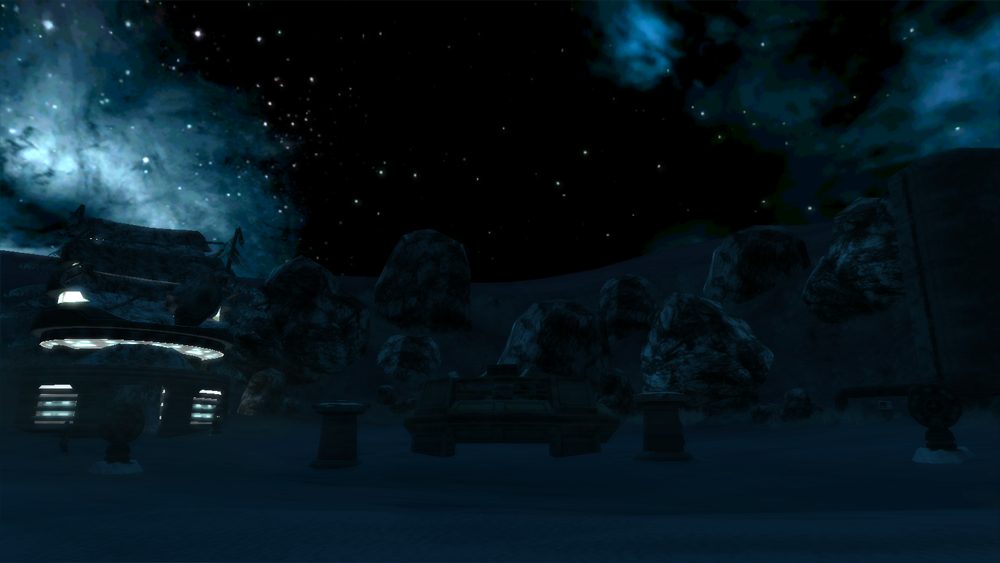
-
Marth8880
- Resistance Leader
- Posts: 5042
- Joined: Tue Feb 09, 2010 8:43 pm
- Projects :: DI2 + Psychosis
- xbox live or psn: Marth8880
- Location: Edinburgh, UK
- Contact:
Re: lining up sun effect with lighting in ZE
What? The normal color value? What do you mean?Loopy53 wrote:What does the normal color value due?

No, the sun flare effect in the ENVFX file does not affect the lighting in any way, other than some HDR stuff if you have that effect enabled as well.Loopy53 wrote:Also, does having the sun effect affect anything?
Yes. It affects the direction that the light points. :pLoopy53 wrote:Does the rotation of the light in ze affect anything?
-
Loopy53
- 1st Lieutenant
- Posts: 456
- Joined: Thu Nov 01, 2012 2:27 am
- Projects :: Earth Apocalypse
- xbox live or psn: Dont have one
- Location: On earth, I guess.
Re: lining up sun effect with lighting in ZE
The color value on the left. Heres a pic.
What I meant with light rotation is does the rotation of the directional light affect the brightness.
Hidden/Spoiler:
-
Marth8880
- Resistance Leader
- Posts: 5042
- Joined: Tue Feb 09, 2010 8:43 pm
- Projects :: DI2 + Psychosis
- xbox live or psn: Marth8880
- Location: Edinburgh, UK
- Contact:
Re: lining up sun effect with lighting in ZE
Those affect the color of the light you have selected.
-
GAB
- 1st Lieutenant
- Posts: 431
- Joined: Sun Jul 03, 2011 8:56 pm
- Location: Somewhere around the world
- Contact:
Re: lining up sun effect with lighting in ZE
To achieve the results in the picture, try 6 23 24 for you "sun" light.
-
Loopy53
- 1st Lieutenant
- Posts: 456
- Joined: Thu Nov 01, 2012 2:27 am
- Projects :: Earth Apocalypse
- xbox live or psn: Dont have one
- Location: On earth, I guess.
Re: lining up sun effect with lighting in ZE
IN ZE it looks like I want ingame, but ingame its still to bright. I will post screenshots of 1) my ZE values and 2) ingame within the next couple hours or so.
EDIT:
The bottom screenshot is still too bright. However it looks exactly what I want in ZE. Am I doing something wrong? Would I have to edit the ground textures? As you can see, the units are dark and the rest isn't. I want everything to have dark lighting on it, or the "lighting in the air" should be dark. Thanks for all the help everyone!!
EDIT:
Hidden/Spoiler:
Hidden/Spoiler:
-
Marth8880
- Resistance Leader
- Posts: 5042
- Joined: Tue Feb 09, 2010 8:43 pm
- Projects :: DI2 + Psychosis
- xbox live or psn: Marth8880
- Location: Edinburgh, UK
- Contact:
Re: lining up sun effect with lighting in ZE
You must burn the witc-- err, terrain in order for lighting changes to affect it.
-
GAB
- 1st Lieutenant
- Posts: 431
- Joined: Sun Jul 03, 2011 8:56 pm
- Location: Somewhere around the world
- Contact:
Re: lining up sun effect with lighting in ZE
Or you can also paint it in ZE. Personally, I think painting the terrain to match the lighting instead of burning it allows you to have a lot better control of its coloring and gives better results, in my opinion. None of the terrains in my Alzoc map were ever burned. All of them were painted to match the lighting.
Last edited by GAB on Mon Feb 04, 2013 9:08 pm, edited 2 times in total.
-
Loopy53
- 1st Lieutenant
- Posts: 456
- Joined: Thu Nov 01, 2012 2:27 am
- Projects :: Earth Apocalypse
- xbox live or psn: Dont have one
- Location: On earth, I guess.
Re: lining up sun effect with lighting in ZE
I'll try burning for now. How do you paint the terrain? Its too dark now after I burned it XD so I will fiddle with the values.
-
GAB
- 1st Lieutenant
- Posts: 431
- Joined: Sun Jul 03, 2011 8:56 pm
- Location: Somewhere around the world
- Contact:
Re: lining up sun effect with lighting in ZE
That's one reason I prefer painting over burning. Usually, it gets too dark. And, to paint the terrain you can use ZE's color tab.
EDIT: If you want, I can give you color values for you to use on the terrain.
EDIT: If you want, I can give you color values for you to use on the terrain.
-
Loopy53
- 1st Lieutenant
- Posts: 456
- Joined: Thu Nov 01, 2012 2:27 am
- Projects :: Earth Apocalypse
- xbox live or psn: Dont have one
- Location: On earth, I guess.
Re: lining up sun effect with lighting in ZE
That'd be great gab! Thanks a ton!
-
GAB
- 1st Lieutenant
- Posts: 431
- Joined: Sun Jul 03, 2011 8:56 pm
- Location: Somewhere around the world
- Contact:
Re: lining up sun effect with lighting in ZE
Ok. Try painting using values around 41 74 92. They should match your lighting well.
-
Loopy53
- 1st Lieutenant
- Posts: 456
- Joined: Thu Nov 01, 2012 2:27 am
- Projects :: Earth Apocalypse
- xbox live or psn: Dont have one
- Location: On earth, I guess.
Re: lining up sun effect with lighting in ZE
Sorry for the belated response. Thanks gab, my map is now lit perfectly. Solved.
EDIT: It's to dark, I will try doubling the values to get a lighter color.
EDIT2: Now im for real solved XD doubling it worked PERFECTLY. Thank you so much all.
EDIT: It's to dark, I will try doubling the values to get a lighter color.
EDIT2: Now im for real solved XD doubling it worked PERFECTLY. Thank you so much all.