Custom Galactic Conquest [Tutorial] (FAQ)

In this forum you will find and post information regarding the modding of Star Wars Battlefront 2. DO NOT POST MOD IDEAS/REQUESTS.

Moderator: Moderators

User avatar
Firefang
Major
Major
Posts: 518
Joined: Mon Nov 15, 2010 8:55 pm
Location: California

Custom Galactic Conquest [Tutorial] (FAQ)

Post by Firefang »

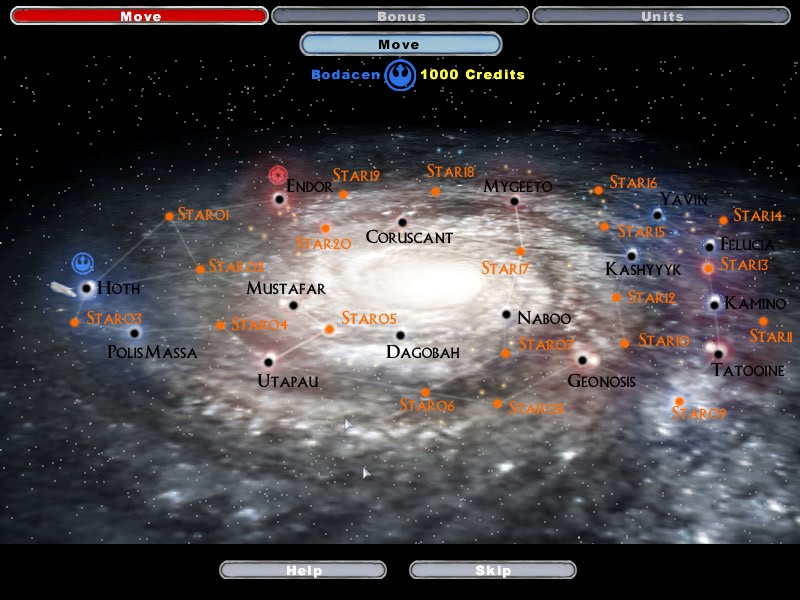
Well, I was talking to my friend Mr. Jedi, and he said he had a problem. He had to go sort out some problem on Manaan and fix relations with the Selkath and the Jedi, but he noticed that both he and Manaan were not loaded into the Galaxy map in Galactic Conquest. So he asked me if I could load, here he is,
Hidden/Spoiler:
Image
him and Manaan into the galaxy. And being the good sport I am, I agreed. So, let's get started.

1. The first thing I had to do was make a world. Let's call it CGC (Custom Galactic Conquest). So I opened up the visual munge and created it.
Hidden/Spoiler:
Image
2. Simple huh? The next thing I did was go to my addme, since the map needs to be loaded into the game.
Hidden/Spoiler:
Image
Now, I didn't want the map to show up in the instant action list, because Mr. Jedi has no need of that. So I'll delete most of the addme and just keep the part at the bottom. Like so.
Hidden/Spoiler:
Image
3. Now save that and exit back to your data folder, since the addme needs no more work. Now I followed Zerted's instructions from his 1.3 patch docs. So I made a new folder called shell in the data folder and put all of the necessary files from Zerted's docs into it.
Hidden/Spoiler:
Image
4. Next, I went into the shell folder. One of the files in there that was from Zerted was a shell.req. So I opened it and changed the names to what I wanted to use.
Hidden/Spoiler:
Image
And of course, you save and close.

5. Then I went into the folder called scripts. Both me and Mr. Jedi didn't want 1 as our custom GC, so we decided to change it to 7. And since the file name was 7, we had to do the same every time it was mentioned in the text document. So I used the replace function (crtl + h) in notepad to do so.
Hidden/Spoiler:
Image
Then I continued on to change the topmost items to what I wanted. (Note: I did forget to take comment out dashed from the ReadDataFile, you need to delete those two dashes if you want the game to recognize the localize string.
Hidden/Spoiler:
Image
6. Once that is saved and closed, you open the start script (ifs_freeform_start_new.lua). Since Mr. Jedi is part of the Republic, I needed to change all the ALL to REP and all the IMP to CIS. Then I changed the planets at the bottom (since there is no endor clone wars, hot clone wars, etc.) to something more appropriate. And of course, I added Manaan to the list.
Hidden/Spoiler:
Image
7. Now came the difficult part. So difficult, that Mr. Jedi (even with the power of the force) was severely confused. So, open the init script (ifs_freeform_init_new.lua). At the very top, you again need to change the planet names and add the necessary planets to be in accordance with the start script. And since some of the planets we'll be using are currently deleted, we need to comment out or delete those lines so they can be loaded. I also had to comment out Kamino and star12 for the creation and appearance of Manaan.
Hidden/Spoiler:
Image
8. Scroll down a bit until you find the connection section. Once again, change the name of all the planets already there to the appropriate planets. And don't forget to add Manaan. It has to have planets connected to it as well as being connected to those planets. Scroll down a bit more, and here you find that you can change the localize string of the fleets, bases, as well as how much money you get from conquering the planet.
Hidden/Spoiler:
Image
9. Scroll down even more, and you can find the texture names associated with each fleet. We'll change those later. What I wanted to change was the base planet as well as the starting planets. I do know from testing, you must start out with your base planet. Trust me on it. Then I changed those accordingly.
Hidden/Spoiler:
Image
10. Well, I was done. But wait, Mr. Jedi wanted to travel to Manaan. And I had linked to to planets, but I hadn't actually created it yet. So I scrolled up a bit to the space above the connections part and below the deleting part. Here I used God-like power to create a planet.
Hidden/Spoiler:
Image
(Or simply typed a few lines). The last 2 lines talking about fleets are commented out, which is just my personal preference. If you put those lines back in, it will create two cruisers orbiting the planet, but nothing bad will happen if you don't.

11. Well, now the planet exists. But what about Mr. Jedi? Don't worry, I haven't forgotten about him. So, now onto the unit creation. First I want to specify the unit types. These can be changed but must be kept consistent with setup_teams.lua if you want it to run correctly. Here you can also change the unlock points of each class, as well as the cost of each successive fleet. At the bottom of the picture is a custom animation set. (I used Gogie's Revan animations) You follow the one there as an example and make sure they are all loaded in the side's shell (which is mentioned later on).
Hidden/Spoiler:
Image
12. I was now onto making Mr. Jedi himself. So right under the animation set lines, I put the unit information.
Hidden/Spoiler:
Image
You must always have information for both sides, and all the fields must be filled out. I decided to leave Mr. Jedi some friends, a soldier and pilot.

13. Now that you've finished making Mr. Jedi, you're probably wondering how to change his ship image and overall icon. Head back out to the shell.req and add these lines to it.
Hidden/Spoiler:
Image
14. Save and exit. Then I made a folder right next to the scripts folder called textures. In it I put two textures I had found that I wanted to use.
Hidden/Spoiler:
Image
One is to be his ship, and the other his icon. The icon needs to be all white with no background and I think 16x16.

15. But now that I had the textures, I need to load them. The seal_rep.tga will replace the stock one automatically, so no problems there. But as for the other one, I went back into the init script, scrolled to the bottom, and changed it accordingly.
Hidden/Spoiler:
Image
16. Now, go make a side called cgc. Make a cgc.req and a cgcshell.req. In the cgcshell.req, I need to load all the models and animations I referenced in my init.lua. So I made it look like this.
Hidden/Spoiler:
Image
Of course all those models and animations were in their correct folders.

17. Find the mission.req in the Common folder. Scroll to the bottom of it and change the mission scripts referenced.
Hidden/Spoiler:
Image
18. Make a req for the mission in the mission folder.
Hidden/Spoiler:
Image
19. Make a script for it in the script folder.
Hidden/Spoiler:
Image
20. Then I began to localize, because I like things having names.
Hidden/Spoiler:
ImageImageImageImage
Use the reference strings from the init.lua to find the placement of each of these localizations.

21. Munge
Hidden/Spoiler:
Image
22. Above the munge is a folder called shell. Open it and run the munge inside of that (_Build\Shell). Once that is finished, go to the _LVL_PC folder and find the shell.lvl. Rename it approriately.
Hidden/Spoiler:
Image
23. Copy the custom_gc_7.lvl to SWBF2's data\_lvl_pc folder like so.
Hidden/Spoiler:
Image
24. Join Mr. Jedi in a fun Game of Galactic Conquest!
Hidden/Spoiler:
ImageImage
For those of you needing reference, I have uploaded the data folder.
MediaFire

And don't forget to credit :D
Credits:
Firefang - for spending a lot of time figuring this all out and writing this extremely long tutorial
Frayed Wires Mod Team - Support and helpful guessing

ARCTroopaNate
Jedi
Jedi
Posts: 1161
Joined: Mon Mar 21, 2011 8:12 pm
Projects :: Star Wars Battlefront - Tides of War
Games I'm Playing :: SWBF2 RC EAW
xbox live or psn: I have ps4
Location: STALKER!
Contact:

Re: Custom Galactic Conquest (Tutorial)

Post by ARCTroopaNate »

:bowdown: I LOVE YOU MAN! no Diet Dr. Pepper. Thank you for this, now I can finally start my project I've been wanting to work on! Thank you! :bowdown:

EDIT: lol, sorry staff, didn't know that was a bad word to say on the forums.
THEWULFMAN
Space Ranger
Posts: 5557
Joined: Tue Aug 17, 2010 3:30 pm
Projects :: Evolved 2
Location: Columbus, Ohio
Contact:

Re: Custom Galactic Conquest (Tutorial)

Post by THEWULFMAN »

Ah you finished it, very nice job. :thumbs:
User avatar
Teancum
Jedi Admin
Jedi Admin
Posts: 11080
Joined: Wed Sep 07, 2005 11:42 pm
Projects :: No Mod project currently.
Games I'm Playing :: Destiny
xbox live or psn: No gamertag set
Location: Indiana

Re: Custom Galactic Conquest (Tutorial)

Post by Teancum »

Informative and entertaining. Kudos :thumbs:
User avatar
Dakota
Field Commander
Field Commander
Posts: 991
Joined: Mon Dec 06, 2010 8:21 pm
Projects :: making random weapon assets
Games I'm Playing :: SWBF2 and more
xbox live or psn: PS3 beats xbox
Location: at a computer desk floating around in space

Re: Custom Galactic Conquest (Tutorial)

Post by Dakota »

i read the whole thing for the story and hoped to see mr jedi at the end standing on manaan posing with a selkath.

(offtopic...er: wow i almost for got what millenium looked like.)
User avatar
Maveritchell
Jedi Admin
Jedi Admin
Posts: 7366
Joined: Mon Aug 21, 2006 11:03 pm

Re: Custom Galactic Conquest (Tutorial)

Post by Maveritchell »

It's a fine tutorial, but remember that a fairly comprehensive tutorial is already included with the patch that's required to make this happen.
User avatar
Dakota
Field Commander
Field Commander
Posts: 991
Joined: Mon Dec 06, 2010 8:21 pm
Projects :: making random weapon assets
Games I'm Playing :: SWBF2 and more
xbox live or psn: PS3 beats xbox
Location: at a computer desk floating around in space

Re: Custom Galactic Conquest (Tutorial)

Post by Dakota »

Maveritchell wrote:It's a fine tutorial, but remember that a fairly comprehensive tutorial is already included with the patch that's required to make this happen.
yet everyone loves it when someone simplifies a tutorial to the point of understandablity.
Jaspo
Command Sergeant Major
Posts: 282
Joined: Sun Mar 01, 2009 4:34 am
Projects :: AotC DoW+++Boonta Eve Classic
Games I'm Playing :: WoT MBWBVC Robocraft
xbox live or psn: No gamertag set
Contact:

Re: Custom Galactic Conquest (Tutorial)

Post by Jaspo »

Maveritchell wrote:It's a fine tutorial, but remember that a fairly comprehensive tutorial is already included with the patch that's required to make this happen.
???... I know of no "comprehensive" tutorial included with the patch...only a few small text documents with bare bones info on what the stuff is, and not really much info on customization.

So, I've asked these questions before of the likes of Zerted and maybe also Mav, and various other people (was a while ago so I don't quite recall) and never got a comprehensive answer that I could easily understand:

A. How do you change what bonuses are enabled or disabled for a particular planet?
B. What causes that light bloom glitch?
C. Where did all those yavin planet models come from? Why is there one at each node, in addition to the desired planet model?
D. Will EraOfDesann ever finish his Malastare map that he said I could use with my gc? :P

Investigation for item A revealed that this is assigned in a different freeform script (ifs_freeform_purchase_tech)
, but I was never given an understandable explanation on how to make a custom version of the script or at least change the necessary info, or how to integrate those things with the custom gc shell files.

I was told this:
Hidden/Spoiler:
[quote="[RDH]Zerted"]Sorry for taking so long to get back to you. I've been really busy with life and haven't done much with SWBF2 in a while.

The quick answer I can give you is simply replace the variables or functions with your modded versions. In Lua, functions are just variables.

(assume all code is in the same file/scope)
Code:
function Hello()
print('Hi')
end
--doing Hello() prints: Hi
is the same as
Code:
Hello = function()
print('Hi')
end
--doing Hello() prints: Hi
and you can override the normal version by setting the Hello variable to a different value/function, such as:
Code:
Hello = function()
print('Yo')
end
--doing Hello() now prints: Yo

If you only need to add some code to the beginning or end of an existing function, rename that function and call it from your overridden version:
Code:
old_Hello = Hello
Hello = function()
old_Hello()
print('-yos are fun toys')
end
--doing Hello() prints: Yo-yos are fun toys
You just need to make sure your code that replaces the game's function is run after the official version is created. If not, then the official versions will override your functions.

Do you understand?[/quote]
And yes, I understood the general concept, but was entirely unsure of how to implement it, and then Zerted never got back to me when I asked about it.

But, on the brighter side of things, I have figured out how to do a lot of things with galactic conquest, including changing the locations of stock planets. I have prevously posted my various findings, as well as my gc scripts, in the 6th post of this topic:
viewtopic.php?f=27&t=27121
Slime615
Lieutenant General
Lieutenant General
Posts: 704
Joined: Thu Jan 07, 2010 9:38 am

Re: Custom Galactic Conquest (Tutorial)

Post by Slime615 »

Wow! This is great - I just want to check somethings though - I am at a friends computor and can't check my self. Other stuff I just dont know.

Do you always have to have the same amount of Planets?

I mean, could Have a Galactic Conquest of only say, 5 planets, the rest all being space maps?

Whats is the Maximun/Minimun number of Planets to have in a space map?

Is it possible to replace some of the empty space/space battle points with other planets? New planets that is.

How/could you change what the Planet looks like?
Could you rearrange the Planets, so they appear at different points?

Is it possible to change the back ground, say from the Galaxy map, to that of a small area? Say, the core worlds, or the Hapes cluster? Or is it hard coded?

Do you over ride the stock Galactic Conquest, or can you create new ones?

If you create new Galactic Conquests, How many can you have at once?

What is the Maximun number of Units to have buy able?
THEWULFMAN
Space Ranger
Posts: 5557
Joined: Tue Aug 17, 2010 3:30 pm
Projects :: Evolved 2
Location: Columbus, Ohio
Contact:

Re: Custom Galactic Conquest (Tutorial)

Post by THEWULFMAN »

Slime615 wrote:Wow! This is great - I just want to check somethings though - I am at a friends computor and can't check my self. Other stuff I just dont know.

Do you always have to have the same amount of Planets? No.

I mean, could Have a Galactic Conquest of only say, 5 planets, the rest all being space maps? Yes.

Whats is the Maximun/Minimun number of Planets to have in a space map? Not sure what you mean, can you describe what you're asking a bit further?

Is it possible to replace some of the empty space/space battle points with other planets? New planets that is. Yes.

How/could you change what the Planet looks like? Yes you can. You'd replace the model with one from a different planet.
Could you rearrange the Planets, so they appear at different points? Yes, but as a note they'd have to be rearranged along certain points. For example, you could move Felucia to where Kashyyyk is. Brand new points can not be created.

Is it possible to change the back ground, say from the Galaxy map, to that of a small area? Say, the core worlds, or the Hapes cluster? Or is it hard coded? While technically not "hard-coded", there is no way to add a new Galaxy map. The assets for the GC map were never released.

Do you over ride the stock Galactic Conquest, or can you create new ones? Add new ones.

If you create new Galactic Conquests, How many can you have at once? I'm not sure the exact number, you'd run out of room on the select screen pretty fast after 3-4.

What is the Maximun number of Units to have buy able?I'm not sure what the limit is, but it shouldn't be an issue. Mav had a lot of buyable units in his DT2 CGC.
Answers in yellow.
Last edited by THEWULFMAN on Fri Dec 23, 2011 11:52 am, edited 1 time in total.
Slime615
Lieutenant General
Lieutenant General
Posts: 704
Joined: Thu Jan 07, 2010 9:38 am

Re: Custom Galactic Conquest (Tutorial)

Post by Slime615 »

What I am saying is. Presumably there is a set number of points on the Galaxy Map.

These Points are designated a Planet or a patch of empty Spoace.

in GC, if a ship attacks a Planet, then a battle starts. if a ship attacks empty space nothing happens. If a Ship attacks a Planet which has a enemy ship over, then a space battle begins, then a Land battle.

Now these points of empty space. You said that you can not create new points. But can I change some of these empty points to include New Planets?

I mean, could some one create a New galactic Conquest, that has all of the stock maps, but over rides some of the empty space buts with new Maps. Such as the Harrun Kal, Alldraan, Hoth (on CW) Genosis (on GCW) Rhen Var, Raxus Prime, Ord Ibanna and Methlyn.

Is it possible top over rise certain Empty Spaces to aadd these? If this is the Case, Some one could create a "Star Wars Battlefront 2 Galactic Conquest Complete" Mod.... That simply adds these maps to the current Maps... And maybe swaps some of the Planets around, like haveing the Genosis Spire, for GCW and Genosis Normals for CWs.... Like wise for Rhen Var, Yavin 4 and Tatooine. Just for the sake of Variety.

If this were possible, could you do it in revese? say I only had 5 or 6 maps, (cause it was a WIP) but wanted to create a totaly new GC with just may Maps, Could I do it in such a way that the 5 Planets were in it, but every other point was just an Empty Space bit?


Does that make sense?
User avatar
Firefang
Major
Major
Posts: 518
Joined: Mon Nov 15, 2010 8:55 pm
Location: California

Re: Custom Galactic Conquest (Tutorial)

Post by Firefang »

@Slime615
If I'm understanding what you're saying, which is you want to take out stock planets and add custom planets, then that is perfectly fine. The only thing you can't do is create new planets on top of stock planets due to there being two geometries in the same spot. To take out stock planets, you add the DeleteEntity("planet"). As far as I know, you can turn planets into blank points in space, but you cannot do so without keeping the planet geometry there as well.

@Jaspo
You can override almost any auxilary function or variable found in many of the ifs_freeform scripts found in assets\Shell. I believe the script is called ifs_freeform_purchase_tech (I can't check since I'm not on my comp). At the top of that script are the functions and variables that were used with all the tech purchases including what planets AI use it on, prices, the unused Sensors bonus, models, etc. Try putting that lua chunk in just like the custom unit table.
Slime615
Lieutenant General
Lieutenant General
Posts: 704
Joined: Thu Jan 07, 2010 9:38 am

Re: Custom Galactic Conquest (Tutorial)

Post by Slime615 »

I think you understand me.

What I am saying is: Can I add new Planets to the Existing Map Without removing an old Planet, by putting it in a place where there would be empty Space?

If this is doable, can I do vise versa, By Removing Planets, and Putting Empty Space there, to get rid of Planets I hate/ Make a GC with only, say 5 Planets, and however many empty patchs of space?
Jaspo
Command Sergeant Major
Posts: 282
Joined: Sun Mar 01, 2009 4:34 am
Projects :: AotC DoW+++Boonta Eve Classic
Games I'm Playing :: WoT MBWBVC Robocraft
xbox live or psn: No gamertag set
Contact:

Re: Custom Galactic Conquest (Tutorial)

Post by Jaspo »

First of all, what ever happened to the problem of only being able to load 1 custom gc at a time? Did someone solve it?

But anyway, in answer to the question at hand,
let us examine this part of my init script (the whole thing can be found if you follow the rabbit trail that starts with the link at the bottom of my first post):

Code: Select all

--create new planets (planet model, grid location, mission)
CreateEntity(GetEntityClass("yav"), GetEntityMatrix("end"), "TWH");
CreateEntity(GetEntityClass("pol"), GetEntityMatrix("kam"), "SDA");
CreateEntity(GetEntityClass("kas"), GetEntityMatrix("mus"), "MAL");
CreateEntity(GetEntityClass("myg"), GetEntityMatrix("nab"), "JAG");
CreateEntity(GetEntityClass("dag"), GetEntityMatrix("yav"), "TRV");
CreateEntity(GetEntityClass("yav"), GetEntityMatrix("star01"), "DRB");
CreateEntity(GetEntityClass("geo"), GetEntityMatrix("star04"), "BNE");
CreateEntity(GetEntityClass("nab"), GetEntityMatrix("star10"), "BHW");
CreateEntity(GetEntityClass("fel"), GetEntityMatrix("star11"), "HUT");
CreateEntity(GetEntityClass("kam"), GetEntityMatrix("star12"), "MMD");
CreateEntity(GetEntityClass("kas"), GetEntityMatrix("star13"), "GAD");
CreateEntity(GetEntityClass("cor"), GetEntityMatrix("star14"), "RPE");
CreateEntity(GetEntityClass("hot"), GetEntityMatrix("star15"), "WOJ");
CreateEntity(GetEntityClass("tat"), GetEntityMatrix("star16"), "KOR");
CreateEntity(GetEntityClass("nab"), GetEntityMatrix("star17"), "ALD");
CreateEntity(GetEntityClass("myg"), GetEntityMatrix("star18"), "DDC");
CreateEntity(GetEntityClass("kas"), GetEntityMatrix("star19"), "DTF");
CreateEntity(GetEntityClass("kas"), GetEntityMatrix("star20"), "PRK");
you see where it says GetEntityMatrix("star20"), for example? EDIT: star20 is the name of another entity, a star, which in the stock version is just used as a connecting dot with no planet on it. However, in this case I told it to create a new planet entity at this star entity's location which uses the kashyyyk planet model (entity class "kas") and to have that planet be identified as "PRK", so that when you go further down in the script it will load a mission:

Code: Select all

["PRK"] = {
["con"] = "PRKg_con",
},
Since we're at this point in the script now anyway, note that when Mav made it possible to randomly load one of multiple maps for, say, Tatooine, all he had to do was alter the above part of the script to look something like:

Code: Select all

["tat"] = {
["con"] = "tat1g_con", "tat2g_con", "tat3g_con",
},
And, voila! Conquest at the Dune Sea, Mos Eisley, or Jabba's Palace. But hey, who says you have to stick with conquest scripts? You could do a CTF galactic conqust or something if you wanted to.
Last edited by Jaspo on Wed Dec 28, 2011 12:59 am, edited 3 times in total.
Slime615
Lieutenant General
Lieutenant General
Posts: 704
Joined: Thu Jan 07, 2010 9:38 am

Re: Custom Galactic Conquest (Tutorial)

Post by Slime615 »

SO if I deleted these Lines entirley:

CreateEntity(GetEntityClass("kas"), GetEntityMatrix("mus"), "MAL");
CreateEntity(GetEntityClass("myg"), GetEntityMatrix("nab"), "JAG");
CreateEntity(GetEntityClass("dag"), GetEntityMatrix("yav"), "TRV");


WOuld those planets be replaced with Empty Star spots?
Lephenix
Captain
Captain
Posts: 497
Joined: Tue Jul 12, 2011 6:46 am
Projects :: Becoming a Concept Artist-Illustrator
Contact:

Re: Custom Galactic Conquest (Tutorial)

Post by Lephenix »

Slime615 wrote:SO if I deleted these Lines entirley:

CreateEntity(GetEntityClass("kas"), GetEntityMatrix("mus"), "MAL");
CreateEntity(GetEntityClass("myg"), GetEntityMatrix("nab"), "JAG");
CreateEntity(GetEntityClass("dag"), GetEntityMatrix("yav"), "TRV");


WOuld those planets be replaced with Empty Star spots?
When i don't know the answer, i try and i see if it works :wink: .
User avatar
Firefang
Major
Major
Posts: 518
Joined: Mon Nov 15, 2010 8:55 pm
Location: California

Re: Custom Galactic Conquest (Tutorial)

Post by Firefang »

If by empty, you mean no geometry, then no. What you would have to do is make some "planets" with the star's geometry or simply not load it as a planet but still make connections to it.
Jaspo
Command Sergeant Major
Posts: 282
Joined: Sun Mar 01, 2009 4:34 am
Projects :: AotC DoW+++Boonta Eve Classic
Games I'm Playing :: WoT MBWBVC Robocraft
xbox live or psn: No gamertag set
Contact:

Re: Custom Galactic Conquest (Tutorial)

Post by Jaspo »

Slime615 wrote:SO if I deleted these Lines entirley:

CreateEntity(GetEntityClass("kas"), GetEntityMatrix("mus"), "MAL");
CreateEntity(GetEntityClass("myg"), GetEntityMatrix("nab"), "JAG");
CreateEntity(GetEntityClass("dag"), GetEntityMatrix("yav"), "TRV");


WOuld those planets be replaced with Empty Star spots?
Well, first of all please acknowledge what I've said about not simply copying my work...but anyway, if I recall correctly you would need:

Code: Select all

DeleteEntity("kas")
DeleteEntity("myg")
DeleteEntity("dag")
If you wished to remove the stock Kashyyyk, Mygeeto, and Dagobah planet models.

If you wished to do the opposite of what is being done in the snippet of code you presented (which creates entities for Malastare, Jade Moon, and Torvik)...well, you simply would not insert those lines into your code, which would be wise considering that I doubt you have anyone's permission to use those particular maps at this point...particularly because Malastare isn't even finished yet.

EDIT: But, we must make sure not to confuse the planet and star models (entities) with the missions. It's easy to confuse these, because they are all kind of named the same thing.

So, let's start with the models (entities). These are the planets and "empty spaces" (stars--20 of these total) that you see ingame, and the planets are for the most part named after the three letter map name they represent, one of the few exceptions being the model named "tantive." The stars are named "star01"," star02", "star03"..."star20". But, these are what's referenced in the GetEntityClass() and GetEntityMatrix() parts of the CreateEntity function.

EDIT: Here's the default location of the star and planet entities in gc:
Hidden/Spoiler:
Image
Now, for the mission designations, as are found in the last part of the CreateEntity function. These can feasibly be named anything you'd like, so long as it matches the name found elsewhere in the init script, like at the part where it's assigned a specific mission from the mission list. Again, though, it's wise to name these in a way that makes sense, so I and the makers of the stock script both just named these the corresponding 3 letter map name. So that's why you see, for example, TRV for Torvik.

Now, it's possible to create a new entity at the current location of a different entity, by duplicating an existing entity and naming it something else. That's what the CreateEntity function does. For example,

Code: Select all

CreateEntity(GetEntityClass("kas"), GetEntityMatrix("nab"), "bob");
gets the entity class "kas", which is uses the kashyyyk planet model, gets the location of the entity "nab" (finds where the Naboo planet model is) and creates a new planet called "bob", which is located at Naboo's location and uses Kashyyyk's model.

Of course, Naboo is also still there, so you'll then have to delete Naboo:

Code: Select all

DeleteEntity("nab")
or instead move it to, say, the current location of "star03":

Code: Select all

CreateEntity(GetEntityClass("nab"), GetEntityMatrix("nab"), "nab2");
DeleteEntity("nab")
CreateEntity(GetEntityClass("nab2"), GetEntityMatrix("star03"), "nab");
DeleteEntity("nab2")
DeleteEntity("star03")
The duplication seen above (making a "nab2" entity) is necessary because if you were to simply:

Code: Select all

CreateEntity(GetEntityClass("nab"), GetEntityMatrix("star03"), "nab");
the original naboo would still also be there, and then if you tried to delete it:

Code: Select all

DeleteEntity("nab")
it would delete both the original and the relocated Naboo entities.
Last edited by Jaspo on Thu Jan 05, 2012 12:30 am, edited 5 times in total.
Slime615
Lieutenant General
Lieutenant General
Posts: 704
Joined: Thu Jan 07, 2010 9:38 am

Re: Custom Galactic Conquest (Tutorial)

Post by Slime615 »

Ah. You missunderstand me. I simplley copyed and pasted a snippet of code from your example above as an example. I don't actualy have those maps.

So If I am reading this right, If say I wanted to remove all Plaents to create a new Custom, Galactic Conquest, I would have to first put some thing along the lines off: (Again, still at different computor, so I cant look at the full stock script yet):

DeleteEntity("kas")
DeleteEntity("myg")
DeleteEntity("dag")
DeleteEntity("yav")
DeleteEntity("mus")
DeleteEntity("nab")
etc
etc, for all of the planets, then, afterwards say I wanted a Map called CST, in the Place where Endor was, useing the Model of Yavin, place:

CreateEntity(GetEntityClass("yav"), GetEntityMatrix("end"), "CST");

and other new planets like wise,. in the next bit?
User avatar
DarthD.U.C.K.
Master of the Force
Master of the Force
Posts: 6027
Joined: Wed Sep 27, 2006 11:05 am
Location: Duckburg, Germany

Re: Custom Galactic Conquest (Tutorial)

Post by DarthD.U.C.K. »

exactly. in case you cant put the new planets in the location of the deleted ones you have to duplicate those first, though.
Post Reply