
I modelled a new starship, gave it appropriate nulls and such. Then I exported it, tryed to add it to a space map, and watched it crash.
I'll post the error log if anyone needs it. But for now my question is: is it a necesity for starships to have animations? I'm not sure; I think not, becuase several shipped models don't seem to have any (A-wing, Y-wing, the TIE fighters, Droid Tri-Fighter, CIS bomber, etc....).
Starship Modelling (XSI)
Moderator: Moderators
-
Fiodis

- Master of the Force

- Posts: 4145
- Joined: Wed Nov 12, 2008 9:27 pm
- Projects :: Rannoch + Tientia + Tools Programming
-
Maveritchell

- Jedi Admin

- Posts: 7366
- Joined: Mon Aug 21, 2006 11:03 pm
Re: Starship Modelling (XSI)
Actually, the above bolded fighters do have animations, but that is irrelevant as no flyer vehicle model needs animations to work.Fiodis wrote:becuase several shipped models don't seem to have any (A-wing, Y-wing, the TIE fighters, Droid Tri-Fighter, CIS bomber, etc....).
-
Fiodis
- Master of the Force
- Posts: 4145
- Joined: Wed Nov 12, 2008 9:27 pm
- Projects :: Rannoch + Tientia + Tools Programming
Re: Starship Modelling (XSI)
Well, I suppose it's not an issue with the mesh, then. Should I make a new topic in the modding forum dealing with ODFs and LUAs and whatnot, or should this one just be moved?
-
FragMe!
- Gametoast Staff

- Posts: 2244
- Joined: Sat May 13, 2006 12:34 am
- Projects :: Not sure keep changing my mind.
- xbox live or psn: No gamertag set
- Location: Origin name GT_FragMe
- Contact:
Re: Starship Modelling (XSI)
Did you mean the ship crashed or the map crashed?Fiodis wrote:I modelled a new starship, gave it appropriate nulls and such. Then I exported it, tryed to add it to a space map, and watched it crash.
Did you get any munge errors?
-
Fiodis
- Master of the Force
- Posts: 4145
- Joined: Wed Nov 12, 2008 9:27 pm
- Projects :: Rannoch + Tientia + Tools Programming
Re: Starship Modelling (XSI)
The game crashed; there is nothing in the error log about the ship, only about other stock ships, which is wierd; the only mungelog errors were warnings of a couple shipped models with NO COLLISION GEOMETRY (WILL BE SLOW!)-type stuff.
-
Frisbeetarian

- Jedi

- Posts: 1233
- Joined: Wed Sep 12, 2007 3:13 pm
Re: Starship Modelling (XSI)
It would seem that your original question was answered, and if indeed the only errors in your log have to do with shipped vehicles, then I'd say that is where your problem is.
-
Fiodis
- Master of the Force
- Posts: 4145
- Joined: Wed Nov 12, 2008 9:27 pm
- Projects :: Rannoch + Tientia + Tools Programming
Re: Starship Modelling (XSI)
Yes, but the thing is that before I added the ship everything worked fine; afterwards I get these errors about stock ships, which were working fine a munge ago and that I haven't edited.Frisbeetarian wrote:It would seem that your original question was answered, and if indeed the only errors in your log have to do with shipped vehicles, then I'd say that is where your problem is.
-
Frisbeetarian
- Jedi
- Posts: 1233
- Joined: Wed Sep 12, 2007 3:13 pm
Re: Starship Modelling (XSI)
Does removing your new ship make the map no longer crash?
-
Fiodis
- Master of the Force
- Posts: 4145
- Joined: Wed Nov 12, 2008 9:27 pm
- Projects :: Rannoch + Tientia + Tools Programming
Re: Starship Modelling (XSI)
Removing the ship did make the map stop crashing, so it isn't any shipped asset but is the ship that causes the CTD.
I have a few odd error log errors:
So it can't find an ODF. Never mind that I'm loading a default TUR side, without any DC: in the line. That doesn't seem to matter to this misbehaving LUA.
Roughly 50 of these, all of them identical. And the thing is, both stock command flyers show up and function fine.
Quite a bit of these. As the only models in the map, at this moment, are stock models, it seems some stock models are missing hardpoints. Never mind that all the hardpoints, as far as I can see, are there: the LUA doesn't seem to care. Pandemic must've made a mistake and forgotten important hardpoints, yes?
So that is my controversial and self-incriminating error log. And, I'll point out once more, once I add my custom ship the map crashes but I don't get any error log messages about it, or even munge log messages.
I have a few odd error log errors:
Hidden/Spoiler:
Hidden/Spoiler:
Hidden/Spoiler:
So that is my controversial and self-incriminating error log. And, I'll point out once more, once I add my custom ship the map crashes but I don't get any error log messages about it, or even munge log messages.
-
Frisbeetarian
- Jedi
- Posts: 1233
- Joined: Wed Sep 12, 2007 3:13 pm
Re: Starship Modelling (XSI)
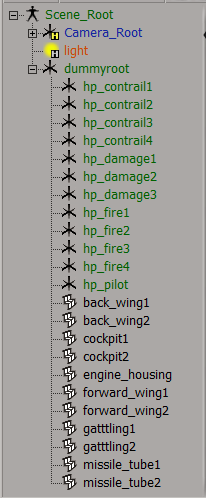
Is the ship you're trying to add a command flyer? Why don't you post the hierarchy of the ship in XSI so we can make sure it's right there and move this topic out of this forum.
-
Fiodis
- Master of the Force
- Posts: 4145
- Joined: Wed Nov 12, 2008 9:27 pm
- Projects :: Rannoch + Tientia + Tools Programming
Re: Starship Modelling (XSI)
It is not a command flyer.
The heirarchy:
The heirarchy:
Hidden/Spoiler:
-
FragMe!
- Gametoast Staff
- Posts: 2244
- Joined: Sat May 13, 2006 12:34 am
- Projects :: Not sure keep changing my mind.
- xbox live or psn: No gamertag set
- Location: Origin name GT_FragMe
- Contact:
Re: Starship Modelling (XSI)
And you can confirm you do not have any lines in your ships odf that relate to animations, like Take Off. Animation errors will crash a map without error, darn things. So if you don't have any anims and the line is still there it will crash. Also for your turrets, if you have any, do you have a .option file for your ships msh the -keep nameofturretnodes
-
Fiodis
- Master of the Force
- Posts: 4145
- Joined: Wed Nov 12, 2008 9:27 pm
- Projects :: Rannoch + Tientia + Tools Programming
Re: Starship Modelling (XSI)
This being a simple one-man starfighter, I have no turrets.
The ODF doesn't conatin any lines that seem to portain to animations. Here it is if you want to have a go, but I'm sure there aren't any animation lines in there. Unless flyers use some kind of code for the animation that I don't recognize as refering to an animation.
I have a req file for it, too; but I don't have a folder called "fpm" in my side's req folder. Should I make this folder, if it is necesary for flyers? What is it used for, anyway? First-person?
The ODF doesn't conatin any lines that seem to portain to animations. Here it is if you want to have a go, but I'm sure there aren't any animation lines in there. Unless flyers use some kind of code for the animation that I don't recognize as refering to an animation.
Hidden/Spoiler:
-
kinetosimpetus
- Imperial Systems Expert

- Posts: 2381
- Joined: Wed Mar 25, 2009 4:15 pm
- Projects :: A secret project
Re: Starship Modelling (XSI)
What is this?
What if it was this?Fiodis wrote:Code: Select all
VehicleType = "fighter"
cis_fly_greviousfighter.odf wrote:Code: Select all
VehicleType = "flyer"
-
Fiodis
- Master of the Force
- Posts: 4145
- Joined: Wed Nov 12, 2008 9:27 pm
- Projects :: Rannoch + Tientia + Tools Programming
Re: Starship Modelling (XSI)
Woah. I...I don't know. What would that do? Is that the sort of disguised animation line I was talking about, a hint to the game engine that ODFs with type "fighter" have anims whereas those with type "flyer" don't? But no.... That can't be it, since the "greviousfighter" is the CIS bomber, and that does have anims (I've noticed them now, thanks, Mav.)
So....what does that line do?
So....what does that line do?
-
kinetosimpetus
- Imperial Systems Expert
- Posts: 2381
- Joined: Wed Mar 25, 2009 4:15 pm
- Projects :: A secret project
Re: Starship Modelling (XSI)
hm... the tiefighter uses VehicleType = "fighter" now I wonder what the difference is, too.
the grievous fighter had it under gameobjectclass and the tie had it under protperties. I wonder if that makes a difference?
hm, only the grievous fighter uses flyer under gameobjectclass, all the other ones i looked at use fighter under properties
the grievous fighter had it under gameobjectclass and the tie had it under protperties. I wonder if that makes a difference?
hm, only the grievous fighter uses flyer under gameobjectclass, all the other ones i looked at use fighter under properties
-
Fiodis
- Master of the Force
- Posts: 4145
- Joined: Wed Nov 12, 2008 9:27 pm
- Projects :: Rannoch + Tientia + Tools Programming
Re: Starship Modelling (XSI)
Look at my own ODF:
Specifically,
under GameObjectClass and
under Properties.
Code: Select all
[GameObjectClass]
ClassLabel          = "flyer"
GeometryName            = "ter_fly_starfighter.msh"

[Properties]
HUDModel        = "hud_arc170_shape"
FLYERSECTION            = "BODY"
VehicleType = "fighter"Code: Select all
ClassLabel = "flyer"Code: Select all
VehicleType = "fighter"-
kinetosimpetus
- Imperial Systems Expert
- Posts: 2381
- Joined: Wed Mar 25, 2009 4:15 pm
- Projects :: A secret project
Re: Starship Modelling (XSI)
here's the grievous fighter that i'm looking at
 don't know what the problem could be then
and VehicleType does not appear anywhere at all under [Properties][GameObjectClass]
ClassLabel = "flyer"
VehicleType = "flyer"
GeometryName = "cis_fly_greviousfighter.msh"
[Properties]
FLYERSECTION = "BODY"
HUDModel = "hud_grievousstarfighter_shape"
Label = "Greviousfighter"
...
don't know what the problem could be then-
Fiodis
- Master of the Force
- Posts: 4145
- Joined: Wed Nov 12, 2008 9:27 pm
- Projects :: Rannoch + Tientia + Tools Programming
Re: Starship Modelling (XSI)
Hm. Classlabel and VehicleType bouth ought to go under GameObjectClass, then? Strange, considering what I have is basically the Republic's ARC-170 odf with a few values changed. I didn't mess with that at all.
Here's the shipped ARC-170's ODF, the GameObjectClass and the first of the Properties section:
Does anyone know why the VehicleType line keeps moving around in different ODFs, and what it is used for?
EDIT - So no one has any idea how I can fix this?
EDIT 2 - What does Targetable Collision = "CollisionMesh" mean?
EDIT 3 - Well, whatever it is, it seems to have been an ODF issue, since I tried using the stock ARC-170 odf again, tweaking a few values, and this time around it worked. So thanks everyone. One last question to do with the starfighters: my new model doesn't shoot from its weapons, it shoots from its dummyroot. Do I need a msh.option with a -keep parameter?
EDIT 4 - Made one, with a list of all the nulls except dummyroot. Four hp_contrails, four hp_fires, three hp_damages. It didn't work. What is happening when the model shoots from the wrong spot, then?
Here's the shipped ARC-170's ODF, the GameObjectClass and the first of the Properties section:
Code: Select all
[GameObjectClass]
ClassLabel          = "flyer"
GeometryName            = "rep_fly_arc170fighter.msh"

[Properties]
HUDModel        = "hud_arc170_shape"
FLYERSECTION            = "BODY"
VehicleType = "fighter"EDIT - So no one has any idea how I can fix this?
EDIT 2 - What does Targetable Collision = "CollisionMesh" mean?
EDIT 3 - Well, whatever it is, it seems to have been an ODF issue, since I tried using the stock ARC-170 odf again, tweaking a few values, and this time around it worked. So thanks everyone. One last question to do with the starfighters: my new model doesn't shoot from its weapons, it shoots from its dummyroot. Do I need a msh.option with a -keep parameter?
EDIT 4 - Made one, with a list of all the nulls except dummyroot. Four hp_contrails, four hp_fires, three hp_damages. It didn't work. What is happening when the model shoots from the wrong spot, then?