
How could I fix this?
Texture appears dark ingame? [Solved]
Moderator: Moderators
-
modmaster13
- General

- Posts: 777
- Joined: Wed Aug 18, 2010 4:23 pm
- xbox live or psn: KrypticcElementt
- Location: Twitter @_KrypticElement
- Contact:
Texture appears dark ingame? [Solved]
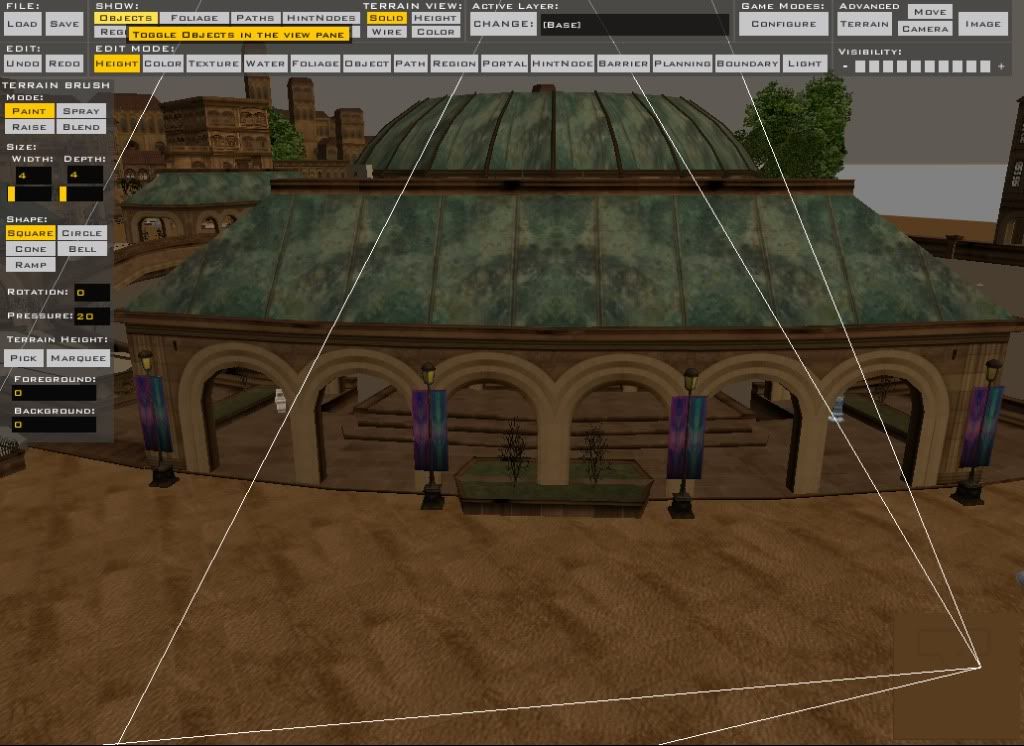
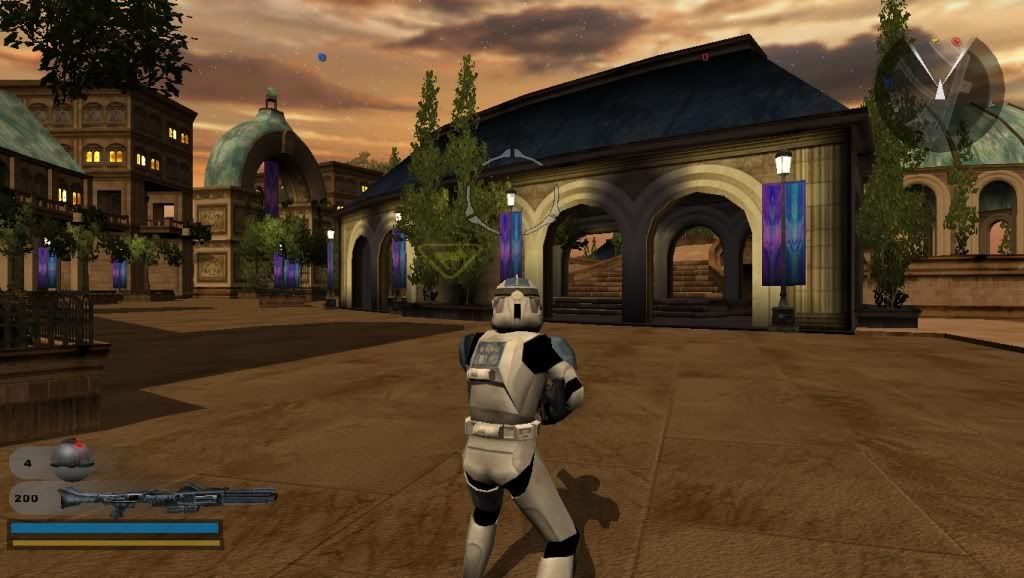
Hey I am having trouble finding the .tga file for nab2_bldg_canal_home.odf. I tried replacing the .odf and .msh files from the BF1 modtools assets folder, it shows up correctly in the ZE, but ingame it shows up as a dark .tga file. It is this in ZE:
It is this ingame:
How could I fix this?
Hidden/Spoiler:
Hidden/Spoiler:
How could I fix this?
-
Darth_Spiderpig
- Sith Master

- Posts: 2631
- Joined: Fri Mar 27, 2009 10:23 am
- Projects :: Something cool...
- xbox live or psn: Has no xbox....Yup
- Location: Does whatever a Spiderpig does
- Contact:
Re: Can't find a certain .tga
I guess it's because of the lighting parameter in the odf, not sure tho.
Try to check the odf for anything like this, or see if there's a msh or tga .option file contaimg anything about this. I can't check my theory right now, and are you now using the bf1 model or the bf2 one?
-
modmaster13
- General

- Posts: 777
- Joined: Wed Aug 18, 2010 4:23 pm
- xbox live or psn: KrypticcElementt
- Location: Twitter @_KrypticElement
- Contact:
Re: Can't find a certain .tga
I am using the BF1 model.Darth_Spiderpig wrote:I guess it's because of the lighting parameter in the odf, not sure tho.
Try to check the odf for anything like this, or see if there's a msh or tga .option file contaimg anything about this. I can't check my theory right now, and are you now using the bf1 model or the bf2 one?
-
THEWULFMAN
- Space Ranger
- Posts: 5557
- Joined: Tue Aug 17, 2010 3:30 pm
- Projects :: Evolved 2
- Location: Columbus, Ohio
- Contact:
Re: Can't find a certain .tga
The BF2 version (They are the same
)does the same thing, I havent gotten a chance to figure out why yet.

- DarthD.U.C.K.
- Master of the Force

- Posts: 6027
- Joined: Wed Sep 27, 2006 11:05 am
- Location: Duckburg, Germany
Re: Can't find a certain .tga
that is because pandemic applied vertexcolors to the model. they can either be used to color it or to determinate how it reacts to lighting when it has "-vertexlighting" in the msh.option (if it becomes bright or dark etc.). the later is the case with this model. you can try to remove the line form the msh.option and see what happens.
-
modmaster13
- General

- Posts: 777
- Joined: Wed Aug 18, 2010 4:23 pm
- xbox live or psn: KrypticcElementt
- Location: Twitter @_KrypticElement
- Contact:
Re: Can't find a certain .tga
What do you mean by "remove the line"?
- Jendo7
- Sith

- Posts: 1304
- Joined: Wed Apr 01, 2009 6:37 pm
- Location: Cambridge, England.
- Contact:
Re: Can't find a certain .tga
In other words remove -vertexlighting from the msh.option file.
-
modmaster13
- General

- Posts: 777
- Joined: Wed Aug 18, 2010 4:23 pm
- xbox live or psn: KrypticcElementt
- Location: Twitter @_KrypticElement
- Contact:
Re: Can't find a certain .tga
Ok, I did that. Yesterday before I removed -vertexlighting, I tried a clean, then munge and I can't spawn anywhere. This came up in the munge log:Jendo7 wrote:In other words remove -vertexlighting from the msh.option file.
Hidden/Spoiler:
-
THEWULFMAN
- Space Ranger
- Posts: 5557
- Joined: Tue Aug 17, 2010 3:30 pm
- Projects :: Evolved 2
- Location: Columbus, Ohio
- Contact:
Re: Can't find a certain .tga
Something is missing a bracket...try loading the map, saving it, then remungeing. Works for me
-
modmaster13
- General

- Posts: 777
- Joined: Wed Aug 18, 2010 4:23 pm
- xbox live or psn: KrypticcElementt
- Location: Twitter @_KrypticElement
- Contact:
Re: Can't find a certain .tga
Thank you!
Hidden/Spoiler:
-
AQT
- Gametoast Staff

- Posts: 4910
- Joined: Sat Nov 03, 2007 4:55 pm
- Location: SoCal, USA
Re: Can't find a certain .tga
Excuse this bump, but I found that this issue was solved for the wrong reason:
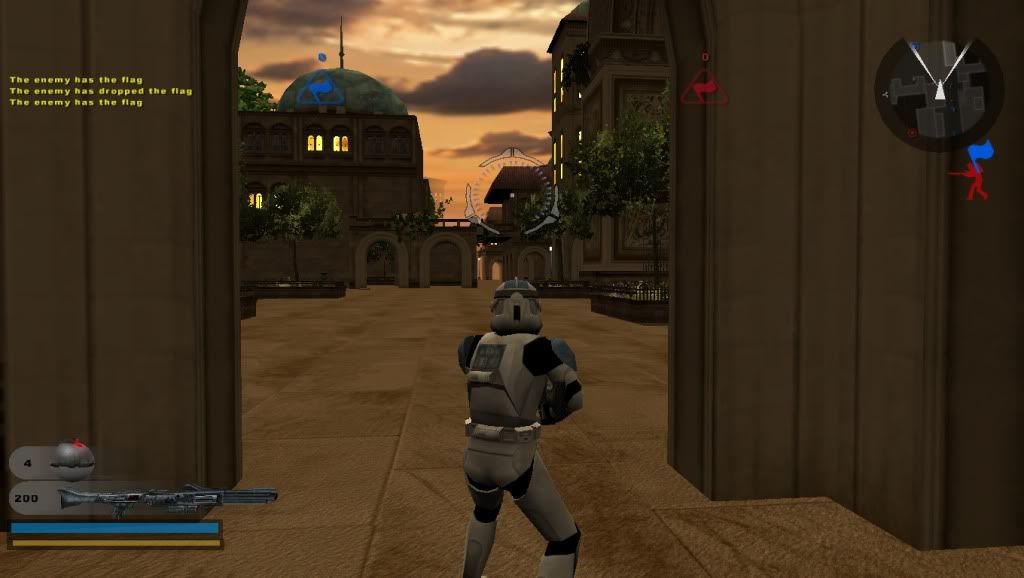
My guess is you were using the SWBF2 model (with the last modified date being in 2005) and saw the problem in-game after munging. You then proceeded to overwrite the SWBF2 model with the SWBF1 one (last modified date in 2004), hoping that it would fix the problem. At this point, the model would appear correctly (not dark) in ZE. After munging and VisualMunge not recognizing the older time and date of the SWBF1 model, the dark SWBF2 model still appeared in-game, so you then posted the problem here without mentioning the specifics.
So the solution after all was: Use the SWBF1 model, and make sure it actually munges. [Solved]
I highly doubt you were. The SWBF1 version of this model does not cause the problem you see in-game. Using the SWBF2 model with the -vertexlighting line removed from the .msh.option won't fix the problem. The ZE image you posted is definitely that of the SWBF1 model since the SWBF2 model would also appear dark in ZE as it does in-game (Note: The .msh.option file has no control over an object's appearance in ZE). Hence, seeing the model appear not dark in ZE but dark in-game would fool you.modmaster13 wrote:I am using the BF1 model.Darth_Spiderpig wrote:I guess it's because of the lighting parameter in the odf, not sure tho.
Try to check the odf for anything like this, or see if there's a msh or tga .option file contaimg anything about this. I can't check my theory right now, and are you now using the bf1 model or the bf2 one?
My guess is you were using the SWBF2 model (with the last modified date being in 2005) and saw the problem in-game after munging. You then proceeded to overwrite the SWBF2 model with the SWBF1 one (last modified date in 2004), hoping that it would fix the problem. At this point, the model would appear correctly (not dark) in ZE. After munging and VisualMunge not recognizing the older time and date of the SWBF1 model, the dark SWBF2 model still appeared in-game, so you then posted the problem here without mentioning the specifics.
So the solution after all was: Use the SWBF1 model, and make sure it actually munges. [Solved]


