
nice, though the barrel on the rifle should be a bit longer, as should the bit underneath.Null_1138 wrote:Thanks Par. LC3 is awesome.
Anyway, I know these models with be familiar with Lego hobbyists. Hidden/Spoiler:
SketchUp Models
Moderator: Moderators
-
Commander_Fett
- High General

- Posts: 847
- Joined: Fri Oct 17, 2008 9:59 pm
- Projects :: No Mod project currently.
Re: SketchUp Models
-
kooster

- Rebel Sergeant

- Posts: 197
- Joined: Thu Jan 22, 2009 6:17 pm
- Projects :: No Mod project currently.
- xbox live or psn: No gamertag set
- Location: Blowing up droids into scrap metal with my Almighty-Ultimate-Mega Projectile Launcher
Re: SketchUp Models
This is my first attempt at a big sketchup model/sketchup map
Hope you like...
I am going to add more to the open part of the model. So far I'm satisfied.
I'd like you guys' comments though. Comment please!
I could get more screenshots from different angles if you guys want them.
Hope you like...
I am going to add more to the open part of the model. So far I'm satisfied.
I'd like you guys' comments though. Comment please!
I could get more screenshots from different angles if you guys want them.
Hidden/Spoiler:
-
destructo_bot

- Chief Warrant Officer

- Posts: 329
- Joined: Sun Aug 10, 2008 3:14 pm
- Projects :: No Mod project currently.
- xbox live or psn: No gamertag set
- Location: Orkney, a place of... well... farming. Scotland FTW!
Re: SketchUp Models
Looks cool, I like it... but if you don't mind me asking, what exactly is it?
-
Eaol
- Major

- Posts: 510
- Joined: Fri Jul 31, 2009 5:49 pm
- Location: Everywhere.
Re: SketchUp Models
Here are some older shots of a model of mine, modelled off a vehicle in Galactic Battlegrounds for a mod in Battlefront 2.
Imperial Light Scout Frigate


Imperial Light Scout Frigate
Hidden/Spoiler:
Hidden/Spoiler:
Hidden/Spoiler:
-
Wonderboy

- Chief Warrant Officer
- Posts: 353
- Joined: Sun Jul 12, 2009 12:54 pm
- Projects :: Making apples into applesauce
- Location: Eastern South Dakota
Re: SketchUp Models
Looks good, but what I would like to know is how you made a texture map?
-
RogueKnight
- Space Ranger
- Posts: 2512
- Joined: Sat Nov 22, 2008 1:50 pm
- Projects :: Life. Work.
- xbox live or psn: No gamertag set
- Location: Washington, US
Re: SketchUp Models
Doesn't look like he did, but I'm probably wrong, knowing him.Wonderboy wrote:Looks good, but what I would like to know is how you made a texture map?
-
Wonderboy
- Chief Warrant Officer
- Posts: 353
- Joined: Sun Jul 12, 2009 12:54 pm
- Projects :: Making apples into applesauce
- Location: Eastern South Dakota
Re: SketchUp Models
Well look at the stripes. I could never dream of getting a texture that precise by just applying it and having it repeat like SketchUp makes it do.
-
Commander_Fett
- High General
- Posts: 847
- Joined: Fri Oct 17, 2008 9:59 pm
- Projects :: No Mod project currently.
Re: SketchUp Models
I'm guessing he drew lines to form a shape where he wanted the lines, then filled it in with the bucket tool
-
RogueKnight
- Space Ranger
- Posts: 2512
- Joined: Sat Nov 22, 2008 1:50 pm
- Projects :: Life. Work.
- xbox live or psn: No gamertag set
- Location: Washington, US
Re: SketchUp Models
No, he used a texture applier, or a 3D unwrap program, probably the first, Sketchup has one built in.Commander_Fett wrote:I'm guessing he drew lines to form a shape where he wanted the lines, then filled it in with the bucket tool
-
destructo_bot
- Chief Warrant Officer
- Posts: 329
- Joined: Sun Aug 10, 2008 3:14 pm
- Projects :: No Mod project currently.
- xbox live or psn: No gamertag set
- Location: Orkney, a place of... well... farming. Scotland FTW!
Re: SketchUp Models
I would agree. Look at the top picture. And also there is a way of rotating sketchup textures and positioning them on the object, although I can't remember how you do it. Anyone know?Commander_Fett wrote:I'm guessing he drew lines to form a shape where he wanted the lines, then filled it in with the bucket tool
-
RogueKnight
- Space Ranger
- Posts: 2512
- Joined: Sat Nov 22, 2008 1:50 pm
- Projects :: Life. Work.
- xbox live or psn: No gamertag set
- Location: Washington, US
Re: SketchUp Models
If he drew lines, you would be able to see them, and I know that he uses the built in texture applicator on all his models.destructo_bot wrote:I would agree. Look at the top picture. And also there is a way of rotating sketchup textures and positioning them on the object, although I can't remember how you do it. Anyone know?Commander_Fett wrote:I'm guessing he drew lines to form a shape where he wanted the lines, then filled it in with the bucket tool
-
Commander_Fett
- High General
- Posts: 847
- Joined: Fri Oct 17, 2008 9:59 pm
- Projects :: No Mod project currently.
Re: SketchUp Models
DarthRogueKnight wrote:If he drew lines, you would be able to see them, and I know that he uses the built in texture applicator on all his models.destructo_bot wrote:I would agree. Look at the top picture. And also there is a way of rotating sketchup textures and positioning them on the object, although I can't remember how you do it. Anyone know?Commander_Fett wrote:I'm guessing he drew lines to form a shape where he wanted the lines, then filled it in with the bucket tool
-
Wonderboy
- Chief Warrant Officer
- Posts: 353
- Joined: Sun Jul 12, 2009 12:54 pm
- Projects :: Making apples into applesauce
- Location: Eastern South Dakota
Re: SketchUp Models
Well if you right click on a poly with a texture, then on the toolbar there is texture -> positiondestructo_bot wrote:I would agree. Look at the top picture. And also there is a way of rotating sketchup textures and positioning them on the object, although I can't remember how you do it. Anyone know?Commander_Fett wrote:I'm guessing he drew lines to form a shape where he wanted the lines, then filled it in with the bucket tool
-
destructo_bot
- Chief Warrant Officer
- Posts: 329
- Joined: Sun Aug 10, 2008 3:14 pm
- Projects :: No Mod project currently.
- xbox live or psn: No gamertag set
- Location: Orkney, a place of... well... farming. Scotland FTW!
Re: SketchUp Models
Ah yes, thankyou.Wonderboy wrote:Well if you right click on a poly with a texture, then on the toolbar there is texture -> positiondestructo_bot wrote:I would agree. Look at the top picture. And also there is a way of rotating sketchup textures and positioning them on the object, although I can't remember how you do it. Anyone know?Commander_Fett wrote:I'm guessing he drew lines to form a shape where he wanted the lines, then filled it in with the bucket tool
-
Eaol
- Major
- Posts: 510
- Joined: Fri Jul 31, 2009 5:49 pm
- Location: Everywhere.
Re: SketchUp Models
You can download my model from the 3D Wharehouse, you know. I like to post some models there sometimes.DarthRogueKnight wrote:Doesn't look like he did, but I'm probably wrong, knowing him.Wonderboy wrote:Looks good, but what I would like to know is how you made a texture map?
http://sketchup.google.com/3dwarehouse/ ... c256412db0
I've been having Xfire issues lately haven't been on on weeks
Now I can't get it to work.
-
Null_1138
- Jedi

- Posts: 1192
- Joined: Thu Oct 16, 2008 4:05 pm
Re: SketchUp Models
Big pic:
And experimental textures:
Semi big pics:
Btw, Happy Halloween. 
Hidden/Spoiler:
Semi big pics:
Hidden/Spoiler:
Hidden/Spoiler:
-
destructo_bot
- Chief Warrant Officer
- Posts: 329
- Joined: Sun Aug 10, 2008 3:14 pm
- Projects :: No Mod project currently.
- xbox live or psn: No gamertag set
- Location: Orkney, a place of... well... farming. Scotland FTW!
Re: SketchUp Models
In the words of Cpt. Awesome: Awesome.
Whats with the 'forest of blocks' bits?
Whats with the 'forest of blocks' bits?
-
Null_1138
- Jedi
- Posts: 1192
- Joined: Thu Oct 16, 2008 4:05 pm
Re: SketchUp Models
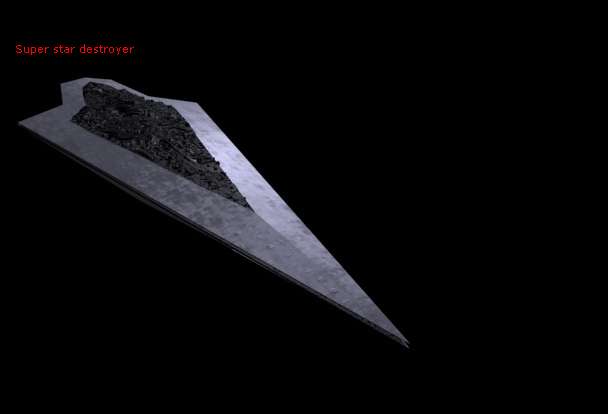
I was hoping it would mimic the "forest of blocks" of the Executor:
Hidden/Spoiler:
-
GangsterJawa

- Sith

- Posts: 1319
- Joined: Tue Nov 18, 2008 7:37 pm
- Projects :: No Mod project currently.
- xbox live or psn: No gamertag set
- Location: In the refrigerator, behind the mayonnaise, next to the ketchup, and to the left of the coleslaw
Re: SketchUp Models
Well... the Executor's "Forest" is a little more nondescript, and it doesn't stick out as much. It's also not as uniform...Null_1138 wrote:I was hoping it would mimic the "forest of blocks" of the Executor:Hidden/Spoiler:
-
Null_1138
- Jedi
- Posts: 1192
- Joined: Thu Oct 16, 2008 4:05 pm
Re: SketchUp Models
Point taken. As a matter of fact, I found a little problem myself - the "trench" on the sides of the destroyer point upward at a 2.1 degree angle. I'm going to make some changes so that the ship will be level throughout, and make those blocks less uniform, then I'll post pictures.