
I`ve seen this done on other maps like Katholis Sea Haven where each time you load up the map, it cycles through rainy weather, day time, night time etc. How do I do this?
Thanks
How can I make a day and night cycle?
Moderator: Moderators
-
SkinnyODST
- Lieutenant Colonel

- Posts: 545
- Joined: Mon Jul 04, 2016 10:56 pm
- Location: My other account
- Contact:
-
Marth8880
- Resistance Leader
- Posts: 5042
- Joined: Tue Feb 09, 2010 8:43 pm
- Projects :: DI2 + Psychosis
- xbox live or psn: Marth8880
- Location: Edinburgh, UK
- Contact:
-
SkinnyODST
- Lieutenant Colonel
- Posts: 545
- Joined: Mon Jul 04, 2016 10:56 pm
- Location: My other account
- Contact:
Re: How can I make a day and night cycle?
Wow, this tut is so hard to understand for me.
Where is load and init?
What does he mean "any space map"? I`ve looked in the space template folder in the modtools folder and I have no idea what hes talking about. I can find a "sky" folder, but I don`t know where this "extra" one is
Hidden/Spoiler:
Hidden/Spoiler:
-
AceMastermind

- Gametoast Staff

- Posts: 3285
- Joined: Mon Aug 21, 2006 6:23 am
- Contact:
Re: How can I make a day and night cycle?
SkinnyODST wrote:Wow, this tut is so hard to understand for me.Hidden/Spoiler:
Where is load and init?[/quote]
This is my interpretation of that:
Code: Select all
function ScriptPostLoad()
    --snip
end


function weather()
    if WeatherMode == 1 then
        ReadDataFile("dc:AMI\\sky.lvl", "cloud")
    elseif WeatherMode == 2 then
        ReadDataFile("dc:AMI\\sky.lvl", "clear")
    elseif WeatherMode == 3 then
        ReadDataFile("dc:AMI\\sky.lvl", "rainy")
    end
end


function ScriptInit()
    --snip
endWhether or not that is correct though I don't know, I never needed to use this.
and I assume when he says this:
that he means to put it inside the ScriptPostLoad() function on the line after "function ScriptPostLoad()" like this:Put this right under function ScriptPostLoad()
Code: Select all
WeatherMode = math.random(1,3)
weather()
Code: Select all
function ScriptPostLoad()
    WeatherMode = math.random(1,3)
    weather()
    --snip
endI would just forget the word "extra" is there, he likely just means the "sky" folder here:SkinnyODST wrote:What does he mean "any space map"? I`ve looked in the space template folder in the modtools folder and I have no idea what hes talking about. I can find a "sky" folder, but I don`t know where this "extra" one isLook at any space map. There's an extra "sky" folder in the
world_whatevermodidis folder. Probably best to copy that to your map.
data_SPC\Worlds\SPC\sky
It might be best here to create a space map for reference.
We should probably modify the tutorial to clarify this stuff, I can see how it may be confusing.
-
SkinnyODST
- Lieutenant Colonel
- Posts: 545
- Joined: Mon Jul 04, 2016 10:56 pm
- Location: My other account
- Contact:
Re: How can I make a day and night cycle?
Thanks. And I was going to write on the topic how hard it is to understand but the last comment on it was from 2009...
-
Delta327
- Master Sergeant

- Posts: 160
- Joined: Thu Jan 21, 2016 8:55 pm
- Projects :: Shattered Galaxy
- xbox live or psn: No gamertag set
- Location: In the Mid Rim of the galaxy
Re: How can I make a day and night cycle?
Well i looked at the tutorial its kinda hard to undersrand to and can i look at a example on a lua file?
-
ARCTroopaNate
- Jedi

- Posts: 1161
- Joined: Mon Mar 21, 2011 8:12 pm
- Projects :: Star Wars Battlefront - Tides of War
- xbox live or psn: I have ps4
- Location: STALKER!
- Contact:
Re: How can I make a day and night cycle?
Hidden/Spoiler:
-
GAB

- 1st Lieutenant

- Posts: 431
- Joined: Sun Jul 03, 2011 8:56 pm
- Location: Somewhere around the world
- Contact:
Re: How can I make a day and night cycle?
Indeed that tutorial is not as clear as it could, so here's a (hopefully) better version.
In this I'll be using ABC as the mod ID. This tutorial assumes that you already have your variants' .fx, .sky, .ter, and .lgt files or that you at least know what they are and how to create them. Strictly speaking, steps 1 and 2 of part 1 are not necessary but they'll help you to organize your files better.
Part 1 - Setting Up Your Folders and Files
1. Go to data_ABC/Worlds/ABC/world1, create one folder for each variant you intend to have in your map. These folders will contain your variant specific files.
2. Paste each variant's .fx, .sky, .lgt and .ter files into their corresponding folders. Generally, .fx and .sky files may also require some extra textures and models, so make sure these are moved to their appropriate folders as well. You may not want to use multiple terrains. If that's the case, don't worry about .ter files.
3. Now, go to data_ABC/Worlds/ABC, create a new folder there and name it "sky".
4. Inside it, create a new folder and name it "REQ".
5. Now, open this new folder and create one .req file for each variant you intend to have in your map. Then, give each .req a unique variant name.
6. Open up one of the .reqs you created and put the following code in it:Repeat this step for each .req you created in step 5.
7. Go back to data_ABC/Worlds/ABC/sky, create a new .req file and name it "sky". Put the following code in it:
Part 2 - Setting Up Your Lua
1. Open your map's Lua and find this line: function ScriptInit()
2. Below that, add the following code:x = Number of variants you intend to have in your map.
3. Now, find this line: ReadDataFile("dc:ABC\\ABC.lvl", "ABC_conquest")
4. Below that, add the following code:
Part 3 - Getting Ready to Munge
1. Open your map's world file (.wld) with a text editor.
2. Find the line LightName("ABC.lgt"); and remove it. this is necessary for the game to be able to load your variants' lighting files.
3. Still in your map's world file, find the line SkyName("ABC.sky") and remove it as well so that the game can load your variants' sky files.
4. Now, open your map's .req (which should be named ABC.req), located in the world1 folder and find and remove this section:
5. (Only if you're using multiple terrains) In your world1 folder, delete your map's terrain file (it should be named ABC.ter). This is necessary because if this terrain is munged, it will be loaded at all times insted of your variants' terrains. Alternatively, removing the TerrainName("ABC.ter") line from the world file has the same practical effects but it causes the minimap to not appear, for some reason.
And that's it. If I didn't miss anything you should be ready to munge.
Some Very Important Notes
SWBF2's mod tools weren't desinged for all of this, which means there are some things you need to be aware of:
First, when you open your map in ZeroEditor, it will load a sort of generic ambient lighting due to what we did in step 2 of part 3 of this tutorial. In order to remedy this, do the following:
1. Open the map's world file (.wld) with a text editor:
2. Look for the following line ScriptName("DummyScript.dll");
3. Above that, add LightName("ABC.lgt"); (Don't forget the semicolon at the end of the line)
4. Go to the folder which contains the files of the variant you want the lighting to be loaded in the editor.
5. Copy the .lgt file in that folder and paste it in the world1 folder.
6. Rename the file you have just pasted to ABC. If you are asked if you wish to overwrite any file, do it.
7. Open the world in ZE and the variant's lighting should be loaded in the editor.
This is only really needed if you want to edit a variant's lighting. If you are going to do anything else, don't worry about the lighting.
Second and most important: ZeroEditor can't open world files (.wld) which do not have a terrain assigned to them. This is really important if you are working with multiple terrains because, since you have to do step 5 of part 3 every time you munge, you have to essentially to the oposite whenever you want to open you map in ZE (i.e. copying one of your variant's terrains to the world1 folder and renaming it to ABC). That's why I whenever I'm not working on map aesthetics I generally skip step 5 of part 3.
That's it. I tried to make this tutorial as comprehensible as possible but like Sky_216 said in his original tut, this is for fairly experienced modders. In my opinion, this is as almost as complicated as Battlefront 2 mapping gets, so be patient and try to understand what you're doing.
I wrote this tutorial a little bit in a hurry and then the lights went out and I had to write part of it again, so if someone finds a mistake, please tell so that I can edit it.
EDIT:
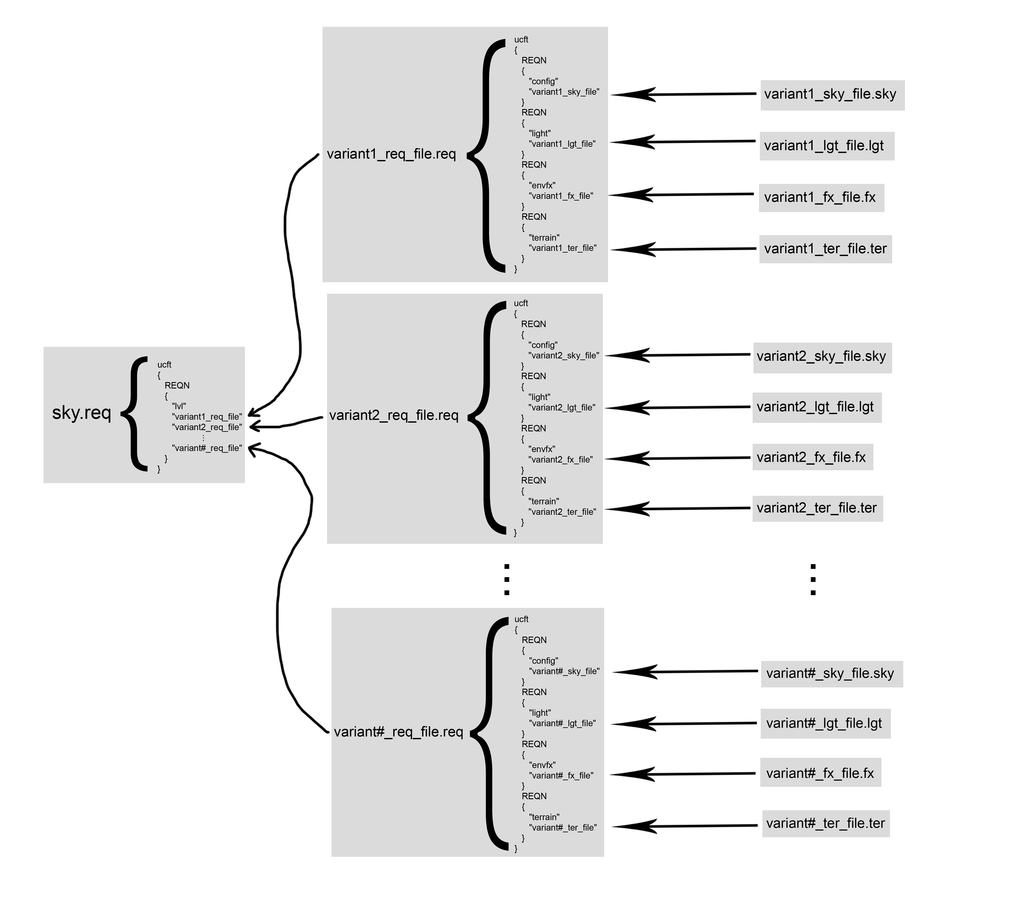
Here's part 1 of this tutorial sumarized in a single diagram:
In this I'll be using ABC as the mod ID. This tutorial assumes that you already have your variants' .fx, .sky, .ter, and .lgt files or that you at least know what they are and how to create them. Strictly speaking, steps 1 and 2 of part 1 are not necessary but they'll help you to organize your files better.
Part 1 - Setting Up Your Folders and Files
1. Go to data_ABC/Worlds/ABC/world1, create one folder for each variant you intend to have in your map. These folders will contain your variant specific files.
2. Paste each variant's .fx, .sky, .lgt and .ter files into their corresponding folders. Generally, .fx and .sky files may also require some extra textures and models, so make sure these are moved to their appropriate folders as well. You may not want to use multiple terrains. If that's the case, don't worry about .ter files.
3. Now, go to data_ABC/Worlds/ABC, create a new folder there and name it "sky".
4. Inside it, create a new folder and name it "REQ".
5. Now, open this new folder and create one .req file for each variant you intend to have in your map. Then, give each .req a unique variant name.
6. Open up one of the .reqs you created and put the following code in it:
Hidden/Spoiler:
7. Go back to data_ABC/Worlds/ABC/sky, create a new .req file and name it "sky". Put the following code in it:
Hidden/Spoiler:
1. Open your map's Lua and find this line: function ScriptInit()
2. Below that, add the following code:
Code: Select all
WeatherMode = math.random(1,x)3. Now, find this line: ReadDataFile("dc:ABC\\ABC.lvl", "ABC_conquest")
4. Below that, add the following code:
Hidden/Spoiler:
1. Open your map's world file (.wld) with a text editor.
2. Find the line LightName("ABC.lgt"); and remove it. this is necessary for the game to be able to load your variants' lighting files.
3. Still in your map's world file, find the line SkyName("ABC.sky") and remove it as well so that the game can load your variants' sky files.
4. Now, open your map's .req (which should be named ABC.req), located in the world1 folder and find and remove this section:
Hidden/Spoiler:
And that's it. If I didn't miss anything you should be ready to munge.
Some Very Important Notes
SWBF2's mod tools weren't desinged for all of this, which means there are some things you need to be aware of:
First, when you open your map in ZeroEditor, it will load a sort of generic ambient lighting due to what we did in step 2 of part 3 of this tutorial. In order to remedy this, do the following:
1. Open the map's world file (.wld) with a text editor:
2. Look for the following line ScriptName("DummyScript.dll");
3. Above that, add LightName("ABC.lgt"); (Don't forget the semicolon at the end of the line)
4. Go to the folder which contains the files of the variant you want the lighting to be loaded in the editor.
5. Copy the .lgt file in that folder and paste it in the world1 folder.
6. Rename the file you have just pasted to ABC. If you are asked if you wish to overwrite any file, do it.
7. Open the world in ZE and the variant's lighting should be loaded in the editor.
This is only really needed if you want to edit a variant's lighting. If you are going to do anything else, don't worry about the lighting.
Second and most important: ZeroEditor can't open world files (.wld) which do not have a terrain assigned to them. This is really important if you are working with multiple terrains because, since you have to do step 5 of part 3 every time you munge, you have to essentially to the oposite whenever you want to open you map in ZE (i.e. copying one of your variant's terrains to the world1 folder and renaming it to ABC). That's why I whenever I'm not working on map aesthetics I generally skip step 5 of part 3.
That's it. I tried to make this tutorial as comprehensible as possible but like Sky_216 said in his original tut, this is for fairly experienced modders. In my opinion, this is as almost as complicated as Battlefront 2 mapping gets, so be patient and try to understand what you're doing.
I wrote this tutorial a little bit in a hurry and then the lights went out and I had to write part of it again, so if someone finds a mistake, please tell so that I can edit it.
EDIT:
Here's part 1 of this tutorial sumarized in a single diagram:
Hidden/Spoiler:
Last edited by GAB on Mon Jun 01, 2020 4:55 pm, edited 11 times in total.
-
Delta327
- Master Sergeant
- Posts: 160
- Joined: Thu Jan 21, 2016 8:55 pm
- Projects :: Shattered Galaxy
- xbox live or psn: No gamertag set
- Location: In the Mid Rim of the galaxy
Re: How can I make a day and night cycle?
While where on the light and day cycle.
How do you add diffrent terrain files to the map and ingame?
How do you add diffrent terrain files to the map and ingame?
-
Marth8880
- Resistance Leader
- Posts: 5042
- Joined: Tue Feb 09, 2010 8:43 pm
- Projects :: DI2 + Psychosis
- xbox live or psn: Marth8880
- Location: Edinburgh, UK
- Contact:
Re: How can I make a day and night cycle?
@GAB: Would you mind expanding on how to implement multiple terrains?  That part seems unclear. This is how I currently understand it based on what you're saying:
If the TER file referenced by TerrainName in the WLD file DOES NOT exist, and a differently-named TER file that DOES exist is referenced in a REQ file, then the map will use that differently-named TER file.
Is this correct?
That part seems unclear. This is how I currently understand it based on what you're saying:If the TER file referenced by TerrainName in the WLD file DOES NOT exist, and a differently-named TER file that DOES exist is referenced in a REQ file, then the map will use that differently-named TER file.
Is this correct?
-
GAB
- 1st Lieutenant
- Posts: 431
- Joined: Sun Jul 03, 2011 8:56 pm
- Location: Somewhere around the world
- Contact:
Re: How can I make a day and night cycle?
Delta327 wrote:While where on the light and day cycle.
How do you add diffrent terrain files to the map and ingame?
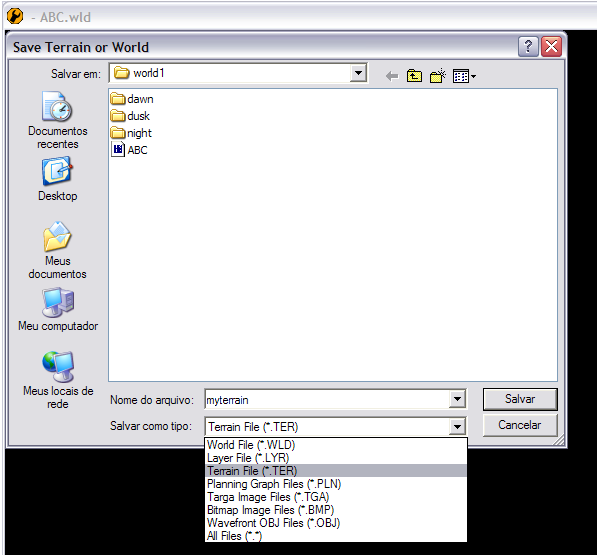
You can create multiple terrains by saving your map in Zero Editor and when the dialog box appears you select Terrain File (*.TER) in the file type just like this:Marth8880 wrote: @GAB: Would you mind expanding on how to implement multiple terrains? That part seems nuclear
Hidden/Spoiler:
Yep.Marth8880 wrote: This is how I currently understand it based on what you're saying:If the TER file referenced by TerrainName in the WLD file DOES NOT exist, and a differently-named TER file that DOES exist is referenced in a REQ file, then the map will use that differently-named TER file.Is this correct?
-
Marth8880
- Resistance Leader
- Posts: 5042
- Joined: Tue Feb 09, 2010 8:43 pm
- Projects :: DI2 + Psychosis
- xbox live or psn: Marth8880
- Location: Edinburgh, UK
- Contact:
Re: How can I make a day and night cycle?
Very good to know. HUGE thanks, GAB! 
-
Delta327
- Master Sergeant
- Posts: 160
- Joined: Thu Jan 21, 2016 8:55 pm
- Projects :: Shattered Galaxy
- xbox live or psn: No gamertag set
- Location: In the Mid Rim of the galaxy
Re: How can I make a day and night cycle?
Im a little confused about how make it on ZE?
Just to carify ive saved the ter before but it dosent show up ingame. Do you just remove it from your .wld file?
Just to carify ive saved the ter before but it dosent show up ingame. Do you just remove it from your .wld file?
-
GAB
- 1st Lieutenant
- Posts: 431
- Joined: Sun Jul 03, 2011 8:56 pm
- Location: Somewhere around the world
- Contact:
Re: How can I make a day and night cycle?
Do you have the Lua code from step 4 of part 2 correctly referencing the .req file from step 7 of part 1 and step 5 and 6 of the same part?Delta327 wrote:Just to carify ive saved the ter before but it dosent show up ingame.
Does the .req file mentioned in step 7 of part 1 have a correct reference to your variant's .req file from steps 5 and 6 of part 1?
Does your variant's .req file from steps 5 and 6 of part 1 contain a correct reference to your terrain file?
As step 5 of part 3 says, this is one of your options, but it will cost you your minimap.Delta327 wrote:Do you just remove it from your .wld file?
-
Delta327
- Master Sergeant
- Posts: 160
- Joined: Thu Jan 21, 2016 8:55 pm
- Projects :: Shattered Galaxy
- xbox live or psn: No gamertag set
- Location: In the Mid Rim of the galaxy
Re: How can I make a day and night cycle?
Its working but is putting the terrain ramdomly
-
GAB
- 1st Lieutenant
- Posts: 431
- Joined: Sun Jul 03, 2011 8:56 pm
- Location: Somewhere around the world
- Contact:
Re: How can I make a day and night cycle?
You mean that every match the game loads a different terrain? If so, then you succeeded.Delta327 wrote:Its working but is putting the terrain ramdomly
-
Oceans14
- Command Sergeant Major

- Posts: 296
- Joined: Mon Apr 27, 2015 7:09 pm
- Projects :: Athenova Campaign
- Location: Planet 4546b
Re: How can I make a day and night cycle?
Great tut GAB. Assuming I just wanted a particular sky/lighting/terrain for a particular game mode (i.e. idk day for conquest, night for campaign) I would just load the appropriate variant in scriptinit, yes? All that weathermode stuff is just in place to allow for randomness?
-
GAB
- 1st Lieutenant
- Posts: 431
- Joined: Sun Jul 03, 2011 8:56 pm
- Location: Somewhere around the world
- Contact:
-
SkinnyODST
- Lieutenant Colonel
- Posts: 545
- Joined: Mon Jul 04, 2016 10:56 pm
- Location: My other account
- Contact:
Re: How can I make a day and night cycle?
Well that is a very good tutorial. Thanks GAB! But yes it is quite advanced, and seeing as this is my first map I don`t want to go too overboard with it, so I think that what Oceans14 said is a very good idea for me. So to add in different weather for each era through LUA, I`m guessing that I do all the same stuff in your tut but skip the whole random weather part in the LUA? I`ve tried adding this, in one of my era`s LUAs but got errors for missing brackets.
I don`t know if this is normal but none of my LUAs have a ReadDataFile("dc:CCC\\CCC.lvl", "CCC_conquest") in them, I had to add that part in.
PS - the "rep_inf_ep2_pilot") thing is supposed to be there for this 3rd team I have.
Hidden/Spoiler:
PS - the "rep_inf_ep2_pilot") thing is supposed to be there for this 3rd team I have.
-
GAB
- 1st Lieutenant
- Posts: 431
- Joined: Sun Jul 03, 2011 8:56 pm
- Location: Somewhere around the world
- Contact:
Re: How can I make a day and night cycle?
Yeah, I think that would work.SkinnyODST wrote:Well that is a very good tutorial. Thanks GAB! But yes it is quite advanced, and seeing as this is my first map I don`t want to go too overboard with it, so I think that what Oceans14 said is a very good idea for me. So to add in different weather for each era through LUA, I`m guessing that I do all the same stuff in your tut but skip the whole random weather part in the LUA?
Post your munge log. Also, post your entire lua.SkinnyODST wrote:I`ve tried adding this, in one of my era`s LUAs but got errors for missing brackets.Hidden/Spoiler:
Are you sure? Because that is in no way normal. The Battlefront II Mission LUA Guide doc says why:SkinnyODST wrote:I don`t know if this is normal but none of my LUAs have a ReadDataFile("dc:CCC\\CCC.lvl", "CCC_conquest") in them, I had to add that part in.
Hidden/Spoiler: