Floor collision Suddenly Disapeared

In this forum you will find and post information regarding the modding of Star Wars Battlefront 2. DO NOT POST MOD IDEAS/REQUESTS.

Moderator: Moderators

Post Reply
modmaster13
General
General
Posts: 777
Joined: Wed Aug 18, 2010 4:23 pm
Games I'm Playing :: COD SWBF
xbox live or psn: KrypticcElementt
Location: Twitter @_KrypticElement
Contact:

Floor collision Suddenly Disapeared

Post by modmaster13 »

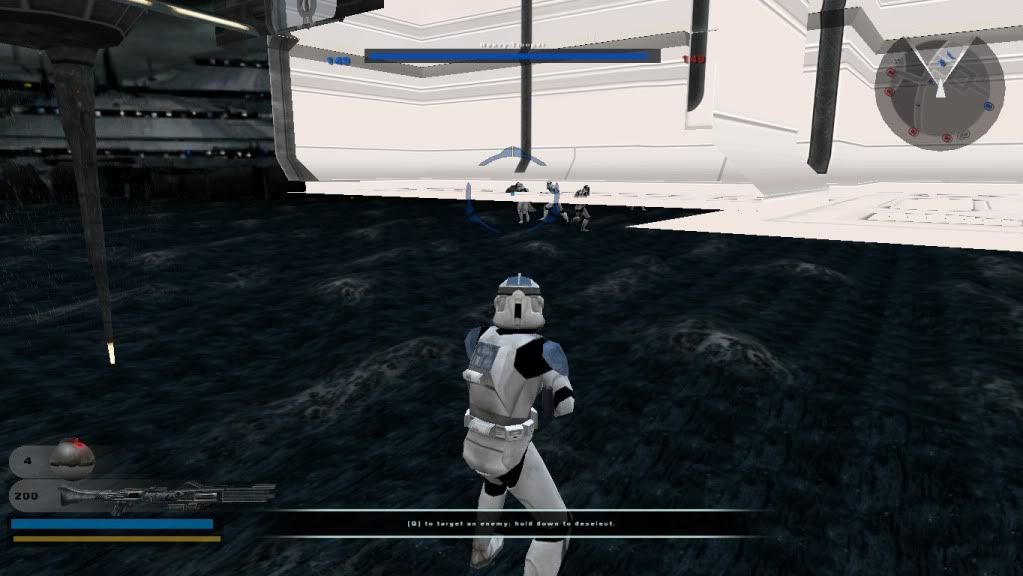
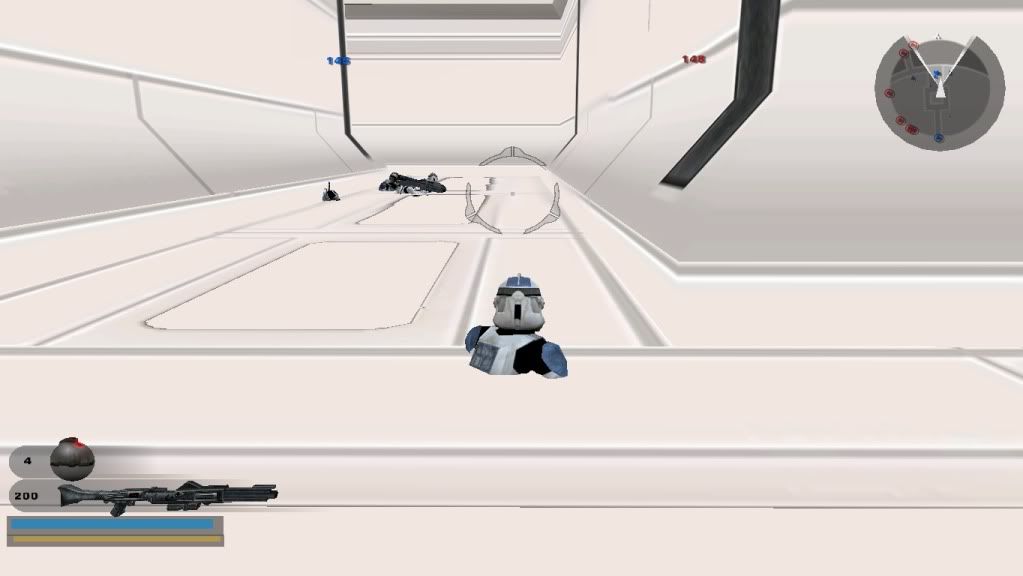
Hey everyone. I was working on a conversion of Kamino Tipoca City. I take the effects/msh/odf folders from the stock bf2 kamino and i replace them with the bf1 effects/msh/odf. I "clean" and re munge the map. I go play the game and i fall right through the floor of the kam_bldg_mushplatform_interior.msh

I tried replacing the msh file with the one from the battlefront 1 assets and I still fall through the floor

Screenshots:
Hidden/Spoiler:
Image
Hidden/Spoiler:
Image
Any suggustions on what I should do to fix this?
AQT
Gametoast Staff
Gametoast Staff
Posts: 4910
Joined: Sat Nov 03, 2007 4:55 pm
Location: SoCal, USA

Re: Floor collision Suddenly Disapeared

Post by AQT »

Try placing stock invisible collision boxes underneath the floors like how it was done with the stock SWBF2 Tantive IV map. Perhaps this was also done with the stock SWBF2 Kamino map?
modmaster13
General
General
Posts: 777
Joined: Wed Aug 18, 2010 4:23 pm
Games I'm Playing :: COD SWBF
xbox live or psn: KrypticcElementt
Location: Twitter @_KrypticElement
Contact:

Re: Floor collision Suddenly Disapeared

Post by modmaster13 »

AQT wrote:Try placing stock invisible collision boxes underneath the floors like how it was done with the stock SWBF2 Tantive IV map. Perhaps this was also done with the stock SWBF2 Kamino map?
Ok, I placed invisible collision boxes underneath the floors. Its alright to walk on. But ingame if i throw a grenade, fire a rocket launcher, or shoot at the floor, it just goes through the floor. The only thing that can stick to the floor now are mines. Any suggestions on what I should do?
User avatar
willinator
Major
Major
Posts: 517
Joined: Sun Mar 13, 2011 3:11 pm
Projects :: [Coming of the Sentinels]
Games I'm Playing :: SWBF2 Minecraft Halo
xbox live or psn: PC pwns all!
Location: The rings of Saturn...

Re: Floor collision Suddenly Disapeared

Post by willinator »

Try placing an actual object below the floor. Whenever I have a problem like this, I usually pick one of the rhen var base brick models, they lego really work. They also don't need a texture, because you place it just barely below the floor, so that you get their collision, but not the z-fighting of clashing textures.

P.S. Also, you could always try making a .option with the line "-donotmergecollision", or whatever that command is. It probably won't work, but it's worth a shot.
modmaster13
General
General
Posts: 777
Joined: Wed Aug 18, 2010 4:23 pm
Games I'm Playing :: COD SWBF
xbox live or psn: KrypticcElementt
Location: Twitter @_KrypticElement
Contact:

Re: Floor collision Suddenly Disapeared

Post by modmaster13 »

willinator wrote:Try placing an actual object below the floor. Whenever I have a problem like this, I usually pick one of the rhen var base brick models, they lego really work. They also don't need a texture, because you place it just barely below the floor, so that you get their collision, but not the z-fighting of clashing textures.
The problem is this is a kamino interior object. It has a reflection region built-into the msh. If i place regular objects it will show up in the reflection part of the object.
willinator wrote:P.S. Also, you could always try making a .option with the line "-donotmergecollision", or whatever that command is. It probably won't work, but it's worth a shot.
Should I make an .option file for the invisible collision objects or the kamino interior object?
User avatar
willinator
Major
Major
Posts: 517
Joined: Sun Mar 13, 2011 3:11 pm
Projects :: [Coming of the Sentinels]
Games I'm Playing :: SWBF2 Minecraft Halo
xbox live or psn: PC pwns all!
Location: The rings of Saturn...

Re: Floor collision Suddenly Disapeared

Post by willinator »

Kamino interior object.
modmaster13
General
General
Posts: 777
Joined: Wed Aug 18, 2010 4:23 pm
Games I'm Playing :: COD SWBF
xbox live or psn: KrypticcElementt
Location: Twitter @_KrypticElement
Contact:

Re: Floor collision Suddenly Disapeared

Post by modmaster13 »

Ok i added -donotmergecollision to the .option file. I didnt fix the grenade problem.
Hidden/Spoiler:
I still find it weird how the floor collision just randomly dissapeared like that
User avatar
willinator
Major
Major
Posts: 517
Joined: Sun Mar 13, 2011 3:11 pm
Projects :: [Coming of the Sentinels]
Games I'm Playing :: SWBF2 Minecraft Halo
xbox live or psn: PC pwns all!
Location: The rings of Saturn...

Re: Floor collision Suddenly Disapeared

Post by willinator »

Try copying the file over again. You never know, there could have been an era coping it.

Also, you can always do the rhen var thing, and hex-edit it to be completely transparent.
AQT
Gametoast Staff
Gametoast Staff
Posts: 4910
Joined: Sat Nov 03, 2007 4:55 pm
Location: SoCal, USA

Re: Floor collision Suddenly Disapeared

Post by AQT »

modmaster13 wrote:Ok, I placed invisible collision boxes underneath the floors. Its alright to walk on. But ingame if i throw a grenade, fire a rocket launcher, or shoot at the floor, it just goes through the floor.
The stock collision boxes allow ordnances to past through. You can use use SetClassProperty to undo it, or you can create a custom ingame.lvl to load the ODFs with this change.
modmaster13
General
General
Posts: 777
Joined: Wed Aug 18, 2010 4:23 pm
Games I'm Playing :: COD SWBF
xbox live or psn: KrypticcElementt
Location: Twitter @_KrypticElement
Contact:

Re: Floor collision Suddenly Disapeared

Post by modmaster13 »

Yeah I figured out the problem. It is the kam_bldg_mushplatform1 object from the bf2 kamino. It screws everything up for some weird reason
FragMe!
Gametoast Staff
Gametoast Staff
Posts: 2244
Joined: Sat May 13, 2006 12:34 am
Projects :: Not sure keep changing my mind.
Games I'm Playing :: F1 and SWBF
xbox live or psn: No gamertag set
Location: Origin name GT_FragMe
Contact:

Re: Floor collision Suddenly Disapeared

Post by FragMe! »

The mushplatform_interior from BFII has floor collision the one from BFI doesn't. The floor collison in BFI is actually on mushplatform1. This may be cause of the problem.
modmaster13
General
General
Posts: 777
Joined: Wed Aug 18, 2010 4:23 pm
Games I'm Playing :: COD SWBF
xbox live or psn: KrypticcElementt
Location: Twitter @_KrypticElement
Contact:

Re: Floor collision Suddenly Disapeared

Post by modmaster13 »

That seems legit to me. I wanted to have the kam_bldg_exterior_door object outside of the interior. The problem with the bf1 kam_bldg_mushplatform1 object is there isnt an extra chunk to have the doors open up to on the side of the object. So thats why i tried using the bf2 msh.

Post Reply