
I've made myself a nice little bucket, but no matter what I do it WILL NOT export properly! I've tried just about everything I can think of, from removing the material to deleting and resetting up materials to deleting bits of the mesh but nothing works! I even exported it into XSI (It loads fine, with the full texture setup) and tried exporting with Ande's tool but the generated mesh file just crashes BFViewer with no errors or anything. Ande's tool doesn't generate any errors on exporting or anything.
It's interesting, because I tried deleting all the faces from my model except for one and it still crashed, so I'm pretty sure it's not a model problem. I tried no textures and it still crashed so it can't be a texture problem. What else could it be?
To make things even weirder and more confusing, in one of my many attempts at exporting from XSI it actually loaded into BFViewer fine and was loading ok, so I quit it. I tried to re-open it a while later and it started crashing again, even though I hadn't changed the .msh in any way!
Blender Woes - Bucket not exporting
Moderator: Moderators
-
lucasfart

- Sith

- Posts: 1440
- Joined: Tue Feb 24, 2009 5:32 am
- Projects :: No Mod project currently.
- xbox live or psn: No gamertag set
- Location: Australia
-
ANDEWEGET

- Ancient Force

- Posts: 1266
- Joined: Tue Apr 01, 2008 8:42 am
- Location: Germany
- Contact:
Re: Blender Woes - Bucket not exporting
A wireframe would be helpful.
Did you try the Check Sel command in the export dialog with your object/the root selected?
This should find problems like too many sides for a polygon etc.
Did you try the Check Sel command in the export dialog with your object/the root selected?
This should find problems like too many sides for a polygon etc.
-
lucasfart
- Sith
- Posts: 1440
- Joined: Tue Feb 24, 2009 5:32 am
- Projects :: No Mod project currently.
- xbox live or psn: No gamertag set
- Location: Australia
Re: Blender Woes - Bucket not exporting
Yeah, there were no errors when I tried the "check sel" button either.
This wireframe is from blender, but I haven't in any way changed the mesh. Their are no faces inside the mesh, unless the inside of the bucket counts as inside a mesh....
Bucket:
Oh. and I've added a face to the inside of the bucket at the bottom which is missing from that pic...
This wireframe is from blender, but I haven't in any way changed the mesh. Their are no faces inside the mesh, unless the inside of the bucket counts as inside a mesh....
Bucket:
Hidden/Spoiler:
-
ANDEWEGET
- Ancient Force
- Posts: 1266
- Joined: Tue Apr 01, 2008 8:42 am
- Location: Germany
- Contact:
Re: Blender Woes - Bucket not exporting
Cant see a problem with the model in the wire which would cause my exporter to fail.
Try triangulating your model before export. Polies with more than 4 sides can break the .msh file with my exporter. Dunno how the other option you use for exporting handles those.
Try triangulating your model before export. Polies with more than 4 sides can break the .msh file with my exporter. Dunno how the other option you use for exporting handles those.
-
lucasfart
- Sith
- Posts: 1440
- Joined: Tue Feb 24, 2009 5:32 am
- Projects :: No Mod project currently.
- xbox live or psn: No gamertag set
- Location: Australia
Re: Blender Woes - Bucket not exporting
Nope. Triangulating didn't make a difference. 
I've done a bit of experimenting with the .wrl file, and I've figured out that the problem has to do with the values under. I replaced that with the coordIndex section from another model I had successfully exported and it loaded into SWBFViewer, but all the edges were stuffed up. The vertices were all in the right place however (I think coordIndex controls the edges joining the vertices). So I'm guessing it means some of my edges are throwing a fit. 
Any ideas for fixing that without completely redoing my model and destroying my UV's?? If worst comes to worst, I guess I could always make it again, but it would be useful to learn how to fix it and to learn from my mistakes...
Here's a pic of the working model with new edges if you don't get what I was saying:
Another note: when I try check sel in your tools, Ande, it says my model has a poly count of 276 and a vertex count of 138, but when I export, the export report says that my model had 828 vertices. Is that right?
I've done a bit of experimenting with the .wrl file, and I've figured out that the problem has to do with the values under
Code: Select all
coordIndex [Any ideas for fixing that without completely redoing my model and destroying my UV's?? If worst comes to worst, I guess I could always make it again, but it would be useful to learn how to fix it and to learn from my mistakes...
Here's a pic of the working model with new edges if you don't get what I was saying:
Hidden/Spoiler:
Last edited by lucasfart on Tue Jun 12, 2012 6:51 am, edited 1 time in total.
-
ANDEWEGET
- Ancient Force
- Posts: 1266
- Joined: Tue Apr 01, 2008 8:42 am
- Location: Germany
- Contact:
Re: Blender Woes - Bucket not exporting
I cant think of a fix right now, if you want I can take a look at it though.
Best format would be .obj.
Which format did you use to get it into XSI?
Best format would be .obj.
Which format did you use to get it into XSI?
-
lucasfart
- Sith
- Posts: 1440
- Joined: Tue Feb 24, 2009 5:32 am
- Projects :: No Mod project currently.
- xbox live or psn: No gamertag set
- Location: Australia
Re: Blender Woes - Bucket not exporting
Yeah, I used obj to get it into xsi. I'll upload the .obj and pm you with it. Thanks heaps for your help.
-
ANDEWEGET
- Ancient Force
- Posts: 1266
- Joined: Tue Apr 01, 2008 8:42 am
- Location: Germany
- Contact:
Re: Blender Woes - Bucket not exporting
Took a quick look at it but couldn't find any problems with the model. I couldn't export it and see if it works here because I don't have a working version of my exporter right now. The next version isn't ready to export. I'll revert back to a working version and post again later.
Usually that shouldn't be a problem, but did you convert your .png to a .tga? I dont think so but maybe thats the problem.
Usually that shouldn't be a problem, but did you convert your .png to a .tga? I dont think so but maybe thats the problem.
-
lucasfart
- Sith
- Posts: 1440
- Joined: Tue Feb 24, 2009 5:32 am
- Projects :: No Mod project currently.
- xbox live or psn: No gamertag set
- Location: Australia
Re: Blender Woes - Bucket not exporting
Yeah, I did try it with a .tga a couple of times, but it made no difference..
-
ANDEWEGET
- Ancient Force
- Posts: 1266
- Joined: Tue Apr 01, 2008 8:42 am
- Location: Germany
- Contact:
Re: Blender Woes - Bucket not exporting
Sorry it took so long. Some stuff came up and yesterday I forgot.
I had no problems exporting it.
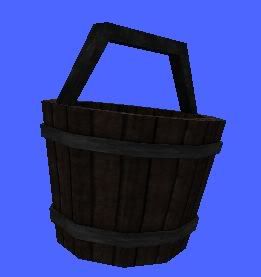
I exported with and without material/texture.
I had no problems exporting it.
I exported with and without material/texture.
-
lucasfart
- Sith
- Posts: 1440
- Joined: Tue Feb 24, 2009 5:32 am
- Projects :: No Mod project currently.
- xbox live or psn: No gamertag set
- Location: Australia
Re: Blender Woes - Bucket not exporting
That's really weird...I definitely was exporting it right, as it's worked fine with other models. Did you do anything special when you were exporting? Sorry for wasting your time like that. I have no idea what I was doing wrong.
Could you send me a copy of the working mesh please?
Also, could you just briefly outline what you did? I just tried exporting again, and it still crashed the mesh viewer. All I'm doing is importing the .obj, adding a material and exporting again. Are you supposed to import the obj with the mesh as parent, a null as parent, or with no hierarchy?
Could you send me a copy of the working mesh please?
Also, could you just briefly outline what you did? I just tried exporting again, and it still crashed the mesh viewer. All I'm doing is importing the .obj, adding a material and exporting again. Are you supposed to import the obj with the mesh as parent, a null as parent, or with no hierarchy?
-
ANDEWEGET
- Ancient Force
- Posts: 1266
- Joined: Tue Apr 01, 2008 8:42 am
- Location: Germany
- Contact:
Re: Blender Woes - Bucket not exporting
New Scene.
Import the obj, via File>Import>Obj
Create New Material via ZE Tools>MSH Tools>Material Manager>Create
Assign a texture(converted the .png to .tga) via the Assign Tex button in the material manager.
Assigned the material to the model by selecting both the material and the model then pressing the Assign button.
Select the model, ZE Tools>.MSH export then press the Export button.
Copy the .tga into the same directory, then view it in the MSH Viewer.
I used the 7.5 XSI Mod Tool.
Should I send you the .msh or the XSI scene?
Import the obj, via File>Import>Obj
Create New Material via ZE Tools>MSH Tools>Material Manager>Create
Assign a texture(converted the .png to .tga) via the Assign Tex button in the material manager.
Assigned the material to the model by selecting both the material and the model then pressing the Assign button.
Select the model, ZE Tools>.MSH export then press the Export button.
Copy the .tga into the same directory, then view it in the MSH Viewer.
I used the 7.5 XSI Mod Tool.
Should I send you the .msh or the XSI scene?
-
lucasfart
- Sith
- Posts: 1440
- Joined: Tue Feb 24, 2009 5:32 am
- Projects :: No Mod project currently.
- xbox live or psn: No gamertag set
- Location: Australia
Re: Blender Woes - Bucket not exporting
Could you send me the scene? I'd like to see if it works fine for me....
Thanks for all your help by the way, Ande.
Thanks for all your help by the way, Ande.
-
ANDEWEGET
- Ancient Force
- Posts: 1266
- Joined: Tue Apr 01, 2008 8:42 am
- Location: Germany
- Contact:
-
lucasfart
- Sith
- Posts: 1440
- Joined: Tue Feb 24, 2009 5:32 am
- Projects :: No Mod project currently.
- xbox live or psn: No gamertag set
- Location: Australia
Re: Blender Woes - Bucket not exporting
Hmm...I think it might have actually had something to do with the texture. I exported your scene, but my model still crashed the viewer. I tried replacing the texture file (2048x2048) with the one you sent back and it worked. I then tried replacing it with a 2048x2048 one to confirm it was the texture resolution, but it still worked. Something must have been stuffed in my.tga file somehow....
Thanks again for your help Ande. Really appreciate it.
Something must have been stuffed in my.tga file somehow.... Thanks again for your help Ande. Really appreciate it.
-
minilogoguy18

- Master Bounty Hunter

- Posts: 1512
- Joined: Wed Nov 09, 2005 11:12 pm
- Projects :: No Mod project currently.
- xbox live or psn: No gamertag set
Re: Blender Woes - Bucket not exporting
Why are you using such a high resolution texture anyway on something so low poly? 512x512 would be more than enough.
-
lucasfart
- Sith
- Posts: 1440
- Joined: Tue Feb 24, 2009 5:32 am
- Projects :: No Mod project currently.
- xbox live or psn: No gamertag set
- Location: Australia
Re: Blender Woes - Bucket not exporting
Well I've been using a high-res base, and then just scaling it down when importing into SWBF2, but I forgot to do it with that model...I wasn't actually planning on using it like that ingame.
-
THEWULFMAN
- Space Ranger
- Posts: 5557
- Joined: Tue Aug 17, 2010 3:30 pm
- Projects :: Evolved 2
- Location: Columbus, Ohio
- Contact:
Re: Blender Woes - Bucket not exporting
Starting with a high resolution texture and then scaling down is generally the logical thing to do.
-
Marth8880
- Resistance Leader
- Posts: 5042
- Joined: Tue Feb 09, 2010 8:43 pm
- Projects :: DI2 + Psychosis
- xbox live or psn: Marth8880
- Location: Edinburgh, UK
- Contact:
Re: Blender Woes - Bucket not exporting
You know, personally, I think that bucket could and should be higher-poly.
-
THEWULFMAN
- Space Ranger
- Posts: 5557
- Joined: Tue Aug 17, 2010 3:30 pm
- Projects :: Evolved 2
- Location: Columbus, Ohio
- Contact:
Re: Blender Woes - Bucket not exporting
Maybe the handle could stand to be slightly higher poly, but beyond that it's fine.