

For some reason the sound lvl wont munge into the _LVL_PC folder and I really dont know why.
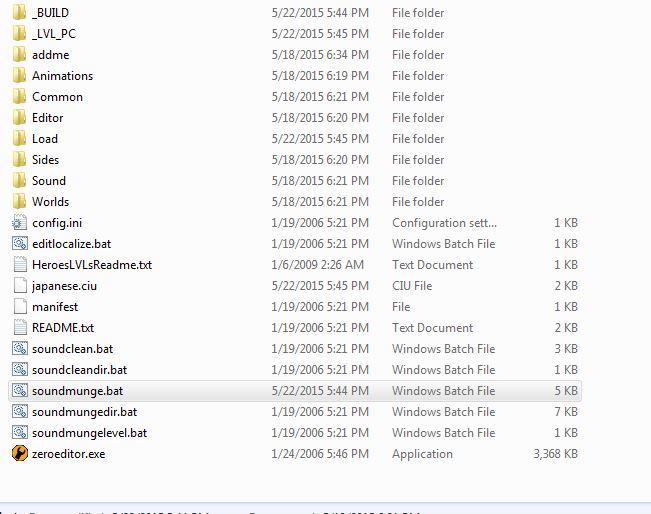
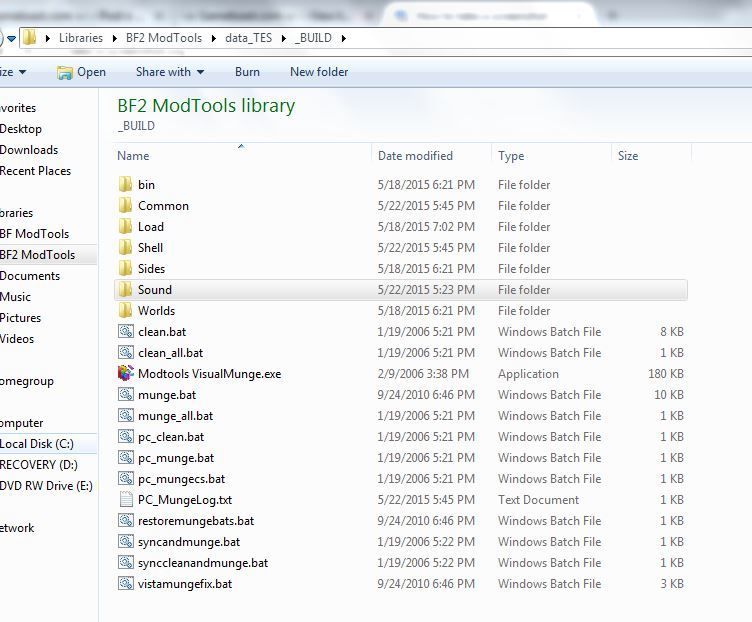
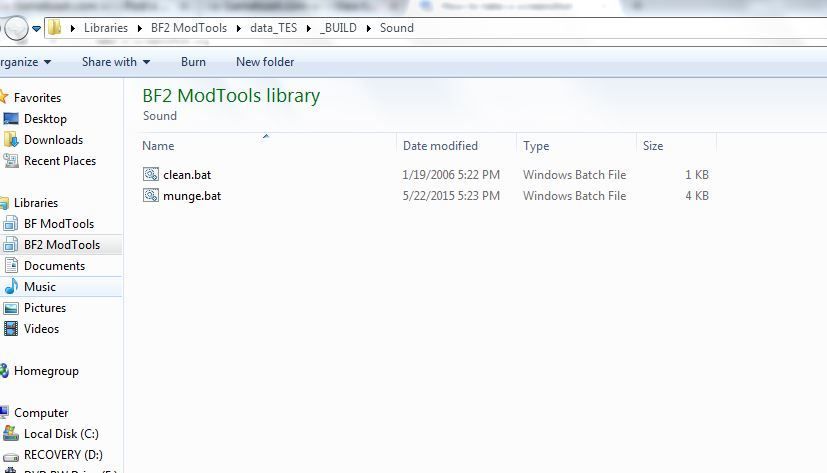
 I have done all the steps neccesary and here's what i've done. If someone could give me a hand on this that'd be great
Pics:
Hidden/Spoiler:
Hidden/Spoiler:
Hidden/Spoiler:
Hidden/Spoiler:
@REM WARNING: enabledelayedexpansion means ! is a special character,
@REM which means it isn't available for use as the mungeapp recursive
@REM wildcard character. Use the alternate $ instead.
@setlocal enabledelayedexpansion
@set MUNGE_ROOT_DIR=..\..
@if not "%1"=="" set MUNGE_PLATFORM=%1
@if %MUNGE_PLATFORM%x==x set MUNGE_PLATFORM=PC
@if "%MUNGE_BIN_DIR%"=="" (
@set MUNGE_BIN_DIR=%CD%\%MUNGE_ROOT_DIR%\..\ToolsFL\Bin
@set PATH=%CD%\..\..\..\ToolsFL\Bin;%PATH%
@echo MUNGE_BIN_DIR=!MUNGE_BIN_DIR!
)
@rem convert to lower case
@if %MUNGE_PLATFORM%==PC set MUNGE_PLATFORM=pc
@if %MUNGE_PLATFORM%==XBOX set MUNGE_PLATFORM=xbox
@if %MUNGE_PLATFORM%==PS2 set MUNGE_PLATFORM=ps2
@if /i %MUNGE_PLATFORM%==pc @set BANKOPT=-template -stub c:\windows\media\chord.wav
@set MUNGE_DIR=MUNGED\%MUNGE_PLATFORM%
@set LOCAL_MUNGE_LOG="%CD%\%MUNGE_PLATFORM%_MungeLog.txt"
@if "%MUNGE_LOG%"=="" (
@set MUNGE_LOG=%LOCAL_MUNGE_LOG%
@if exist %LOCAL_MUNGE_LOG% ( del %LOCAL_MUNGE_LOG% )
)
@rem echo ********************************************************************* >> %MUNGE_LOG%
@rem echo Sound\munge.bat %MUNGE_PLATFORM% >> %MUNGE_LOG%
@rem echo MUNGE_BIN_DIR=%MUNGE_BIN_DIR% >> %MUNGE_LOG%
@rem echo ********************************************************************* >> %MUNGE_LOG%
@cd ..\..
@if not exist _LVL_%MUNGE_PLATFORM% mkdir _LVL_%MUNGE_PLATFORM%
@if not exist _LVL_%MUNGE_PLATFORM%\Sound mkdir _LVL_%MUNGE_PLATFORM%\Sound
@call soundmunge.bat %MUNGE_PLATFORM%
@if %SOUNDCLEANLVL%x==1x @del /S /Q _BUILD\sound\*.lvl & @call soundmunge.bat %MUNGE_PLATFORM%
@if /i not "%SOUNDLVL%"=="" (
@for %%A in (%SOUNDLVL%) do @if /i "%%A"=="global" @goto buildglobalbank
@goto skipglobalbank
)
:buildglobalbank
@rem Build a global sound bank...
@set BANKLIST=
@for /R %%A in (*.sfx) do @set BANKLIST=!BANKLIST! %%A
@for /R %%A in (*.asfx) do @set BANKLIST=!BANKLIST! %%A
@if %SOUNDLOG%x==1x ( @set SOUNDOPT=-verbose & @set SOUNDLOGOUT=%LOGDIR%\SoundBankLog.txt ) else ( @set SOUNDOPT= & @set SOUNDLOGOUT=NUL )
@if not %MUNGE_PLATFORM%==pc goto skipglobalbank
@echo Munging common.bnk, this could take a while...
@soundflmunge -platform %MUNGE_PLATFORM% -banklistinput %BANKLIST% -bankoutput _LVL_%MUNGE_PLATFORM%\Sound\common.bnk -checkdate -resample -compact nowarning -checkid noabort -relativepath %SOUNDOPT% 2>>%MUNGE_LOG% 1>>%SOUNDLOGOUT%
:skipglobalbank
@cd _BUILD\Sound
@REM If the munge log was created locally and has anything in it, view it
@if not %MUNGE_LOG%x==%LOCAL_MUNGE_LOG%x goto skip_mungelog
@set FILE_CONTENTS_TEST=
@if exist %MUNGE_LOG% for /f %%i in (%MUNGE_LOG:"=%) do @set FILE_CONTENTS_TEST=%%i
@if not "%FILE_CONTENTS_TEST%"=="" ( Notepad.exe %MUNGE_LOG% ) else ( if exist %MUNGE_LOG% (del %MUNGE_LOG%) )
:skip_mungelog
@rem convert to upper case
@if %MUNGE_PLATFORM%==pc set MUNGE_PLATFORM=PC
@if %MUNGE_PLATFORM%==xbox set MUNGE_PLATFORM=XBOX
@if %MUNGE_PLATFORM%==ps2 set MUNGE_PLATFORM=PS2
@endlocal
@REM which means it isn't available for use as the mungeapp recursive
@REM wildcard character. Use the alternate $ instead.
@setlocal enabledelayedexpansion
@set MUNGE_ROOT_DIR=..\..
@if not "%1"=="" set MUNGE_PLATFORM=%1
@if %MUNGE_PLATFORM%x==x set MUNGE_PLATFORM=PC
@if "%MUNGE_BIN_DIR%"=="" (
@set MUNGE_BIN_DIR=%CD%\%MUNGE_ROOT_DIR%\..\ToolsFL\Bin
@set PATH=%CD%\..\..\..\ToolsFL\Bin;%PATH%
@echo MUNGE_BIN_DIR=!MUNGE_BIN_DIR!
)
@rem convert to lower case
@if %MUNGE_PLATFORM%==PC set MUNGE_PLATFORM=pc
@if %MUNGE_PLATFORM%==XBOX set MUNGE_PLATFORM=xbox
@if %MUNGE_PLATFORM%==PS2 set MUNGE_PLATFORM=ps2
@if /i %MUNGE_PLATFORM%==pc @set BANKOPT=-template -stub c:\windows\media\chord.wav
@set MUNGE_DIR=MUNGED\%MUNGE_PLATFORM%
@set LOCAL_MUNGE_LOG="%CD%\%MUNGE_PLATFORM%_MungeLog.txt"
@if "%MUNGE_LOG%"=="" (
@set MUNGE_LOG=%LOCAL_MUNGE_LOG%
@if exist %LOCAL_MUNGE_LOG% ( del %LOCAL_MUNGE_LOG% )
)
@rem echo ********************************************************************* >> %MUNGE_LOG%
@rem echo Sound\munge.bat %MUNGE_PLATFORM% >> %MUNGE_LOG%
@rem echo MUNGE_BIN_DIR=%MUNGE_BIN_DIR% >> %MUNGE_LOG%
@rem echo ********************************************************************* >> %MUNGE_LOG%
@cd ..\..
@if not exist _LVL_%MUNGE_PLATFORM% mkdir _LVL_%MUNGE_PLATFORM%
@if not exist _LVL_%MUNGE_PLATFORM%\Sound mkdir _LVL_%MUNGE_PLATFORM%\Sound
@call soundmunge.bat %MUNGE_PLATFORM%
@if %SOUNDCLEANLVL%x==1x @del /S /Q _BUILD\sound\*.lvl & @call soundmunge.bat %MUNGE_PLATFORM%
@if /i not "%SOUNDLVL%"=="" (
@for %%A in (%SOUNDLVL%) do @if /i "%%A"=="global" @goto buildglobalbank
@goto skipglobalbank
)
:buildglobalbank
@rem Build a global sound bank...
@set BANKLIST=
@for /R %%A in (*.sfx) do @set BANKLIST=!BANKLIST! %%A
@for /R %%A in (*.asfx) do @set BANKLIST=!BANKLIST! %%A
@if %SOUNDLOG%x==1x ( @set SOUNDOPT=-verbose & @set SOUNDLOGOUT=%LOGDIR%\SoundBankLog.txt ) else ( @set SOUNDOPT= & @set SOUNDLOGOUT=NUL )
@if not %MUNGE_PLATFORM%==pc goto skipglobalbank
@echo Munging common.bnk, this could take a while...
@soundflmunge -platform %MUNGE_PLATFORM% -banklistinput %BANKLIST% -bankoutput _LVL_%MUNGE_PLATFORM%\Sound\common.bnk -checkdate -resample -compact nowarning -checkid noabort -relativepath %SOUNDOPT% 2>>%MUNGE_LOG% 1>>%SOUNDLOGOUT%
:skipglobalbank
@cd _BUILD\Sound
@REM If the munge log was created locally and has anything in it, view it
@if not %MUNGE_LOG%x==%LOCAL_MUNGE_LOG%x goto skip_mungelog
@set FILE_CONTENTS_TEST=
@if exist %MUNGE_LOG% for /f %%i in (%MUNGE_LOG:"=%) do @set FILE_CONTENTS_TEST=%%i
@if not "%FILE_CONTENTS_TEST%"=="" ( Notepad.exe %MUNGE_LOG% ) else ( if exist %MUNGE_LOG% (del %MUNGE_LOG%) )
:skip_mungelog
@rem convert to upper case
@if %MUNGE_PLATFORM%==pc set MUNGE_PLATFORM=PC
@if %MUNGE_PLATFORM%==xbox set MUNGE_PLATFORM=XBOX
@if %MUNGE_PLATFORM%==ps2 set MUNGE_PLATFORM=PS2
@endlocal
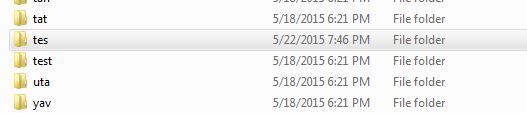
(Sound/worlds folder)
Hidden/Spoiler:
Hidden/Spoiler:
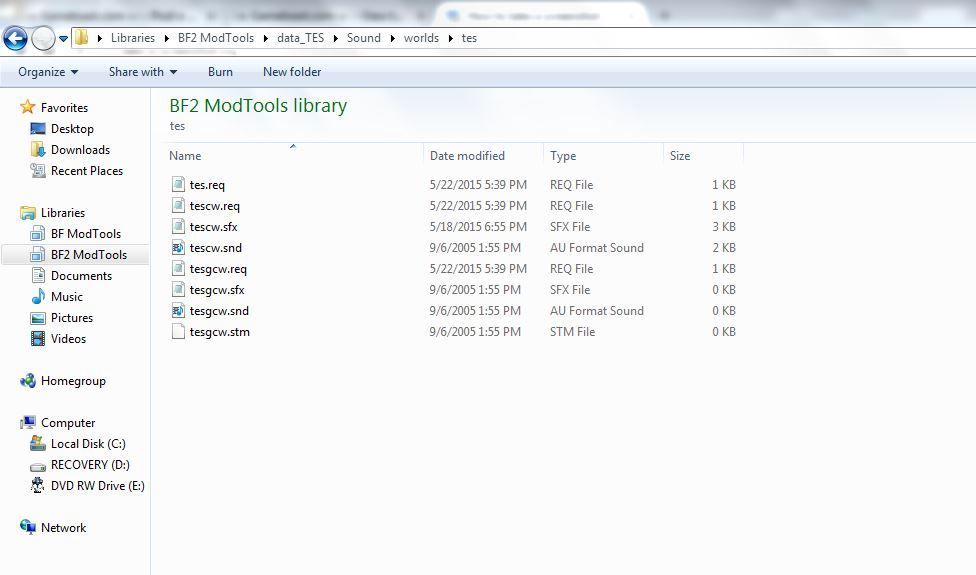
Hidden/Spoiler:
ucft
{
REQN
{
"str"
"align=2048"
}
REQN
{
"lvl"
"tescw"
}
}
{
REQN
{
"str"
"align=2048"
}
REQN
{
"lvl"
"tescw"
}
}
Hidden/Spoiler:
ucft
{
REQN
{
"bnk"
"align=2048"
"tescw"
}
REQN
{
"config"
"imp_walk_atst"
}
}
{
REQN
{
"bnk"
"align=2048"
"tescw"
}
REQN
{
"config"
"imp_walk_atst"
}
}
Hidden/Spoiler:
// AT Walker Common -ATAT ATST ATTE -------------------------
..\..\global\effects\hyd_walker01.wav atst_leg_up01 -resample xbox 22050 pc 22050
..\..\global\effects\hyd_walker02.wav atst_leg_up02 -resample xbox 22050 pc 22050
..\..\global\effects\hyd_walker03.wav atst_leg_up03 -resample xbox 22050 pc 22050
..\..\global\effects\hyd_walker04.wav atst_leg_up04 -resample xbox 22050 pc 22050
..\..\global\effects\hyd_walker05.wav atst_leg_up05 -resample xbox 22050 pc 22050
..\..\global\effects\hyd_walker06.wav atst_leg_up06 -resample xbox 22050 pc 22050
//------------------------------------------------------------------------------------
// AT Walker Footsteps XBOX and PC ATTE ATAT ATST----------------------------------
..\..\global\effects\fs_walker_layerA01.wav -resample xbox 22050 pc 22050
..\..\global\effects\fs_walker_layerA02.wav -resample xbox 22050 pc 22050
..\..\global\effects\fs_walker_layerA03.wav -resample xbox 22050 pc 22050
..\..\global\effects\fs_walker_layerA04.wav -resample xbox 22050 pc 22050
..\..\global\effects\fs_walker_layerA05.wav -resample xbox 22050 pc 22050
..\..\global\effects\fs_walker_layerA06.wav -resample xbox 22050 pc 22050
..\..\global\effects\fs_walker_layerB01.wav -resample xbox 22050 pc 22050
..\..\global\effects\fs_walker_layerB02.wav -resample xbox 22050 pc 22050
..\..\global\effects\fs_walker_layerB03.wav -resample xbox 22050 pc 22050
..\..\global\effects\fs_walker_layerB04.wav -resample xbox 22050 pc 22050
..\..\global\effects\fs_walker_layerB05.wav -resample xbox 22050 pc 22050
..\..\global\effects\fs_walker_layerB06.wav -resample xbox 22050 pc 22050
..\..\global\effects\fs_walker_layerC01.wav -resample xbox 22050 pc 22050
..\..\global\effects\fs_walker_layerC02.wav -resample xbox 22050 pc 22050
..\..\global\effects\fs_walker_layerC03.wav -resample xbox 22050 pc 22050
..\..\global\effects\fs_walker_layerC04.wav -resample xbox 22050 pc 22050
..\..\global\effects\fs_walker_layerC05.wav -resample xbox 22050 pc 22050
..\..\global\effects\fs_walker_layerC06.wav -resample xbox 22050 pc 22050
..\..\global\effects\fs_walker_low01.wav -resample xbox 22050 pc 22050
..\..\global\effects\fs_walker_low02.wav -resample xbox 22050 pc 22050
..\..\global\effects\fs_walker_low03.wav -resample xbox 22050 pc 22050
// ----- ATST Weapons --------------------------------------------------------------------------------------
..\..\gcw\effects\wpn_atat_chinBlaster_fire.wav -resample xbox 22050 pc 44100
..\..\gcw\effects\wpn_atst_headBlaster_fire.wav -resample xbox 22050 pc 44100
..\..\global\effects\hyd_walker01.wav atst_leg_up01 -resample xbox 22050 pc 22050
..\..\global\effects\hyd_walker02.wav atst_leg_up02 -resample xbox 22050 pc 22050
..\..\global\effects\hyd_walker03.wav atst_leg_up03 -resample xbox 22050 pc 22050
..\..\global\effects\hyd_walker04.wav atst_leg_up04 -resample xbox 22050 pc 22050
..\..\global\effects\hyd_walker05.wav atst_leg_up05 -resample xbox 22050 pc 22050
..\..\global\effects\hyd_walker06.wav atst_leg_up06 -resample xbox 22050 pc 22050
//------------------------------------------------------------------------------------
// AT Walker Footsteps XBOX and PC ATTE ATAT ATST----------------------------------
..\..\global\effects\fs_walker_layerA01.wav -resample xbox 22050 pc 22050
..\..\global\effects\fs_walker_layerA02.wav -resample xbox 22050 pc 22050
..\..\global\effects\fs_walker_layerA03.wav -resample xbox 22050 pc 22050
..\..\global\effects\fs_walker_layerA04.wav -resample xbox 22050 pc 22050
..\..\global\effects\fs_walker_layerA05.wav -resample xbox 22050 pc 22050
..\..\global\effects\fs_walker_layerA06.wav -resample xbox 22050 pc 22050
..\..\global\effects\fs_walker_layerB01.wav -resample xbox 22050 pc 22050
..\..\global\effects\fs_walker_layerB02.wav -resample xbox 22050 pc 22050
..\..\global\effects\fs_walker_layerB03.wav -resample xbox 22050 pc 22050
..\..\global\effects\fs_walker_layerB04.wav -resample xbox 22050 pc 22050
..\..\global\effects\fs_walker_layerB05.wav -resample xbox 22050 pc 22050
..\..\global\effects\fs_walker_layerB06.wav -resample xbox 22050 pc 22050
..\..\global\effects\fs_walker_layerC01.wav -resample xbox 22050 pc 22050
..\..\global\effects\fs_walker_layerC02.wav -resample xbox 22050 pc 22050
..\..\global\effects\fs_walker_layerC03.wav -resample xbox 22050 pc 22050
..\..\global\effects\fs_walker_layerC04.wav -resample xbox 22050 pc 22050
..\..\global\effects\fs_walker_layerC05.wav -resample xbox 22050 pc 22050
..\..\global\effects\fs_walker_layerC06.wav -resample xbox 22050 pc 22050
..\..\global\effects\fs_walker_low01.wav -resample xbox 22050 pc 22050
..\..\global\effects\fs_walker_low02.wav -resample xbox 22050 pc 22050
..\..\global\effects\fs_walker_low03.wav -resample xbox 22050 pc 22050
// ----- ATST Weapons --------------------------------------------------------------------------------------
..\..\gcw\effects\wpn_atat_chinBlaster_fire.wav -resample xbox 22050 pc 44100
..\..\gcw\effects\wpn_atst_headBlaster_fire.wav -resample xbox 22050 pc 44100
Hidden/Spoiler:
@if %1x==x goto noplatform
@set MUNGE_PLATFORM=%1
@set MUNGE_DIR=MUNGED\%MUNGE_PLATFORM%
@rem EDIT THE LINE BELOW TO POINT TO YOUR BF2 INTSALL PATH
@set BF2_SOUNDPATH="c:\Program Files\LucasArts\Star Wars Battlefront II\"
@rem Munge global, shell and side specific sound data
@call soundmungedir _BUILD\sound\cw\%MUNGE_DIR% sound\cw sound\cw\%MUNGE_PLATFORM% %MUNGE_PLATFORM% _BUILD _LVL_%MUNGE_PLATFORM%\sound _BUILD\sound cw
@call soundmungedir _BUILD\sound\gcw\%MUNGE_DIR% sound\gcw sound\gcw\%MUNGE_PLATFORM% %MUNGE_PLATFORM% _BUILD _LVL_%MUNGE_PLATFORM%\sound _BUILD\sound gcw
@call soundmungedir _BUILD\sound\global\%MUNGE_DIR% sound\global sound\global\%MUNGE_PLATFORM% %MUNGE_PLATFORM% _BUILD _LVL_%MUNGE_PLATFORM%\sound _BUILD\sound global nolevelfile
@call soundmungedir _BUILD\sound\shell\%MUNGE_DIR% sound\shell sound\shell\%MUNGE_PLATFORM% %MUNGE_PLATFORM% _BUILD _LVL_%MUNGE_PLATFORM%\sound _BUILD\sound shell
@rem Munge world specific sound data
@call soundmungedir _BUILD\sound\worlds\cor\%MUNGE_DIR% sound\worlds\cor sound\worlds\cor\%MUNGE_PLATFORM% %MUNGE_PLATFORM% _BUILD _LVL_%MUNGE_PLATFORM%\sound _BUILD\sound cor
@call soundmungedir _BUILD\sound\worlds\dag\%MUNGE_DIR% sound\worlds\dag sound\worlds\dag\%MUNGE_PLATFORM% %MUNGE_PLATFORM% _BUILD _LVL_%MUNGE_PLATFORM%\sound _BUILD\sound dag
@call soundmungedir _BUILD\sound\worlds\dea\%MUNGE_DIR% sound\worlds\dea sound\worlds\dea\%MUNGE_PLATFORM% %MUNGE_PLATFORM% _BUILD _LVL_%MUNGE_PLATFORM%\sound _BUILD\sound dea
@call soundmungedir _BUILD\sound\worlds\end\%MUNGE_DIR% sound\worlds\end sound\worlds\end\%MUNGE_PLATFORM% %MUNGE_PLATFORM% _BUILD _LVL_%MUNGE_PLATFORM%\sound _BUILD\sound end
@call soundmungedir _BUILD\sound\worlds\fel\%MUNGE_DIR% sound\worlds\fel sound\worlds\fel\%MUNGE_PLATFORM% %MUNGE_PLATFORM% _BUILD _LVL_%MUNGE_PLATFORM%\sound _BUILD\sound fel
@call soundmungedir _BUILD\sound\worlds\gal\%MUNGE_DIR% sound\worlds\gal sound\worlds\gal\%MUNGE_PLATFORM% %MUNGE_PLATFORM% _BUILD _LVL_%MUNGE_PLATFORM%\sound _BUILD\sound gal
@call soundmungedir _BUILD\sound\worlds\geo\%MUNGE_DIR% sound\worlds\geo sound\worlds\geo\%MUNGE_PLATFORM% %MUNGE_PLATFORM% _BUILD _LVL_%MUNGE_PLATFORM%\sound _BUILD\sound geo
@call soundmungedir _BUILD\sound\worlds\hot\%MUNGE_DIR% sound\worlds\hot sound\worlds\hot\%MUNGE_PLATFORM% %MUNGE_PLATFORM% _BUILD _LVL_%MUNGE_PLATFORM%\sound _BUILD\sound hot
@call soundmungedir _BUILD\sound\worlds\kam\%MUNGE_DIR% sound\worlds\kam sound\worlds\kam\%MUNGE_PLATFORM% %MUNGE_PLATFORM% _BUILD _LVL_%MUNGE_PLATFORM%\sound _BUILD\sound kam
@call soundmungedir _BUILD\sound\worlds\kas\%MUNGE_DIR% sound\worlds\kas sound\worlds\kas\%MUNGE_PLATFORM% %MUNGE_PLATFORM% _BUILD _LVL_%MUNGE_PLATFORM%\sound _BUILD\sound kas
@call soundmungedir _BUILD\sound\worlds\mus\%MUNGE_DIR% sound\worlds\mus sound\worlds\mus\%MUNGE_PLATFORM% %MUNGE_PLATFORM% _BUILD _LVL_%MUNGE_PLATFORM%\sound _BUILD\sound mus
@call soundmungedir _BUILD\sound\worlds\myg\%MUNGE_DIR% sound\worlds\myg sound\worlds\myg\%MUNGE_PLATFORM% %MUNGE_PLATFORM% _BUILD _LVL_%MUNGE_PLATFORM%\sound _BUILD\sound myg
@call soundmungedir _BUILD\sound\worlds\nab\%MUNGE_DIR% sound\worlds\nab sound\worlds\nab\%MUNGE_PLATFORM% %MUNGE_PLATFORM% _BUILD _LVL_%MUNGE_PLATFORM%\sound _BUILD\sound nab
@call soundmungedir _BUILD\sound\worlds\pol\%MUNGE_DIR% sound\worlds\pol sound\worlds\pol\%MUNGE_PLATFORM% %MUNGE_PLATFORM% _BUILD _LVL_%MUNGE_PLATFORM%\sound _BUILD\sound pol
@call soundmungedir _BUILD\sound\worlds\spa\%MUNGE_DIR% sound\worlds\spa sound\worlds\spa\%MUNGE_PLATFORM% %MUNGE_PLATFORM% _BUILD _LVL_%MUNGE_PLATFORM%\sound _BUILD\sound spa
@call soundmungedir _BUILD\sound\worlds\tan\%MUNGE_DIR% sound\worlds\tan sound\worlds\tan\%MUNGE_PLATFORM% %MUNGE_PLATFORM% _BUILD _LVL_%MUNGE_PLATFORM%\sound _BUILD\sound tan
@call soundmungedir _BUILD\sound\worlds\tat\%MUNGE_DIR% sound\worlds\tat sound\worlds\tat\%MUNGE_PLATFORM% %MUNGE_PLATFORM% _BUILD _LVL_%MUNGE_PLATFORM%\sound _BUILD\sound tat
@call soundmungedir _BUILD\sound\worlds\uta\%MUNGE_DIR% sound\worlds\uta sound\worlds\uta\%MUNGE_PLATFORM% %MUNGE_PLATFORM% _BUILD _LVL_%MUNGE_PLATFORM%\sound _BUILD\sound uta
@call soundmungedir _BUILD\sound\worlds\yav\%MUNGE_DIR% sound\worlds\yav sound\worlds\yav\%MUNGE_PLATFORM% %MUNGE_PLATFORM% _BUILD _LVL_%MUNGE_PLATFORM%\sound _BUILD\sound yav
@call soundmungedir _BUILD\sound\worlds\hero\%MUNGE_DIR% sound\worlds\hero sound\worlds\hero\%MUNGE_PLATFORM% %MUNGE_PLATFORM% _BUILD _LVL_%MUNGE_PLATFORM%\sound _BUILD\sound hero
@rem EDIT THE TWO LINES BELOW TO POINT TO YOUR MOD BY REPLACING SND WITH YOUR WORLD ABBREVIATION
@call soundmungedir _BUILD\sound\worlds\TES\%MUNGE_DIR% sound\worlds\TES sound\worlds\TES\%MUNGE_PLATFORM% %MUNGE_PLATFORM% _BUILD _LVL_%MUNGE_PLATFORM%\sound _BUILD\sound TES
xcopy _LVL_%MUNGE_PLATFORM%\sound\* %BF2_SOUNDPATH%GameData\addon\TES\data\_LVL_PC\Sound\ /Y
@goto exit
:noplatform
@echo Platform must be specified as the first argument
:exit
@set MUNGE_PLATFORM=%1
@set MUNGE_DIR=MUNGED\%MUNGE_PLATFORM%
@rem EDIT THE LINE BELOW TO POINT TO YOUR BF2 INTSALL PATH
@set BF2_SOUNDPATH="c:\Program Files\LucasArts\Star Wars Battlefront II\"
@rem Munge global, shell and side specific sound data
@call soundmungedir _BUILD\sound\cw\%MUNGE_DIR% sound\cw sound\cw\%MUNGE_PLATFORM% %MUNGE_PLATFORM% _BUILD _LVL_%MUNGE_PLATFORM%\sound _BUILD\sound cw
@call soundmungedir _BUILD\sound\gcw\%MUNGE_DIR% sound\gcw sound\gcw\%MUNGE_PLATFORM% %MUNGE_PLATFORM% _BUILD _LVL_%MUNGE_PLATFORM%\sound _BUILD\sound gcw
@call soundmungedir _BUILD\sound\global\%MUNGE_DIR% sound\global sound\global\%MUNGE_PLATFORM% %MUNGE_PLATFORM% _BUILD _LVL_%MUNGE_PLATFORM%\sound _BUILD\sound global nolevelfile
@call soundmungedir _BUILD\sound\shell\%MUNGE_DIR% sound\shell sound\shell\%MUNGE_PLATFORM% %MUNGE_PLATFORM% _BUILD _LVL_%MUNGE_PLATFORM%\sound _BUILD\sound shell
@rem Munge world specific sound data
@call soundmungedir _BUILD\sound\worlds\cor\%MUNGE_DIR% sound\worlds\cor sound\worlds\cor\%MUNGE_PLATFORM% %MUNGE_PLATFORM% _BUILD _LVL_%MUNGE_PLATFORM%\sound _BUILD\sound cor
@call soundmungedir _BUILD\sound\worlds\dag\%MUNGE_DIR% sound\worlds\dag sound\worlds\dag\%MUNGE_PLATFORM% %MUNGE_PLATFORM% _BUILD _LVL_%MUNGE_PLATFORM%\sound _BUILD\sound dag
@call soundmungedir _BUILD\sound\worlds\dea\%MUNGE_DIR% sound\worlds\dea sound\worlds\dea\%MUNGE_PLATFORM% %MUNGE_PLATFORM% _BUILD _LVL_%MUNGE_PLATFORM%\sound _BUILD\sound dea
@call soundmungedir _BUILD\sound\worlds\end\%MUNGE_DIR% sound\worlds\end sound\worlds\end\%MUNGE_PLATFORM% %MUNGE_PLATFORM% _BUILD _LVL_%MUNGE_PLATFORM%\sound _BUILD\sound end
@call soundmungedir _BUILD\sound\worlds\fel\%MUNGE_DIR% sound\worlds\fel sound\worlds\fel\%MUNGE_PLATFORM% %MUNGE_PLATFORM% _BUILD _LVL_%MUNGE_PLATFORM%\sound _BUILD\sound fel
@call soundmungedir _BUILD\sound\worlds\gal\%MUNGE_DIR% sound\worlds\gal sound\worlds\gal\%MUNGE_PLATFORM% %MUNGE_PLATFORM% _BUILD _LVL_%MUNGE_PLATFORM%\sound _BUILD\sound gal
@call soundmungedir _BUILD\sound\worlds\geo\%MUNGE_DIR% sound\worlds\geo sound\worlds\geo\%MUNGE_PLATFORM% %MUNGE_PLATFORM% _BUILD _LVL_%MUNGE_PLATFORM%\sound _BUILD\sound geo
@call soundmungedir _BUILD\sound\worlds\hot\%MUNGE_DIR% sound\worlds\hot sound\worlds\hot\%MUNGE_PLATFORM% %MUNGE_PLATFORM% _BUILD _LVL_%MUNGE_PLATFORM%\sound _BUILD\sound hot
@call soundmungedir _BUILD\sound\worlds\kam\%MUNGE_DIR% sound\worlds\kam sound\worlds\kam\%MUNGE_PLATFORM% %MUNGE_PLATFORM% _BUILD _LVL_%MUNGE_PLATFORM%\sound _BUILD\sound kam
@call soundmungedir _BUILD\sound\worlds\kas\%MUNGE_DIR% sound\worlds\kas sound\worlds\kas\%MUNGE_PLATFORM% %MUNGE_PLATFORM% _BUILD _LVL_%MUNGE_PLATFORM%\sound _BUILD\sound kas
@call soundmungedir _BUILD\sound\worlds\mus\%MUNGE_DIR% sound\worlds\mus sound\worlds\mus\%MUNGE_PLATFORM% %MUNGE_PLATFORM% _BUILD _LVL_%MUNGE_PLATFORM%\sound _BUILD\sound mus
@call soundmungedir _BUILD\sound\worlds\myg\%MUNGE_DIR% sound\worlds\myg sound\worlds\myg\%MUNGE_PLATFORM% %MUNGE_PLATFORM% _BUILD _LVL_%MUNGE_PLATFORM%\sound _BUILD\sound myg
@call soundmungedir _BUILD\sound\worlds\nab\%MUNGE_DIR% sound\worlds\nab sound\worlds\nab\%MUNGE_PLATFORM% %MUNGE_PLATFORM% _BUILD _LVL_%MUNGE_PLATFORM%\sound _BUILD\sound nab
@call soundmungedir _BUILD\sound\worlds\pol\%MUNGE_DIR% sound\worlds\pol sound\worlds\pol\%MUNGE_PLATFORM% %MUNGE_PLATFORM% _BUILD _LVL_%MUNGE_PLATFORM%\sound _BUILD\sound pol
@call soundmungedir _BUILD\sound\worlds\spa\%MUNGE_DIR% sound\worlds\spa sound\worlds\spa\%MUNGE_PLATFORM% %MUNGE_PLATFORM% _BUILD _LVL_%MUNGE_PLATFORM%\sound _BUILD\sound spa
@call soundmungedir _BUILD\sound\worlds\tan\%MUNGE_DIR% sound\worlds\tan sound\worlds\tan\%MUNGE_PLATFORM% %MUNGE_PLATFORM% _BUILD _LVL_%MUNGE_PLATFORM%\sound _BUILD\sound tan
@call soundmungedir _BUILD\sound\worlds\tat\%MUNGE_DIR% sound\worlds\tat sound\worlds\tat\%MUNGE_PLATFORM% %MUNGE_PLATFORM% _BUILD _LVL_%MUNGE_PLATFORM%\sound _BUILD\sound tat
@call soundmungedir _BUILD\sound\worlds\uta\%MUNGE_DIR% sound\worlds\uta sound\worlds\uta\%MUNGE_PLATFORM% %MUNGE_PLATFORM% _BUILD _LVL_%MUNGE_PLATFORM%\sound _BUILD\sound uta
@call soundmungedir _BUILD\sound\worlds\yav\%MUNGE_DIR% sound\worlds\yav sound\worlds\yav\%MUNGE_PLATFORM% %MUNGE_PLATFORM% _BUILD _LVL_%MUNGE_PLATFORM%\sound _BUILD\sound yav
@call soundmungedir _BUILD\sound\worlds\hero\%MUNGE_DIR% sound\worlds\hero sound\worlds\hero\%MUNGE_PLATFORM% %MUNGE_PLATFORM% _BUILD _LVL_%MUNGE_PLATFORM%\sound _BUILD\sound hero
@rem EDIT THE TWO LINES BELOW TO POINT TO YOUR MOD BY REPLACING SND WITH YOUR WORLD ABBREVIATION
@call soundmungedir _BUILD\sound\worlds\TES\%MUNGE_DIR% sound\worlds\TES sound\worlds\TES\%MUNGE_PLATFORM% %MUNGE_PLATFORM% _BUILD _LVL_%MUNGE_PLATFORM%\sound _BUILD\sound TES
xcopy _LVL_%MUNGE_PLATFORM%\sound\* %BF2_SOUNDPATH%GameData\addon\TES\data\_LVL_PC\Sound\ /Y
@goto exit
:noplatform
@echo Platform must be specified as the first argument
:exit



