
SketchUp Models
Moderator: Moderators
-
Eaol
- Major

- Posts: 510
- Joined: Fri Jul 31, 2009 5:49 pm
- Location: Everywhere.
Re: SketchUp Models
There is no issue there, if you do it correctly.
-
[Padawan]Helkaan
- Sith

- Posts: 1444
- Joined: Mon Aug 16, 2010 3:01 pm
- Projects :: Dunno. Maybe making something
Re: SketchUp Models
Yeah, it's a nice start 
-
SAMofBIA
- Major General

- Posts: 649
- Joined: Tue Jun 15, 2010 3:38 pm
- Projects :: Nothing....nothing at all.
- xbox live or psn: No gamertag set
- Location: MIA and not stopping in often anymore.

Re: SketchUp Models
ok for anyone reading this that wants to use sketchup but doesnt know what to make, heres a good tip (imo), make a sphere by drawing lines on the the axes (red blue and green lines) starting from the origin and equal lengths. (in this case 5'). Ok now make a circle starting at the origin that has a radius to the outermost point one of the lines on the green or red axis. Now on the circle, when you select the pencil, there will be green dots along the edges at intervals when you cross over them. your going to want to create a line from one dot to its opposite dot all the way around the circle.
now take the arc tool, click on a green dot then click on its opposite green dot then pull the arc up to the top dot of the line on the upward blue axis. do this for all of the lines going across the circle and repeat the line drawings and arcs on the bottom as well. now to make the sphere, connect the green dots on the arcs to the green dot of equal height on the next arc.
MAKE SURE NOT TO ALLOW ANYTHING BE BLUE. this means it is (i believe) an inverted poly which will not run well in XSI or convert to msh at all.
OK now if you have connect all the arcs' green dots to the corresponding one on the adjacent arcs, you should have a sphere.
Now play around and extrude things from the sphere and cut things in if your at a loss for an idea, this can be a very entertaining way to get your brain fluids pumping. Heres something that came from my boredome:
now take the arc tool, click on a green dot then click on its opposite green dot then pull the arc up to the top dot of the line on the upward blue axis. do this for all of the lines going across the circle and repeat the line drawings and arcs on the bottom as well. now to make the sphere, connect the green dots on the arcs to the green dot of equal height on the next arc.
MAKE SURE NOT TO ALLOW ANYTHING BE BLUE. this means it is (i believe) an inverted poly which will not run well in XSI or convert to msh at all.
OK now if you have connect all the arcs' green dots to the corresponding one on the adjacent arcs, you should have a sphere.
Now play around and extrude things from the sphere and cut things in if your at a loss for an idea, this can be a very entertaining way to get your brain fluids pumping. Heres something that came from my boredome:
Hidden/Spoiler:
-
Eaol
- Major
- Posts: 510
- Joined: Fri Jul 31, 2009 5:49 pm
- Location: Everywhere.
Re: SketchUp Models
So I am pretty sure I can bump this safely:


-
THEWULFMAN
- Space Ranger
- Posts: 5557
- Joined: Tue Aug 17, 2010 3:30 pm
- Projects :: Evolved 2
- Location: Columbus, Ohio
- Contact:
Re: SketchUp Models
The second and third ones are awesome
-
Firefang

- Major
- Posts: 518
- Joined: Mon Nov 15, 2010 8:55 pm
- Location: California
Re: SketchUp Models
I agreeTHEWULFMAN wrote:The second and third ones are awesome

-
acryptozoo

- Master Bounty Hunter

- Posts: 1642
- Joined: Wed Jun 03, 2009 3:14 pm
- Projects :: Yavin Mappack
- xbox live or psn: acryptozoo
- Location: in the jungles of Yavin IV
- Contact:
Re: SketchUp Models
really awesome
but arent your models always awesome XD
esp like the 2nd one is that that mountain walker the empire has? cant make out what the 3rd one is tho turret?
but arent your models always awesome XD
esp like the 2nd one is that that mountain walker the empire has? cant make out what the 3rd one is tho turret?
-
Eaol
- Major
- Posts: 510
- Joined: Fri Jul 31, 2009 5:49 pm
- Location: Everywhere.
Re: SketchUp Models
The second one is an MT-AT. The third one is a missile turret.
-
SAMofBIA
- Major General
- Posts: 649
- Joined: Tue Jun 15, 2010 3:38 pm
- Projects :: Nothing....nothing at all.
- xbox live or psn: No gamertag set
- Location: MIA and not stopping in often anymore.
Re: SketchUp Models
those last two are beastly, but what exaclty is the first one?
-
ACEwithSPADES

- Command Sergeant Major

- Posts: 253
- Joined: Thu Jan 20, 2011 3:49 pm
- Projects :: Alzoc 3
- xbox live or psn: xundyingxace
- Location: Somewhere, but most likely where i am
Re: SketchUp Models
That AT-MT is so amazing bro! 
-
Eaol
- Major
- Posts: 510
- Joined: Fri Jul 31, 2009 5:49 pm
- Location: Everywhere.
Re: SketchUp Models
The first one is just a wall.
EDIT:


EDIT:
-
Darth_Spiderpig
- Sith Master

- Posts: 2631
- Joined: Fri Mar 27, 2009 10:23 am
- Projects :: Something cool...
- xbox live or psn: Has no xbox....Yup
- Location: Does whatever a Spiderpig does
- Contact:
Re: SketchUp Models
The second one would be a cool cp.
-
Eaol
- Major
- Posts: 510
- Joined: Fri Jul 31, 2009 5:49 pm
- Location: Everywhere.
Re: SketchUp Models
'Tis a lowly bacta tank. :\
-
Maveritchell

- Jedi Admin

- Posts: 7366
- Joined: Mon Aug 21, 2006 11:03 pm
Re: SketchUp Models
All the super-sharpening and unnecessary bloom isn't doing anything for your already-lowrez textures.
-
Darth_Spiderpig
- Sith Master
- Posts: 2631
- Joined: Fri Mar 27, 2009 10:23 am
- Projects :: Something cool...
- xbox live or psn: Has no xbox....Yup
- Location: Does whatever a Spiderpig does
- Contact:
Re: SketchUp Models
I can barely recognize it as such.:/Eaol wrote:'Tis a lowly bacta tank. :\
Agreed.Maveritchell wrote:All the super-sharpening and unnecessary bloom isn't doing anything for your already-lowrez textures.
-
Eaol
- Major
- Posts: 510
- Joined: Fri Jul 31, 2009 5:49 pm
- Location: Everywhere.
Re: SketchUp Models
Yes, I noticed that problem there especially with the bacta tank. But for the sake of consistency and laziness I decided to leave it.All the super-sharpening and unnecessary bloom isn't doing anything for your already-lowrez textures.
-
Snork

- Lieutenant General

- Posts: 669
- Joined: Thu Jun 07, 2007 3:34 pm
- xbox live or psn: No gamertag set
- Contact:
Re: SketchUp Models
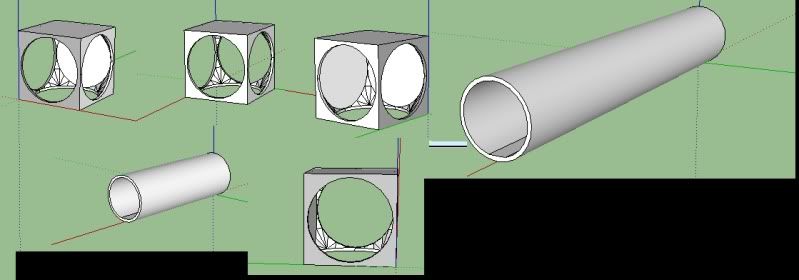
I don't know what the point of making these was since I don't have a clue how to get them into .msh, but hey, heres some tubes
-
Eaol
- Major
- Posts: 510
- Joined: Fri Jul 31, 2009 5:49 pm
- Location: Everywhere.
Re: SketchUp Models
Nice.
-
Snork
- Lieutenant General
- Posts: 669
- Joined: Thu Jun 07, 2007 3:34 pm
- xbox live or psn: No gamertag set
- Contact:
Re: SketchUp Models
Is there a tutorial somewhere of how to get them exported to .msh without using XSI? Or do I have to have someone else export them?
-
Lephenix