
Vyse's Tut
Moderator: Moderators
-
MandeRek
- Sith Master

- Posts: 2766
- Joined: Tue Oct 02, 2007 10:51 am
- Projects :: Battlefront Zer0
- xbox live or psn: No gamertag set
- Location: Ghosting around GT
- Contact:
Vyse's Tut
Heey, I'm following Vyse's tut on how to get a playermodel ingame, and I'm stuck on the animate>envelope>set envelope part... Where's the animate button in XSI ModTools 6? Thanks in advance
-
Thunder

- Lieutenant Colonel

- Posts: 543
- Joined: Sun Jul 15, 2007 6:57 pm
- Location: Michigan
Re: Vyse's Tut
well make sure you are in the layout Default then there
and i would sugest useing explorer after you click Animate-->Deform-->Envolepe-->Set
click everybone on the explorer in the bones layer
like click Shoft and hold it then selet everydone one by one
and i would sugest useing explorer after you click Animate-->Deform-->Envolepe-->Set
click everybone on the explorer in the bones layer
like click Shoft and hold it then selet everydone one by one
-
MandeRek
- Sith Master
- Posts: 2766
- Joined: Tue Oct 02, 2007 10:51 am
- Projects :: Battlefront Zer0
- xbox live or psn: No gamertag set
- Location: Ghosting around GT
- Contact:
Re: Vyse's Tut
Layout default, and then where?? I might just overlook it  , but can you maybe post a pic or something? Thanks
, but can you maybe post a pic or something? Thanks-
Thunder
- Lieutenant Colonel
- Posts: 543
- Joined: Sun Jul 15, 2007 6:57 pm
- Location: Michigan
Re: Vyse's Tut
View-->Layouts-->Default
and if you need a pic
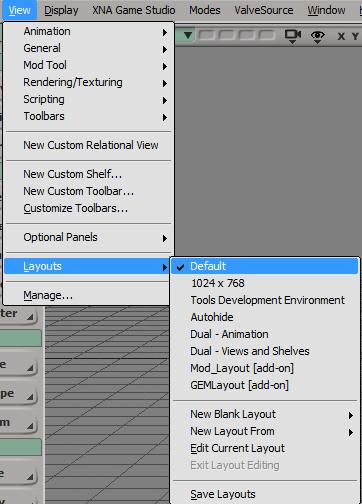
and if you need a pic
-
MandeRek
- Sith Master
- Posts: 2766
- Joined: Tue Oct 02, 2007 10:51 am
- Projects :: Battlefront Zer0
- xbox live or psn: No gamertag set
- Location: Ghosting around GT
- Contact:
Re: Vyse's Tut
Ok thanks, but when you're in the default layout, where is the animate>envelope>set envelope?
-
Thunder
- Lieutenant Colonel
- Posts: 543
- Joined: Sun Jul 15, 2007 6:57 pm
- Location: Michigan
Re: Vyse's Tut
at the top where it says model in purple click that and select animate then you will see
-
MandeRek
- Sith Master
- Posts: 2766
- Joined: Tue Oct 02, 2007 10:51 am
- Projects :: Battlefront Zer0
- xbox live or psn: No gamertag set
- Location: Ghosting around GT
- Contact:
Re: Vyse's Tut
Great thank you thunder... That helped a lot!
