
Hello , i followed fragme ' s tuto about setuping doors in xsi to swbf2 , but there is a problem , all in xsi is setuped right , when i click on munge in data_***/Animations/ , it is really fast , and after in the tuto , he said , to see if the animation is munged correctly , there will be files in data***/worlds/***/MUNGED , but there is nothing
What is the problem , Thanks in advance .
Door animation munge problem in Windows 7 [Solved]
Moderator: Moderators
-
DarthD.U.C.K.

- Master of the Force

- Posts: 6027
- Joined: Wed Sep 27, 2006 11:05 am
- Location: Duckburg, Germany
Re: Door munged problem
can you please post your munge.bats and the name of your anims?
-
Lephenix
Re: Door munged problem
My model is msb_door1 , msb_door1_basepose and , msb_door1_open , my munge.bat situated in the data_***/animations/props/msb_door1/ is :
@call ..\munge_animation.bat "/keepframe0 /specialquathack /dest msb_door1.zaf" Worlds\MSB
and the one in data_***/animations/ is :
@REM munge.bat
@REM Calls %1\munge.bat for all animation subdirectories
@REM soldier animation banks
@call munge_subdir.bat SoldierAnimationBank\sitting
@REM first person animation banks
@REM addons
@REM vehicles
@REM props
@call munge_subdir.bat Prop\msb_door1
@call ..\munge_animation.bat "/keepframe0 /specialquathack /dest msb_door1.zaf" Worlds\MSB
and the one in data_***/animations/ is :
@REM munge.bat
@REM Calls %1\munge.bat for all animation subdirectories
@REM soldier animation banks
@call munge_subdir.bat SoldierAnimationBank\sitting
@REM first person animation banks
@REM addons
@REM vehicles
@REM props
@call munge_subdir.bat Prop\msb_door1
-
DarthD.U.C.K.
- Master of the Force
- Posts: 6027
- Joined: Wed Sep 27, 2006 11:05 am
- Location: Duckburg, Germany
Re: Door munged problem
and you got the basepose.msh and open.msh in the Animation\Prop\doorname\ folder together with the munge.bat?
-
Lephenix
Re: Door munged problem
Yes
EDIT : Vid : http://s1043.photobucket.com/albums/b43 ... roblem.mp4
EDIT : Vid : http://s1043.photobucket.com/albums/b43 ... roblem.mp4
-
DarthD.U.C.K.
- Master of the Force
- Posts: 6027
- Joined: Wed Sep 27, 2006 11:05 am
- Location: Duckburg, Germany
Re: Door munged problem
that link doesnt seem right to me...
-
FragMe!
- Gametoast Staff

- Posts: 2244
- Joined: Sat May 13, 2006 12:34 am
- Projects :: Not sure keep changing my mind.
- xbox live or psn: No gamertag set
- Location: Origin name GT_FragMe
- Contact:
Re: Door munged problem
The files when you export them would be calledLephenix_dor wrote:My model is msb_door1 , msb_door1_basepose and , msb_door1_open ,
The normal model to the msh folder
msb_door1
To the animation folder
basepose
open
you do not need and really shouldn't have any thing in front of basepose or open.
-
Lephenix
Re: Door munged problem
I tryed with the same door , same names of your tuto ,and same , it is a munge problem :S .
Fragme or darth duck , can you make a vid of you following the tuto ? I will see if i forget something before munging .
I captured a pic when it munged : http://i1043.photobucket.com/albums/b43 ... /error.png
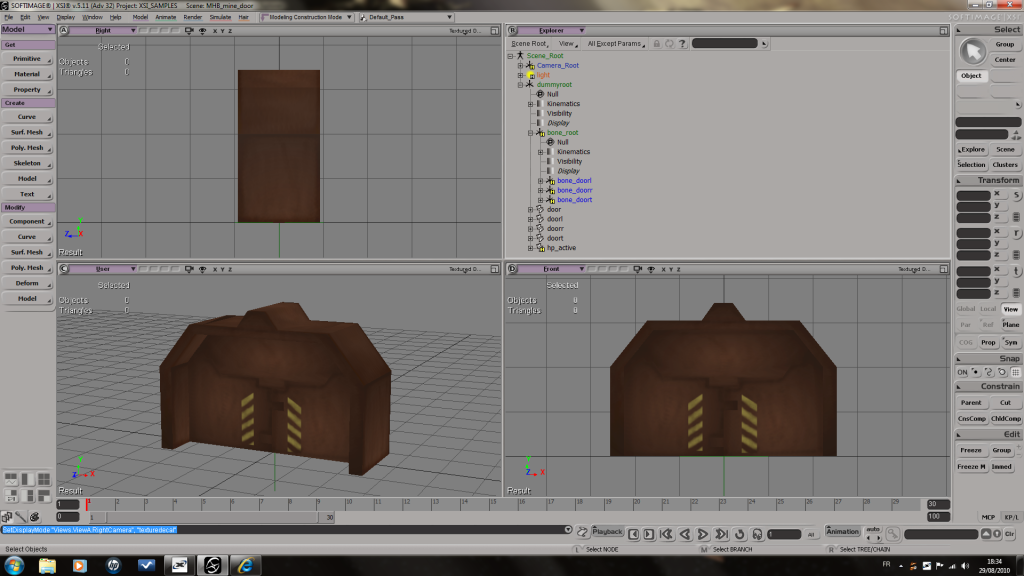
And btw , my door ^^: http://i1043.photobucket.com/albums/b43 ... eddoor.png
Fragme or darth duck , can you make a vid of you following the tuto ? I will see if i forget something before munging .
I captured a pic when it munged : http://i1043.photobucket.com/albums/b43 ... /error.png

And btw , my door ^^: http://i1043.photobucket.com/albums/b43 ... eddoor.png
-
FragMe!
- Gametoast Staff
- Posts: 2244
- Joined: Sat May 13, 2006 12:34 am
- Projects :: Not sure keep changing my mind.
- xbox live or psn: No gamertag set
- Location: Origin name GT_FragMe
- Contact:
Re: Door munged problem
Which munge.bat are you running, it should be the one that is in the folder where you door animation is. The one you edited. That is the one I always run.
-
Lephenix
Re: Door munged problem
it is the munge.bat in data_***/animations , what is the one you run ? I tryed the one in data_***/animations/prop/msb_door/ and it is the same thing , ATI was unexpected ...
And when i clean , there is that : http://i1043.photobucket.com/albums/b43 ... nerror.png
And when i clean , there is that : http://i1043.photobucket.com/albums/b43 ... nerror.png

-
FragMe!
- Gametoast Staff
- Posts: 2244
- Joined: Sat May 13, 2006 12:34 am
- Projects :: Not sure keep changing my mind.
- xbox live or psn: No gamertag set
- Location: Origin name GT_FragMe
- Contact:
Re: Door munged problem
This is the one I was referring to
data_***/animations/prop/msb_door/
not sure where all those ATI messages are coming from but I am going to guess you are running Vista or Windows 7. If that is the case have a look at the topics in the FAQ about ZE and or munge problems related to this. I use XP so I can't really help much with Vista/Win7 related errors.
data_***/animations/prop/msb_door/
not sure where all those ATI messages are coming from but I am going to guess you are running Vista or Windows 7. If that is the case have a look at the topics in the FAQ about ZE and or munge problems related to this. I use XP so I can't really help much with Vista/Win7 related errors.
-
Lephenix
Re: Door munged problem
yes , i am running 7 , and i installed the fix for visual munge for it works perfectly with vista and 7 .
What is the fix? Does it change paths? If so look at the munge and mungesubdirectoy(?) bat files in the animation directory and see if those paths need to change too.
EDIT , found a fix , [SOLVED]
What is the fix? Does it change paths? If so look at the munge and mungesubdirectoy(?) bat files in the animation directory and see if those paths need to change too.
EDIT , found a fix
Now it worksphazon_elite wrote:
Very sorry to bump this, but I have some important information regarding this fix.
If anyone has run into the problem of munge_animation.bat not working in Vista, here's a fix:
Change this:
Hidden/Spoiler:
@REM called from $\Animations\type\subfolder\
@REM all params are passed to zenasset
@REM if there are more than 9 parameters to pass, you can enclose all params in double quotes
@setlocal
@set MUNGE_ROOT_DIR=..\..\..
@if "%MUNGE_BIN_DIR%"=="" (
@set MUNGE_BIN_DIR=%CD%\%MUNGE_ROOT_DIR%\..\ToolsFL\Bin
@set PATH=%CD%\%MUNGE_ROOT_DIR%\..\ToolsFL\Bin;%PATH%
)
zenasset /multimsh /writefiles %~1 > ZenAsset.log
@mkdir %MUNGE_ROOT_DIR%\%2\MUNGED
binmunge -inputfile *.zaa -chunkid zaa_ -ext zaabin -outputdir %MUNGE_ROOT_DIR%\%2\MUNGED\
binmunge -inputfile *.zaf -chunkid zaf_ -ext zafbin -outputdir %MUNGE_ROOT_DIR%\%2\MUNGED\
del *.zaa
del *.zaf
move *.anims %MUNGE_ROOT_DIR%\%2\MUNGED\
@endlocal
To this:
Hidden/Spoiler:
@REM called from $\Animations\type\subfolder\
@REM all params are passed to zenasset
@REM if there are more than 9 parameters to pass, you can enclose all params in double quotes
@setlocal
@set MUNGE_ROOT_DIR=..\..\..
REM @if "%MUNGE_BIN_DIR%"=="" (
@set MUNGE_BIN_DIR=%CD%\%MUNGE_ROOT_DIR%\..\ToolsFL\Bin
@set PATH=%CD%\%MUNGE_ROOT_DIR%\..\ToolsFL\Bin;%PATH%
REM )
zenasset /multimsh /writefiles %~1 > ZenAsset.log
@mkdir %MUNGE_ROOT_DIR%\%2\MUNGED
binmunge -inputfile *.zaa -chunkid zaa_ -ext zaabin -outputdir %MUNGE_ROOT_DIR%\%2\MUNGED\
binmunge -inputfile *.zaf -chunkid zaf_ -ext zafbin -outputdir %MUNGE_ROOT_DIR%\%2\MUNGED\
del *.zaa
del *.zaf
move *.anims %MUNGE_ROOT_DIR%\%2\MUNGED\
@endlocal
I encountered this today, and I hope it helps to anyone who had this problem.
, [SOLVED]