


Scripts:
extraweapons.hud:
Hidden/Spoiler:
[code]Code:
ViewPort("Transforms")
{
EventNameFilter("player%")
// First Weapons Section
TransformNameMesh("player1weapon1")
// add msh names of first weapons here and remove unused lines
{
NameMesh("mnd_weap_inf_boba_rifle", "com_inv_mesh")
EventInput("player1.weapon1.change")
EventOutput("player1.weapon1.mesh")
}
}
Group("extraWeaponDisplay")
{
PropagateAlpha(1)
Viewport(1)
Position(0.0000000, 1.000000, 0.000000, "Viewport")
ZOrder(255)
EventEnable("player1.weaponsEnable")
EventDisable("player1.weaponsDisable")
Group("extraWeaponIcon")
{
Viewport(1)
Position(0.346161, -0.450412, 0.000000, "Viewport")
EventEnable("initialize")
Model3D("player1.weapon1mesh")
{
EventMesh("player1.weapon1.change")
Viewport(1)
ZOrder(5)
EventEnable("player1.weapon1.mesh")
EventDisable("player1.weapon1.disable")
Position(500.000000, 500.000000, 500.000000, "Viewport")
Rotation(0.804269, 359.994110, 359.999695)
Scale(0.000000, 0.000000, 0.000000)
//change position, rotation and scale of first weapon here, remove unused lines
MeshInfo("mnd_weap_inf_boba_rifle")
{
Position(-0.222832, 0.361293, 0.014590, "Viewport")
Rotation(0.804269, 90.747269, 359.999695)
}
}
}
}
[/code]
ViewPort("Transforms")
{
EventNameFilter("player%")
// First Weapons Section
TransformNameMesh("player1weapon1")
// add msh names of first weapons here and remove unused lines
{
NameMesh("mnd_weap_inf_boba_rifle", "com_inv_mesh")
EventInput("player1.weapon1.change")
EventOutput("player1.weapon1.mesh")
}
}
Group("extraWeaponDisplay")
{
PropagateAlpha(1)
Viewport(1)
Position(0.0000000, 1.000000, 0.000000, "Viewport")
ZOrder(255)
EventEnable("player1.weaponsEnable")
EventDisable("player1.weaponsDisable")
Group("extraWeaponIcon")
{
Viewport(1)
Position(0.346161, -0.450412, 0.000000, "Viewport")
EventEnable("initialize")
Model3D("player1.weapon1mesh")
{
EventMesh("player1.weapon1.change")
Viewport(1)
ZOrder(5)
EventEnable("player1.weapon1.mesh")
EventDisable("player1.weapon1.disable")
Position(500.000000, 500.000000, 500.000000, "Viewport")
Rotation(0.804269, 359.994110, 359.999695)
Scale(0.000000, 0.000000, 0.000000)
//change position, rotation and scale of first weapon here, remove unused lines
MeshInfo("mnd_weap_inf_boba_rifle")
{
Position(-0.222832, 0.361293, 0.014590, "Viewport")
Rotation(0.804269, 90.747269, 359.999695)
}
}
}
}
[/code]
Hidden/Spoiler:
[code]ucft
{
REQN
{
"lvl"
"imp_hero_bobafett"
}
REQN
{
"model"
"com_inv_mesh"
}
REQN
{
"config"
"extraweapons"
}
}
[/code]
{
REQN
{
"lvl"
"imp_hero_bobafett"
}
REQN
{
"model"
"com_inv_mesh"
}
REQN
{
"config"
"extraweapons"
}
}
[/code]
Hidden/Spoiler:
[code][WeaponClass]
ClassParent = "com_weap_award_rifle"
GeometryName = "mnd_weap_inf_boba_rifle.msh"
[Properties]
ScoreForMedalsType = -1
MedalsTypeToUnlock = -1
GeometryName = "mnd_weap_inf_boba_rifle"
HighResGeometry = "mnd_weap_inf_boba_rifle"
HUDTag = "mnd_weap_inf_boba_rifle"
OrdnanceName = "imp_weap_hero_bobarifle_ord"
FirePointName = "hp_fire"
//******************************************************
//*************** SOUND ****************
//******************************************************
FireSound = "imp_weap_inf_rifle_fire"
FireEmptySound = "com_weap_inf_ammo_empty"
FireLoopSound = ""
ReloadSound = "com_weap_inf_reload_med"
ChargeSound = ""
ChargeSoundPitch = ""
ChangeModeSound = "com_weap_inf_equip_med"
WeaponChangeSound = "com_weap_inf_equip_med"
JumpSound = "com_weap_inf_rifle_mvt_jump"
LandSound = "com_weap_inf_rifle_mvt_land"
RollSound = "com_weap_inf_rifle_mvt_roll"
//ProneSound = "com_weap_inf_rifle_mvt_lie"
SquatSound = "com_weap_inf_rifle_mvt_squat"
//StandSound = "com_weap_inf_rifle_mvt_getup"
[/code]
ClassParent = "com_weap_award_rifle"
GeometryName = "mnd_weap_inf_boba_rifle.msh"
[Properties]
ScoreForMedalsType = -1
MedalsTypeToUnlock = -1
GeometryName = "mnd_weap_inf_boba_rifle"
HighResGeometry = "mnd_weap_inf_boba_rifle"
HUDTag = "mnd_weap_inf_boba_rifle"
OrdnanceName = "imp_weap_hero_bobarifle_ord"
FirePointName = "hp_fire"
//******************************************************
//*************** SOUND ****************
//******************************************************
FireSound = "imp_weap_inf_rifle_fire"
FireEmptySound = "com_weap_inf_ammo_empty"
FireLoopSound = ""
ReloadSound = "com_weap_inf_reload_med"
ChargeSound = ""
ChargeSoundPitch = ""
ChangeModeSound = "com_weap_inf_equip_med"
WeaponChangeSound = "com_weap_inf_equip_med"
JumpSound = "com_weap_inf_rifle_mvt_jump"
LandSound = "com_weap_inf_rifle_mvt_land"
RollSound = "com_weap_inf_rifle_mvt_roll"
//ProneSound = "com_weap_inf_rifle_mvt_lie"
SquatSound = "com_weap_inf_rifle_mvt_squat"
//StandSound = "com_weap_inf_rifle_mvt_getup"
[/code]
mnd_weap_inf_boba_rifle.msh.option:
-scale 1.2
A section of my LUA file:
Hidden/Spoiler:
[code]
---------------------------------------------------------------------------
-- FUNCTION: ScriptInit
-- PURPOSE: This function is only run once
-- INPUT:
-- OUTPUT:
-- NOTES: The name, 'ScriptInit' is a chosen convention, and each
-- mission script must contain a version of this function, as
-- it is called from C to start the mission.
---------------------------------------------------------------------------
function ScriptInit()
--tell the game to load our loading image
ReadDataFile("dc:Load\\common.lvl")
ReadDataFile("ingame.lvl")
SetMaxFlyHeight(90)
SetMaxPlayerFlyHeight(80)
SetMemoryPoolSize ("ClothData",20)
SetMemoryPoolSize ("Combo",50) -- should be ~ 2x number of jedi classes
SetMemoryPoolSize ("Combo::State",650) -- should be ~12x #Combo
SetMemoryPoolSize ("Combo::Transition",650) -- should be a bit bigger than #Combo::State
SetMemoryPoolSize ("Combo::Condition",650) -- should be a bit bigger than #Combo::State
SetMemoryPoolSize ("Combo::Attack",550) -- should be ~8-12x #Combo
SetMemoryPoolSize ("Combo::DamageSample",6000) -- should be ~8-12x #Combo::Attack
SetMemoryPoolSize ("Combo::Deflect",100) -- should be ~1x #combo
ReadDataFile("sound\\tan.lvl;tan1gcw")
ReadDataFile("dc:sound\\bne.lvl;bnegcw")
ReadDataFile("dc:sound\\bes.lvl;bnegcw")
ReadDataFile("..\\..\\addon\\BDT\\data\\_LVL_PC\\sound\\bgl.lvl;bglgcw")
ReadDataFile("SIDE\\all.lvl",
"all_inf_rifleman_urban",
"all_inf_rocketeer",
"all_inf_sniper",
"all_inf_engineer",
"all_inf_pilot",
"all_inf_officer",
"all_inf_wookiee",
"all_fly_awing")
ReadDataFile("SIDE\\imp.lvl",
"imp_inf_rifleman",
"imp_inf_rocketeer",
"imp_inf_pilot",
"imp_inf_engineer",
"imp_inf_sniper",
"imp_inf_officer",
"imp_inf_dark_trooper",
"imp_walk_atst",
"imp_fly_destroyer_dome")
ReadDataFile("dc:SIDE\\imp.lvl",
"imp_hero_bobafett")
ReadDataFile("..\\..\\addon\\BDT\\data\\_LVL_PC\\SIDE\\dtspace.lvl",
"all_fly_dt_ywing",
"imp_fly_dt_slave1")
ReadDataFile("dc:SIDE\\trt.lvl",
"imp_fly_trooptrans",
"bes_fly_cloudcar",
"all_hero_bespin_luke",
"all_inf_rocketeer_urban",
"all_inf_sniper_urban",
"all_inf_engineer_pilot",
"imp_inf_engineer_pilot",
"imp_inf_officer_gray",
"all_fly_xwing",
"imp_fly_tiefighter")
[/code]
---------------------------------------------------------------------------
-- FUNCTION: ScriptInit
-- PURPOSE: This function is only run once
-- INPUT:
-- OUTPUT:
-- NOTES: The name, 'ScriptInit' is a chosen convention, and each
-- mission script must contain a version of this function, as
-- it is called from C to start the mission.
---------------------------------------------------------------------------
function ScriptInit()
--tell the game to load our loading image
ReadDataFile("dc:Load\\common.lvl")
ReadDataFile("ingame.lvl")
SetMaxFlyHeight(90)
SetMaxPlayerFlyHeight(80)
SetMemoryPoolSize ("ClothData",20)
SetMemoryPoolSize ("Combo",50) -- should be ~ 2x number of jedi classes
SetMemoryPoolSize ("Combo::State",650) -- should be ~12x #Combo
SetMemoryPoolSize ("Combo::Transition",650) -- should be a bit bigger than #Combo::State
SetMemoryPoolSize ("Combo::Condition",650) -- should be a bit bigger than #Combo::State
SetMemoryPoolSize ("Combo::Attack",550) -- should be ~8-12x #Combo
SetMemoryPoolSize ("Combo::DamageSample",6000) -- should be ~8-12x #Combo::Attack
SetMemoryPoolSize ("Combo::Deflect",100) -- should be ~1x #combo
ReadDataFile("sound\\tan.lvl;tan1gcw")
ReadDataFile("dc:sound\\bne.lvl;bnegcw")
ReadDataFile("dc:sound\\bes.lvl;bnegcw")
ReadDataFile("..\\..\\addon\\BDT\\data\\_LVL_PC\\sound\\bgl.lvl;bglgcw")
ReadDataFile("SIDE\\all.lvl",
"all_inf_rifleman_urban",
"all_inf_rocketeer",
"all_inf_sniper",
"all_inf_engineer",
"all_inf_pilot",
"all_inf_officer",
"all_inf_wookiee",
"all_fly_awing")
ReadDataFile("SIDE\\imp.lvl",
"imp_inf_rifleman",
"imp_inf_rocketeer",
"imp_inf_pilot",
"imp_inf_engineer",
"imp_inf_sniper",
"imp_inf_officer",
"imp_inf_dark_trooper",
"imp_walk_atst",
"imp_fly_destroyer_dome")
ReadDataFile("dc:SIDE\\imp.lvl",
"imp_hero_bobafett")
ReadDataFile("..\\..\\addon\\BDT\\data\\_LVL_PC\\SIDE\\dtspace.lvl",
"all_fly_dt_ywing",
"imp_fly_dt_slave1")
ReadDataFile("dc:SIDE\\trt.lvl",
"imp_fly_trooptrans",
"bes_fly_cloudcar",
"all_hero_bespin_luke",
"all_inf_rocketeer_urban",
"all_inf_sniper_urban",
"all_inf_engineer_pilot",
"imp_inf_engineer_pilot",
"imp_inf_officer_gray",
"all_fly_xwing",
"imp_fly_tiefighter")
[/code]
Screen:
Hidden/Spoiler:
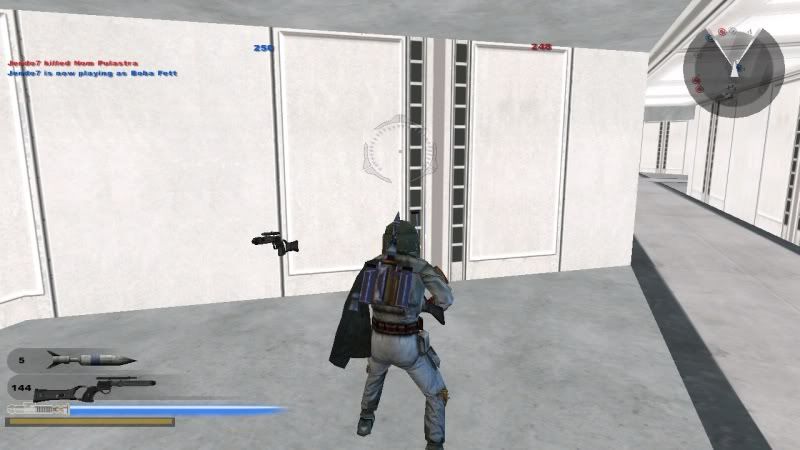
I really don't know what the problem could be having followed the tutorial precisely.
If anyone has any idea at all, it would be much appreciated.

