Page 1 of 1
Model crashing zeroeditor
Posted: Sat Jul 09, 2011 1:28 pm
by nmycon
hey!
I just spend the better part of an hour creating this bunker I was planning to use for my map. I saved it as WRL, loaded it into SWBFViewer (where it loaded fine, with all textures), saved it as a MSH file.
I dropped off the MSH and textures (saved as TGA) into my World folder, created the ODF (in the ODF folder), but when I go to place in ZE, as soon as I load the ODF... crash

I've uploaded the .blend, .wrl and .msh files, as well as the texture if anyone could help me out. Evidently there's something wrong with the mesh file, but I don't have a clue how I can fix it.
http://www.2shared.com/file/vDTb_sSV/nm ... model.html
(Some textures may need to be reloaded... sorry

)
Re: model crashing zeroeditor
Posted: Sat Jul 09, 2011 1:38 pm
by DarthD.U.C.K.
the bunker has a sh!tload of polygons!!!! it has
20.000 verticles! that is incredible, it should have like 100. you seriously have to reduce them, no wonder ZE crashes on the model. you should only have edges, where they contribute to the shape. edges on a flat surface are useless.
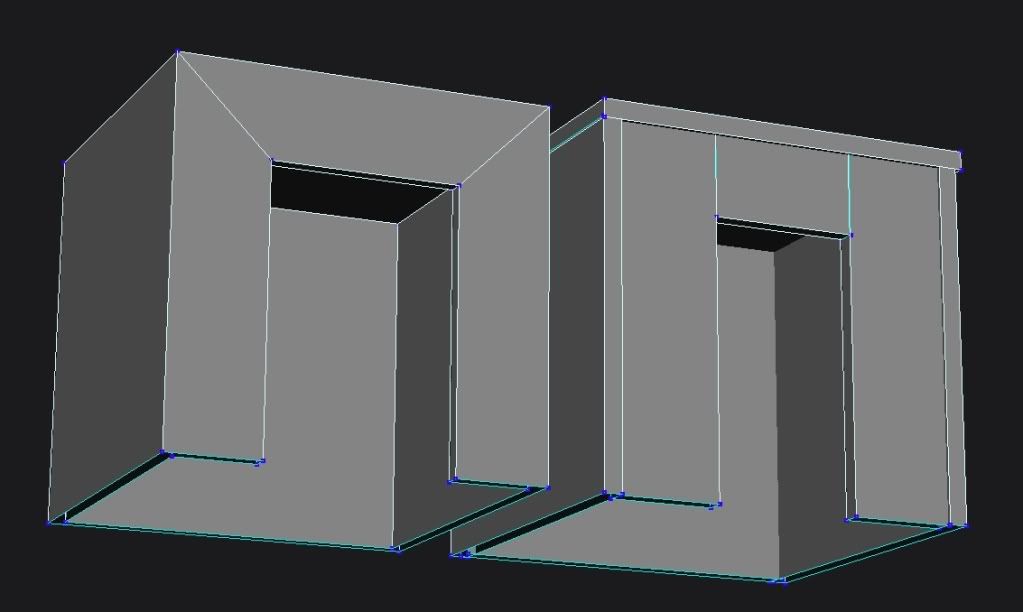
ive made a quick example of how the bunker should look like polygondistributionwise:
as you can see, the model has only edges, where they are really needed to shape it. it has also walls inside because one dimensional walls wont work well. you would have to give the doublesided transparency or they will be invisible from the inside and you could run through them from the inside.
Re: Model crashing zeroeditor
Posted: Sun Jul 10, 2011 12:52 pm
by nmycon
lol that makes sense!
I'm used to 3D animation where, for the most part, a model with 100 verticies and one with 20 000 would have practically the same rendering times.
I guess I'm going to have to learn to work with XSI, because AFAIK there's no way to join faces together in blender after you subdivide...
Re: Model crashing zeroeditor
Posted: Sun Jul 10, 2011 12:58 pm
by DarthD.U.C.K.
in xsi you can weld disconnected edges im sure there is a similiar function. but why do you want to subdivide faces?
Re: Model crashing zeroeditor
Posted: Sun Jul 10, 2011 1:26 pm
by THEWULFMAN
Using Subdivide is a noob blender mistake, I used to make it 8 months ago. Rather than Subdivide, use more than one cube to make the model. 5 cubes should make a simple bunker. And never use Subdivide, use Ctrl + R to add edges on a model.
Re: Model crashing zeroeditor
Posted: Sun Jul 10, 2011 3:41 pm
by nmycon
THEWULFMAN wrote:use Ctrl + R to add edges on a model.
Thank you! Can't believe I've never leared of this until now! I've remade most of the bunker, no roof yet, but have the 4 walls (with thickness) and the two cutouts with only 68 vertices so far

I do have one more question though, How would I go about smoothing the corners of the building and the roof?
Re: Model crashing zeroeditor
Posted: Sun Jul 10, 2011 3:44 pm
by The Nasal Abyss
THEWULFMAN wrote:Using Subdivide is a noob blender mistake, I used to make it 8 months ago. Rather than Subdivide, use more than one cube to make the model. 5 cubes should make a simple bunker. And never use Subdivide, use Ctrl + R to add edges on a model.
General rule of thumb; you want to avoid having models made out of separate pieces of geometry. It makes texturing a hassle and is unefficient and unclean.
nmycon wrote:I do have one more question though, How would I go about smoothing the corners of the building and the roof?
Use a chamfer or beveling tool. I don't know the specific names from XSI off hand but look for those two key words.
Re: Model crashing zeroeditor
Posted: Sun Jul 10, 2011 4:18 pm
by FragMe!
It is called bevel in XSI.
If you are going to start working in XSI even if you have previous experince working in other programs, have a look at these VAST tutorials graciously posted by AceMastermind it will let you know the commands etc as used by XSI
VAST XSI Tutorials
Re: Model crashing zeroeditor
Posted: Sun Jul 10, 2011 4:25 pm
by nmycon
Just spend a half hour redoing the bunker, it's not as pretty but I just wanted to get it in-game to see if it works/how it looks.
It's crashing SWBFViewer so now I have no way of converting the WRL file to MSH
Would anyone mind taking a quick look at this one?
 http://www.2shared.com/file/8N1c7MSU/re ... unker.html
Re: Model crashing zeroeditor
Posted: Sun Jul 10, 2011 5:43 pm
by The Nasal Abyss
I did a quick check, and the model wasn't triangulated. That may have been your problem.
Also, you may want to get better at modelling and understanding how to build something like that bunker before you try to get something in-game. Because right now, there are a great multitude of things wrong with your model (any of them could be causing the problem). I know you are just starting out, but I'm not trying to be harsh here.
1. There are unconnected edges all over the place.
2. There is quite a bit of overlapping geometry.
3. Poly distribution is.... not so good....
4. The object was also un-textured. That also could have caused the problem.
As I said, I'm not trying to be hostile. I'm not good at making my statements sound nicer, so please understand that I mean no harm. This is all constructive.
Look at Duck's great example on how the bunker should look poly distribution wise.
Re: Model crashing zeroeditor
Posted: Sun Jul 10, 2011 6:27 pm
by nmycon
thanks again for the input. I'm going to have to look into triangulation and such, I dont know what it is, never needed to know either.
Most of the modeling i've done has been for animation rather than games, which has probably led me to take shortcuts that you cant take when modeling for games.
For example, a vertice reduction of perhaps 50 000 vertices would not be worth worrying about because of the rendering time it would save (0.25-0.5 seconds).
And in a scene, you can only see half of an object at any given time, so you can get away with hiding a lot of things, or even making just half a model...
Time to buckly down and learn how to use XSI.
Re: Model crashing zeroeditor
Posted: Sun Jul 10, 2011 8:52 pm
by Snork
Triangulation is turning all the polygons of your model into triangles. The game renders triangles much faster than quads.
Re: Model crashing zeroeditor
Posted: Sun Jul 10, 2011 10:34 pm
by The Nasal Abyss
Snork wrote:Triangulation is turning all the polygons of your model into triangles. The game renders triangles much faster than quads.
More like it ONLY renders triangles

Re: Model crashing zeroeditor
Posted: Sun Jul 10, 2011 11:38 pm
by THEWULFMAN
The Nasal Abyss wrote:General rule of thumb; you want to avoid having models made out of separate pieces of geometry. It makes texturing a hassle and is unefficient and unclean.
Maybe its the "General rule of thumb", but using multiple pieces of geometry makes a far more poly efficient model, and makes it easier to texture, at least for me.
The Nasal Abyss wrote:Use a chamfer or beveling tool. I don't know the specific names from XSI off hand but look for those two key words.
I keep hearing you guys say XSI, when he was never using XSI, he has been using Blender, which I know a lot about, my knowledge of XSI is highly limited.
In Blender, select the vertices you want to bevel and press W, then select Bevel from the menu that pops up.
When exporting from Blender to .wrl, remember to merge all your geometry by (in object mode) hitting A, selecting all of your geometries, and pressing Ctrl + J to combine them, or otherwise it will crash MSH Viewer.
The Nasal Abyss wrote:Snork wrote:Triangulation is turning all the polygons of your model into triangles. The game renders triangles much faster than quads.
More like it ONLY renders triangles
Zero Engine will sometimes not render quads, espcially if they are small. To convert from Triangles to Quads in blender, in edit mode, select all your vertices, and go to your Mesh > Faces menu, and select "Convert Quads to Triangles", as seen here.

Re: Model crashing zeroeditor
Posted: Mon Jul 11, 2011 8:48 am
by FragMe!
I keep hearing you guys say XSI, when he was never using XSI, he has been using Blender, which I know a lot about, my knowledge of XSI is highly limited.
Maybe we mention it because he stated a couple of times that maybe he should learn XSI
Time to buckly down and learn how to use XSI.
As for trianagulation, the model gets triangulated upon export when using the Pandemic exporter.
One reason to pretriangulate is that the above process is not perfect and will on occasion affect sharp transition edges (they will disappear in game) While you are still working on a model and testing it in game you don't need to triangulate, it makes it easier to go back into the modeling program and edit. If in game you see problems then you can then upon final export do the triangulation.
Re: Model crashing zeroeditor
Posted: Mon Jul 11, 2011 8:55 am
by DarthD.U.C.K.
FragMe! wrote:As for trianagulation, the model gets triangulated upon export when using the Pandemic exporter..
no, they arent automatically triangulated. battlefront somehow seems to be able to work with quads some time. if you have a quad with 5thplace glow and triangulate it, it will have an ugly hard shading ingame. if you dont triangulate it, it will be rendered properly.
i have no idea how and why that works/happens.
Re: Model crashing zeroeditor
Posted: Mon Jul 11, 2011 10:57 am
by ANDEWEGET
Not really On-Topic:
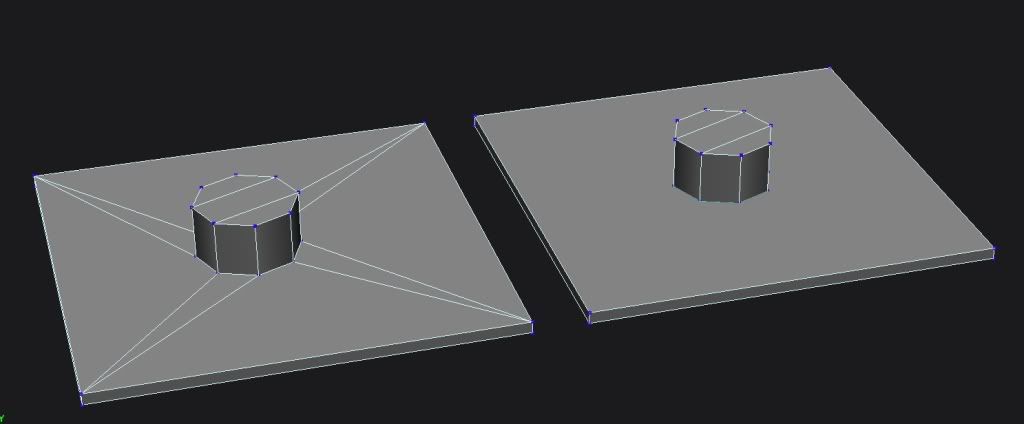
THEWULFMAN wrote:Maybe its the "General rule of thumb", but using multiple pieces of geometry makes a far more poly efficient model, and makes it easier to texture, at least for me.
Left one is 34 triangles, right one is 50. Left one took me less time and looks better.
The Nasal Abyss wrote:General rule of thumb; you want to avoid having models made out of separate pieces of geometry. It makes texturing a hassle and is unefficient and unclean.
Left one is 44 tris, right ones 34. Right one (obviously) took me less time. Thats a rather bad example, though.
It always depends on the situation. I generally agree with TNA, though, building everything out of one object/merging all objects into one gives you at least as much as control over your object as multiple objects do. Texturing isnt any easier with multiple objects unless you arent able to use chunks(or corresponding methods in other 3D packages). Having only one object shows its advantages when you want to achieve seemless textures, which is a real hassle with multiple objects. From what Ive read intersecting geometry is harder to render for the engine/might cause graphical artifacts.
Re: Model crashing zeroeditor
Posted: Mon Jul 11, 2011 2:09 pm
by THEWULFMAN
I agree with Ande, depends on the situation, but like I said, it may be the general rule of thumb but for me its easier.
Anyway I dont know why I even bothered to say anything when TNA and Ande can answer your questions.
I wasnt offended, I was simply stating that it depends on the person and that I felt that I wasnt helping, you and The Nasal Abyss seem to be much better at it than me, so I figured I would step aside and just let you guys take care of it.