i was wondering if it is possible to rearrange the stock skeleton without making a complete new set of animations.
My problem is that i have a model that has longer arms than the stock skeleton. Everything else is just fine. I tried to scale just the arms down, and now it is ok. But the elbow is still at the wrong position. Any ideas how to do that?? Or is it impossible??
Re: rearrange skeleton
Posted: Sun Jan 17, 2016 11:11 am
by AceMastermind
You should make the skeleton fit the mesh, not the other way around.
When you start adjusting the mesh you might throw off the proportions.
Remove the keys from the bones you're adjusting.
Adjust bone chain lengths with the ppg or Move Joint tool.
Set your envelope and edit the weights
Key the bones that you adjusted
Export a new basepose.msh
Munge your new basepose and call it in your ODF with SkeletonName = "nameofzaf"
The wookiees are your working examples in the assets if you need reference.
Re: rearrange skeleton
Posted: Tue Jan 19, 2016 10:31 am
by Anakin
Ok i remade the envelope. This time i did not change the mesh to fit to the model. Removed all keys from the bones, rearranged them, keyed everything i unkeyed.
Exported the model (i hope the envelope is as good as before)
and checked "export animation" "use current frame as basepose" and export it to basepose.msh.
Do i understand you right, that i need to munge a new set of animation and choose this basepose as basepose??
==EDIT==
i tried to munge the animation, but got this problem:
[img]@REM called from $\Animations\type\subfolder\
@REM all params are passed to zenasset
@REM if there are more than 9 parameters to pass, you can enclose all params in double quotes
@setlocal
I wonder why this does not work, since it did on my old pc.
Re: rearrange skeleton
Posted: Tue Jan 19, 2016 10:47 am
by AceMastermind
Overwrite your munge_animation.bat with this and try again:
Hidden/Spoiler:
[code]@REM called from $\Animations\type\subfolder\
@REM all params are passed to zenasset
@REM if there are more than 9 parameters to pass, you can enclose all params in double quotes
@setlocal
Well, the first thing I notice is you aren't following the wookiee ODFs as your example and you're calling the skeleton before the geometry.
I don't know what else you're doing that might not be working though, not enough information about the steps you've taken.
You also need to give those hands a kung fu grip since this game doesn't use finger bones.
Re: rearrange skeleton
Posted: Mon Jan 25, 2016 7:31 am
by Anakin
Haha, very funny. Deviss told me that the game crashes and there need to be something wrong with the skeleton. I told him, that everything is fine for me, than i noticed that i used the wrong msh file. Changed it and noticed that the skeleton does not work. Put the Skeleton name behind the geometry name and now it crashes...
My swbfiii.zafbin is about 2KB. Inside my swbfiii folder is only the basepose.msh and the munge.bat (i used the one from the wookies)
My steps for the basepose:
Anakin wrote:Ok i remade the envelope. This time i did not change the mesh to fit to the skeleton. Removed all keys from the bones, rearranged them, keyed everything i unkeyed.
Exported the model (i hope the envelope is as good as before)
and checked "export animation" "use current frame as basepose" and export it to basepose.msh.
[...]
The log is not usefull:
Hidden/Spoiler:
[code]Opened logfile BFront2.log 2016-01-25 1221
shell_interface: Entered
shell_interface: gPlatformStr, gOnlineServiceStr, gLangStr, gLangEnum: PC GameSpy german 4
ifs_era_handler - Entered
ifs_era_handler - Exited
shell_interface: No custom_gc_0.lvl
shell_interface: No custom_gc_1.lvl
shell_interface: No custom_gc_2.lvl
shell_interface: No custom_gc_3.lvl
shell_interface: No custom_gc_4.lvl
shell_interface: No custom_gc_5.lvl
shell_interface: No custom_gc_6.lvl
shell_interface: No custom_gc_7.lvl
shell_interface: No custom_gc_8.lvl
shell_interface: No custom_gc_9.lvl
shell_interface: Found custom_gc_10.lvl
custom_gc_10: Entered
custom_gc_10: Found custom_gc_11.lvl
custom_gc_11: Entered
ifs_freeform_init_dt.lua
ifs_freeform_start_dt.lua
custom_gc_11: Taking control of custom_GetGCButtonList()...
custom_gc_11: Taking control of custom_PressedGCButton()...
custom_gc_11: Exited
custom_gc_10: Found custom_gc_12.lvl
custom_gc_12: RCM GC Entered
ifs_freeform_init_rc.lua
ifs_freeform_start_rc.lua
custom_gc_12: Taking control of custom_GetGCButtonList()...
custom_gc_12: Taking control of custom_PressedGCButton()...
custom_gc_12: Taking control of AddIFScreen()...
custom_gc_12: Have control of AddIFScreen()
custom_gc_12: Exited
custom_gc_10: No custom_gc_13.lvl. Will stop searching for any more cGC scripts.
custom_gc_10: Exited
custom_EraButtonList(): Finished building era button table Known eras buttons: 28
custom_GetGMapEras(): Finished building era table Known eras: 28
custom_GetGMapModes(): Finished building game mode table Known Modes: 39
custom_gc_12: AddIFScreen(ifs_legal): Entered
custom_gc_12: adding rcm logo
custom_gc_12: AddIFScreen(ifs_legal): Exited
custom_GetMPGameModeList(): Finished building game mode list table List Length: 40
custom_SetMovieLocation()
custom_gc_12: custom_GetGCButtonList(): Entered
custom_gc_11: custom_GetGCButtonList(): Entered
custom_GetGCButtonList()
custom_gc_11: custom_GetGCButtonList(): Exited
custom_gc_12: custom_GetGCButtonList(): Exited
custom_SetMovieLocation()
custom_GetFreeformBattleModeList(): Finished building freeform battle mode list Known Modes: 39
ingame stream movies\crawlgr.mvs
shell_interface: Opening movie: movies\shellgr.mvs
shell_interface: Leaving
Mission Checker: Entered addme
Mission Checker: addme: Now listening in on AddDownloadableContent() calls
Mission Checker: Exited addme
Found ..\..\addon\BDT\data\_LVL_PC\SIDE\lead.lvl. Adding ETR's extra Dark Times missions
Cannot find ..\..\addon\BF1\data\_LVL_PC\SIDE\sen.lvl. Skipping ETR's extra Dark Times + Conversion Pack missions
addme.KTH: Dark Times II: Rising Son is installed! Adding missions...
addme.KTH: Battlefront Extreme is installed! Adding missions...
addme.KTH: Republic Commando is installed! Adding missions...
Cannot find ..\..\addon\ZZB\data\_LVL_PC\SIDE\beach.lvl. Skipping KTH's extra Beach Troopers missions
RCM addme - entered
load custom interface..
load custom era icon..
adding conquest missions..
adding space missions..
adding ctf missions..
adding tdm missions..
loading localize keys..
RCM addme - exited
Message Severity: 2
C:\Battlefront2\main\Battlefront2\Source\GameMovie.cpp(399)
Unable to find open movie segment shell_main
ifs_saveop_DoOps LoadFileList
ifs_saveop_DoOps LoadFileList
ifs_saveop_DoOps LoadProfile
ifs_saveop_DoOps LoadProfile
ifs_sp_campaign: Input_Accept(): Entered: _tab_instant
missionlist_ExpandMapList()
ifs_missionselect_pcMulti_fnSetMapPreview(): Defaulting index to 1
this.CurButton = nil
cur_button = nil
this.CurButton = nil
cur_button = nil
this.CurButton = check_mode1
cur_button = nil
this.CurButton = nil
cur_button = nil
Checkbox for check_era3 clicked
this.CurButton = check_era3
cur_button = nil
custom_AddMapNew()
custom_printTable(): table: 063AA16C
The key, value is: era_c 1
The key, value is: era_g 1
The key, value is: mode_con_c 1
The key is mapluafile, the formated value is: AAA<A>_<B>
The key, value is: mode_con_g 1
The key, value is: bSelected 1
The key, value is: isModLevel 1
custom_printTable(): Returning
custom_printTable(): table: 063AFD8C
The key, value is: key mode_con
The key, value is: subst con
The key, value is: showstr modename.name.con
The key, value is: descstr modename.description.con
The key, value is: icon mode_icon_con
custom_printTable(): Returning
gMapEras.key = era_c Era = era_c subst = c
Adding map: AAAc_con idx: 1
this.CurButton = _map_add
cur_button = nil
this.CurButton = Launch
cur_button = nil
Message Severity: 2
C:\Battlefront2\main\Battlefront2\Source\HUDElementBitmap.cpp(380)
HUD BitmapElement unable to find texture btn_directional_pad_LR
game_interface: Entered
utility_functions2: Listening on AddUnitClass() calls
utility_functions2: Listening on SetHeroClass() calls
utility_functions2: Listening on ReadDataFile() calls
game_interface: Reading in custom strings
game_interface: No user_script_0.lvl
game_interface: No user_script_1.lvl
game_interface: No user_script_2.lvl
game_interface: No user_script_3.lvl
game_interface: No user_script_4.lvl
game_interface: No user_script_5.lvl
game_interface: No user_script_6.lvl
game_interface: No user_script_7.lvl
game_interface: No user_script_8.lvl
game_interface: No user_script_9.lvl
game_interface: Found user_script_10.lvl
user_script_10: Entered
user_script_10: Replacing v1.3 (r117)'s AddUnitClass as it should've had a return value. This fixes the Leia bug.
user_script_10: Found user_script_11.lvl
user_script_11: entered
user_script_11: Taking control of ScriptCB_DoFile()...
user_script_11: exited
user_script_10: No user_script_12.lvl. Will stop searching for any more user scripts.
user_script_10: Exited
ifs_sideselect_fnBuildScreen()
game_interface: Exited
Message Severity: 2
C:\Battlefront2\main\RedEngineFL\Memory\RedMemoryPool.cpp(317)
Memory pool "ClothData" set item count after being allocated
Message Severity: 2
C:\Battlefront2\main\Battlefront2\Source\SkyManager.cpp(122)
Skyfile FarSceneRange is in old format
ifs_sideselect_fnEnter(): Map does not support custom era teams
ifs_sideselect_fnEnter(): The award settings file does not exist
[/code]
And yes i changed the hands, but for some reason it is not ingame. But first of all i want the bones and envelope be fine before i make some cosmetics.
Re: rearrange skeleton
Posted: Mon Jan 25, 2016 12:24 pm
by AceMastermind
What happened here?
Are you adjusting the unit template with bone chains or an imported null skeleton?
Re: rearrange skeleton
Posted: Mon Jan 25, 2016 5:32 pm
by Anakin
the nulls....
Is there a way to repair that without reenvelope everything??
Re: rearrange skeleton
Posted: Mon Jan 25, 2016 6:13 pm
by AceMastermind
I really recommend you use the unit_template from psych0fred for this, you'll have a lot less to keep track of as you adjust bones.
I wouldn't attempt adjusting null chains like this without first applying temporary constraints.
Keep what you got in the scene but put it under a model then duplicate the stormtrooper mesh and freeze and cut it from the hierarchy so it is child of scene_root then hide the entire original hierarchy.
Bring in the unit template and freeze all geometry and delete the override_texture mesh then adjust the bones however you want.
Envelope the copied stormtrooper mesh to it, and finally GATOR the weights from the original stormtrooper mesh to the new one and do the same for the sv mesh and you should be golden.
pretty sure i know what happend. You said "put everything under a model". I put everything under a null and thought that's the same. Now with importing the emdl there is a null looking grunddummy that is called model when i put the mouse on it. Where can i find such a model?? I searched through the whole Model>Get menu, but haven't found.
An other question, in the readme (yes i read it ) psycho said that i need to do something with layers. I know absolutely nothing about layers. So do i need that? and where can i get some more informations about that layers??
Re: rearrange skeleton
Posted: Tue Jan 26, 2016 5:49 pm
by AceMastermind
Anakin wrote:pretty sure i know what happend. You said "put everything under a model". I put everything under a null and thought that's the same. Now with importing the emdl there is a null looking grunddummy that is called model when i put the mouse on it. Where can i find such a model?? I searched through the whole Model>Get menu, but haven't found.
Select dummyroot and go to:
Create > Model > New Model
under the Model module on the left of the UI
The reason you do this is so you can have objects in the same scene with the same name, or else a "1" will be appended to everything you brought in last.
Anakin wrote:An other question, in the readme (yes i read it ) psycho said that i need to do something with layers. I know absolutely nothing about layers. So do i need that? and where can i get some more informations about that layers??
No need for layers here, just hide everything except the bones.
Re: rearrange skeleton
Posted: Wed Jan 27, 2016 11:24 am
by Anakin
The GATOR thing seams not to work.
I selected the mesh under the template model, then the one under the other one. But the gator says, it is not possible, because there is already a envelope operator. and if i do not envelope the new mesh to the template bones first, and copy the envelope, the bones from the other model will be taken... Any ideas how to handle that??
Re: rearrange skeleton
Posted: Wed Jan 27, 2016 2:50 pm
by AceMastermind
If Mod Tool didn't have limitations such as saving out weight presets then I would just tell you to save one from the original and apply it to the new one.
Envelope the mesh to the new skeleton and press ctrl+e then go to File>Load Preset and apply it.
Tested and 100% working in Mod Tool 7.5!
Re: rearrange skeleton
Posted: Fri Jan 29, 2016 7:41 am
by Anakin
Haven't seen your edit. But thank you anyway. So i reenveloped everything and tried to make it even more accurate now.
But the SWBF still crashes. And it does not simply close. it says the exe doesn't work anymore. This animation envelope is a big ****. I never get this working
I really hope you still can/want help me. Here is the latest msh, basepose, and animation.
How do you make these presets?? I'm sure itt can be very useful for me.....
Re: rearrange skeleton
Posted: Fri Jan 29, 2016 4:10 pm
by AceMastermind
Your bones have no keys, when you export with ZETools you must have Export Animation ticked so it grabs that information.
You also don't need that GroundDummy null, go ahead and remove that to eliminate it from the equation.
Correct those 2 things and try it again.
As for creating weight presets, I used Softimage 7.5 Advanced which is exactly like Mod Tool 7.5 but without the insane limitations.
PM me for details.
The sample you uploaded is deforming pretty much the same as the one on the left of your image.
Clean and munge to make sure the latest version is being munged.
I see you're using soft skinning around the elbow but i've never been able to get it working despite the docs saying it's possible to have up to 3 bones per vertex with -softskin in an option file.


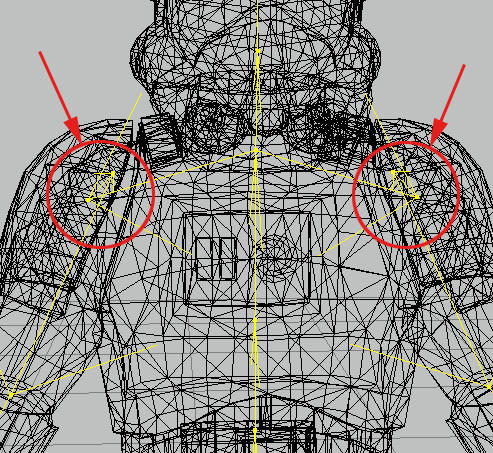
 the nulls....


