Page 1 of 1
Unable to create custom UVs for Model [Solved]
Posted: Wed Jan 18, 2017 1:21 am
by MissingTexture
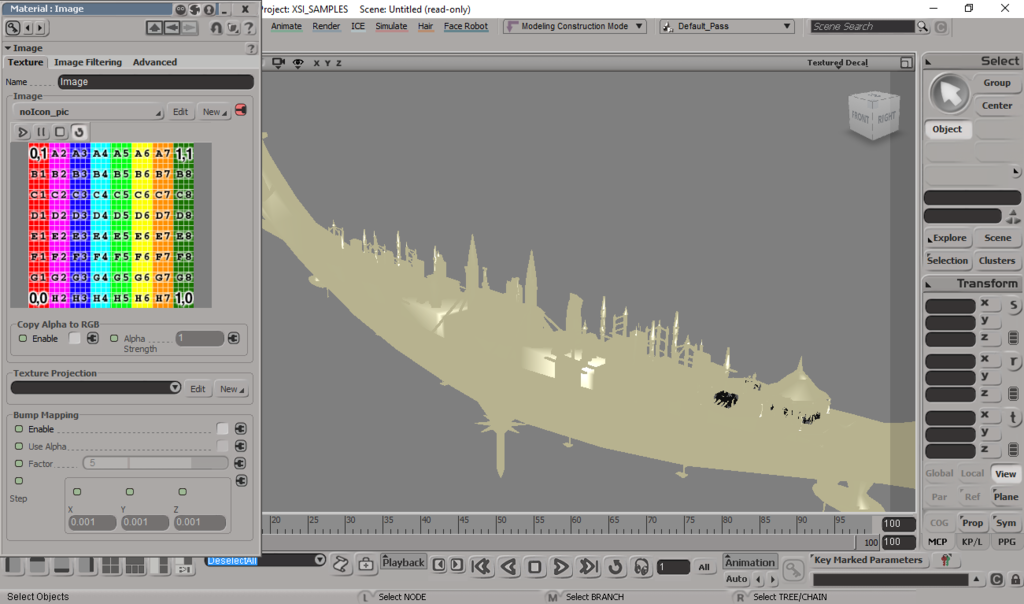
So I am trying to make custom textures for the Cato Neimoidia map that was released with SWBF3 Pre-Alpha models, since I am unable to get a hold of the actual textures. But for some reason the model appears like this:
Any reason as to why this is happening?
Re: Unable to create custom UVs for Model
Posted: Wed Jan 18, 2017 1:10 pm
by Gogie
IF YOU ARE NOT USING XSI ZE TOOLS:
Try opening your scene explorer (8 key default)
Click the "+" sign next to your model
Under your model click the "+" sign next to Polygon Mesh
Under Polygon Mesh click the "+" sign next to Clusters
Under that there will be something named Texture_Support_Auto or something to that effect delete this.
Then at the top of XSI go Model > Property > Texture Projection > (choose your projection type).
Then at the top again of XSI go Render > Texture > Image and choose your image.
IF YOU ARE USING XSIZETOOLS
Click the "+" sign next to your model
Under your model click the "+" sign next to Polygon Mesh
Under Polygon Mesh click the "+" sign next to Clusters
Under that there will be something named Texture_Support_Auto or something to that effect delete this.
Open the XSIZETOOLS MENU then go to Manage Materials.
Click Create, this will create your new material.
Select your new material and click ZEify
Select your new material and click Assign TEX and choose your image
Select your new material then in the explorer window click your desired model, then click "Assign" in XSIZETOOLS
Select your material in XSIZETOOLS and click edit, then under the diffuse section with the three color bars that say "color" on the left notice a redish pink bar on the far right, click this little square bar thing. scroll down in the window that pops up til you see a section that says "texture projection" click new next to this and choose your projection. your texture should be visible now.
Re: Unable to create custom UVs for Model
Posted: Wed Jan 18, 2017 2:34 pm
by MissingTexture
Thank you so much, Gogie!
Worked precisely as explained

Now I'm having issues trying to export the UV as a TGA so I can edit it :/
Re: Unable to create custom UVs for Model
Posted: Wed Jan 18, 2017 3:14 pm
by Gogie
What program are you using to try to export to a .tga?
Re: Unable to create custom UVs for Model
Posted: Wed Jan 18, 2017 3:32 pm
by MissingTexture
Gogie wrote:What program are you using to try to export to a .tga?
Well I'm trying to export it from XSI, using the texture editor!
Re: Unable to create custom UVs for Model
Posted: Wed Jan 18, 2017 4:14 pm
by Gogie
I would strongly recommend using GIMP as an exporter, instead of using XSI, the texture exporter (somebody please correct me if im wrong) is not implemented in the mod tool version of XSI. GIMP is also useful for editing things needed for SWBF2 modding such as alpha channels. So great download for exporting.
Re: Unable to create custom UVs for Model
Posted: Wed Jan 18, 2017 4:19 pm
by MissingTexture
Ah okay, well how exactly would I use gimp to make UV textures for the model?
Re: Unable to create custom UVs for Model
Posted: Wed Jan 18, 2017 11:59 pm
by AceMastermind
Gogie wrote:IF YOU ARE USING XSIZETOOLS
...
Select your new material and click ZEify
...
This isn't necessary unless you're adding flags to the material.
Also be sure to have the viewport set to "Textured" or "Textured Decal" or your texture will not display.
Gogie wrote:... the texture exporter (somebody please correct me if im wrong) is not implemented in the mod tool version of XSI...
The "Stamp UV Mesh" feature works in all versions of Softimage (XSI), even the free Mod Tool.
Re: Unable to create custom UVs for Model
Posted: Thu Jan 19, 2017 2:54 pm
by MissingTexture
AceMastermind wrote:
The "Stamp UV Mesh" feature works in all versions of Softimage (XSI), even the free Mod Tool.
How exactly would I use Stamp UV Mesh to make my textures?
Re: Unable to create custom UVs for Model
Posted: Thu Jan 19, 2017 4:15 pm
by AceMastermind
Re: Unable to create custom UVs for Model
Posted: Sat Jan 21, 2017 12:55 pm
by MissingTexture
Thank you Ace, but everytime I export the Stamp UV mesh it only comes out as a 256x256 targa :/ How can I up the size?
Re: Unable to create custom UVs for Model
Posted: Sat Jan 21, 2017 2:32 pm
by Marth8880
The resolution of the stamped UVs output image will always be equivalent to the resolution of the selected clip in the Texture Editor.
For example, when you stamp the UVs with the default noIcon.pic clip, the outputted image will always come out at 256x256 because that's the resolution of noIcon.pic. Here are a few tests of stamped images:
Output of stamped image with noIcon.pic (whose resolution is 256x256):
Output of stamped image with Jed_temple_library_04.tga (whose resolution is 512x512):
Output of stamped image with nov_ice_1.tga (whose resolution is 1024x1024):
Re: Unable to create custom UVs for Model
Posted: Sat Jan 21, 2017 6:03 pm
by AceMastermind
It might be best to create a 2048x2048 all white image for the UV stamp in advance, you can always scale the image down later, then change your preference in the Texture Editor for the "UV Mesh" color to black.
File>Preferences>Colors>UV Mesh
Re: Unable to create custom UVs for Model
Posted: Sun Jan 22, 2017 3:09 am
by MissingTexture
Thank you for all of the help! I have gotten a start on texturing the Cato Bridge from scratch