Page 1 of 1
Square bushes?
Posted: Tue Oct 16, 2007 10:46 pm
by authraw
Err... what causes this, and how do I fix it?

Re: Square bushes?
Posted: Tue Oct 16, 2007 10:52 pm
by ryukaji
I'm not sure but my guess is maybe a texture problem?
Re: Square bushes?
Posted: Tue Oct 16, 2007 10:57 pm
by authraw
ryukaji wrote:I'm not sure but my guess is maybe a texture problem?
Yeah, I figured it had to do with the textures. That's about all I know, though. How does the game decide which colours to make transparent? The odd thing is that some of the bushes attached to that same tree model are rendered correctly.
Re: Square bushes?
Posted: Wed Oct 17, 2007 1:09 am
by Frisbeetarian
Could it just be the quality of your game settings?
Re: Square bushes?
Posted: Wed Oct 17, 2007 6:53 pm
by ryukaji
are the bushes that aren't working right the same one? I think (im not sure) it should look like this in the texture:
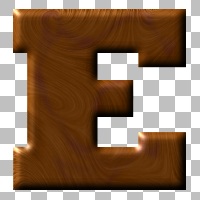
this is just a sample picture i found but i think the checkered squares mean that the background is transparent
so check your texture file
Re: Square bushes?
Posted: Wed Oct 17, 2007 11:01 pm
by Penguin
Transparency is defined by the Alpha Channel.
Re: Square bushes?
Posted: Wed Oct 17, 2007 11:07 pm
by trainmaster611
Crap! I actually knew that! I know there are two layers for these images. One layer is just an alpha and the other is the actual skin. Check the skin and see if there is something wrong with the layer holding the alpha channel.
Btw, skin layer goes on top of alpha layer.
Re: Square bushes?
Posted: Wed Oct 24, 2007 8:02 pm
by t551
They're not different layers, they're different channels, which are not the same thing. A channel is an actual set of values for pixels.
255 255 255 is a three-channel pixel.
255 255 255 255 is a four-channel pixel, the fourth being the alpha channel. You can have more than four channels, they just proceed in order: beta, gamma, and so on.