One the tool is finished, I might just get XSI 2012 and learn how to use it. Thanks for the awesome tool so far ANDE. Sure it's good practice for your career, but it also helps the community a ton.
Re: XSI ZETools
Posted: Mon Apr 02, 2012 12:18 pm
by ANDEWEGET
Thanks! I always try to combine expanding my knowledge/skills with creating something useful.
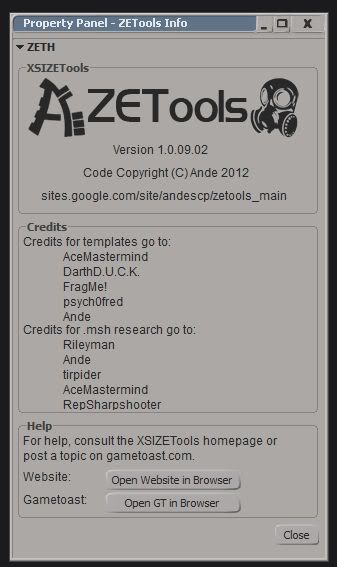
BTW, I've updated the Help dialog(I love designing UIs ):
Hidden/Spoiler:
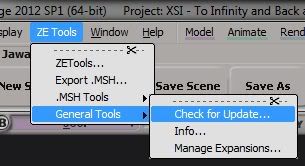
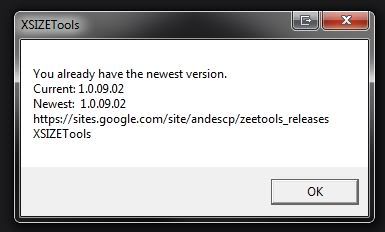
And I wrote a small version checker which downloads a small text file from my google sites page and compares it to the local file:
Hidden/Spoiler:
Re: XSI ZETools
Posted: Mon Apr 02, 2012 2:26 pm
by Marth8880
Hidden/Spoiler:
[quote="THEWULFMAN"]One the tool is finished, I might just get XSI 2012 and learn how to use it.[/quote]
You filthy, filthy liar! You lied to me!
Re: XSI ZETools
Posted: Mon Apr 02, 2012 4:30 pm
by THEWULFMAN
Marth8880 wrote:
Hidden/Spoiler:
[quote="THEWULFMAN"]One the tool is finished, I might just get XSI 2012 and learn how to use it.
You filthy, filthy liar! You lied to me! [/hide][/quote]
I said might.
Hidden/Spoiler:
Heh, that's really nice.
Re: XSI ZETools
Posted: Mon Apr 02, 2012 5:09 pm
by Cerfon Rournes
I like the new features.
Re: XSI ZETools
Posted: Sun Apr 08, 2012 8:37 am
by ANDEWEGET
ANDEWEGET wrote:
ANDEWEGET wrote:I've got some data for some more reverse engineering of the still 'unknown' parts of .msh files. Depending on how that reverse engineering(I love that phrase) goes along I might postpone the release and add in a completely new export feature.
Thanks for the comments BTW!
I think I won't include that new feature yet. Unless I suddenly become less lazy in the next days(and solve that last riddle).
Hidden/Spoiler:
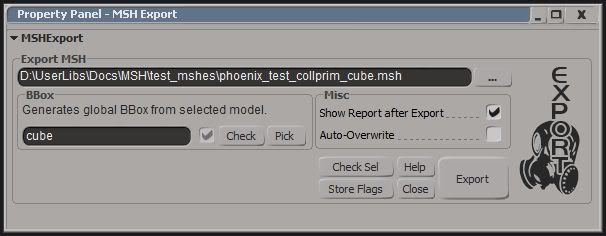
I've added a checkbox which indicates if the named BBox model exists. It will update every time you change the content of that line edit. It's possible to force update by clicking the Check button(for example if you deleted some objects).
If I really don't implement that additional function I'll release this version in the next days(maybe monday), it's pretty much finished(I believe).
So, 1.0.numbers is up now. As always there could still be some errors around. Please report them ASAP.
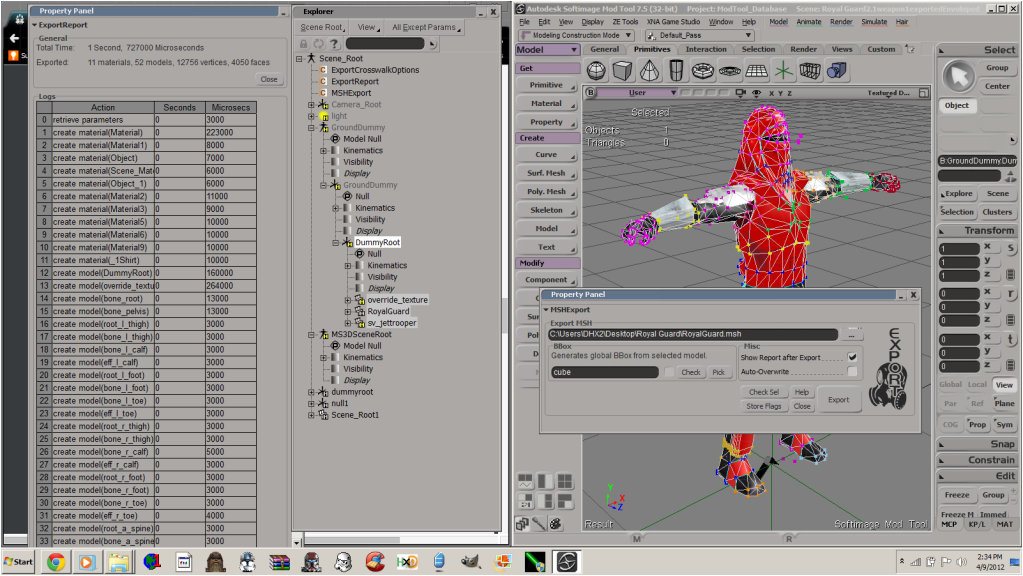
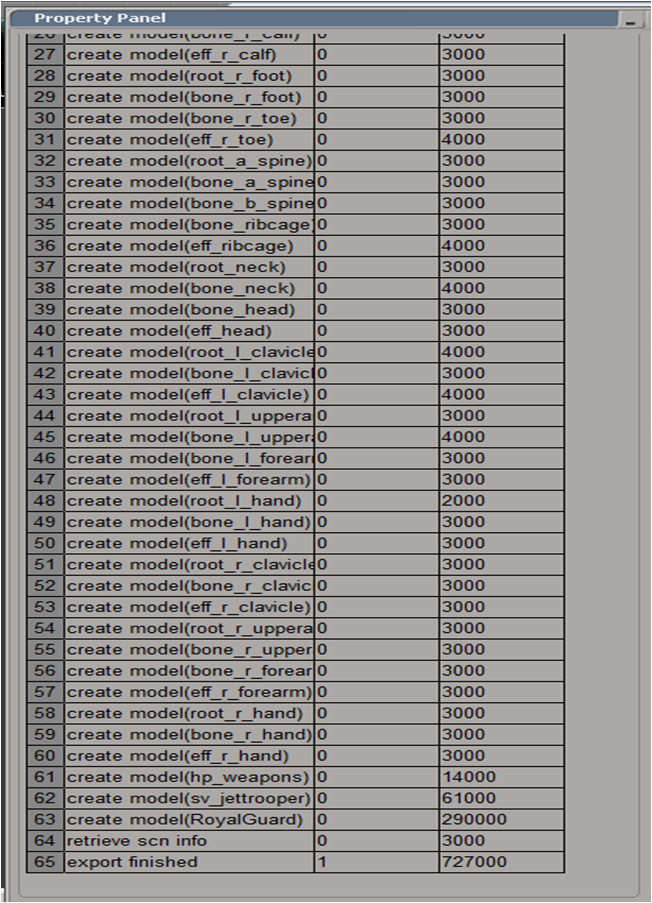
Something exported using my exporter:
Hidden/Spoiler:
I didn't find any deleted tris yet although I have lots of small polies in this model...
Changelog 1.0.09.02:
Polished reports.
Polished appeareance.
Added update checker.
Changed the folder structure.
Cleaned up code.
Rewrote Export and Material Code.
Wrote a additional 1k lines of code.
Re: XSI ZETools
Posted: Sun Apr 08, 2012 4:04 pm
by AceMastermind
Thanks for sharing!
I just performed a quick export test using a default cube with basic UVs+material and received this error:
Hidden/Spoiler:
# ERROR : Traceback (most recent call last):
# File "<Script Block >", line 39, in exportbutton_OnClicked
# export_msh()
# File "<Script Block >", line 109, in export_msh
# pbset(1, 'Preparing export...')
# File "<Script Block >", line 171, in pbset
# pbar.Value = value
# AttributeError: 'NoneType' object has no attribute 'Value'
# - [line 170 in C:\users\Ace\Autodesk\Softimage_Mod_Tool_7.5\Addons\XSIZETools\Resources\Logic\Export.py]
# ERROR : Property Page Script Logic Error (Python ActiveX Scripting Engine)
# ERROR : [168]
# ERROR : [169]
# ERROR : >[170] def pbset(maximum, caption, pbar=pb, value=0, step=1):
# ERROR : [171] pbar.Value = value
# ERROR : [172] pbar.Maximum = maximum
# ERROR : [173] pbar.Caption = caption
# ERROR : Traceback (most recent call last):
# File "<Script Block >", line 39, in exportbutton_OnClicked
# export_msh()
# File "<Script Block >", line 109, in export_msh
# pbset(1, 'Preparing export...')
# File "<Script Block >", line 171, in pbset
# pbar.Value = value
# AttributeError: 'NoneType' object has no attribute 'Value'
#
Microsoft Windows XP Professional SP3
Softimage Modtool 7.5
Python 2.6
Microsoft Visual C++ Redistributable - 10.0.30319
Re: XSI ZETools
Posted: Sun Apr 08, 2012 6:36 pm
by ANDEWEGET
That happens when making last-minute changes...
Revision 1 is up. Thanks for the heads up, Ace!
Re: XSI ZETools
Posted: Sun Apr 08, 2012 9:11 pm
by AceMastermind
Same test scene, different error (build 1.0.09.02 r1):
Hidden/Spoiler:
# ERROR : Traceback (most recent call last):
# File "<Script Block >", line 39, in exportbutton_OnClicked
# export_msh()
# File "<Script Block >", line 142, in export_msh
# msh_models = get_msh_models(to_b_exported, (material_index_dict, ))
# File "<Script Block >", line 226, in get_msh_models
# models.append(create_msh_model(obj, matdata, index))
# File "<Script Block >", line 434, in create_msh_model
# return process_model_data(obj, matdata, index)
# File "<Script Block >", line 463, in process_model_data
# mdl.segments = process_segment_data(obj, matdata)
# File "<Script Block >", line 478, in process_segment_data
# segments = create_segments_from_geo(geometry, obj, matdata[0])
# File "<Script Block >", line 439, in create_segments_from_geo
# poly_mat_indices = xsi.CGA_GetPolyIndicesPerMaterial(geo)
# File "C:\Python26\lib\site-packages\win32comext\axscript\client\pyscript.py", line 142, in __getattr__
# return getattr(self._scriptItem_.dispatchContainer,attr)
# File "C:\Python26\lib\site-packages\win32com\client\dynamic.py", line 500, in __getattr__
# raise AttributeError, "%s.%s" % (self._username_, attr)
# AttributeError: Application.CGA_GetPolyIndicesPerMaterial
# - [line 438 in C:\users\Ace\Autodesk\Softimage_Mod_Tool_7.5\Addons\XSIZETools\Resources\Logic\Export.py]
# ERROR : Property Page Script Logic Error (Python ActiveX Scripting Engine)
# ERROR : [436]
# ERROR : [437] def create_segments_from_geo(geometry, obj, mat_ndx_dict):
# ERROR : >[438] geo = obj.ActivePrimitive.GetGeometry2(0)
# ERROR : [439] poly_mat_indices = xsi.CGA_GetPolyIndicesPerMaterial(geo)
# ERROR : [440] mat_names = xsi.CGA_GetMaterialNames(geo)
# ERROR : [441] if len(mat_names) == 1:
# ERROR : Traceback (most recent call last):
# File "<Script Block >", line 39, in exportbutton_OnClicked
# export_msh()
# File "<Script Block >", line 142, in export_msh
# msh_models = get_msh_models(to_b_exported, (material_index_dict, ))
# File "<Script Block >", line 226, in get_msh_models
# models.append(create_msh_model(obj, matdata, index))
# File "<Script Block >", line 434, in create_msh_model
# return process_model_data(obj, matdata, index)
# File "<Script Block >", line 463, in process_model_data
# mdl.segments = process_segment_data(obj, matdata)
# File "<Script Block >", line 478, in process_segment_data
# segments = create_segments_from_geo(geometry, obj, matdata[0])
# File "<Script Block >", line 439, in create_segments_from_geo
# poly_mat_indices = xsi.CGA_GetPolyIndicesPerMaterial(geo)
# File "C:\Python26\lib\site-packages\win32comext\axscript\client\pyscript.py", line 142, in __getattr__
# return getattr(self._scriptItem_.dispatchContainer,attr)
# File "C:\Python26\lib\site-packages\win32com\client\dynamic.py", line 500, in __getattr__
# raise AttributeError, "%s.%s" % (self._username_, attr)
# AttributeError: Application.CGA_GetPolyIndicesPerMaterial
#
Re: XSI ZETools
Posted: Mon Apr 09, 2012 8:33 am
by ANDEWEGET
Forget that(if anyone read that post).
r2 will be up soon. I forgot including the right .32.dll for CGeoAccessors. The one in the DL is outdated...
EDIT: r2 is up. Thanks again for the heads-up. Why can't there be a single release without me forgetting to test something... Hopefully that was the last error caused by me forgetting something.
Re: XSI ZETools
Posted: Mon Apr 09, 2012 2:51 pm
by Cerfon Rournes
Question, do I have to apply textures through the tools?
Re: XSI ZETools
Posted: Mon Apr 09, 2012 5:43 pm
by AceMastermind
@Cerfon Rournes
You can use the traditional XSI way or through the ZE Tools 'Manage Materials'.
@ANDEWEGET
The exporter isn't writing the name of the assigned texture to the material in the msh file, everything else in the material seems to be fine though.
Re: XSI ZETools
Posted: Mon Apr 09, 2012 6:48 pm
by ANDEWEGET
@Cerfon: What Ace said.
@Ace: How did you apply the image? Did you first create the Image Node then connected it to the Shader or did you open the Shader's PPG then Color>this small icon thingy>Image>New from file... etc?
I used a bit of a hack getting the texture connected to the diffuse slot(finding 'diffuse' in the image's fullname(like a full path to the image)). FullNames can change depending on from where you navigate though. This hack always worked for me... I most likely won't be able to get a new version up until wednesday if this doesn't have a fast fix. If it has, expect one tomorrow.
Re: XSI ZETools
Posted: Mon Apr 09, 2012 8:56 pm
by AceMastermind
ANDEWEGET wrote:How did you apply the image? Did you first create the Image Node then connected it to the Shader or did you open the Shader's PPG then Color>this small icon thingy>Image>New from file... etc?
I tried both with the same results.
Re: XSI ZETools
Posted: Mon Apr 09, 2012 10:37 pm
by Cerfon Rournes
I said that because I got this error after I used the 'check sel' button.
Hidden/Spoiler:
[code]# ERROR : Traceback (most recent call last):
# File "<Script Block >", line 55, in check_sel_OnClicked
# if check_objects(objects):
# File "<Script Block >", line 899, in check_objects
# obj.Material.Name)
# AttributeError: 'NoneType' object has no attribute 'Name'
# - [line 898 in C:\Users\DHX2\Autodesk\Softimage_Mod_Tool_7.5\Addons\XSIZETools\Resources\Logic\Export.py]
# ERROR : Property Page Script Logic Error (Python ActiveX Scripting Engine)
# ERROR : [896] Model Type:\t{1}({2})
# ERROR : [897] Main Material:\t{3}'''.format(obj.Name,
# ERROR : >[898] mtyp, obj.Type,
# ERROR : [899] obj.Material.Name)
# ERROR : [900] lay.AddStaticText(txt)
# ERROR : [901] lay.EndGroup()
# ERROR : Traceback (most recent call last):
# File "<Script Block >", line 55, in check_sel_OnClicked
# if check_objects(objects):
# File "<Script Block >", line 899, in check_objects
# obj.Material.Name)
# AttributeError: 'NoneType' object has no attribute 'Name'
#
[/code]
Hidden/Spoiler:
I get a CTD when I test the model.
Re: XSI ZETools
Posted: Tue Apr 10, 2012 7:44 am
by ANDEWEGET
I fixed the check sel error. I thought bones could have materials, too(even nulls do), but it seems that's not the case.
About the CTD: could you show me the model's clusters? I can export weighted units fine. Although I always get a Split Skinned segments out of catalog or something warning.
I don't suppose you get any munge errors etc?
EDIT:
The diffuse texture should get exported now. I added a 'Assign Tex' button to the material manager, which assigns a .tga to the diffuse texture of the phong shader.
r3 is up BTW.
Re: XSI ZETools
Posted: Tue Apr 10, 2012 3:22 pm
by CressAlbane
I'm having trouble. I modeled and uv mapped my model in Blender, exported it as a .obj, and imported into XSI Mod Tool 7.5. The Check Sel didn't seem to return any problems, so I exported. When it finished, however, the msh file didn't work. (SWBFViewer would not load the model; visual inspection of the msh by hex editor revealed it to be wrong; file was very small)
What could I be doing wrong? I don't know much of XSI (why I use Blender), so please be very explicit with help.
Re: XSI ZETools
Posted: Tue Apr 10, 2012 6:11 pm
by ANDEWEGET
Did you make sure your models all were under a root? Just create a Null(left panel, Get>Primitive>Null) and drag&drop all your models onto the null(do all this in the explorer; shortcut is 8 ). You have to select the root object when exporting/checking. Both will only use the first object in the current selection(if you only select one, that one) and all of it's children and their children etc etc.
Check Sel will create one tab per object(if you have more than one), so try running it again and see if all of the models you want to export show up.
Try that, if it doesn't work we'll try something else.
Re: XSI ZETools
Posted: Tue Apr 10, 2012 7:32 pm
by CressAlbane
Great! That fixed the problem! I hadn't selected all of my model, and I think I imported it incorrectly. This time, I imported the stock clone model, and the export to .msh went flawlessly!
Next I need to try exporting a unit model...
Re: XSI ZETools
Posted: Tue Apr 10, 2012 11:15 pm
by AceMastermind
ANDEWEGET wrote:The diffuse texture should get exported now. I added a 'Assign Tex' button to the material manager, which assigns a .tga to the diffuse texture of the phong shader.
Thanks, texture names are being written now, I tried texturing through ZETools and the traditional XSI ways and they all work, I didn't have to use the 'Assign Tex' button.
When exporting the unit_template it checks out OK in your reports and when opening the *.msh in U3D everything seems to be there and properly weighted, but when munging the side the *.msh won't munge properly. It looks like the data is being skipped by VisualMunge resulting in an 8 byte *.model file in the _BUILD\Sides\myside\MUNGED\PC folder.
I threw several random shipped unit *.msh files into the side and they all munged fine, so VisualMunge is working. Simple prop objects munge and work ingame fine.
EDIT
Scratch that, the unit template that comes with the ZETools exports and munges fine, I was importing a different one where for some reason the effectors were re-parented directly under the root of each bone chain, this obviously broke the msh and caused VisualMunge to ignore it.

 ):
):