Page 1 of 1
Game crashes because of missing geometry?
Posted: Sun Jan 21, 2007 4:39 pm
by Droideka88
Lately my Movie map, Mustafar, has been crashing because whenever I have been adding a new unit to the field, the game crashes.
Message Severity: 3
.\Source\EntityGeometry.cpp(619)
Entity "rep_inf_ep3_rifleman2" missing geometry "rep_inf_ep3trooper2"
Above that is the problem.
With that said, I have decided to reveal all the vital properties of my NEW Clone unit because maybe I messed up something. I didn't overwrite these files with the examples like rep_inf_ep3_rifleman. My unit is "rep_inf_ep3_rifleman2"
Req
{
REQN
{
"class"
"rep_inf_ep3_rifleman2"
}
}
[GameObjectClass]
ClassParent = "rep_inf_default_rifleman2"
[Properties]
GeometryName = "rep_inf_ep3trooper2"
GeometryLowRes = "rep_inf_ep3trooper_low2"
FirstPerson = "REP\reptroop;rep_1st_trooper"
rep_inf_ep3trooper_low2
(I renamed REP_Ep3CloneTrooper_low1 to REP_Ep3CloneTrooper_low2 because originally a line says "rep_inf_ep3trooper.tga" and it had to be changed to "rep_inf_ep3trooper2" because it's the new skin texture. In this file, I found something about "bone pelvis". Does that need to be changed???
For Softimage file, the file's name is rep_inf_ep3trooper_low2
For the rep_inf_ep3_trooper msh, I renamed REP_EP3Trooper to REP_EP3Trooper2 and in the tga section, I renamed rep_inf_ep3trooper.tga to rep_inf_ep3trooper2.tga
Also, I localized the "rep_inf_rifleman2".
If there's no solution to this, I did hear from Qdin that you can Override the original skin texture. The question is if I do this, what shouldn't I modify such as the msh??
Game crashes because of missing geometry
Posted: Sun Jan 21, 2007 4:57 pm
by AceMastermind
Droideka88 wrote:Lately my Movie map, Mustafar, has been crashing because whenever I have been adding a new unit to the field, the game crashes.
Message Severity: 3
.\Source\EntityGeometry.cpp(619)
Entity "rep_inf_ep3_rifleman2" missing geometry "rep_inf_ep3trooper2"
Your "rep_inf_ep3trooper2" ODF is calling for a ".msh" file named:
rep_inf_ep3trooper2
You forgot to rename the ".msh" file called by your new ODF, and the game can't locate it.
RE: Re: Game crashes because of missing geometry....I need h
Posted: Sun Jan 21, 2007 6:01 pm
by Droideka88
Are you telling me to do this?
[GameObjectClass]
ClassParent = "rep_inf_default_rifleman2"
GeometryName = "rep_inf_ep3trooper2.msh"
[Properties]
GeometryName = "rep_inf_ep3trooper2"
GeometryLowRes = "rep_inf_ep3trooper_low2"
FirstPerson = "REP\reptroop;rep_1st_trooper"
By the way, here's a screenshot of the msh folder.

Game crashes because of missing geometry
Posted: Sun Jan 21, 2007 8:25 pm
by AceMastermind
Droideka88 wrote:Are you telling me to do this?
Yes, that looks good to me, but what are those "softimage" files that i see?(option files?)
Also, do you have a "class parent" file named "rep_inf_default_rifleman2" ?
RE: Re: RE: Re: Game crashes because of missing geometry....
Posted: Sun Jan 21, 2007 11:57 pm
by Droideka88
I think the softimage are option files. I think most mshs require these. Also the class parent file would have to be odf correct? Because I have it.

Game crashes because of missing geometry
Posted: Mon Jan 22, 2007 12:23 am
by AceMastermind
Ok, yeah i was just curious about the custom "class parent" odf file.
Well what were the latest results for your most recent munge, does your game still crash?
Posted: Mon Jan 22, 2007 12:48 am
by Droideka88
With some help from Penguin she explained that Hex Edit still takes place when using the Mod Tools, which why my maps kept crashing.
If you modify the hex codes which Pandemic made, then it must be equal or less. So acutally, she explained to me that this goes for units' odfs, reqs, and tgas.
I'm checking right to see if the map and unit works. If it does I'll post a screenshot of it.
Posted: Mon Jan 22, 2007 1:18 am
by Penguin
If you hexedit anything, it must remain the same character length, if the name replacement is smaller then the orignal name then replace the remainign letters with spaces.
Posted: Mon Jan 22, 2007 1:29 am
by Droideka88
Message Severity: 3
.\Source\EntityGeometry.cpp(619)
Entity "rep_inf_ep3_trooper1" missing geometry "rep_inf_ep3trooper"
This is getting crazy. In my current odf,
[GameObjectClass]
ClassParent = "rep_inf_default_rifleman"
[Properties]
GeometryName = "rep_inf_ep3trooper"
GeometryLowRes = "rep_inf_ep3trooper_low1"
FirstPerson = "REP\reptroop;rep_1st_trooper"
OverrideTexture = "rep_inf_ep3troope2"
What is going wrong? :evil:

Note: Does OverrideTexture work with Ep3 Clone Troopers??? I have been unsucessful in this working....so I may try again. I'll keep everyone updated.
Posted: Mon Jan 22, 2007 7:00 am
by Qdin
As far as I know there's not something original from the assets called 'rep_inf_ep3troope2'
So you've basicly renamed the .tga also.
here's the bad thing:
The rep_inf_ep3troope2.msh will STILL use the 'original' .tga.
The good is:
you can open the rep_inf_ep3troope2.msh with Notepad, and in one of the top lines you'll see where it calls for a .tga. if you rename it from (the original - in this example I assume you've used rep_inf_ep3trooper) rep_inf_ep3trooper.tga to rep_inf_ep3troope2.tga it'll use that texture.
Posted: Mon Jan 22, 2007 9:02 pm
by Droideka88
you can open the rep_inf_ep3troope2.msh with Notepad, and in one of the top lines you'll see where it calls for a .tga. if you rename it from (the original - in this example I assume you've used rep_inf_ep3trooper) rep_inf_ep3trooper.tga to rep_inf_ep3troope2.tga it'll use that texture.
It only shows me this.
-lodgroup soldier -nocollision -keepmaterial override_texture
Unless you're referring to the msh file then there is a tga line for that. I changed ep3trooper to ep3troope2. It still doesn't solve my problem.
the original - in this example I assume you've used rep_inf_ep3trooper)
I did. Also was there anything wrong with the
odf. In OverrideTexture do I need to add ".tga" next to the name???
Do I change what is marked in blue too??? Look below.

Posted: Mon Jan 22, 2007 9:26 pm
by Darth_Z13
@Droideka, I recommend using
PS Pad. It's free and it's really easy to use. Once you've got it open find the highlighted part. That's what you need to change.
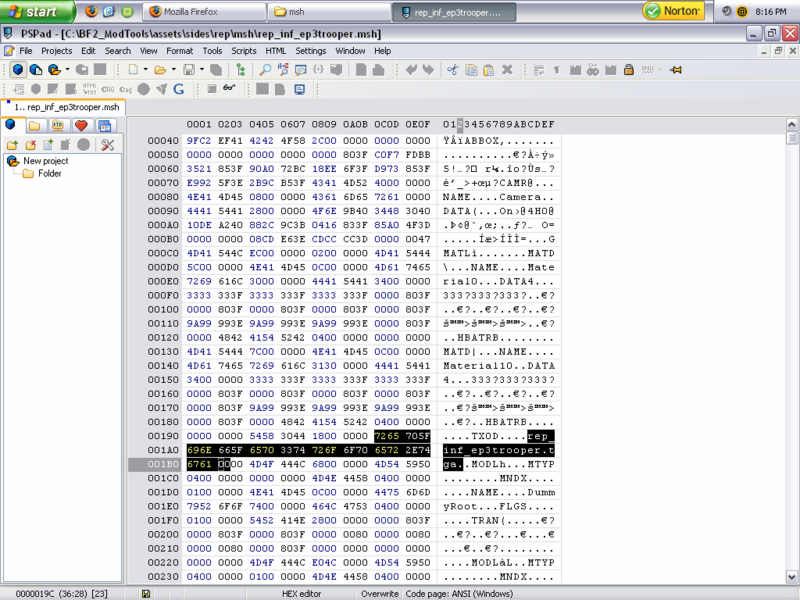
Posted: Tue Jan 23, 2007 8:58 pm
by Droideka88
I did do I do that for the highlighted "rep_inf_ep3trooper"? The rep_inf_ep3trooper.msh is a custom file. I said...
Unless you're referring to the msh file then there is a tga line for that. I changed ep3trooper to ep3troope2. It still doesn't solve my problem.
And yes I should've used PSPadEditor, which is ironic, because I only used it for hex mods.

Also: I just realized something. For this to work, I think I have to following the skin texture instructions and add a few things like bat files and such.
EDIT
I aplogize for bumping but I noticed something strange about this.

Does anyone recommend I make a new duplicate like this called rep_inf_ep3troope2_low1.msh and change that black line to "rep_inf_ep3troope2"? Now I realize if I did this, then in the odf property
[Properties]
GeometryName = "rep_inf_ep3trooper"
GeometryLowRes = "rep_inf_ep3troope2_low1"
FirstPerson = "REP\reptroop;rep_1st_trooper"
OverrideTexture = "rep_inf_ep3troope2"
Would this solve my issue? I aplogize if I haven't done a good job in this but I'm trying my best.
Maybe that's why my game crashes.
Posted: Tue Jan 23, 2007 9:10 pm
by Darth_Z13
Only one way to find out... try it!
Posted: Tue Jan 23, 2007 9:15 pm
by Droideka88
Darth_Z13 wrote:Only one way to find out... try it!
Risk take? Sure but not today due to homework.

I figured certain people like Majin Revan have done this before and could therefore, at least assist me if there are external links to this problem so that I wouldn't have be constantly posting screenies that take up the bandwidth.