ANDEWEGET wrote:Yep, that looks like it's the problem. Gonna have a closer look at it later.
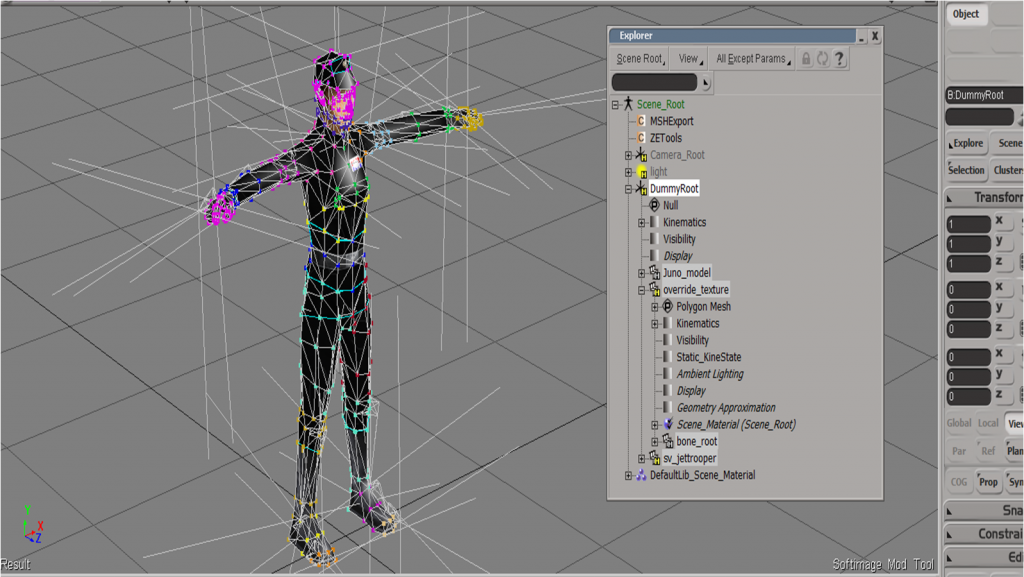
Marth, I assume you used the Unit_template_beta? Did you maybe by accident key the effs and roots (not just the bones)?
This would cause such a problem.
When exporting animations I call a built-in function (.IsNodeAnimated()) on every model. If that returns true it means that the model has (and maybe had, I'm not 100% sure how the function works, I just know that until now it always delivered correct results) keyframes and thus needs to be exported.
Re: XSI ZETools
Posted: Wed Nov 14, 2012 10:05 pm
by minilogoguy18
I'm confused, most games that use Softimage know to dump the roots and effectors then arrange the hierarchy accordingly, for example an AT-RT I built for Jedi Academy is like this. I built a rig using constraints around the skeleton outside the hierarchy, animated and exported the plotted animations. While I'm certain the keys were plotted to the roots/effectors as well as the bones they still got dumped at compile time.
Maybe your exporter can be changed so that the roots and effectors are dumped and the IK chains are converted to FK using nulls similar to the dotXSI exporter?
The conversion from IK to FK shouldn't affect the animation since if I'm not mistaken since this game only accepts linear plotted animations anyway.
Re: XSI ZETools
Posted: Wed Nov 14, 2012 10:34 pm
by kinetosimpetus
minilogoguy18 wrote:The conversion from IK to FK shouldn't affect the animation since if I'm not mistaken since this game only accepts linear plotted animations anyway.
"linear plotted"
If this means the animated bone moves directly from starting position to the next key with no acceleration, then no, it accepts curved animations.
Re: XSI ZETools
Posted: Tue Nov 20, 2012 4:40 am
by sereja2
When I try to import hex crafted infantry model, by tripider, it give me this error:
Hidden/Spoiler:
INFO (640, do_import): Starting import.
INFO (641, do_import): .msh file path: C:\Softimage\Softimage_Mod_Tool_7.5\Addons\ModTool_Database\Models\tal_inf_talz.msh
INFO (661, do_import): Starting unpack.
ERROR (665, do_import):
Traceback (most recent call last):
File "C:\users\Serejenka\Autodesk\Softimage_Mod_Tool_7.5\Addons\XSIZEtools\Application\Core\andezetimport.py", line 662, in do_import
self.msh = unpacker.unpack()
File "C:\users\Serejenka\Autodesk\Softimage_Mod_Tool_7.5\Addons\XSIZEtools\Application\Modules\msh2_unpack.py", line 164, in unpack
raise UnpackError('Unrecognized chunk {0} in MSHUnpack.'.format(hdr))
UnpackError: Unrecognized chunk MATD in MSHUnpack.
Any chance to fix that?
Re: XSI ZETools
Posted: Tue Nov 20, 2012 8:43 am
by ANDEWEGET
Seems like tirpider didn't update the MATL MATD count... This happens if the long int after MATL (material list) does not match up with the number of MATDs (materials). So, most likely tirpiders fault.
Re: XSI ZETools
Posted: Tue Nov 20, 2012 11:55 am
by tirpider
Yep, that sounds like my fault...
Sorry about that.
I fixed it and the low1 (I missed that one as well) and sent you a link.
Re: XSI ZETools
Posted: Wed Nov 21, 2012 7:46 am
by sereja2
Another error, I found, when try export non animated model:
Hidden/Spoiler:
[code]' ERROR : Traceback (most recent call last):
' File "<Script Block >", line 36, in exportbutton_OnClicked
' export.export()
' File "C:\users\Serejenka\Autodesk\Softimage_Mod_Tool_7.5\Addons\XSIZEtools\Application\Core\andezetexport.py", line 692, in export
' self.do_export()
' File "C:\users\Serejenka\Autodesk\Softimage_Mod_Tool_7.5\Addons\XSIZEtools\Application\Core\andezetexport.py", line 712, in do_export
' self.msh.materials.add(conv.convert())
' File "C:\users\Serejenka\Autodesk\Softimage_Mod_Tool_7.5\Addons\XSIZEtools\Application\Core\andezetexport.py", line 583, in convert
' self.process_shader_data()
' File "C:\users\Serejenka\Autodesk\Softimage_Mod_Tool_7.5\Addons\XSIZEtools\Application\Core\andezetexport.py", line 531, in process_shader_data
' if diff_param.Source:
' AttributeError: 'NoneType' object has no attribute 'Source'
' - [line 35 in C:\users\Serejenka\Autodesk\Softimage_Mod_Tool_7.5\Addons\XSIZETools\Application\Logic\exporter.py]
' ERROR : Property Page Script Logic Error (Python ActiveX Scripting Engine)
' ERROR : [33] params.preview()
' ERROR : [34] export = andezetexport.Export(xsi, params)
' ERROR : >[35] try:
' ERROR : [36] export.export()
' ERROR : [37] except SystemExit:
' ERROR : [38] return
' ERROR : Traceback (most recent call last):
' File "<Script Block >", line 36, in exportbutton_OnClicked
' export.export()
' File "C:\users\Serejenka\Autodesk\Softimage_Mod_Tool_7.5\Addons\XSIZEtools\Application\Core\andezetexport.py", line 692, in export
' self.do_export()
' File "C:\users\Serejenka\Autodesk\Softimage_Mod_Tool_7.5\Addons\XSIZEtools\Application\Core\andezetexport.py", line 712, in do_export
' self.msh.materials.add(conv.convert())
' File "C:\users\Serejenka\Autodesk\Softimage_Mod_Tool_7.5\Addons\XSIZEtools\Application\Core\andezetexport.py", line 583, in convert
' self.process_shader_data()
' File "C:\users\Serejenka\Autodesk\Softimage_Mod_Tool_7.5\Addons\XSIZEtools\Application\Core\andezetexport.py", line 531, in process_shader_data
' if diff_param.Source:
' AttributeError: 'NoneType' object has no attribute 'Source'
'
[/code]
Re: XSI ZETools
Posted: Wed Nov 21, 2012 5:34 pm
by ANDEWEGET
It's a problem with one of your materials. Make sure you only use Phong or Lambert and only have 1 image node connected to the phong shader's diffuse input. The phong shader should be connected to the material. There could be problems if there are more than one shader (and that one is not of type Phong or lambert).
Re: XSI ZETools
Posted: Sun Nov 25, 2012 12:40 pm
by willinator
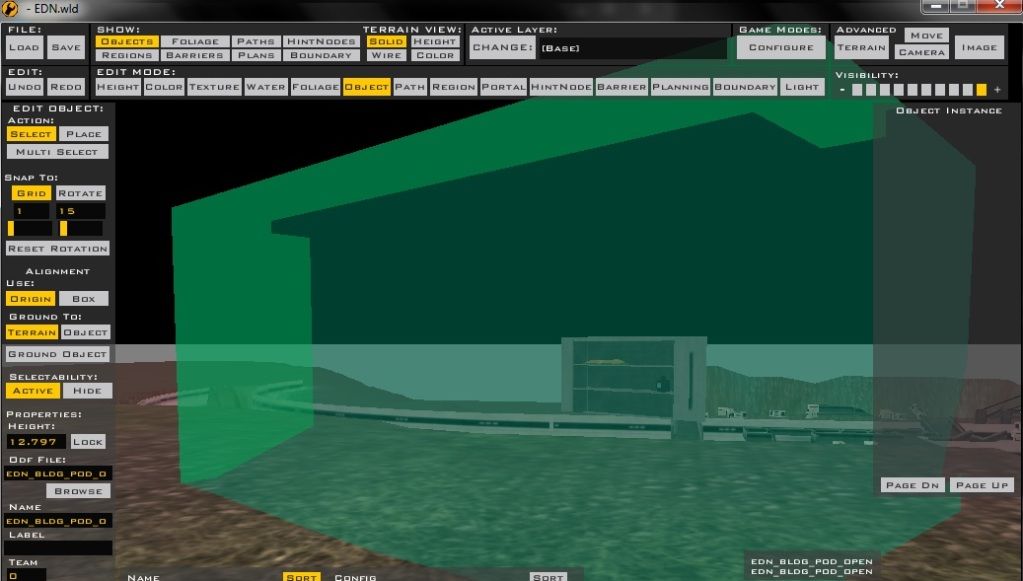
So, I am having a problem with the latest version of ZE tools. Whenever I export props, they show up ingame and in SWBF Viewer just fine, but whenever I go into ZE, none of my objects are visible. As you move around them with the camera, you can tell that there's an object there, but the object is completely transperent. I had a feeling it was something to do with a bbox, but when I go into the exporter menu, the bbox commands are gone. Please help!
Hidden/Spoiler:
Re: XSI ZETools
Posted: Sun Nov 25, 2012 3:46 pm
by Marth8880
Do you have GeometryName = "yourmeshname.msh" under ClassLabel in the [GameObjectClass] section of your ODFs?
Re: XSI ZETools
Posted: Sun Nov 25, 2012 4:09 pm
by sereja2
I has the same problem, before install last version of ZETools. So, make sure, you download last one.
Re: XSI ZETools
Posted: Sun Nov 25, 2012 7:05 pm
by willinator
All the odfs are set up correctly. The models worked just fine before, but I just went back into XSI to add to the models, didn't change the names at all, re-exported, and that happened.
Re: XSI ZETools
Posted: Sun Nov 25, 2012 7:28 pm
by Marth8880
Could you take a screenshot of one of the material PPGs for a prop?
Re: XSI ZETools
Posted: Sun Nov 25, 2012 7:58 pm
by willinator
PPG?
Re: XSI ZETools
Posted: Sun Nov 25, 2012 8:03 pm
by Marth8880
The floating property window.
Re: XSI ZETools
Posted: Mon Nov 26, 2012 3:12 pm
by ANDEWEGET
The last version should have fixed it.
Best do a complete reinstall by deleting the old folder before unzipping the archive.
Re: XSI ZETools
Posted: Thu Jan 03, 2013 7:22 am
by sereja2
Here is another one issue, I found: in some reason, I can't import soldier lowrez animation. There is no error lines, but it just not imported...
Re: XSI ZETools
Posted: Thu Jan 03, 2013 9:56 am
by ANDEWEGET
No lowrez animation at all? Or does just a single one not work?
Re: XSI ZETools
Posted: Fri Jan 04, 2013 1:00 pm
by Cerfon Rournes
Been a while since I posted here...I really like the new updates!
I re-download tried to export player models again. When I do, I always get this error:
Hidden/Spoiler:
[code]' ERROR : Traceback (most recent call last):
' File "<Script Block >", line 36, in exportbutton_OnClicked
' export.export()
' File "C:\Users\DHX2\Autodesk\Softimage_Mod_Tool_7.5\Addons\XSIZEtools\Application\Core\andezetexport.py", line 686, in export
' self.do_export()
' File "C:\Users\DHX2\Autodesk\Softimage_Mod_Tool_7.5\Addons\XSIZEtools\Application\Core\andezetexport.py", line 753, in do_export
' if not self.write_msh(self.msh.pack()):
' File "C:\Users\DHX2\Autodesk\Softimage_Mod_Tool_7.5\Addons\XSIZEtools\Application\Modules\msh2.py", line 122, in pack
' msh2_data.append(self.models.pack())
' File "C:\Users\DHX2\Autodesk\Softimage_Mod_Tool_7.5\Addons\XSIZEtools\Application\Modules\msh2.py", line 647, in pack
' data = [model.pack() for model in self.models]
' File "C:\Users\DHX2\Autodesk\Softimage_Mod_Tool_7.5\Addons\XSIZEtools\Application\Modules\msh2.py", line 486, in pack
' data.append(self.pack_GEOM())
' File "C:\Users\DHX2\Autodesk\Softimage_Mod_Tool_7.5\Addons\XSIZEtools\Application\Modules\msh2.py", line 518, in pack_GEOM
' data.append(self.pack_ENVL())
' File "C:\Users\DHX2\Autodesk\Softimage_Mod_Tool_7.5\Addons\XSIZEtools\Application\Modules\msh2.py", line 528, in pack_ENVL
' data.append(struct.pack('<L', index))
' TypeError: unsupported operand type(s) for &: 'NoneType' and 'long'
' - [line 35 in C:\Users\DHX2\Autodesk\Softimage_Mod_Tool_7.5\Addons\XSIZETools\Application\Logic\exporter.py]
' ERROR : Property Page Script Logic Error (Python ActiveX Scripting Engine)
' ERROR : [33] params.preview()
' ERROR : [34] export = andezetexport.Export(xsi, params)
' ERROR : >[35] try:
' ERROR : [36] export.export()
' ERROR : [37] except SystemExit:
' ERROR : [38] return
' ERROR : Traceback (most recent call last):
' File "<Script Block >", line 36, in exportbutton_OnClicked
' export.export()
' File "C:\Users\DHX2\Autodesk\Softimage_Mod_Tool_7.5\Addons\XSIZEtools\Application\Core\andezetexport.py", line 686, in export
' self.do_export()
' File "C:\Users\DHX2\Autodesk\Softimage_Mod_Tool_7.5\Addons\XSIZEtools\Application\Core\andezetexport.py", line 753, in do_export
' if not self.write_msh(self.msh.pack()):
' File "C:\Users\DHX2\Autodesk\Softimage_Mod_Tool_7.5\Addons\XSIZEtools\Application\Modules\msh2.py", line 122, in pack
' msh2_data.append(self.models.pack())
' File "C:\Users\DHX2\Autodesk\Softimage_Mod_Tool_7.5\Addons\XSIZEtools\Application\Modules\msh2.py", line 647, in pack
' data = [model.pack() for model in self.models]
' File "C:\Users\DHX2\Autodesk\Softimage_Mod_Tool_7.5\Addons\XSIZEtools\Application\Modules\msh2.py", line 486, in pack
' data.append(self.pack_GEOM())
' File "C:\Users\DHX2\Autodesk\Softimage_Mod_Tool_7.5\Addons\XSIZEtools\Application\Modules\msh2.py", line 518, in pack_GEOM
' data.append(self.pack_ENVL())
' File "C:\Users\DHX2\Autodesk\Softimage_Mod_Tool_7.5\Addons\XSIZEtools\Application\Modules\msh2.py", line 528, in pack_ENVL
' data.append(struct.pack('<L', index))
' TypeError: unsupported operand type(s) for &: 'NoneType' and 'long'
'
[/code]
Since I found '.py', I read up on this part of "Frequently Asked Questions"
Hidden/Spoiler:
Q: The ZE Tools Menu item appears but when I try to do anything XSI says that it cant find a file named '<something>.py'. What should I do?
This shouldn't happen as of 1.1.11.02. I added a function which checks the install dir and asks to move the plug in if the install dir is wrong.
A: Check that you unzipped the archive to '%drive%:\\Users\\%user%\\Autodesk\\%xsi_version%\\Addons\\'.
I'm positive I installed to that location.
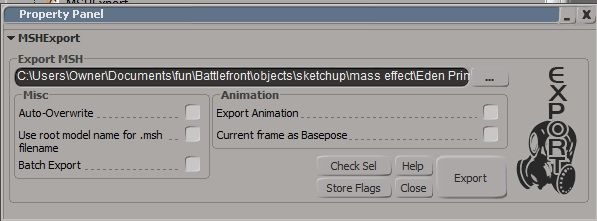
Here is a picture of the export.
Hidden/Spoiler:
Thanks for the help!
Re: XSI ZETools
Posted: Fri Jan 04, 2013 1:50 pm
by ANDEWEGET
Yes, that's no 'wrong directory error'.
There should be a log file in C:\\Users\\<user>\\Autodesk\\Softimage_modTool_7.5\\Addons\\XSIZETools\\, could you upload that? It might shed a bit more light onto the problem.