Marth8880 wrote:Except profit can't be made from ANDE's addon. :S
I meant in general as they don't release an SDK for the Mod Tool version which is slightly different to try to keep people from developing addons that they could use to export content to a current game engine and make profit from freeware.
Of course nothing could be made today, Avid was originally supposed to make a Mod Tool version of the pandemic addon but that went down the toilet when Autodesk bought Softimage. Corporate takeover ftl.
Though if someone feels like they could have even the slightest chance in hell they could email someone at the Softimage division of Autodesk to see if they still have the Pandemic source code for the addon but it's unlikely.
Re: XSI ZETools
Posted: Sun May 20, 2012 2:31 pm
by Lephenix
minilogoguy18 wrote:
Marth8880 wrote:Except profit can't be made from ANDE's addon. :S
I meant in general as they don't release an SDK for the Mod Tool version which is slightly different to try to keep people from developing addons that they could use to export content to a current game engine and make profit from freeware.
Of course nothing could be made today, Avid was originally supposed to make a Mod Tool version of the pandemic addon but that went down the toilet when Autodesk bought Softimage. Corporate takeover ftl.
Though if someone feels like they could have even the slightest chance in hell they could email someone at the Softimage division of Autodesk to see if they still have the Pandemic source code for the addon but it's unlikely.
I had contacted the original programmer Mike Zaimont, and he didn't have the source files anymore.
Re: XSI ZETools
Posted: Sun May 20, 2012 2:41 pm
by AceMastermind
minilogoguy18 wrote:...Avid was originally supposed to make a Mod Tool version of the pandemic addon...
...email someone at the Softimage division of Autodesk to see if they still have the Pandemic source code for the addon...
I would label this as false information since neither Avid, Softimage or Autodesk had anything to do with source code for the Pandemic Tools. Pandemic just didn't release the Mod Tool compatible version of the Pandemic Tools. forums/viewtopic.php?p=52788#p52788
Anyone with scripting experience could write a plugin/addon for Mod Tool, although you can expect free versions of commercial software to be crippled or limited and have disabled features due to being free, there are usually workarounds. If you wanted the SDK you could've just download the commercial trial version matching that of Mod Tool and pulled it from the installation.
I think if anyone other than Pandemic had the official source code for the Pandemic Tools and distributed it then there would likely be legal issues since it wasn't officially released.
All of this talk of the official tools is unimportant since ANDEWEGET is already doing an amazing job here and has provided a free and open source solution for the masses.
Re: XSI ZETools
Posted: Sun May 20, 2012 2:48 pm
by minilogoguy18
Well it was sorta hard to remember from 06.
Re: XSI ZETools
Posted: Wed Jun 13, 2012 1:20 pm
by ANDEWEGET
Hidden/Spoiler:
[quote="ANDEWEGET"]Just quickly reporting in:
WALL OF TEXT!
If you're not interested in nerd programming talk, maybe skip to the last paragraph.
Most likely I won't have the next release done by this week. That's the problem if you learn loads of stuff while/after developing something. Now when I get back and see all of this old code(which I rewrote a few weeks/months ago) I always feel the urge to rewrite it... The msh2 module whic handles packing(and some unpacking) of the .msh file is nearly competely rewritten now(it was quite old compared to the other code). Now it's a lot easier to maintain the code and use it for other projects. The code itself is just better written, too. As I now have all the geometry in quite 'high-level' classes(Vertex objects which contain position, uv, color, weights etc for one vertex) instead of lists which contained pure data(only position or uv or weight etc) the plugin code has to adapt a bit. These classes make it easier to transform vertices, uvs etc though(which isn't needed right now but maybe some time).
I created a small tool which will reside in the XSIZETools\\Tools directory as of the next release. Mostly it's only for me but 2 commands, Check Dir and Find Dir could be useful to new users. Check Dir checks if the current directory is a valid installation directory for the XSIZETools, Find Dir prints possible installation directories. Check it out naaow here.
Sometimes it's nice to just write semi-random stuff which comes to mind. [/quote]
Progress is slow but steady.
Does anyone have any wishes for functions/tools to speed something up/make it easier? I want to make it as user friendly and efficient as possible.
Re: XSI ZETools
Posted: Wed Jun 13, 2012 2:33 pm
by Marth8880
The ability to select multiple materials at once in the material manager would be incredibly convenient.
Re: XSI ZETools
Posted: Wed Jun 13, 2012 10:11 pm
by minilogoguy18
Take your time, I'd rather wait for something that has all the capability of the pandemic exporter, can't say I care for anything extra.
Re: XSI ZETools
Posted: Mon Jul 02, 2012 2:26 pm
by ANDEWEGET
Hidden/Spoiler:
[quote="ANDEWEGET"]Never thought of multi selection. I only had maybe four materials max in my test scenes though.
Im playing with the idea of using Qt as GUI framework instead of XSIs builtin. That would allow me to easily implement multi selection, thumbnails for materials and other cool stuff XSI doesnt have. This would require PyQt though. Ill have to see if I could just distribute that so users dont have to install it extra(would just be once though).
Its way more fun to develop with Qt too.
Edit: That (sadly) won't work. The additional plug in I need to get it working nicely with XSI(as a child window etc) doesn't have a 32 bit version...[/quote]
Hidden/Spoiler:
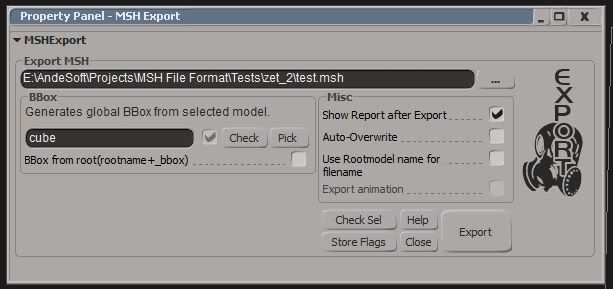
Got a small (visual)update you'll actually notice. I used the ZETools to export some models in the last days and I noticed that exporting multiple .mshes from one scene is quite inefficient because you always have to switch filename and bbox. To make that a bit more efficient I added 2 functions:
1. BBox from root: searches for a bbox model automatically. Right now you have to name it the same as the root and append '_bbox' to it. This model will be excluded from export, it will only be used for the main BBox.
2. Rootmodel name for filename: this uses the name of the root as filename(it will override the set filename but use the path).
As I'm a bit busy with another project and playing KotOR(for my first time, how could I let that game gather dust in my Steam Lib for more than a year now without playing it?) so the next release will still take some time.
Todo right now:
Make a better algorithm for Check Sel, the old one was a bit hacky.
As motivation comes start animations and/or cloth implementation.
Maybe a batch export function which exports all direct children(and each complete hierarchy) of the currently selected model as .msh.
Re: XSI ZETools
Posted: Wed Jul 04, 2012 4:16 am
by Cerfon Rournes
@Visual update:
Interesting. Looking forward to using the new features.
@Kotor:
Enjoy playing!
Todo right now:
Make a better algorithm for Check Sel, the old one was a bit hacky. As motivation comes start animations and/or cloth implementation.
Maybe a batch export function which exports all direct children(and each complete hierarchy) of the currently selected model as .msh.
Re: XSI ZETools
Posted: Fri Jul 06, 2012 5:28 pm
by ANDEWEGET
I decided to release it now. This should work at least as good as the last not-rewritten version. It has some smaller stuff which makes working easier(like multi selection for the Material Manager). I postponed the bigger features to the next version.
I didn't want to code anymore so I recorded this short video about the new features: http://www.youtube.com/watch?v=0JYiME0u ... e=youtu.be
Would be nice if some people could download this to see how well it performs. Added the link to the first page.
Full changelog:
1.1.10.02:
Restructured folders and class-system.
Higher level approach to storing data enabling easy manipulation of components.
Minimized folder structure complexity.
Added XSIZETUtils.
Rewrote most of the export code. Now a lot cleaner and straight forward.
Removed some things like the detailed export report, it was useful for me for profiling but now it just clutters the export up.
Material Manager: Refined code, dialog now doesn't relaunch when a material gets deleted/created.
Material Manager: Multi selection is now enabled.
Material Manager: Every material has an indicator telling if it has ZE flags or not.
Exporter: Batch Export
Exporter: Automatic naming and finding of BBoxes.
Re: XSI ZETools
Posted: Fri Jul 06, 2012 5:47 pm
by Marth8880
Jes! Thank you so much! ^^
Re: XSI ZETools
Posted: Wed Jul 11, 2012 3:25 am
by AceMastermind
Error when exporting a cube with default cubic UVs
Hidden/Spoiler:
' ERROR : Traceback (most recent call last):
' File "<Script Block >", line 36, in exportbutton_OnClicked
' export.export()
' File "C:\users\Ace\Autodesk\Softimage_Mod_Tool_7.5\Addons\XSIZEtools\Application\Core\andezetexport.py", line 498, in export
' self.do_export()
' File "C:\users\Ace\Autodesk\Softimage_Mod_Tool_7.5\Addons\XSIZEtools\Application\Core\andezetexport.py", line 532, in do_export
' self.msh.models.add(conv.convert())
' File "C:\users\Ace\Autodesk\Softimage_Mod_Tool_7.5\Addons\XSIZEtools\Application\Core\andezetexport.py", line 297, in convert
' self.msh2_model.segments = self.get_segments()
' File "C:\users\Ace\Autodesk\Softimage_Mod_Tool_7.5\Addons\XSIZEtools\Application\Core\andezetexport.py", line 237, in get_segments
' geometry = self.process_geometry()
' File "C:\users\Ace\Autodesk\Softimage_Mod_Tool_7.5\Addons\XSIZEtools\Application\Core\andezetexport.py", line 218, in process_geometry
' seg.vertices = self.get_vertices()
' File "C:\users\Ace\Autodesk\Softimage_Mod_Tool_7.5\Addons\XSIZEtools\Application\Core\andezetexport.py", line 109, in get_vertices
' vert_pos_list = xsi.CGA_GetNodeVertexPositions(self.geo, True)
' File "C:\Python26\lib\site-packages\win32com\client\dynamic.py", line 500, in __getattr__
' raise AttributeError, "%s.%s" % (self._username_, attr)
' AttributeError: XSI.Application.CGA_GetNodeVertexPositions
' - [line 35 in C:\users\Ace\Autodesk\Softimage_Mod_Tool_7.5\Addons\XSIZETools\Application\Logic\exporter.py]
' ERROR : Property Page Script Logic Error (Python ActiveX Scripting Engine)
' ERROR : [33] params.preview()
' ERROR : [34] export = andezetexport.Export(params)
' ERROR : >[35] try:
' ERROR : [36] export.export()
' ERROR : [37] except SystemExit:
' ERROR : [38] return
' ERROR : Traceback (most recent call last):
' File "<Script Block >", line 36, in exportbutton_OnClicked
' export.export()
' File "C:\users\Ace\Autodesk\Softimage_Mod_Tool_7.5\Addons\XSIZEtools\Application\Core\andezetexport.py", line 498, in export
' self.do_export()
' File "C:\users\Ace\Autodesk\Softimage_Mod_Tool_7.5\Addons\XSIZEtools\Application\Core\andezetexport.py", line 532, in do_export
' self.msh.models.add(conv.convert())
' File "C:\users\Ace\Autodesk\Softimage_Mod_Tool_7.5\Addons\XSIZEtools\Application\Core\andezetexport.py", line 297, in convert
' self.msh2_model.segments = self.get_segments()
' File "C:\users\Ace\Autodesk\Softimage_Mod_Tool_7.5\Addons\XSIZEtools\Application\Core\andezetexport.py", line 237, in get_segments
' geometry = self.process_geometry()
' File "C:\users\Ace\Autodesk\Softimage_Mod_Tool_7.5\Addons\XSIZEtools\Application\Core\andezetexport.py", line 218, in process_geometry
' seg.vertices = self.get_vertices()
' File "C:\users\Ace\Autodesk\Softimage_Mod_Tool_7.5\Addons\XSIZEtools\Application\Core\andezetexport.py", line 109, in get_vertices
' vert_pos_list = xsi.CGA_GetNodeVertexPositions(self.geo, True)
' File "C:\Python26\lib\site-packages\win32com\client\dynamic.py", line 500, in __getattr__
' raise AttributeError, "%s.%s" % (self._username_, attr)
' AttributeError: XSI.Application.CGA_GetNodeVertexPositions
'
XSIZETools_10_09_02_r3 was the last version that completely worked on my machine.
I'll finally upgrade to the newest version of Softimage when you get around to implementing cloth and animation support.
Re: XSI ZETools
Posted: Wed Jul 11, 2012 11:41 am
by ANDEWEGET
Thanks. The first error says that it cant find a CGeoAccessor wrapper command. As the names are the same in 32 and 64 versions this should work. Please make sure the C++ plugin was registered. It should be in the same folder as the XSIZETools plugin in the plugin manager/explorer. If it isnt try manually loading it in the plugin explorer.
I assumed they wouldnt change the delete commands name but it seems they did. Will fix in the next release which should be this weekend sometimes.
Re: XSI ZETools
Posted: Wed Jul 11, 2012 4:11 pm
by AceMastermind
Hidden/Spoiler:
Re: XSI ZETools
Posted: Sat Jul 21, 2012 12:30 pm
by ANDEWEGET
Quick heads up:
Couldnt fix the commands yet. I have an idea about how to do it though.
Because I couldnt fix the commands I worked on cloth a bit. I got it to show ingame but it doesnt get animated. IThat might be because I dont export bend constraints(BPRS chunk) yet. I had hoped that it would at least work partially without those constraints because I have no idea how I could calculate them. The only way I came up with was comparing vertex positions but that would be very slow and might not work at all. Im away this weekend and from 1st aug Ill be two weeks in Ireland so the next release might be delayed until after I come back.
Re: XSI ZETools
Posted: Sun Jul 22, 2012 10:36 pm
by minilogoguy18
Good progress, hopefully soon your addon will do everything the pandemic one can and draw more talent to the community since they can use freeware to get their models in game with full animations, cloth and edited flags.
Re: XSI ZETools
Posted: Sun Jul 22, 2012 10:42 pm
by willinator
YES! I'm specifically waiting for animating ability!
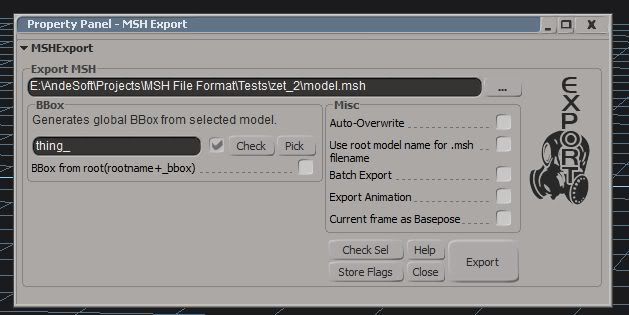
I would have finished this in one day if I had noticed sooner that I called the wrong animation in my prop .ODF. Getting the keyframe positions and rotations is a bit slow. On my machine it takes roughly 1 second to export 30 frames, so 1 second to export 1 second of frames.
Export with Export Animation checked exports the animation in the current frame range, Current frame as basepose exports only the current frame and the next one. So you don't have to shrink your frame range every time you export a basepose. Just move the cursor to frame 0 or 1 and check that option.
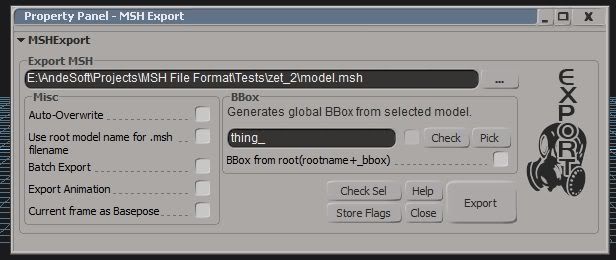
Maybe I'll redesign the exporter a bit, right now there's a lot of free space I could use for the check boxes...
EDIT: 'Redesigned' the UI:
Hidden/Spoiler:
Just quickly shifted the groups around. Now 45 pixels less high!
Re: XSI ZETools
Posted: Wed Jul 25, 2012 1:55 pm
by tirpider
Now witness the power of this fully armed and operational... er.. exporter.
You have done a good thing.
Now I need to learn how to use XSI properly.
Re: XSI ZETools
Posted: Thu Jul 26, 2012 3:00 am
by sereja2
Interesting! Is it possible now to export door animation? If yes, it cud be a realy great invention...
It is realy sad, XSI ZETools isn't work with my XSI Mod Tool. Some "red line error" appear each time, as I click on it...

 [/quote]