Texture problem

How to create models in XSI and other 3D applications and make them work in Battlefront 1 & 2. Post models, tips for application usage and share anything XSI, 3DMax, SketchUp, etc.

Moderator: Moderators

Post Reply
User avatar
trainmaster611
Sith Lord
Sith Lord
Posts: 1779
Joined: Thu Aug 24, 2006 5:22 pm
Projects :: No Mod project currently.
Games I'm Playing :: I have not listed any games yet
xbox live or psn: No gamertag set
Location: Building a railway to Coruscant
Contact:

Texture problem

Post by trainmaster611 »

I was messing with the anakin fighter a little bit (I was changing the R2D2 droid) and after I finished, I reapplied the appropriate tga texture (there was only one highrez texture).

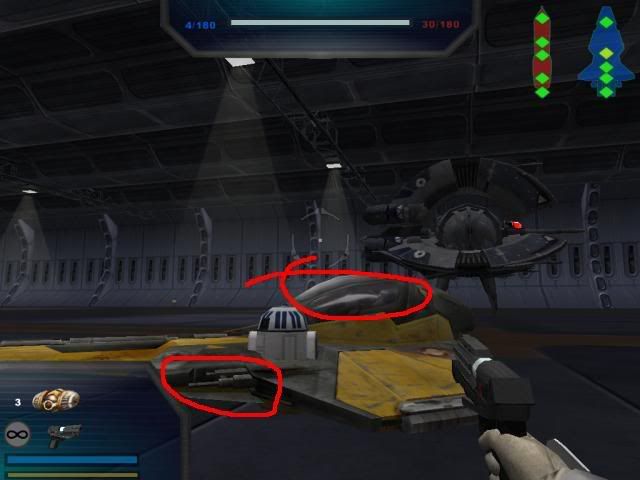
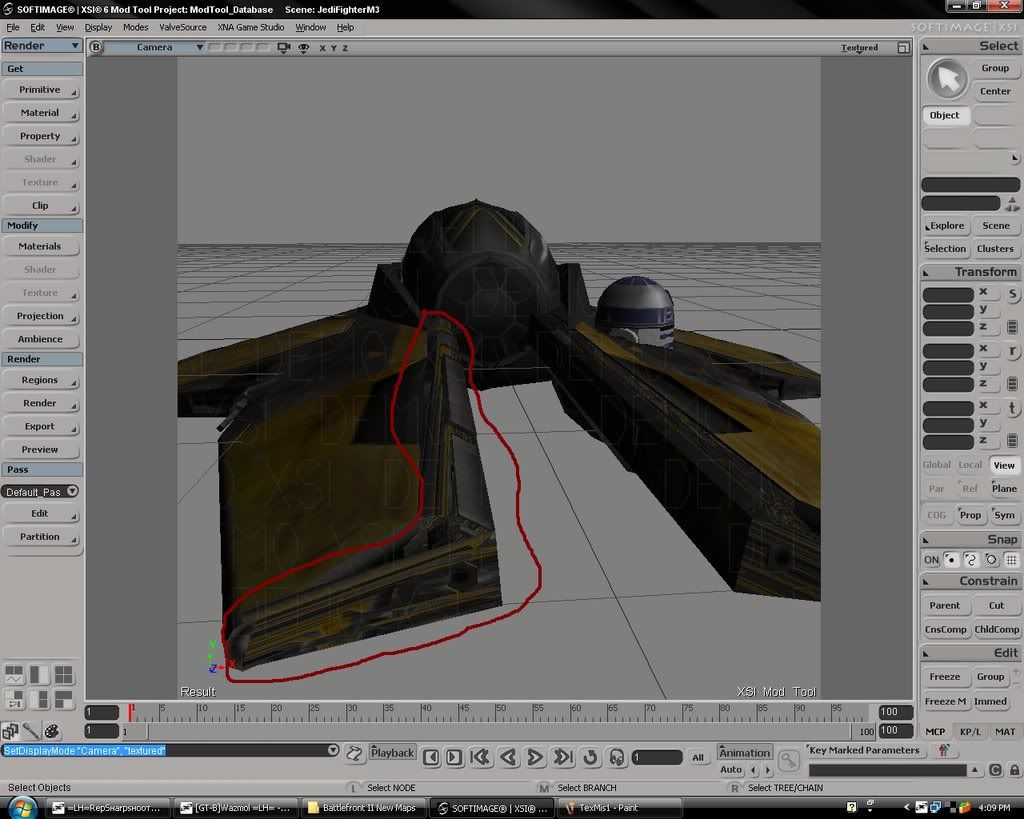
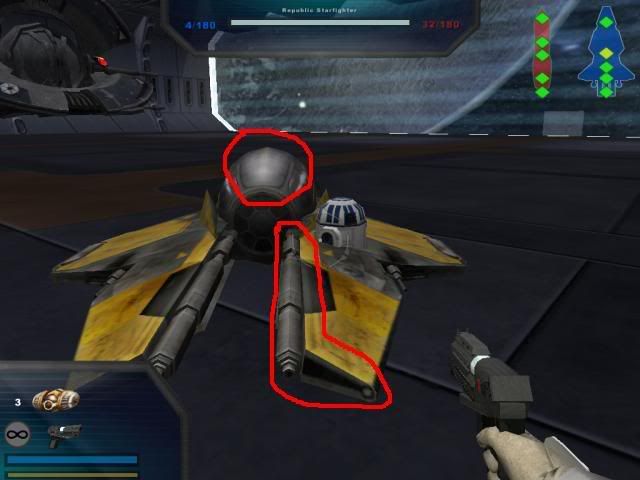
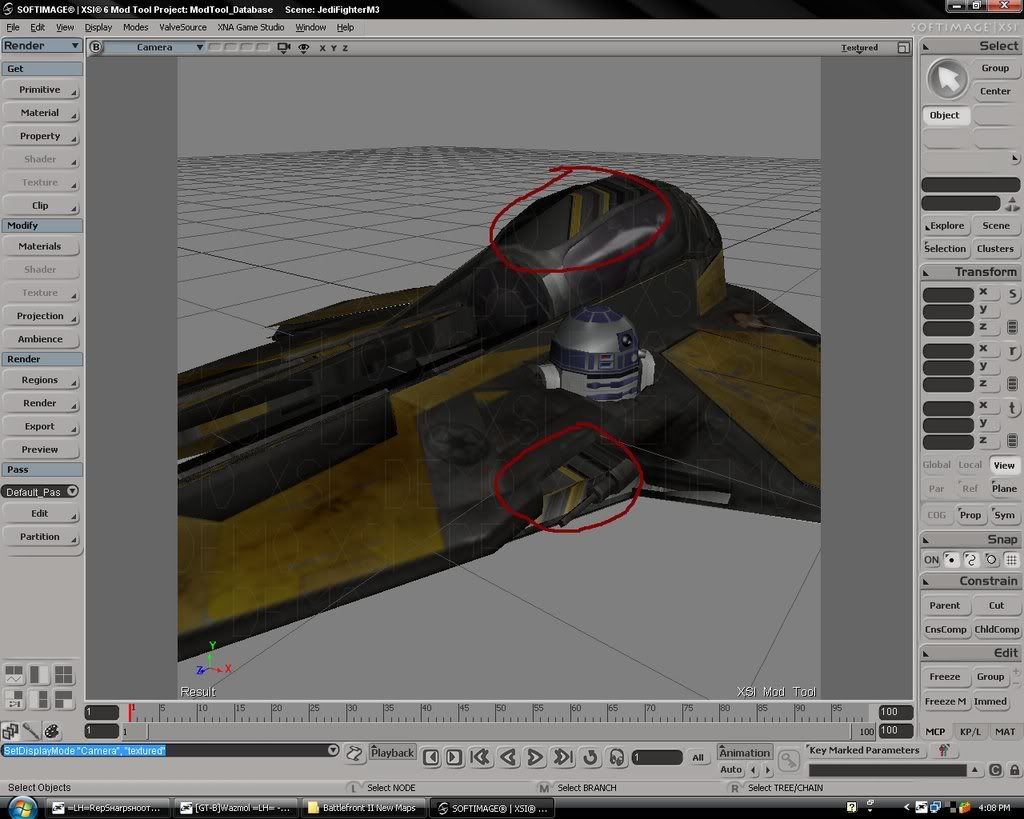
I didn't change anything with the ship itself. But rep deleted some of the giant collision balls surrounding the fighter. Now some of the textures look a little bit skewed.

Where the cannons that run up the length of the ship are, there's some stretched skin there, along with at the nose of the ship, and near the laser cannons are.

In game, the default fighter doesnt have any of these stretched pieces, but when I reapplied the texture they do.

Here's some pics
Image

Image

Image

Image

Could someone tell me what I could have done wrong?
RepSharpshooter
Gametoast Staff
Gametoast Staff
Posts: 1351
Joined: Tue Jul 10, 2007 4:10 pm

Re: Ttexture problem

Post by RepSharpshooter »

delete the collision geometry that is right on top of the lod mesh. It looks exactly like it but has screwed up uvs.
User avatar
trainmaster611
Sith Lord
Sith Lord
Posts: 1779
Joined: Thu Aug 24, 2006 5:22 pm
Projects :: No Mod project currently.
Games I'm Playing :: I have not listed any games yet
xbox live or psn: No gamertag set
Location: Building a railway to Coruscant
Contact:

Re: Ttexture problem

Post by trainmaster611 »

When I'm selecting the collision geometry polygons, how am I supposed to differentiate the collision geometry from the real mesh?
Caleb1117
2008 Most Original Avatar
Posts: 3096
Joined: Sun Aug 20, 2006 5:55 pm
Projects :: No Mod project currently.
xbox live or psn: No gamertag set
Location: X-Fire: caleb1117 ಠ_ಠ

Re: Ttexture problem

Post by Caleb1117 »

Only by weather or not it looks messed up, or if it causes the model no not have the right shape in that spot, for instance, when I edit player models the Shadowvolume mesh, (cause players need no collision) on the hands is a square, which hides the fingers inside of it, that plus the messed up UVs, makes it easy to spot. So just select the polys, (easiest way in your case, is with the tweak tool) then delete them, it should leave the properly textured LOD mesh which is just under it.

If when deleting polys with the Tweak tool, the whole mesh gets deleted, undo, and swap to Rectangle Select - Polygons, it should keep the same selection, then delete.
It's just something that happens every now and again when using the Tweak tool like this.

BTW shortcut for Tweak should be M.
FragMe!
Gametoast Staff
Gametoast Staff
Posts: 2244
Joined: Sat May 13, 2006 12:34 am
Projects :: Not sure keep changing my mind.
Games I'm Playing :: F1 and SWBF
xbox live or psn: No gamertag set
Location: Origin name GT_FragMe
Contact:

Re: Ttexture problem

Post by FragMe! »

Similar to what Caleb said select a poly that looks bad (pressing U so it just does single selection is best)
To make sure it is the right poly try moving it. if it is the right one press shift+ until the number counter at the bottom of the screen stops incrementing. Press alt-delete to get rid of them. If it wasn't the ploy you wanted just undo and try another one. Continue until all the collision polys are gone.
Post Reply