


I've decided to take the time to download the latest version (3.5) of Fierfek's tutorial and proofread it for problems. I didn't find as many as I thought I would, though I would expect version 3.5 of any tutorial to be completely free of errors. I'll point out the things that I noticed; I will also send Fierfek a PM about them. Hopefully they will be resolved in a version 3.6, and if not then at least beginner modders will stumble on this thread after doing a forum search. Some of these are actual straight-out errors; some are things that may prove annoying/misleading.
I think it's something else - not sure what exactly. At any rate there's a handy "tape measure" tool in the Paths interface of ZE.First maps are often HUGE....I believe each square is 1 meter.
While I would agree with "don't start with water", I might argue against "water takes a lot of extra programming." That's a relative term, and in fact adding water is mainly a matter of copy-and-pasting assets and involves very little "programming" at all.Don’t flood the map with water. Water requires a lot of extra programming to get working. Don’t start with water.
There's nothing exactly wrong with those heros in and of themselves. If they fit your map, why not keep them rather than going through some extra effort to change them?Change the heroes. Please, no Anakin, Maul, Han, or Boba. They are the defaults, and must be changed. More on changing them later.
That doesn't mean you can't be, though - just something encouraging I thought I'd say.Say (out loud) “I am not Dann Boeing” 3 times.
More like call it whatever you want, and bonus points if it makes sense. Good maps don't have to be Star Wars-related.Call your map whatever you want. Just don’t call it something that doesn’t relate to Star Wars.
Nope. It will set terrain to the height you specify in the left-hand panel. This is zero by default (hence why Fierfek said "original ground level") but it doesn't have to stay zero - you can change it to whatever number you want.[In talking about ZeroEditor height manipulation]
PAINT: When you hold the mouse button down and drag this over the ground, it will set it to the original ground level.
This statement may mislead beginner modders into thinking SWBFFiles reviewers take out a tape measure and count paces. Make sure your CPs aren't too far apart, and make sure they aren't too close together, but "too far" and "too close" are relative terms. If it suits the map's gameplay and style to have CPs not at regular intervals, that's all well.[In talking about moving command posts]
Make sure they are about the same distance to each other though.
While this isn't technically incorrect, it is a large waste of filesize. You only need to copy over the msh, tga, odf, and other files for whichever objects you want; you do not (and shouldn't) need to copy over the world's entire odf and msh folders. Xavious has pointed out that a possible alternative is to copy over the entire folders, then delete whichever object's files you don't end up using.[In talking about placing objects from stock assets]
You could insert the odf and msh folders from any world, and place whatever you want in your world.
This isn't wrong, but it's easier to just look into the side's req (not shell.req) file.[In talking about finding the names of the odf files for specific troops]
Go into the sides folder, then to rep, then odf. Here are all the republic files. Sort by name, and find the section where everything is sorted by rep_hero_(hero name). The default is rep_hero_anakin. We want Mace Windu. So scroll down until you find him. He is rep_hero_macewindu. Write that down somewhere.
Why?Control Zones should be 10 height instead of 5
Why?Control Zones should be placed next to the command posts instead of over them
Fierfek does not explain what Control Regions are and what they do. This is not a good thing, as then beginner modders might see their vehicles do strange things and then wonder why, when the cause was the control region.[In talking about Control Regions]
Then, make the control regions. Place them next to the command posts. Now we will make vehicles.
Well, actually, the stock documentation says:Go back to objects, and find com_item_vehicle_spawn again. Place 2 or 3 next to each command post, outside the capture zone but NOT IN THE CONTROL ZONE. This is important. Do not place the vehicle spawns in the control zones.
At a stroke the stock documentation explains what Control Regions are and what they do. In reality you can place both Control Regions and vehicle spawns wherever you want.Getting Started.doc wrote:The ControlRegion is a region that controls the spawning of vehicles associated with a CP. Vehicle Spawns are placed inside the Control Region, and once they leave the Control Region, if they are abandoned, they will eventually self-destruct, and respawn.
You can have vehicle spawns inside the spawn path, just not on the spawn nodes. And even if you do have the vehicles on the spawn nodes I think either the vehicles or the units would be forced to one side, and wouldn't actually spawn inside each other. I've never tried it, though.You don’t want them inside the spawn path because if you do, people would spawn inside vehicles (which would be a little disturbing).
Fierfek does not explain what any of these values are, only tells the beginner to plug in numbers. In fact, sometimes completely different SpawnCounts or DecayTimes will suit a map better than Fierfek's numbers. Once again, the stock documentation explains this perfectly. See Getting Started.doc.In ControlZone, write the command post number. So, if it is cp1, write cp1, if cp2 write cp2, etc. In Spawn Count, put 1. In Spawn time, put 30.0. In ExpireTimeEnemy, put 30.0. In ExpireTimeField, put 60.0. In DecayTime, put 30.0.
Notice the spaces between the last quotation mark and the parenthesis? That's not good. There shouldn't be any spaces - this error comes up again several times in Fierfek's tutorial.[When copying a lua]
"cis_hero_darthmaul",
"cis_hover_aat",
“cis_hover_stap” )
"Make tons of these" is rarely good advice. I would rather say "make as many as you need". It is also important to note (though the tutorial doesn't) that each hub can have a maximum of six connections.[In talking about planning]
To place hubs, click new hub, and click on the ground. Drag to choose the size. Make tons of these.
Your sky has not made the switchover if the new MAP.sky's time stamp still reads from before the last munge. To ensure that the sky file will be munged, I would recommend going into it with notepad and re-saving it, then munging.[In talking about changing the sky]
So, rename the old MAP.sky to old.sky. Now, rename end1.sky to MAP.sky. Now, your sky has made the switchover. Munge, and play!
Come on, there's no call for that. How do you suppose Count_Zooku or the maker of Onmanjon take that comment?After you have tested your level thoroughly, and played around with it in zeroeditor, you can share it. Testing is extremely important. Check out Count_Zooku’s latest projects to see what happens when you don’t test levels. Check out the file Planet Onmanjon.
~ Note: Xavious has brought to my attention that Count_Zooku submitted four files to SWBFFiles, two of which made it onto the site, without even owning the game. So while I still don't like Fierfek's comment I can see what he means.
Generally tutorials explain the way to do something rather than saying "find some way" to do it, even if it's as simple as zipping up a folder.Now, find some way to zip your file up to compress it.
Not necessarily true.And if you keep the original skins, it doesn’t matter how great your weapons are, because it will be boring.
But sometimes they don't, and then the poor beginner is all confused. In fact, when dealing with props and buildings, often msh files use several textures at once. It is a good idea to open the MSH file with notepad and search for "tga". This will help you find the files you need. Alternatively, download the MSH Viewer utility, drag-and-drop the msh file into it, and click the big i button.Generally, msh’s and their associating TGA’s have the same name.
And if you followed the tutorial exactly but are wondering why it still doesn't work, Fierfek forgot to mention that you need to copy the "Common" side folder from assets/sides into your own Data_ABC/sides and then munge that as well.Now run BF2. If you did everything right, now your skins are ingame!!! Awesome!!
What? Why did "Mode 2" replace the essential "Conquest"?
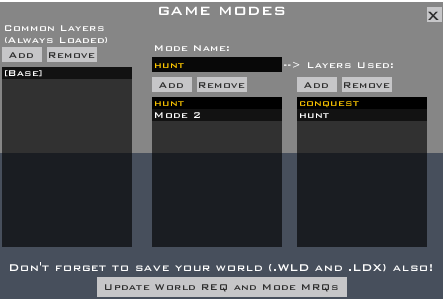
Why not? It's not a very hard or lengthy thing to explain, and would round off the section nicely rather than leaving a hole.It will have rebels vs. wampas. I won’t tell you how to change that right now.
No need - "pilot" and "marine" both function fine.[In talking about SetUp_Teams.lua]
Rename pilot to “commander” and rename marine to “stealth”.
It's up to the modder to decide if something is unnecessary or not.Anyway, in the beginning of this tutorial, I told you to not start with water, and with good reason. It takes some extra programming to get right, and is an unnecessary complication.
It might be a good idea to go over how to add uncapturable CPs here.[In talking about making CTF mode maps]
In Zeroeditor, there is a new layer. When you move a command post, you also have to move the spawn path, the flag score region, the flag score circley-thingy, and the flag itself.
Actually, maybe that was the shortest section.
That seems more than a bit self-congratulatory, especially if the writer taught the reader to mod incorrectly. In this case the tutorial is fairly comprehensive but has holes in it. In any case, the best tutorials (most tutorials, actually) don't say "pay me homage" at their ends.Make sure to give credit to me when you publish your mod! Seriously, if you read this, then I taught you to mod, and you should thank me.
Finally, throughout the tutorial I kept running into comments like these:
These seem more like (rather strong) personal opinions than ironbound modding facts. My advice to the beginner modder: be aware of scale, but don't crowd lots of things together.Flat maps suck.
FLAT MAPS SUCK.
If your map is flat, you will get minus points.
BIG MAPS SUCK.
Those are my notes from reading through Fierfek's latest tutorial. Hopefully Fierfek's readers will find some answers to several confusing questions in this thread. To anyone else: feel free to add/remove notes.




 Good job Fiodis

 There is this munge fix to fix that error (by Frisbeetarian):




 i was wondering when he would see it
