Model problem.

How to create models in XSI and other 3D applications and make them work in Battlefront 1 & 2. Post models, tips for application usage and share anything XSI, 3DMax, SketchUp, etc.

Moderator: Moderators

Post Reply
User avatar
Cerfon Rournes
Master Bounty Hunter
Posts: 1558
Joined: Thu Jul 08, 2010 5:53 pm
Projects :: WIP. I will reveal what it is later on..
Games I'm Playing :: SWBF2-SWRC
xbox live or psn: No gamertag set
Location: New York, USA
Contact:

Model problem.

Post by Cerfon Rournes »

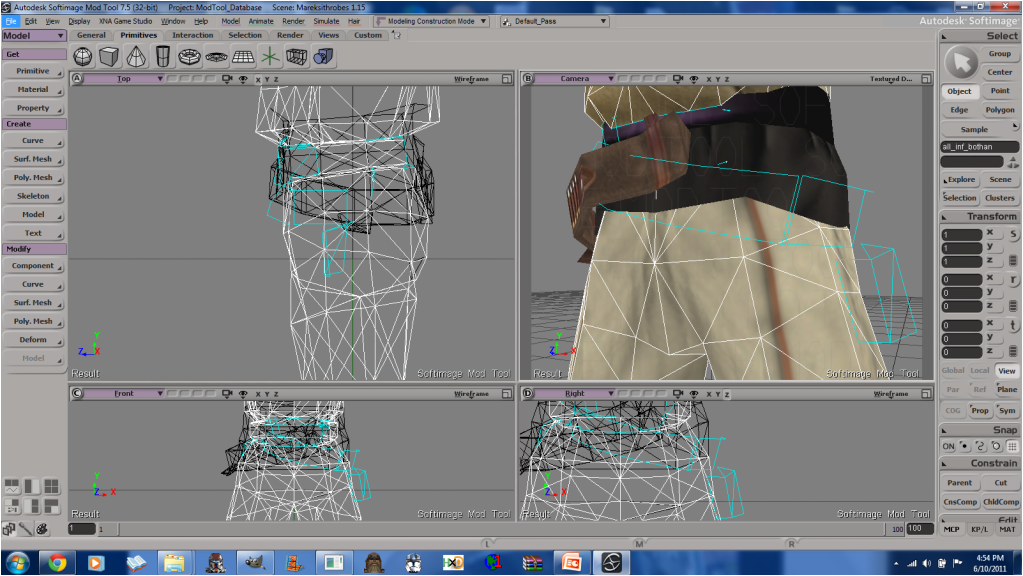
While i was doing some editing In XSI, I came across this small problem.
Hidden/Spoiler:
Image
Those light blue lines happened after I erased some polys. How would I get rid of them?
Thanks. I already tried the 'I' select for this, and they would not erase.
Hidden/Spoiler:
Also, I did not do a Search for this, because I didn't know what to look for..
User avatar
DarthD.U.C.K.
Master of the Force
Master of the Force
Posts: 6027
Joined: Wed Sep 27, 2006 11:05 am
Location: Duckburg, Germany

Re: Model problem.

Post by DarthD.U.C.K. »

looks like they are remaining edges, i would try edgeselect. you can "forcefully" delete important polys and edges that you can't delete normally by pressing ALT+delete.

User avatar
Cerfon Rournes
Master Bounty Hunter
Posts: 1558
Joined: Thu Jul 08, 2010 5:53 pm
Projects :: WIP. I will reveal what it is later on..
Games I'm Playing :: SWBF2-SWRC
xbox live or psn: No gamertag set
Location: New York, USA
Contact:

Re: Model problem.

Post by Cerfon Rournes »

Thanks D.U.C.K! Alt + Delete works like a charm! :thumbs:
Post Reply