Page 31 of 75
Posted: Sun Dec 31, 2006 3:57 pm
by Linus
I agree with you, JK514...
- Linus
Posted: Sun Dec 31, 2006 4:01 pm
by Guest
Linus

I want ask you... You are Photoshop 8.0-user, yes?
Posted: Sun Dec 31, 2006 6:26 pm
by Linus
Sorry to say this, but I use Adobe Photoshop CS2...
- Linus
Posted: Sun Dec 31, 2006 6:35 pm
by wazmol
thanks guys for saying my skin is good

Posted: Sun Dec 31, 2006 7:02 pm
by SymbolS
kind of off-topic, but does anybody know how to get new textures into GIMP, such as getting like a camo texture that you can blend in with the trooper?
!!HAPPY NEW YEAR!!
Posted: Sun Dec 31, 2006 9:11 pm
by DooFi
Linus wrote:Sorry to say this, but I use Adobe Photoshop CS2...
- Linus
Which is actually
Photoshop 9, if I'm not mistaken. Just to clear that up

SymbolS wrote:kind of off-topic, but does anybody know how to get new textures into GIMP, such as getting like a camo texture that you can blend in with the trooper?
!!HAPPY NEW YEAR!!
ever thought of...
painting?
Posted: Sun Dec 31, 2006 9:38 pm
by SymbolS
I didn't mean it like that Doofi, I meant like texturing only and still having the shapes and designs on the object.(very difficult to explain)
Posted: Sun Dec 31, 2006 9:39 pm
by wazmol
do you no of patterns in gimp SymbolS?
put the .Pat file in your D:/docs and settings/'your name'/-gimp 2.2 (or summin)/patterns then open gimp and in your patterns section there will be a new camo pattern
heres the link:
http://files.filefront.com/camo3pat/;64 ... einfo.html
now make a new layer, over your clone and fill the whole screen with the pattern then at the side on the layers section change the style of the layer to multiply or summin and it will work just fine.
Posted: Sun Dec 31, 2006 10:56 pm
by DooFi
SymbolS wrote:I didn't mean it like that Doofi, I meant like texturing only and still having the shapes and designs on the object.(very difficult to explain)
put it on a new layer and play around with blend modes.
Posted: Sun Dec 31, 2006 11:42 pm
by SymbolS
Yes, that's what I was looking for, thank you wazmol69.
Posted: Mon Jan 01, 2007 1:04 am
by EGG_GUTS
here's my first skin and I know it's not good but well here it is
Shadow Trooper

Posted: Mon Jan 01, 2007 2:12 am
by SymbolS
It's not too bad, I like the eyes, but the body needs some work. Good for first skin!
Posted: Mon Jan 01, 2007 3:00 pm
by Razgriz
i think it looks pretty good great job for your first skin
Posted: Mon Jan 01, 2007 7:35 pm
by SymbolS
Here is a...Engineer?
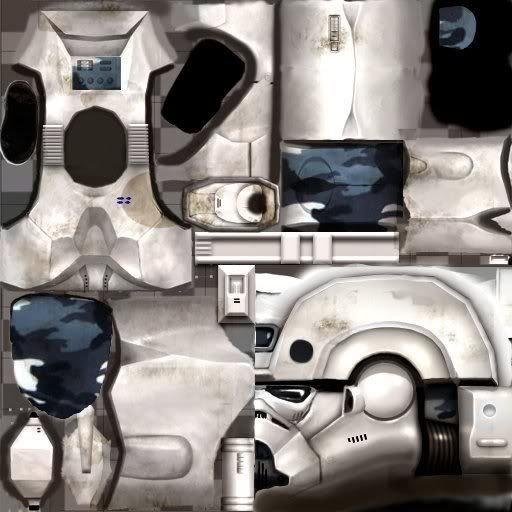
Just a simple camo design, thank you wazmol69
Posted: Wed Jan 03, 2007 2:07 am
by SymbolS
WARNING: THIS MAKES YOUR EYES HURT!!! DO NOT LOOK AT FOR MORE THAN 1 min!!!

AHHH ITS BURNS lol. I didn't get a chance to see what it would be like in-game.
Posted: Wed Jan 03, 2007 3:59 am
by Schizo
Posted: Wed Jan 03, 2007 4:12 am
by Penguin
I see nothing
Posted: Wed Jan 03, 2007 4:44 am
by -_-
great job on the arms.
Posted: Wed Jan 03, 2007 11:14 am
by Guest
-_- wrote:great job on the arms.
agree
Schizo
GIMP?
or Photoshop?
Posted: Wed Jan 03, 2007 12:02 pm
by Ipodzanyman
how do you make such a neat camo pattern?
