Page 1 of 1
Terrain Texture Issues [Solved]
Posted: Fri Apr 01, 2016 6:52 am
by MrMew
So I'm going for a sandy desert look. I tried the Mos Eisley terrain and one from Sky's Desert Pack. However they seem to come out really dark in-game. I even added a directional lighting to see if it changes anything, yellow, white, orange, but it seems to only really affect the objects and bipeds. I've been trying to get a very sunny dry feel.
Re: Terrain Texture Issues
Posted: Fri Apr 01, 2016 10:39 am
by Oceans14
MrMew wrote:So I'm going for a sandy desert look. I tried the Mos Eisley terrain and one from Sky's Desert Pack. However they seem to come out really dark in-game. I even added a directional lighting to see if it changes anything, yellow, white, orange, but it seems to only really affect the objects and bipeds. I've been trying to get a very sunny dry feel.
There's a color tab in ZE that allows you to paint over the terrain. If you choose a color, say, red, and paint the terrain, it will have a reddish tinge. In order to adjust brightness you can adjust the alpha value (that would be the 4th one). There's plenty of options to play with. Also, I've found that terrain in ZE tends to appear darker than it does in game. Not by very much, but you may want to keep that in mind

Re: Terrain Texture Issues
Posted: Fri Apr 01, 2016 7:26 pm
by MrMew
The terrain appears lighter in ZE than the game for me... Where is the alpha option? I can only find it for barrier, planning, water and hintnode.
Re: Terrain Texture Issues
Posted: Fri Apr 01, 2016 10:37 pm
by Oceans14
My bad, there is no alpha field. Adjust the brightness by increasing/decreasing the color values. Bright would be closer to 255, dim; 0. So if nothing else, you could use the same values you set for your light and go from there.
The terms foreground and background (I believe) just mean you can set a different color for right click and left click. But since I'm less and less sure I really know what I'm talking about, here's a link to the documentation:
https://sites.google.com/site/swbf2modt ... itor_guide. Look under the heading "COLOR MODE".
Re: Terrain Texture Issues
Posted: Sat Apr 02, 2016 12:13 am
by MrMew
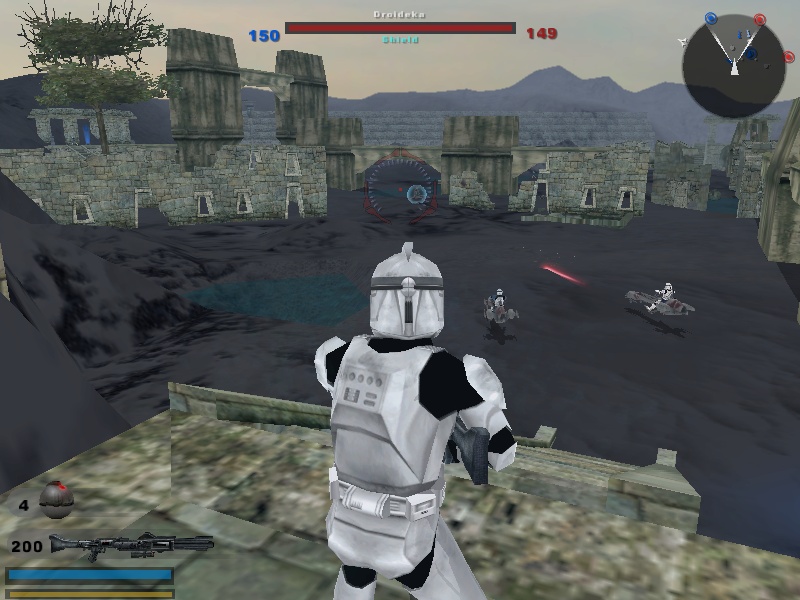
Well this is Hoth snow terrain with just white colour, and white light. Looks a bit dark too me...
Re: Terrain Texture Issues
Posted: Sat Apr 02, 2016 1:33 am
by AQT
Re: Terrain Texture Issues [Solved]
Posted: Wed Apr 06, 2016 5:14 am
by MrMew
Ok so this is texture related again and is driving me bananas. I downloaded some assets to get some platforms. I placed the .odf .msh and .tga in the world folder, even tried them in seperate odf and msh folders, but the texture refuses to show up.