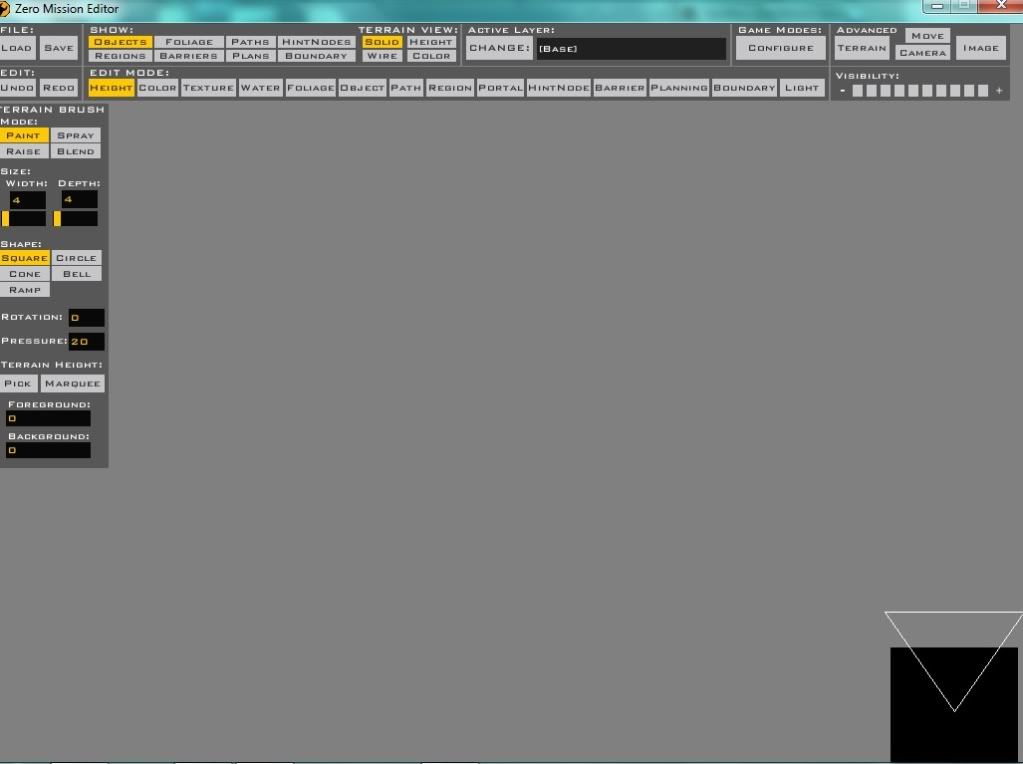
willinator wrote:When I follow that link, all I see is a scary wall of code. What you should do is copy the picture into paint, then save the image and upload it to an image site like photobucket or dropbox. Then, use the img tag feature when posting here. If by grey screen you mean this:
Hidden/Spoiler:
then everything is fine. Just use the Load button, and scroll to find you map's .wld file.
There's not much more to say, and not much more to do, it's just an all black screen, not buttons, it has the top display to exit, but the rest is all black. And that link SHOULD be a download of the file, but what I've explained really can't be more detailed in an image anyway.
Re: ZeroEditor problems :(
Posted: Fri Apr 06, 2012 1:29 pm
by willinator
I'm not sure how to help you, maybe a re-install
Also, this is what I see on your website (a small excerpt)
Weird... also I tried reinstalling, but that did nothing, also, is the README supposed to talk about xbox?
Hidden/Spoiler:
Random hiding stuff‼ :maulsaber:
Re: ZeroEditor problems :(
Posted: Fri Apr 06, 2012 3:53 pm
by Marth8880
mostimpresive wrote:also, is the README supposed to talk about xbox?
Yes.
Zero Editor problem W7, config.ini?
Posted: Sun Apr 22, 2012 5:31 am
by AhsokaTano
Hi again.
I really want to mod again SWBF 2, but the ZE doesn't work for me. It's for the Runtime Error of C++. I decided to change the compatibility to Windows XP (Service Pack 2) and Windows XP (Service Pack 3), before install Windows 7 in my computer, the ZE works correct in Windows XP.
But, when i run the program, is this error:
Hidden/Spoiler:
But i have the config.ini in my zero editor file. If you can give me a config.ini of a Windows XP version, maybe the ZE will works.
If you can, please, give me a config.ini of a Windows XP version.
If won't work, can anyone help me to solve the error?
Thanks.
Windows 7 Professional 32-bit on 64 amd
NVIDIA GeForce 8600 GS
MS .NET Framework versions - 1.1
Notes:
When I troubleshot the compatibility and ran in the recommended settings, I got an error report that said: config.ini not found, unable to start
but that is the only time a get a non-runtime error
Cody_LG can't get ZE to work
Windows 7 Home Premium 64-bit
NVIDIA GeForce 430 GT
MS .NET Framework versions - 1.1 and 4.0
Notes:
When I start it as admin, it come another error: Zero Editor Error: "config.ini" not found, unable to start!
But I have the config.ini in the same folder.
Notes:
When try to run the zeroeditor without changing anything it says:
"Runtime Error! Program: C:\BF2_ModTools\Data_IMB\zeroeditor.exe This application has requested the Runtime to terminate [...]".
But when I run the zeroeditor in compatibility mode it just says: "config.ini" not found, unable to start
even though the file is there.
There is currently no solution, or at least no one has come forth with one. If the config.ini file exist then there really isn't anything else to do. You could always switch back to XP if you're anxious to get going.
I'll probably merge this thread with the main one later and please answer the questionaire so we can collect information about your computer.
Re: Zero Editor problem W7, config.ini?
Posted: Mon Apr 23, 2012 1:53 pm
by AhsokaTano
Ok, thanks for the reply. Maybe, i will return to Windows XP.
Re: Zero Editor Runtime Error in Vista & Win7
Posted: Mon Apr 23, 2012 11:06 pm
by Marth8880
Does Zero Editor work for you? Yes
Windows verson? Windows Vista Home Premium SP2
Graphics card? MSI NVIDIA GeForce GT 220
Graphics card driver version? 259.73 (02/21/12)
Operating system architecture? 32-bit
Microsoft .NET Framework version? 1.0.3705, 1.1.4322, 2.0.50727, 3.0, 3.5, 4.0.30319
Re: Zero Editor Runtime Error in Vista & Win7
Posted: Tue Apr 24, 2012 12:09 am
by AceMastermind
Thanks for participating Marth.
Judging by the number of NVIDIA users experiencing runtime errors it looks like ATI Radeon might be worth looking into as last resort, even if for nothing other than modding SWBF2. If any of you are desperate to get ZE working then you could pick up a SWBF2 supported ATI gfx card for cheap somewhere or borrow one from a friend for testing and give it a try, just post a reply here if it works.
Re: Zero Editor Runtime Error in Vista & Win7
Posted: Sat Apr 28, 2012 2:36 pm
by Tears2Roses
Does ZE work for you? Yes
What edition of Vista or Windows 7 are you running? Vista Home Premium
What graphics card are you currently using? Nvidia GeForce 9500 GS
What's the current driver version of your gfx card? 296.10
Are you running 32 or 64 bit? 64
What version of Microsoft .NET Framework do you currently have installed? 1.1, 3.5 SP1, 4 client profile.
Re: Zero Editor Runtime Error in Vista & Win7
Posted: Fri Jun 22, 2012 2:11 am
by razac920
I think having Microsoft Visual C++ installed might be part of getting ZE to work... I had a lot of trouble in the past and couldn't mod, but at some point (before joining this forum) I was able to get it to work, after going a *bit* crazy installing lots of C++ versions, since that was the runtime error I was facing. all versions
Re: Zero Editor Runtime Error in Vista & Win7
Posted: Fri Jun 22, 2012 5:09 am
by AceMastermind
Is that the only thing you did to get ZE working? According to your screenshot you use Windows 7, correct?
I would think ZE would only require Microsoft Visual C++ Redistributable 2005 x86 (32-bit runtime for 32-bit applications) since the programs in the ModTools were likely written/modified and compiled in that era of programming, but i'm not sure.
If you open the zeroeditor.exe in a hex editor you'll find mention of "Microsoft Visual C++ Runtime Library" but no version info etc. You'll also find this error:
This application cannot run using the active version of the Microsoft .NET Runtime...
Re: Zero Editor Runtime Error in Vista & Win7
Posted: Fri Jun 22, 2012 2:24 pm
by razac920
Yes, I have a Windows 7 Professional 64-bit machine. I believe I also had to get the Microsoft .NET Framework, not sure which one(s?), but I got the general impression from this thread that you ONLY need the .NET, which I think (may?) be inaccurate. It certainly is very likely that most of these Visual C++ Redistributables are unneeded, but I can at least confirm that having them installed doesn't prevent ZE from running. Also, though I don't know if it's important or not, but I have a NVIDIA Quadro FX 880M graphics card.
Re: Zero Editor Runtime Error in Vista & Win7
Posted: Tue Jul 17, 2012 3:09 pm
by MrMuffins
Computer 1: (Laptop)
Hidden/Spoiler:
Does ZE work for you? Yes
What edition of Vista or Windows 7 are you running? Windows Vista Ultimate SP2
What graphics card are you currently using? Mobile Intel(R) 4 Series Express Chipset Family
What's the current driver version of your gfx card? No idea, same as factory bought
Are you running 32 or 64 bit? 32-Bit
What version of Microsoft .NET Framework do you currently have installed? 1.1
Basically I use my laptop for everything since its portable and easy. When I found out you could make battlefront maps I got excited and downloaded zero editor and ran it without any problems. (Basically had no idea of the errors this presented for others)
Computer 2: (Desktop)
Hidden/Spoiler:
Does ZE work for you? No, then yes, then no
What edition of Vista or Windows 7 are you running? Windows Vista Ultimate SP2
What graphics card are you currently using? Nvidia Geforce 9400GT 1GB
What's the current driver version of your gfx card? 382
Are you running 32 or 64 bit? 32-Bit
What version of Microsoft .NET Framework do you currently have installed? 1.1
So after I had it on my laptop, I got annoyed that it depended on the scroll wheel for some stuff, I just had a mouse pad. Also it got laggy some times so I thought why not move it to my desktop which has a dedicated card in it. After it finished downloaded I was presented with the famous runtime error and couldn't get it to run. Reading in this thread I saw upgrading drivers and I thought what the heck so I did that, updated to 272 (if I'm not mistaken), and boom, it ran.
Computer 3: (New Desktop)
Hidden/Spoiler:
Does ZE work for you? No, then yes
What edition of Vista or Windows 7 are you running? Windows 7 Home Premium
What graphics card are you currently using? Radeon HD 7750 1GB
What's the current driver version of your gfx card?
Are you running 32 or 64 bit? 64-Bit
What version of Microsoft .NET Framework do you currently have installed? 1.1
Ok so not too long ago I wanted to buy a better desktop. At that time I lost track of modding, but shortly after it I remembered and thought I'd try it. I switched gpus from computer 2 to 3, now running the 9400 with latest drivers...and runtime error. After frustratingly long time of downloading each driver, uninstalling the current one, and installing it, I couldn't find the driver that made it work on my first desktop. I figured after reading abit that vista messes up zero editor from running, but is still possible, but windows 7 outright kills it from working.
I tried going back to my second desktop, now missing the geforce, and running it but it failed, runtime error.
I tried using 3dAnalyze but it didn't work. Running the program in admin/xp support didn't work.
I tried the new feature troubleshoot compatibility for xp sp2 and..no runtime error. Now it says config.ini was missing. ?? Went so much as to place a copy of config.ini in every folder I thought it might be calling, still not working.
Then I took it slow and read through what people had and hadn't and what it was working on. Due to the sheer number of nvidias that aren't working with this, and the fact that my desktop didn't work until i updated the drivers, means that its the gpu's fault. At least in my case. I picked up the new gpu Radeon 7750, popped it in today, ran the CD and installed drivers.....and...... It works on first try. Success at last!
I hope this gives further ideas on how to run this cause I sure was getting mad when it wouldn't run on my new desktop. Yet in my case it seems to be graphics card dependent.
Zero Error
Posted: Thu Jul 19, 2012 10:37 am
by Anakin
just reinstalled Mod Tools , but still get this error.
Hidden/Spoiler:
Re: Zero Error
Posted: Thu Jul 19, 2012 10:42 am
by lucasfart
I'm surprised that a member of your amount of posts/involvement hasn't seen the massive topic for this over in the Technical Advice and Tutorials Sub-Forum....
now get an error cannot find confic.ini. how can i fiy that?
Re: Zero Editor Runtime Error in Vista & Win7
Posted: Sun Jul 29, 2012 10:57 am
by LukeCreed
Does ZE work for you? No
What edition of Vista or Windows 7 are you running? Windows 7 Home Premium
What graphics card are you currently using? NVIDIA GeForce TI 4600 (i think)
Are you running 32 or 64 bit? 32 bit
What version of Microsoft .NET Framework do you currently have installed? 4.0
Error --> The famous runtime error...
Run as Administrator ---> Appear the runtime error
Run with 3D Analyzer --->Appear the runtime error!
Run with compatibility mod ---> Runtime error with all types of compatibility mod!
Run with lower screen resolution ---> Runtime error with ALL screen resolution types! (800x600, 1024x768, 1280x760, ecc...)
Sorry for my english, but i'm Italian Can someone help me?
the only two words that go through my head almost every time are "Runtime error!"
EDIT Ok, i've reinstalled Star Wars Battlefront II and Mod Tools, but Zero Editor still doesn't work! The runtime error don't want to disappear! May the unlucky is with me?
Re: Zero Editor Runtime Error in Vista & Win7
Posted: Sun Jul 29, 2012 1:54 pm
by AceMastermind
Reinstalling the game or modding tools won't fix runtime errors anyway. The problem runs much deeper but seems to be mostly graphics related.
Re: Zero Editor Runtime Error in Vista & Win7
Posted: Sun Jul 29, 2012 2:23 pm
by LukeCreed
I discovered that my graphic card is Nvidia geforce 525m. When i try to get an update, the computer tells me that the card is updated.


 :maulsaber:

 Can someone help me?