Alpha channel ineffective ingame? [Solved]
Moderator: Moderators
-
jedi_pilot
- Command Sergeant Major

- Posts: 288
- Joined: Sat Sep 15, 2007 2:09 pm
Alpha channel ineffective ingame? [Solved]
Well, I followed the video tutorial on how to add an Alpha Channel on my texture, so I could make some parts of my model texture invisible
. But when I munge, and take a look at my model ingame, my alpha channel didn't do anything. Is there something I'm missing here
??? Thank's.
- DarthD.U.C.K.
- Master of the Force

- Posts: 6027
- Joined: Wed Sep 27, 2006 11:05 am
- Location: Duckburg, Germany
Re: Alpha channel ingame???
did you activate transparency in the edit flags tab?
-
jedi_pilot
- Command Sergeant Major

- Posts: 288
- Joined: Sat Sep 15, 2007 2:09 pm
Re: Alpha channel ingame???
No, but won't that make the whole polygon transparent
???
-
FragMe!
- Gametoast Staff

- Posts: 2244
- Joined: Sat May 13, 2006 12:34 am
- Projects :: Not sure keep changing my mind.
- xbox live or psn: No gamertag set
- Location: Origin name GT_FragMe
- Contact:
Re: Alpha channel ingame???
Only the bits of the tga that are transparent will be so the rest of it will be normal even if the tga covers the whole polygon, case in point the fences on Naboo they are rectangles with the fence tga applied.
So yes it is okay to set the edit flag for all the polies that are going to need transparancy or if you are hex editing then what ever is required for that (sorry I don't hex edit so I can't give details but they can be found in the FAQs)
-
jedi_pilot
- Command Sergeant Major

- Posts: 288
- Joined: Sat Sep 15, 2007 2:09 pm
Re: Alpha channel ingame???
Ok, I've set up the alpha channel and set up what kind of transparency I wanted. Is there anything else I need to do with the edit flags besides selecting what kind of transparency I want set up(single sided, double side)??? And what does the hard edged transparency button do??? Thank's
.
- ANDEWEGET
- Ancient Force

- Posts: 1266
- Joined: Tue Apr 01, 2008 8:42 am
- Location: Germany
- Contact:
Re: Alpha channel ingame???
hard edged, i think, makes the whole model invisible without a texture
- DarthD.U.C.K.
- Master of the Force

- Posts: 6027
- Joined: Wed Sep 27, 2006 11:05 am
- Location: Duckburg, Germany
Re: Alpha channel ingame???
really?!
does that make sense?
you could just hide the model
does that make sense?
you could just hide the model
- AceMastermind
- Gametoast Staff

- Posts: 3285
- Joined: Mon Aug 21, 2006 6:23 am
- Contact:
Re: Alpha channel ingame???
BF2_materials.doc wrote:Hard Edged Transparency
Hard edged transparency enables alpha testing and does not write pixels whose alpha is below a certain value.
- DarthD.U.C.K.
- Master of the Force

- Posts: 6027
- Joined: Wed Sep 27, 2006 11:05 am
- Location: Duckburg, Germany
Re: Alpha channel ingame???
ah ok, i thought it would do that *gets nothing*
-
jedi_pilot
- Command Sergeant Major

- Posts: 288
- Joined: Sat Sep 15, 2007 2:09 pm
Re: Alpha channel ingame???
Ok, so I don't need enable that. Is there anything else I need to enable in the edit flags besides what kind of transparency I want to use???
- DarthD.U.C.K.
- Master of the Force

- Posts: 6027
- Joined: Wed Sep 27, 2006 11:05 am
- Location: Duckburg, Germany
Re: Alpha channel ingame???
no, its enough
-
jedi_pilot
- Command Sergeant Major

- Posts: 288
- Joined: Sat Sep 15, 2007 2:09 pm
Re: Alpha channel ingame?
Ok, I'll export and see if that works. Thank's
.
EDIT
Sorry to double post
. But I still cant see through my prop
. Is there anything I'm forgetting to do after I select the transparency option? Do I have to specify a texture or somthing?
Double posting is against the RULES please use the Edit button - Staff
EDIT
Sorry to double post
Double posting is against the RULES please use the Edit button - Staff
- DarthD.U.C.K.
- Master of the Force

- Posts: 6027
- Joined: Wed Sep 27, 2006 11:05 am
- Location: Duckburg, Germany
Re: Alpha channel ingame?
1. give your texture alphachannel
2. texture your object with this texture
3. select the polygons that you want to be transparent (you can select all polys, it doesnt matter)
4. go to pandemic tool>edit flags and set the tranparency to 2
5. export your model and you should be done
if that doesnt work, try to hexedit tranparency to your model, if that still doesnt work, theremust be a problem with the texure
2. texture your object with this texture
3. select the polygons that you want to be transparent (you can select all polys, it doesnt matter)
4. go to pandemic tool>edit flags and set the tranparency to 2
5. export your model and you should be done
if that doesnt work, try to hexedit tranparency to your model, if that still doesnt work, theremust be a problem with the texure
-
jedi_pilot
- Command Sergeant Major

- Posts: 288
- Joined: Sat Sep 15, 2007 2:09 pm
Re: Alpha channel ingame?
Well, half my texture has an alpha channel while the other half doesn't. Do you think that could be the problem??? Should I give the whole texture an alpha channel???
- DarthD.U.C.K.
- Master of the Force

- Posts: 6027
- Joined: Wed Sep 27, 2006 11:05 am
- Location: Duckburg, Germany
Re: Alpha channel ingame?
yes, that could be the problem
-
jedi_pilot
- Command Sergeant Major

- Posts: 288
- Joined: Sat Sep 15, 2007 2:09 pm
Re: Alpha channel ingame?
Well, editing the alpha channel didn't do anything. But I was able to get the hexediting to somewhat work
. When I hexedited it, the wole texture became transparent in game. Can you specify in hexeditor that only the parts of the texture that are alpha channelled will be transparent in game???
- DarthD.U.C.K.
- Master of the Force

- Posts: 6027
- Joined: Wed Sep 27, 2006 11:05 am
- Location: Duckburg, Germany
Re: Alpha channel ingame?
you cant, that is specified already
there must be something wrong with your texture
-
jedi_pilot
- Command Sergeant Major

- Posts: 288
- Joined: Sat Sep 15, 2007 2:09 pm
Re: Alpha channel ingame?
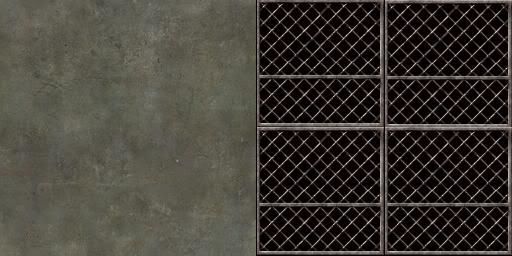
Well, I can't figure out what the problem is with my texture so here is a picture of my texture
,

And here is a picture of my alphachannel,

The problem is that the whole part of the model that uses this texture is transparent. So maybe you can figure out what the problem is
.

And here is a picture of my alphachannel,

The problem is that the whole part of the model that uses this texture is transparent. So maybe you can figure out what the problem is
- AceMastermind
- Gametoast Staff

- Posts: 3285
- Joined: Mon Aug 21, 2006 6:23 am
- Contact:
Re: Alpha channel ingame?
Your texture works fine:

You must be doing something else wrong.
-
jedi_pilot
- Command Sergeant Major

- Posts: 288
- Joined: Sat Sep 15, 2007 2:09 pm
Re: Alpha channel ingame?
Maybe It has somthing to do with MeshEx. Is there anything extra I have to specify with my model before I export with MeshEx???
Or, do you think it might have to do with the fact that I used the edit flag in XSI and Hexedited my model as well??? Maybe on process cancelled out the other
....

Or, do you think it might have to do with the fact that I used the edit flag in XSI and Hexedited my model as well??? Maybe on process cancelled out the other