Page 1 of 2
Ghost's Models Folder
Posted: Fri Feb 23, 2007 3:20 pm
by {Ipro}_Ghost
Welcome to Model Land.
Need a model to populate you BF maps
I will fill up this section soon:
BF Models Folder
Edit: Fixed link
Structures = 3 model
Model Packs = 1
Building = 0
vessels = 0
objects = 0
[/color]
Right now I'm working on:
Castle pieces, Trees
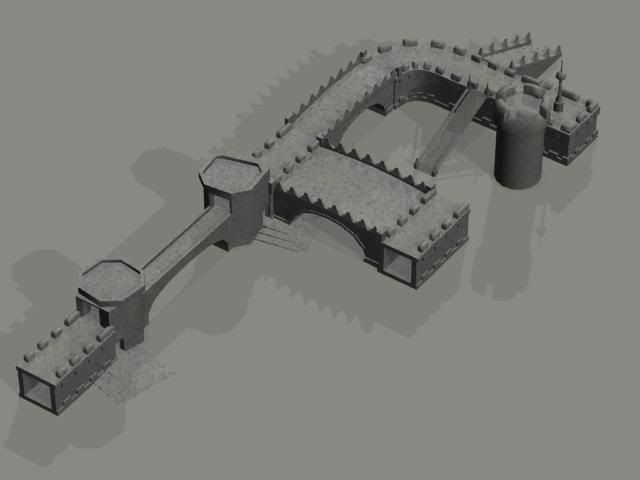




Also working on trees you can get in


[/img]
Posted: Fri Feb 23, 2007 3:32 pm
by DooFi
these look very nice! You have to work on your texture alignment. Use better UVMaps and - considering the models are huge - use texture tiling and mirroring! And show us some wireframe shots, please

Posted: Fri Feb 23, 2007 3:35 pm
by rebel_scum
Sup Ghost, nice to see ya here and nice models as well

Posted: Fri Feb 23, 2007 3:36 pm
by {Ipro}_Ghost
right now i just placed a texture on so I can test for see through walls, and problems. in he game. So I have not texture them for real, just best fitted them on so you don't see screeched UV's right now, As these are for download, I will texture map as need, As some do not have the programs needed to do it there selfs, And each time some one requested a Mapping I will save each textured as a set, to download
Wire fram shots
Posted: Sat Feb 24, 2007 12:33 am
by {Ipro}_Ghost
RE: Wire fram shots
Posted: Sat Feb 24, 2007 2:57 am
by Epena
Dangit dude! That's pretty flipping amazing. I just downloaded your stuff and I'm really impressed. Thanks for your work man!
What else are you working on?
RE: Wire fram shots
Posted: Sat Feb 24, 2007 3:01 am
by Penguin
Nice looking desgin and layout. UVs need some readjusting and polys need to be cut down by at least 3/4
Well
Posted: Sat Feb 24, 2007 4:09 am
by {Ipro}_Ghost
As BFI limit is 500 polys for each msh None of my models now exced 250 so I'm hlf of the games limit right now for each model, so I dont need to reduce them,
also if you read my earlyer posts the UV's are just on for now to check for problems with my models in the game, like invisable walls, textures on the wrong side, ex.. so please reffran from texture comments as I have not realy textured them at all. just best fit so you don't see streched polys.
As far as other things I'm working on is
walls that can be destroy in various spots but not the hole wall, also Gen grevious for BFI with four arms.
And I'm open for requests
RE: Well
Posted: Sat Feb 24, 2007 8:15 am
by Qdin
Oh noo xD it didn't post it o.o
oh, well - I'll see if I remember everything

Just because the limit says 500 and you have 250 it doesn't mean that you shouldn't reduce it further?
Are you sure there's only 250 in your entire scene..?

As far as I can count on 1 single side of the bridge there are +60, and double up - for the other side, and plus the 'stop' and bottom I see WAY more than 250...
2nd of all, we have a whole topic for requests if you need any work
And requests should work per PM.
It wouldn't be cool if this topic became a spam-topic
And about the destroyable wall?
you COULD make small pieces of the wall and put together in small amounts of bits 'till it in the end looks like a full wall after grouping in ZE
of course adding and .odf and all will also be necessary as well as health to them.
Also keep in mind that there's really no gravity on the objects in case you think you can blast and hole in the bottom of the wall and see the entire wall collapse down.
RE: Well
Posted: Sat Feb 24, 2007 10:18 am
by RC-1290
Why not just make chunks, so that when the wall is destroyed the chunks fall down... or use a dense smoke effect in combination with a destroyed geometry thingy.(The smoke is so it seems like you just can't see the bricks falling)
RE: Well
Posted: Sat Feb 24, 2007 2:43 pm
by {Ipro}_Ghost
well I'm making the animation for the explosions, As I know there is no gravity, But like he said I'm building pieces that fit to gather so they look like one wall, but one is distroable. leaving the other wall there, Now you can wall through the open space.
And so far I have hosted a few MP games with my with my models. And I have had no problem with my models lagging the game. In fact I was able to host a 10on10 with 32 bots, with no lag. on my lab top. And I can normaly host only 5on5 with no bots, as my upload speed is only 125kb not that inpresive. And the game leaves all ways lagged for me. So I started to build my own maps. so I would not lag any more. And I'v been sucssefull on making lag free maps.
Also For the number of polys just the out side wall is ployed like that. The rest of the walls as there arwe tunnels are just a few polys, I left the out side a little more polyed so I can add more detail to my objects. Later and when I export I reduce all my polys, I when to my model converter after enxport and my corner wall after reduction, and after I export it to .msh witch adds more triangle polys to my model for the game, and My poly count is 176 in game count and thats the courner piece witch has the most polys right now.
RE: Well
Posted: Sat Feb 24, 2007 3:19 pm
by Karnage
Wow! I checked out your model pack folder. Those are some pretty nice looking structures.
Do you only create buildings and objects? Or do you also create unit models?
RE: Well
Posted: Sat Feb 24, 2007 3:52 pm
by {Ipro}_Ghost
I do but they take a lot longer to make, So I have not released any to download yet, But the first will be Gen Grevious form BFII to BFI, and I'm making tatooin Luke , But my main focus is to bring new models for world creations, so we can have totally new maps to play
Here are a few of my maps with my models
http://www.box.net/public/vvvklvsxui this is my Ghost's Geo Choas.
A racing map. I used pretty much the hole playable map, lots of race courses or just battle like normal.
http://www.box.net/public/rc1czk3sqj this a map I made with the tunnel pieces.
And I'm working on Maze 2
http://www.box.net/public/bguq3dijnp[/url]
RE: Well
Posted: Sat Feb 24, 2007 4:59 pm
by rebel_scum
Btw the maps are all SWBF1 maps
To avoid confusion.
RE: Well
Posted: Mon Feb 26, 2007 5:07 am
by Qdin
So his maps are SWBF1 maps. but the models just need the MS3dScene_Root renamed to DummyRoot

and exported with the SWBF2 Exporter to work
RE: Well
Posted: Mon Feb 26, 2007 3:04 pm
by {Ipro}_Ghost
I will make another download of my tunnel pack with the changes so you can use them, in BFII. I use the BFII exporter now even though I build right now FOR BFI, as the flags were not working for me with the BFI export.
Soon as I find some extra time I will, update my folder. I will make shure I set up all my models for BFII as well from now on. As I didn't know I had to use dummyroot, for BFII
some of you might wonder why I have no clue about BFII stuff.
I'm a mac user, so I do not have BFII, played it a few times on Playstation, and I found it's mutiplay was not as strong as BFI, So I never when out and bought it for my PC.
RE: Well
Posted: Mon Feb 26, 2007 4:47 pm
by minilogoguy18
dummyroot is for BF1 and 2, i dont know who started the whole ms3dsceneroot but it kinda makes no sense at all since pandemic sure didnt use ms3d for either game since it cant do much for it.
RE: Well
Posted: Mon Feb 26, 2007 5:30 pm
by {Ipro}_Ghost
I have never use dummyroot, for my null names. I use short names of my models. And I have never had any issues. Now when I do Bones I place everything in a dummyroot. but not models. What effect does this have on objects. or is it the same as the null, just locating the object to 0,0,0. so you models are in the same place in the game as in ZE. because we all know if you don't build you object at 0,0,0. what ever movement you make from 0,0,0. is displaced in the mungie process. And your models are all over the place in the game, but look fine in ZE
Has any body here try using my models yet in BFII
Also is there anything different I need know about any differences to things like terrainctters and such. From BFI to BFII.
RE: Well
Posted: Tue Feb 27, 2007 7:05 am
by Qdin
i know Mini, but it worked since the first tutorial for SWBF1
But use dummyRoot and use it as a MasterParent. This way you can just Branch Select your DummyRoot and you will have everything in your scene exported properly.
So yes - meshes and all should go under as well.
RE: Well
Posted: Tue Feb 27, 2007 4:34 pm
by {Ipro}_Ghost
It's just a null called dummyroot. I do this now, just don't call it dummyroot, what difference can this make in the mungie process. Or does this just effect battle front II, as you see I have build multipul maps, with out a problem with my models., In fact I don't even need a collision object for most my models. and I can't see the difference. Bullets missile's, vichicals people hit, land on them no problem. you can fire through my windows, I don't see any collision problems.
I would really like to know the difference, between them. if some one could explain it.