Page 1 of 6

Custom Side: How To (FAQ)

Posted: Fri Jan 25, 2008 7:56 am
by Caleb1117
How to create a working side in SWBF2


Ok, so you want to make a side eh? Are there no poor houses?* Guess not, so bear with me, this could be painstaking, but I promise you, it gets easier. Well, alittle anyway.

*joke property of The_Emperor

Ok for the purpose of this tutorial, I will assume you have a functioning map in SWBF2 already. If not, then get cracking.
Now some of you may want to just edit a shipped side, but in this tut I’ll be teaching how to make a completely new one. It works pretty much the same way, except with a shipped side, your doing a lot more little patch work. Making small additions to get stuff working, but if you know the whole process, then you’ll know all the little things that are needed.
And… uhm Its just the way I’m doing so thar.

First decide what you want your side to be called, traditionally, they are something with only 3 characters, like ALL, IMP, or CIS, but this doesn’t have to be, you can name your side anything, I know of no limits.
So lets say, your making this for a super duper stormie trooper, you could name you side SDST... I suddenly find that anacronim annoying, so I won’t use it, the example side name will be: PMS >.> What?

Ok, so make a folder in Data_ABC/Sides, and name it PMS (IE whatever your side name is)
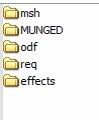
And then inside it, make a: effects, odf, msh, req, and MUNGED folders
(note that the MUNGED folder doesn’t need to be in caps, it just typically is.)
So it now looks like this:
Image


Now go get the assets for your unit.
(make sure you only copy the original assets, and not modify them.)
This means get the all the TGAs, MSHs, weapon ODFs, and the unit’s ODF, that you want/need.

All MSHs and TGAs go in your sides msh folder, ODFs in the odf folder, etc.

If the unit you are changing is a Jedi, look in his sides MUNGED folder, and find grab all the files with his name on it, there should be one .anims, one .zaabin, and one .zafbin, move these into your sides MUNGED folder

Lets take another trip to the assets.
Go to Assets/Sides, and copy the common side to your Data_ABC/Sides.
If the tur side is in your Data_ABC/Sides, you can delete that, unless you plan on having turrets in your map at some point.

Ok, now to make the .reqs which stands for Required Files, every unit, vehicle, or hero (and even a few other things) in a side needs one, and then, the side itself needs one.
They are text files, and really easy to set up.

Ok first your unit(s) req.
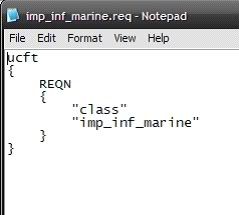
Go into your side’s req folder, and make a text file, you should name it whatever then name of your unit is. So if your unit is called pms_inf_supr_tropr You should call the req file pms_inf_supr_tropr.req. Now its handy to look at a shipped .req, so you go do that, I’ll wait.


Done? Its really quite simple.
I suggest you just copy the text out of a shipped req, and paste it into your own and change the text about the unit. If you don’t understand, then you didn’t look.
Image
That is a unit req, just copy it, and change the unit name to yours, req names must match that of the unit’s odf.
Save your new .req file, and that’s done.
Hit back, and go to your sides main directory, you remember, this place:
Image
And make another text file, this will be the side’s req, give it the same name as your side, so it would be (in my example) pms.req.
Again, let’s look at a shipped side req.
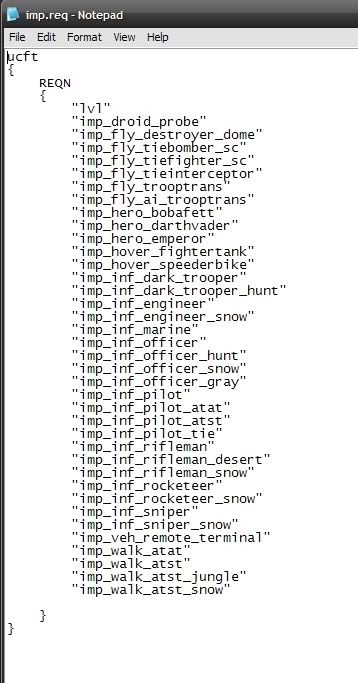
Here is the imperial one:
Image
Cluttered looking isn’t it?
Basically, it just lists all the units, vehicles, and heroes etc
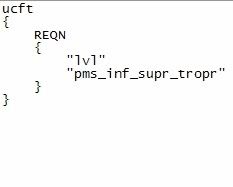
So copy one of the shipped side reqs into yours, and delete all the little units and such in quotes Except The “lvl” thing at the top of the list, then add your unit in so it looks like this:
Image

And save it.
Your side should now be a bit more something like this:
Image

Just 2 things left

Go to Data_ABC/_BUILD/Sides and make a new folder for your side, this is where, the half munged side bits will go on their glorious metamorphosis into a .lvl file.
(if you don’t know what metamorphosis is, perhaps you’re to young to mod)

So, make a folder named PMS, then go to one of the other side folders in there, Data_ABC/_BUILD/Sides/ALL for example, and find two files called clean.bat and munge.bat, paste a copy of those two .bat files, into Data_ABC/_BUILD/Sides/PMS.

Last step adding your unit to the lua script.

Go to Data_ABC/Common/scripts/ABC there should be a bunch of files here, .lua and .bak.

The baks are just luas with their file extension changed, and are “backups” of the default luas.
You can delete these, I do.

Now you need to find the lua you want. The unit we’re talking about is a soldier, so lets put him in conquest.
Lua names start with your map name ABC then either a c for CW era, or g for GCW era.
And then the mode
con = Conquest
eli = Hero Assault
ctf = Capture the Flag
1flag = 1 Flag Capture the Flag


So lets put him in the GCW era, so find your ABCg_con.lua and open it, it’s a notepad file.

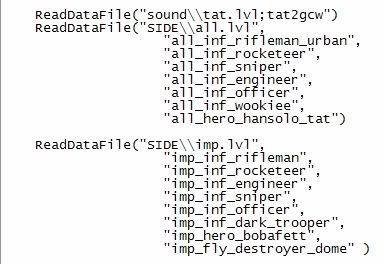
First scroll down and find this part.
Image

This area of the lua loads a unit’s data into the game for use.
Again, we’re just going to kinda copy and paste a shipped bit.
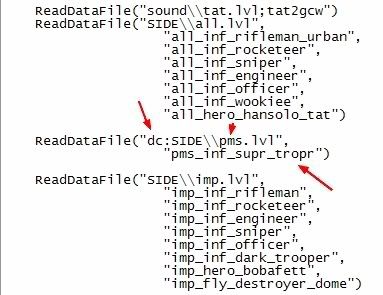
Take the imp section, copy all of it and paste it again, in that section, change the lvl name from imp.lvl to pms.lvl, and put a dc: in front of SIDE, but before the parentheses, this dc: tells the lua that it is loading a custom file.

(if you where editing a shipped side, you would need to add a dc: to it’s load section too.)

And delete all the listed units, except for the top one, and change the name to your unit’s.
And close it off with a )
It should look a bit like this:
Image

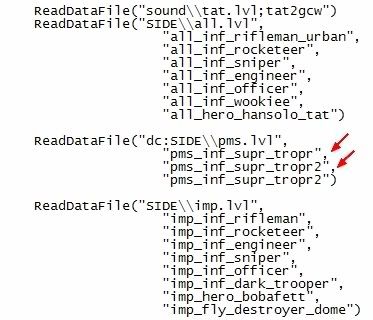
Now if you where adding more units, you would have to add comma’s like so:
Image

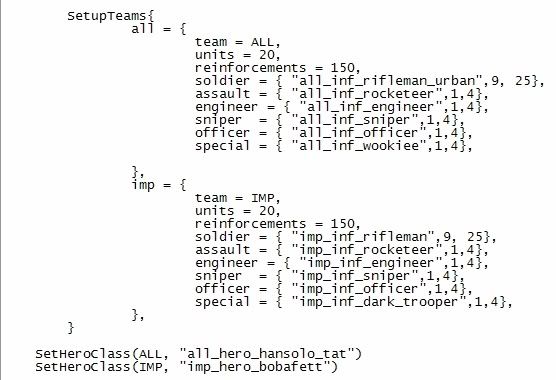
Ok, now scroll down to the unit line up.
This bit:
Image

Now if you could replace one of the normal unit’s with yours, but I’ll teach you how to add a new one, incase you don’t want to replace anyone, and hurt a trooper's feelings.

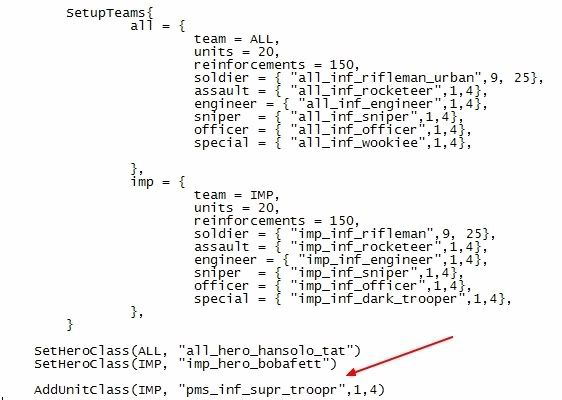
Under the SetHeroClass part, add this:

AddUnitClass(IMP, "pms_inf_supr_troopr",1,4)

This will add your unit under the Imperial side’s line up.

So now you’ve got this:
Image
Good? Good.


Now we munge.
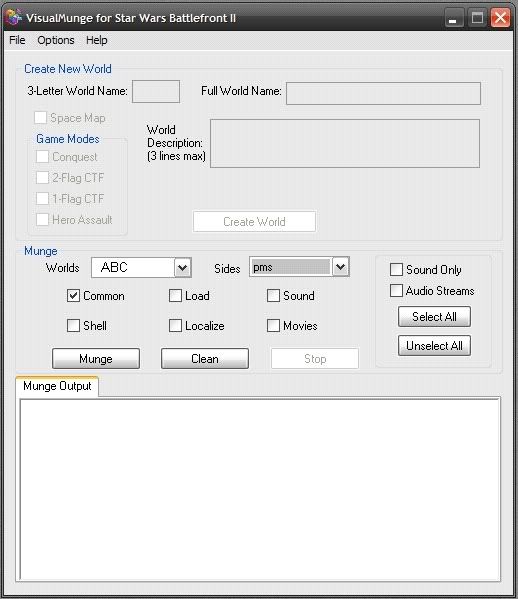
Go to: Data_ABC/_Build and click Modtools VisualMunge.exe.
Check the common box, and select your side from the drop down Sides menu.
Image

Munge and go play, you are done.

Re: Custom Side: How To

Posted: Fri Jan 25, 2008 5:11 pm
by theITfactor
Much better than the SaturnLabs guide, and for BF2 instead of BF1, very nice :wink:

Re: Custom Side: How To

Posted: Sun Jan 27, 2008 9:33 pm
by Silas
I think i followed the directions exactly and spelled everything the way i wanted it, but my Side doesn't work and the game crashes before it fully loads. Im gonna look through my stuff to check for misspellings and such, but i dont think there are any.

I noticed that the guide doesn't say that you need a shell.req (like repshell.req) file.
Is that needed?

Re: Custom Side: How To

Posted: Sun Jan 27, 2008 9:49 pm
by SilvaDalek
Thank you so much caleb. With this thread I have made sides for my map!

Re: Custom Side: How To

Posted: Sun Jan 27, 2008 10:28 pm
by Caleb1117
Silas wrote:I think i followed the directions exactly and spelled everything the way i wanted it, but my Side doesn't work and the game crashes before it fully loads. Im gonna look through my stuff to check for misspellings and such, but i dont think there are any.

I noticed that the guide doesn't say that you need a shell.req (like repshell.req) file.
Is that needed?
No, custom sides don't need shell.req's

Do you have an error log, perhaps I can help.

@SilvaDalek

Thats great!
The joy of modding, learning to do stuff that you didn't think you could. (or couldn't find out how to)

Like I was scared to death of having to fix all the HUD tags in my map, till I tried it and found how easy it was.
Which only sorta relates, but you get the point. :P

Re: Custom Side: How To

Posted: Mon Jan 28, 2008 6:42 am
by Silas
No actually, i don't have an error log for some reason. Everything seems to work until a couple seconds before the map loads

Re: Custom Side: How To

Posted: Mon Jan 28, 2008 9:11 am
by SilvaDalek
It could be something wrong with a turret then (maybe weapon . . .). Take them out and try again.

Re: Custom Side: How To

Posted: Mon Jan 28, 2008 9:46 am
by Caleb1117
There is always a error log, always, just opening the game produces one. :P
Silly but true.

Your running BF2_modtools.exe right?

Re: Custom Side: How To

Posted: Mon Jan 28, 2008 11:18 am
by Teancum
I didn't read over the tutorial thoroughly, but you also might mention the filespace-saving method when you're basically copying all of a shipped lvl:

-In [sidename].req, remove all of the lines you aren't using. At munge time the system won't pack any unnecessary files into the lvl file. You can take a 150mb side and cut it down to sometimes as small as 30mb this way.
-If you're redoing a shipped side, but not the shipped vehicles, rename the side something else like in Caleb's tut. So instead of data_###/sides/rep/rep.req you'd have something like data_###/sides/rep_new/rep_new.req. Why? Then you can call the shipped vehicles in your lua and call your custom side at the same time, cutting the filesize dramatically.

Re: Custom Side: How To

Posted: Mon Jan 28, 2008 4:15 pm
by Silas
Caleb1117 wrote:There is always a error log, always, just opening the game produces one. :P
Silly but true.

Your running BF2_modtools.exe right?
yes, im running the modtools. There wasn't any actual errors , but i did get a lot of warnings.
Hidden/Spoiler:
WARNING[PC_modelmunge msh\cis_1st_droideka.msh]:cis_1st_droideka has 2908 vertices and NO COLLISION GEOMETRY (WILL BE SLOW)!
WARNING[PC_modelmunge msh\cis_tread_hailfire.msh]:SplitSkinnedSegments: WARNING: out of space in splitting catalog!
WARNING[PC_modelmunge msh\cis_tread_hailfire.msh]:SplitSkinnedSegments: WARNING: resorting to brute force, this may take a while...
WARNING[PC_modelmunge msh\cis_tread_hailfire.msh]:SplitSkinnedSegments: WARNING: out of space in splitting catalog!
WARNING[PC_modelmunge msh\cis_tread_hailfire.msh]:SplitSkinnedSegments: WARNING: resorting to brute force, this may take a while...
WARNING[PC_modelmunge msh\cis_1st_bdroid.msh]:cis_1st_bdroid has 1509 vertices and NO COLLISION GEOMETRY (WILL BE SLOW)!
WARNING[PC_modelmunge msh\cis_1st_jangofett.msh]:cis_1st_jangofett has 1102 vertices and NO COLLISION GEOMETRY (WILL BE SLOW)!
WARNING[PC_modelmunge msh\cis_1st_magnaguard.msh]:cis_1st_magnaguard has 1961 vertices and NO COLLISION GEOMETRY (WILL BE SLOW)!
WARNING[PC_modelmunge msh\cis_droideka_idle_low1.msh]:cis_droideka_idle_low1 has 1164 vertices and NO COLLISION GEOMETRY (WILL BE SLOW)!
WARNING[PC_modelmunge msh\cis_droideka_roll_low1.msh]:cis_droideka_roll_low1 has 1166 vertices and NO COLLISION GEOMETRY (WILL BE SLOW)!
WARNING[PC_modelmunge msh\cis_inf_bdroid.msh]:cis_inf_bdroid has 2633 vertices and NO COLLISION GEOMETRY (WILL BE SLOW)!
WARNING[PC_modelmunge msh\cis_inf_countdooku.msh]:cis_inf_countdooku has 1575 vertices and NO COLLISION GEOMETRY (WILL BE SLOW)!
WARNING[PC_modelmunge msh\cis_inf_darthmaul.msh]:cis_inf_darthmaul has 1575 vertices and NO COLLISION GEOMETRY (WILL BE SLOW)!
WARNING[PC_modelmunge msh\cis_inf_darthsidious.msh]:cis_inf_darthsidious has 2429 vertices and NO COLLISION GEOMETRY (WILL BE SLOW)!
WARNING[PC_modelmunge msh\cis_inf_generalgrevious.msh]:SplitSkinnedSegments: WARNING: out of space in splitting catalog!
WARNING[PC_modelmunge msh\cis_inf_generalgrevious.msh]:SplitSkinnedSegments: WARNING: resorting to brute force, this may take a while...
WARNING[PC_modelmunge msh\cis_inf_generalgrevious.msh]:cis_inf_generalgrevious has 5784 vertices and NO COLLISION GEOMETRY (WILL BE SLOW)!
WARNING[PC_modelmunge msh\cis_inf_generalgrevious_low1.msh]:cis_inf_generalgrevious_low1 has 1769 vertices and NO COLLISION GEOMETRY (WILL BE SLOW)!
WARNING[PC_modelmunge msh\cis_inf_jangofett.msh]:cis_inf_jangofett has 2949 vertices and NO COLLISION GEOMETRY (WILL BE SLOW)!
WARNING[PC_modelmunge msh\cis_inf_magnaguard.msh]:cis_inf_magnaguard has 3527 vertices and NO COLLISION GEOMETRY (WILL BE SLOW)!
WARNING[PC_modelmunge msh\cis_inf_sbdroid.msh]:cis_inf_sbdroid has 2894 vertices and NO COLLISION GEOMETRY (WILL BE SLOW)!
WARNING[PC_modelmunge msh\cis_walk_droideka.msh]:SplitSkinnedSegments: WARNING: out of space in splitting catalog!
WARNING[PC_modelmunge msh\cis_walk_droideka.msh]:SplitSkinnedSegments: WARNING: resorting to brute force, this may take a while...
WARNING[PC_modelmunge msh\cis_walk_droideka_low1.msh]:cis_walk_droideka_low1 has 1188 vertices and NO COLLISION GEOMETRY (WILL BE SLOW)!
0 Errors 24 Warnings
this happens with every side i use, just with different units

Re: Custom Side: How To

Posted: Mon Jan 28, 2008 6:13 pm
by mutedrancor
That's your munge log not error log to get your error log go to C/bf2modtools and copy the icon saying modtools.exe now go to c/programfiles/lucasarts/swbf2/gamedata and paste. Double click and run it should be bf2 run your map. If and when it crashes go back to your gamedata folder and find the .txt file named errorlog. Paste that here. :thumbs:

Re: Custom Side: How To

Posted: Mon Jan 28, 2008 6:24 pm
by Silas
is it a problem if after i do that i don't get an error log at all? i have 3 non-error related txt things in there, and after it crashes, i dont get another one.

Re: Custom Side: How To

Posted: Mon Jan 28, 2008 8:11 pm
by Maveritchell
Silas wrote:is it a problem if after i do that i don't get an error log at all? i have 3 non-error related txt things in there, and after it crashes, i dont get another one.
If you've got the program BF2_modtools.exe in your Gamedata folder, you'll get an output file "BFront2log.txt" every time.

Re: Custom Side: How To

Posted: Mon Jan 28, 2008 8:33 pm
by authraw
Wow, very nice Caleb. I've been meaning to do one of these myself (a video version, actually) but I've been so swamped lately that I haven't even had time to work on my own maps. >_<

But, uh, is it really a good idea to call your side "PMS"? :lol:

Re: Custom Side: How To

Posted: Mon Jan 28, 2008 9:20 pm
by Silas
i was misdirected. i thought the error log was named with "error" in it. my friend's been helpign me out with this, but he seems to be rather unhelpful with these lines:
Hidden/Spoiler:
Message Severity: 3
.\Source\LoadUtil.cpp(829)
Unable to find level chunk rep_inf_ep2_rocketeer in C:\Program Files\LucasArts\Star Wars Battlefront II\GameData\AddOn\AJS\Data\_lvl_pc\SIDE\rep.lvl

Message Severity: 3
.\Source\LoadUtil.cpp(1019)
Unable to find level chunk in dc:SIDE\rep.lvl
how do i fix these?

edit: huh. nevermind, the problem fixed itself and my side is working ingame. :lol:

Re: Custom Side: How To

Posted: Wed Jan 30, 2008 9:12 pm
by SilvaDalek
Um Caleb, now it may be time for the tut to include how to replace characters in the already made sides :lol:

Re: Custom Side: How To

Posted: Wed Jan 30, 2008 10:06 pm
by Caleb1117
You mean edit the shipped sides?

It works the same way, except the side is set up already.

If you add a new unit, make him a req, add him to the side req, etc.

Re: Custom Side: How To

Posted: Wed Jan 30, 2008 10:20 pm
by SilvaDalek
No I mean add a custom unit directly into a shipped side.

Re: Custom Side: How To

Posted: Wed Jan 30, 2008 10:25 pm
by Caleb1117
Caleb1117 wrote:except the side is set up already.

If you add a new unit, make him a req, add him to the side req, etc.
Like that.

Re: Custom Side: How To

Posted: Wed Jan 30, 2008 10:36 pm
by SBF_Dann_Boeing
I was thinking of making a huge sides 101 tut that explained everything and anything about sides. But I'm too lazy. :P
Thx Caleb for makin this, that'll save me from at least a couple "Teach me how to mod" begs. I may start working on an outlined side (every line is explained in every odf). But I'm prolly to lazy to do that as well. :P