Page 1 of 1
Muzzle Flash
Posted: Fri Apr 25, 2014 10:25 am
by Eaol
Is there any way to change the muzzle flash effect? I noticed that there's a file in the FX folder for a large muzzle flash, containing a puff of smoke. Is there perhaps a way to set up an effect to appear when the muzzle flash appears?
Re: Muzzle Flash
Posted: Fri Apr 25, 2014 11:28 am
by JimmyAngler
Yeah, just add an emitter to the muzzle flash.fx file.
Re: Muzzle Flash
Posted: Fri Apr 25, 2014 11:55 am
by LRKfm946
Change the Discharge effect:
Code: Select all
MuzzleFlash         = "small_muzzle_flash"
FlashColor          = "80 80 255 255"
FlashLength         = 0.025
FlashColor          = "100 100 255 255"
FlashLength         = 0.025
FlashLightColor     = "220 220 255 175"
FlashLightRadius    = "2.0"
FlashLightDuration  = "0.25"
Discharge           = "small_smoke_effect"   //<--Change this to whatever you want
Re: Muzzle Flash
Posted: Fri Apr 25, 2014 12:59 pm
by Marth8880
The Discharge ODF parameter doesn't work. (Unless of course you've gotten it to work.

...Please tell me someone's finally gotten it to work.)
Re: Muzzle Flash
Posted: Fri Apr 25, 2014 1:16 pm
by LRKfm946
Oh, nevermind then.

Do what Jimmy said.
Re: Muzzle Flash
Posted: Sat Apr 26, 2014 1:25 am
by Eaol
JimmyAngler wrote:Yeah, just add an emitter to the muzzle flash.fx file.
But isn't that effect unused? I've never seen the contents of that file actually used in the game (the puff of smoke and whatnot).
Re: Muzzle Flash
Posted: Fri May 02, 2014 4:53 pm
by kinetosimpetus
AFAIK the only way to make a custom muzzle fx on a trooper is to make a trail fx that is offset so it appears near the gun barrel, such as:

An effect like that could be added, but it'd need to be a different custom one for every gun as they are different sizes.
I don't think you can get rid of the stock flash... unless you make its color black maybe?
Re: Muzzle Flash
Posted: Fri May 02, 2014 7:30 pm
by JimmyAngler
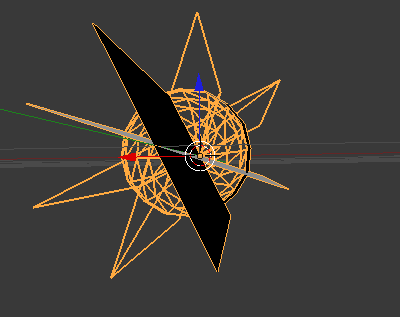
Um way off, AQT did it for Halofront. You need two planes. One for side view and one for front/back view. Texture them, load them in your ingame, and add it to you weapon odf:
Re: Muzzle Flash
Posted: Fri May 02, 2014 11:35 pm
by Eaol
Yeah I tried that, Kinetos, and I got unsatisfactory results (the thing with an offset effect) - it'd move around when I looked around so that sometimes it'd be off.
Re: Muzzle Flash
Posted: Sat May 03, 2014 6:08 pm
by AQT
JimmyAngler wrote:Um way off, AQT did it for Halofront. You need two planes. One for side view and one for front/back view. Texture them, load them in your ingame, and add it to you weapon odf:
For the record, I'd just like to point out that DarthD.U.C.K. did it for Prosecutor, and I merely reused the asset in an originally stand-alone map.
Re: Muzzle Flash
Posted: Sat May 03, 2014 6:44 pm
by kinetosimpetus
Can you post a more specific instruction on how it was done?
Re: Muzzle Flash
Posted: Tue May 13, 2014 5:39 pm
by Nedarb7
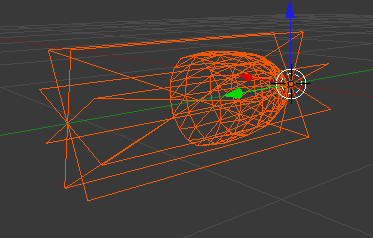
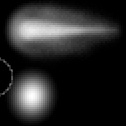
If anyone is still wondering here is how it looks in the stock game:
- Model
- Texture (alpha layer)
- Weapon ODF
I believe the stock flash model name is "meshmuzzleflash" (found in SWBF1 assets).
In order to get your new muzzle flash model into the game you will need to load it into a req (lvl) that will be loaded into the mission.
Say your side's req or the ingame req.
Here's an example of a custom muzzle flash put together by simply retexturing the stock flash's texture:
Re: Muzzle Flash
Posted: Wed May 14, 2014 2:20 pm
by Eaol
Yeah, I've been doing it that way, but I had created a really movie-accurate .fx file for a muzzle flash and wanted to know if I could attach it somehow; unfortunately, I had it sort of working but it'd move around so that sometimes, it'd be floating above or below the muzzle by a foot or so. Thanks anyway!