Page 14 of 45
Re: XSI ZETools
Posted: Thu Mar 22, 2012 1:59 pm
by Slime615
Did all of the things you suggested - But Now I get this error. Its a result at least:
Re: XSI ZETools
Posted: Thu Mar 22, 2012 3:55 pm
by ANDEWEGET
Could you try exporting a cube with the same settings(bbox disabled)?
Ill try to get the new version out this weekend.
Re: XSI ZETools
Posted: Thu Mar 22, 2012 4:43 pm
by Slime615
If I just click on the cube to export, then I get the same error, but If I click Batch Select on the dummyroot or just the dummyroot, then export the model is not visible in the .msh viewer.
Interestingly, if I click info in the .msh viewer, it tells me:
File: paceship.msh, Size: 240.1602 K bytes
Material 1: 'material' (Texture: "tst_fly_spaceship")
Material 2: 'New_Material'
Points 0
Triangles 0
Re: XSI ZETools
Posted: Fri Mar 23, 2012 2:16 am
by lucasfart
ANDEWEGET wrote:To me this looks as if one of the models still is assigned to a material you deleted.
Sorry for being such a noob at these things, but how would I fix this?
EDIT:I just created a new material with the name of the missing one and it worked!
Re: XSI ZETools
Posted: Fri Mar 23, 2012 4:21 am
by Slime615
Good News! I got the Model exported! But Unfortunatly, the Textures aren't on it...
I unclick bound box, then just click the dummy dummy or whatever, and exported it.
I also freesed all transforms and exported, and it looks great!
But for some reason the Textures aren't on it....
Any ideas?
Re: XSI ZETools
Posted: Fri Mar 23, 2012 4:57 am
by lucasfart
You should probably explain what you did if you want help fixing the textures. I also have a question - is it possible to assign multiple materials to one model? I've been fiddling with clusters for AGES and have managed to get my model ingame, but not with textures. Any help would be appreciated.
Re: XSI ZETools
Posted: Fri Mar 23, 2012 7:13 am
by ANDEWEGET
@Slime615:
Please post a bit more information. Especially see if you have any clusters. Do this by exanding your model until you see the folder clusters:
- model
---PolygonMesh
------stuff
------more stuff
------Clusters
---------shouldnt be more than 1 cluster(most likely called Texture_Projection)
After you've expanded your model please take a screenshot and post it here.
@lucasfart:
Multiple materials per model don't work yet. But I'm working on it, that's why I'm rewriting most of the export. I posted in your other topic regarding the UV problem.
Re: XSI ZETools
Posted: Fri Mar 23, 2012 7:47 am
by lucasfart
ANDEWEGET wrote:
@lucasfart:
Multiple materials per model don't work yet. But I'm working on it, that's why I'm rewriting most of the export. I posted in your other topic regarding the UV problem.
Thanks so much for your help and work on this! Really appreciate it.
Re: XSI ZETools
Posted: Fri Mar 23, 2012 12:36 pm
by Cerfon Rournes
ANDEWEGET wrote:
Did anyone test out weights yet btw?
I tried exporting Vader again, and it worked.  The body was moving with the animations.(Was not doing that before) I'll test out the weights soon.
For the next release I will switch to XSI's material system. For the new feature(s) planned I need XSI's materials. For the user it's better anyways, no need to create every material twice anymore. The Zero-specific flags and attributes will now be stored in the material itself.
Awesome; Looking forward to that. Keep up the great work ANDE! 
Re: XSI ZETools
Posted: Fri Mar 23, 2012 2:18 pm
by ANDEWEGET
Soooo, most of the rewriting is done now. Exporting works again, all with materials and stuff.
I haven't tested vertex colors, bones, weights and per poly materials yet, but that should work alright. I suppose I can get the next version out this weekend or next.
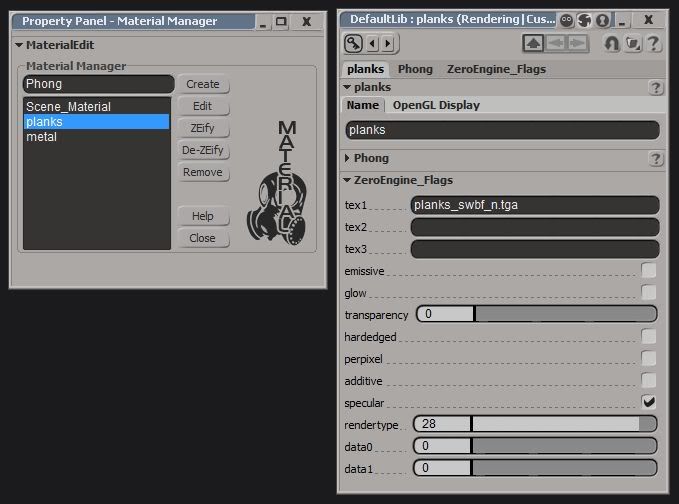
Here's the new material dialog:
left is the Material Manager, it now lists all XSI materials of this scene, Create/Edit/Remove now handles materials inside XSI instead of my own. ZEify and De-ZEify add and remove ZeroEngine flags. A non-ZEified material is just like any other Phong material. When you ZEify it, it adds the flags you can see in the right window. The export gets the diffuse texture/texture 0 from the diffuse input of the phong shader. That means users have to be able to apply a diffuse texture to phong shaders to use it. The report after the export now has fewer items because too many logs would clutter the code. Maybe it's just an illusion but it seems faster, too...
Re: XSI ZETools
Posted: Fri Mar 23, 2012 7:13 pm
by lucasfart
Woohooo! Does this mean support for multiple clusters in one mesh?
Re: XSI ZETools
Posted: Sat Mar 24, 2012 7:19 am
by ANDEWEGET
ANDEWEGET wrote:Well, it adds support for multiple materials per model, which requires clusters. Overlapping clusters with important information(UVs etc) will most likely still break the .msh/break the data they contain. Overlapping clusters should not exist anyway(unless you need them for morphing or whatever, that doesn't apply to games most of the time though[definitely not for SWBF]). So if you avoid overlaps it should work alright.
Next update:
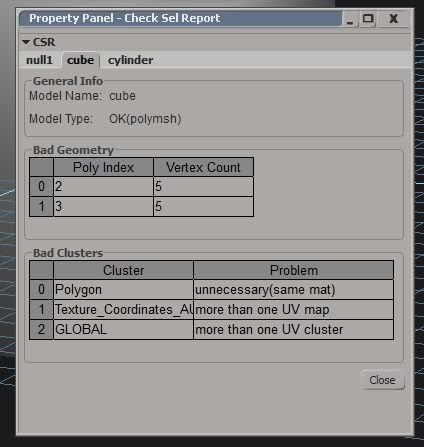
I have made some changes to the Check Sel report:
It now creates one Tab per model, lists all polies with more than 4 sides, not just the first. It lists all clusters which could cause problems, too.
I added an Assign button to the material manager so users don't have to use XSIs material manager/render tree at all if they don't want to.
Re: XSI ZETools
Posted: Tue Mar 27, 2012 3:12 am
by Slime615
I have a sincire request. Could you make an expansion pack that allowed importation of all the Space Map assets? So All the interiors, Exterior parts and main models for all four Sides (Or jus tthe Imps would be good).
Re: XSI ZETools
Posted: Tue Mar 27, 2012 11:19 am
by ANDEWEGET
No, I wont anyways, sorry. Most of those assets are easy enough to import and I dont have the time.
Re: XSI ZETools
Posted: Thu Mar 29, 2012 1:18 pm
by Slime615
What is a "bad poly cls"? And how do I fix it?
Re: XSI ZETools
Posted: Thu Mar 29, 2012 1:48 pm
by Marth8880
Slime615 wrote:What is a "bad poly cls"? And how do I fix it?
Screenshot please?
Re: XSI ZETools
Posted: Thu Mar 29, 2012 2:22 pm
by Slime615
Re: XSI ZETools
Posted: Mon Apr 02, 2012 7:08 am
by ANDEWEGET
ANDEWEGET wrote:All the models listed have at least one polygon cluster(contains polygons) which they shouldn't have. This may break the .msh depending on what info is stored in the clusters and if they're overlapping.
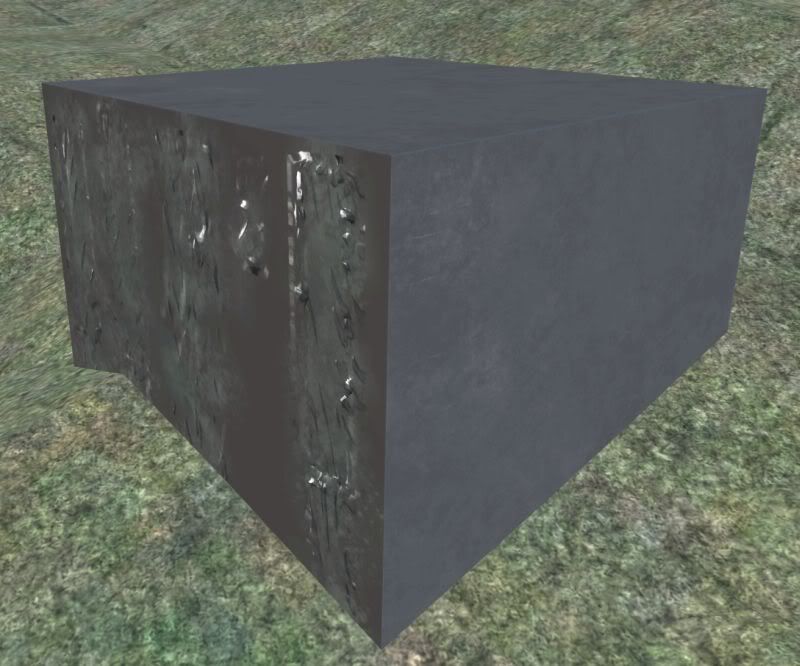
Now, what have we 'ere... Material system works, per-poly/cluster materials seem to work, too.
I'll do some more testing to make sure weights, vertex colors etc work, too.
Re: XSI ZETools
Posted: Mon Apr 02, 2012 8:45 am
by lucasfart
Woot! Keep up the great work Ande! This'll make stuff so much easier! (For me, anyway)
Re: XSI ZETools
Posted: Mon Apr 02, 2012 10:10 am
by ANDEWEGET
Just a quick report: Weights, vertex colors and collision primitives work. I'll do some more polishing, depending on how long that takes and if I get weird ideas for more features I'll release the next version in the next days. I dunno if I'll implement cloth for this version already...