Page 1 of 1
Textures applied in ZeroEditor don't show up ingame [Solved]
Posted: Tue May 17, 2011 10:08 am
by Locutus
Hi!
The textures applied in the editor don't show up ingame.
I used the same textures as high-res and low-res textures yet I don't fully understand the difference here.
So, whenever I found I texture that I liked I selected this texture as a low-res texture
and as a high-res texture. I assume that that is causing my problem.
Can someone tell me what to do?
Re: Textures applied in the Zeroeditor don't show up ingame
Posted: Tue May 17, 2011 12:06 pm
by DarthD.U.C.K.
i have trouble understanding your problem. as far as i know you can only have one lowrestexture for the terrain that is set in the .sky file. textures or models with lowres/lowrez in their name are those who are seen when the object has a big distance to the player.
i honestly cant see which texture in the editor is no present inagem, probably because i cant make out where the area from the ingamescreen is in the ze-screen.
Re: Textures applied in the Zeroeditor don't show up ingame
Posted: Tue May 17, 2011 3:10 pm
by modmaster13
Try to have the same camera positions in both ZE and ingame.
Wait a minute, are you talking about the white texture?
Re: Textures applied in the Zeroeditor don't show up ingame
Posted: Tue May 17, 2011 3:27 pm
by Locutus
modmaster13 wrote:Wait a minute, are you talking about the white texture?
No, that's the texture brush xD
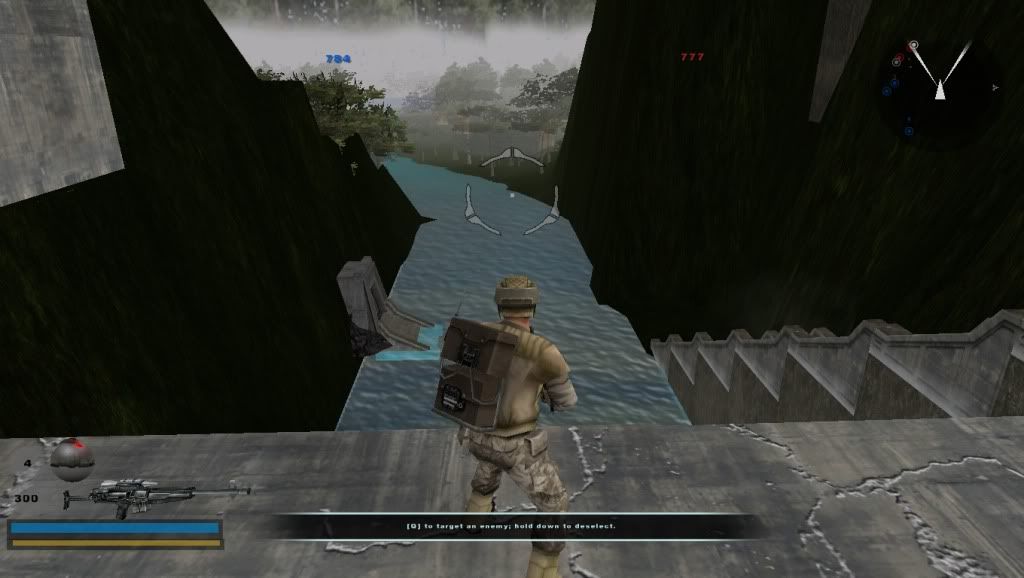
Okay, what I mean is simple - If you take a look at the ingame screen you see the terrain is green all over (only one single texture everywhere).
That's how it looks at
EVERY place ingame (it's textur 1 btw).
ALL of the other textures don't show up, the terrain should look similar to the one depicted in the Zeroeditor screenshot.
Re: Textures applied in the Zeroeditor don't show up ingame
Posted: Tue May 17, 2011 3:56 pm
by DarthD.U.C.K.
that is probably because the green texture has the highest priority?!
im not sure though, it should look all green in ZE then too probably.
Re: Textures applied in the Zeroeditor don't show up ingame
Posted: Tue May 17, 2011 5:53 pm
by THEWULFMAN
Can you turn objects off visually, then take an overhead screenshot in ZE, that way we can see what you mean about multiple textures?
Re: Textures applied in the Zeroeditor don't show up ingame
Posted: Mon May 23, 2011 6:35 am
by Locutus
I've taken another picture to point this out a bit:
You can see the difference to the editor, ingame it's all green, only texture 0 (lowest layer) shows up.
I messed up with high-res and low-res texture - what I meant was "Texture" and "Detail".
What's the difference there?
Re: Textures applied in the Zeroeditor don't show up ingame
Posted: Mon May 23, 2011 9:42 am
by DarthD.U.C.K.
"texture" is the texturename "detail" is a greyscaled detailtexture that is blended over the terraintexture ingame with lightsetting on high, you cna only have one detailtexture i think.
do you have all your terraintextures in data_XXX\Worlds\XXX\world1 ?
Re: Textures applied in the Zeroeditor don't show up ingame
Posted: Mon May 23, 2011 2:23 pm
by Locutus
DarthD.U.C.K. wrote:do you have all your terraintextures in data_XXX\Worlds\XXX\world1 ?
Yes, all of the textures are in my world1 folder.
I made a manual clean as well but with no success.
Any idea how I can make my textures appear ingame? The map looks terrible without the textures
Re: Textures applied in the Zeroeditor don't show up ingame
Posted: Mon May 23, 2011 2:57 pm
by THEWULFMAN
Try removing all detail textures. (In ZE. Dont just remove them from your world1 folder, that would do nothing)
Re: Textures applied in the Zeroeditor don't show up ingame
Posted: Tue May 24, 2011 11:06 am
by Locutus
THEWULFMAN wrote:Try removing all detail textures. (In ZE. Dont just remove them from your world1 folder, that would do nothing)
Yay, it worked!
Unfortunately the textures look different than in the editor and not as good.
Do I need another detail texture maybe?
Re: Textures applied in the Zeroeditor don't show up ingame
Posted: Tue May 24, 2011 7:06 pm
by AQT
What does your problematic detail texture look like?
Re: Textures applied in the Zeroeditor don't show up ingame
Posted: Wed May 25, 2011 12:38 pm
by Locutus
AQT wrote:What does your problematic detail texture look like?
I'm not using any detail textures (I even don't fully understand from where I can take them and what they do).
I used the detail textures randomly but then the textures don't show up at all (ingame).
It is working now, but the textures look different (and worse) than in the editor.
Re: Textures applied in the Zeroeditor don't show up ingame
Posted: Wed May 25, 2011 12:45 pm
by THEWULFMAN
Locutus wrote:AQT wrote:What does your problematic detail texture look like?
I'm not using any detail textures (I even don't fully understand from where I can take them and what they do).
I used the detail textures randomly but then the textures don't show up at all (ingame).
It is working now, but the textures look different (and worse) than in the editor.
"Worse" is opinionated. I happen to like how they look ingame, they look desaturated from in ZE, but thats all. I think it looks good, and you should move on in my opinion.
Re: Textures applied in the Zeroeditor don't show up ingame
Posted: Fri May 27, 2011 11:37 am
by Locutus
THEWULFMAN wrote:[...]you should move on in my opinion.
Guess you're right.
Re: Textures applied in the Zeroeditor don't show up [SOLVED
Posted: Fri May 27, 2011 12:23 pm
by acryptozoo
you could always try a different detail texture
Re: Textures applied in the Zeroeditor don't show up ingame
Posted: Fri May 27, 2011 4:00 pm
by modmaster13
OFFTOPIC:
@ Pic 2, there is something called foliage to add grass, weeds, etc. Just a tip, but it could make the map less laggy.