Could not open MISSION.LVL [Solved]
Posted: Sat Jan 20, 2018 4:36 pm
I attempt to open my map and it says that it couldn't open MISSION.LVL
Get more from your games!
http://www.gametoast.com/
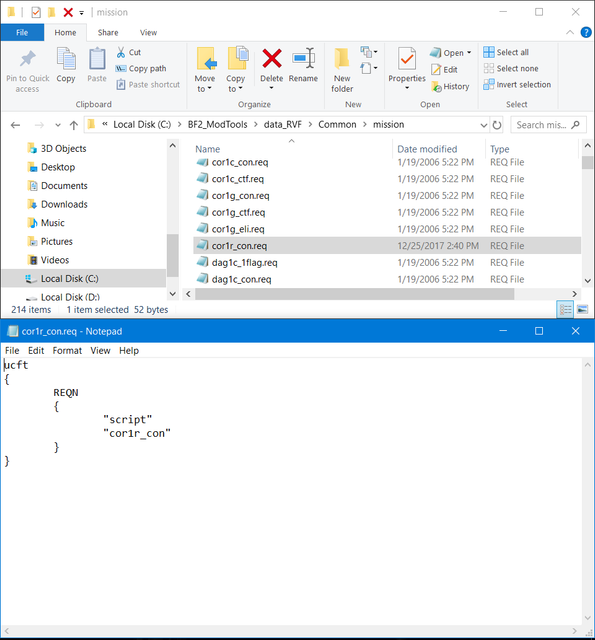
How do I make a .req file calling in Common? and how do I see if my lua is being called in my Common/mission.reqCalrissian97 wrote:Make sure your lua is being called in your Common/mission.req and you made a .req file calling your lua in Common/mission/
I did it all but hopefully I did it rightCalrissian97 wrote:Open up your mission.req using a text editor (notepad for example) and make sure your script is listed under "lvl", such as "cor1r_con". Just add yours to the list.
Now make a .req file for your lua if one isn't already. You can just make a copy of one already in your mission folder, and edit the name and contents to match your lua file name.Hidden/Spoiler:Hidden/Spoiler:
How fast was your munge?gooddominic wrote:I attempt to open my map and it says that it couldn't open MISSION.LVL
It was quick. Why?AceMastermind wrote:How fast was your munge?gooddominic wrote:I attempt to open my map and it says that it couldn't open MISSION.LVL
[b][color=#FF8000]The FAQ / Everything You Need Thread Version 3.0[/color][/b] wrote:...
Question #7 - I'm using Windows Vista/7/8.x/10 and Visual Munge is not working properly, it's munging too fast, what's wrong?
Answer - Try THIS munge fix or the Fixed and improved munge files to get it working properly.
...
Much thanks!AQT wrote:The following could be the solution to your problem:[b][color=#FF8000]The FAQ / Everything You Need Thread Version 3.0[/color][/b] wrote:...
Question #7 - I'm using Windows Vista/7/8.x/10 and Visual Munge is not working properly, it's munging too fast, what's wrong?
Answer - Try THIS munge fix or the Fixed and improved munge files to get it working properly.
...