Page 3 of 5
Re: BF2 ZE Terrain Tool
Posted: Fri Dec 21, 2012 12:45 am
by Maveritchell
Marth8880 wrote:A request: the ability to change the density, or subdivision level, if you will, of the terrain, which I'm almost positive must be possible since space terrain is lower-res than normal terrain.

That's already in ZE:

Re: BF2 ZE Terrain Tool
Posted: Fri Dec 21, 2012 12:53 am
by THEWULFMAN
We use tile range extensively already(since we use so many high-resolution terrain textures), that's not what we meant.
We mean the actual terrain "model" grid density. I'm not sure exactly how to word it.
Re: BF2 ZE Terrain Tool
Posted: Fri Dec 21, 2012 3:45 am
by Marth8880
Tile range is the terrain's UVWs, not the subdivision level. What I'm basically requesting is higher-res terrain.
Re: BF2 ZE Terrain Tool
Posted: Thu Jan 03, 2013 11:37 am
by Fiodis
Marth8880 wrote:A request: the ability to change the density, or subdivision level, if you will, of the terrain, which I'm almost positive must be possible since space terrain is lower-res than normal terrain.
Are you sure it's not just normal-res terrain with some of the grid lines hidden by the grid scale?
DarthD.U.C.K. wrote:wow, that is awesome and motivating !
how is everybody becoming a programming genius? can i get some of that stuff too please?
Thanks!

I mostly taught myself off of tutorials and by making tons of mistakes. If you want to learn GUI programming and/or 3D graphics programming, I'd recommend C++ since that's the native language of the Qt framework, and it has a bunch of useful libraries for 3D coding, like GLM. But I know a whole lot of others get along with other languages better than I do with C++. Python's a popular one - I started learning it and it's pretty easy to get the grasp of.
Now that finals are over with, and Christmas and New Year crazyness is over with (happy new year, btw), I can dedicate more time to this.

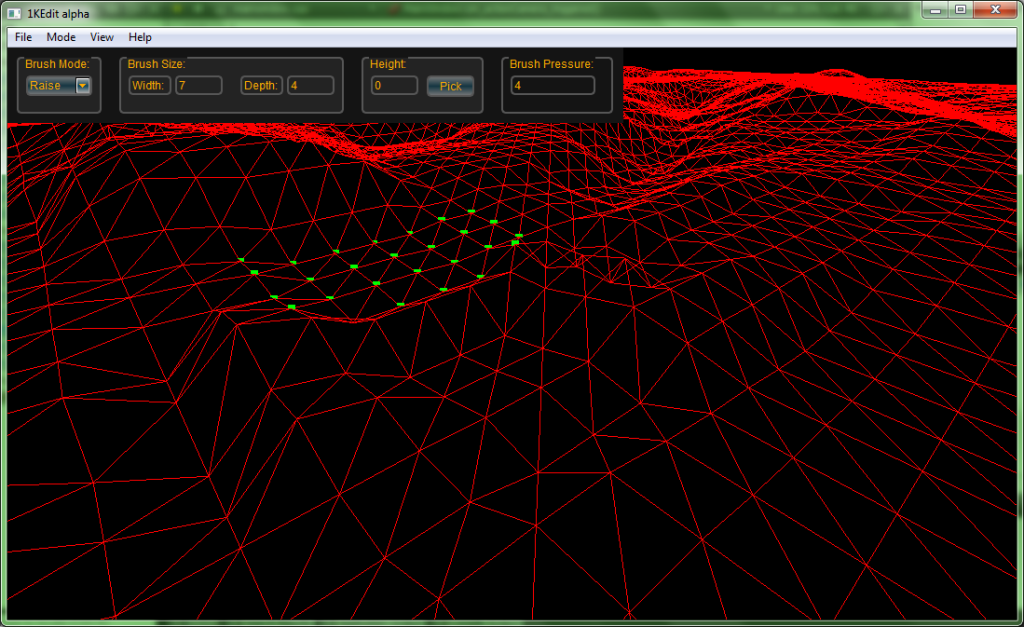
This morning I sat down and wrote a bunch more code to try to get brush resizing working properly. The problem was that the brush vertices were being calculated correctly if width and depth were both either even or odd, but if one was odd while the other was even I'd get either a crash or something really funky-looking and unresponsive to the mouse. Anyway, after leaving the computer to go for a walk I figured out a solution and it seems to be working fine:
Thanks to Ande, I was also able to get rid of those ugly white borders around the controls. I turned off the blue background so I could see the brush a bit better, but I don't know if some people actually preferred it, so I added a little feature to let the user change the background color themselves. I also changed to brush to just highlight the points it's affecting - it made debugging a bit easier. I'm thinking I'll go for something like in ZE, with the edges of the brush tapering off to transparent.
Also I'm pretty sure I can write shader code to make the vertices different colors depending on their height. I remember in ZE's height mode, vertices were either red or yellow or something in between based on how high up they were. I have mixed feelings about that, so I'll ask the community - do you find it useful to have that color indication of how high a vertex is, or is it distracting?
Re: BF2 ZE Terrain Tool
Posted: Thu Jan 03, 2013 1:13 pm
by Loopy53
From the colors alone I couldnt tell how high up any one piece of terrain was. It would have to have more colors, or none at all. Say go roy. g. biv. red, orange, yellow,(this is already in ze, maybe not orange, but still,) green, blue, indigo, violet. A rainbow!

Red being ground +/- 10-15ft, violet being really high up. perhaps 100+ feet for violet. I would use a pink color do show the terrain is sunken, and a darker pink for how much lower the terrain got. Ie using brush to move terrain down instead of up. Now that I think about it the system I just typed up could be extremely useful. Is it possible? Thanks!
Re: BF2 ZE Terrain Tool
Posted: Thu Jan 03, 2013 1:26 pm
by Fiodis
It's certainly possible, it'd just require some finangling. That is, red would be ground level with a color of (255, 0, 0) going up to green (0, 255, 0) up to blue (0, 0, 255) (see a pattern?) up to purplish-violet (255, 0, 255) - suddenly red is back. Possible, and maybe worth it.
An alternate system I'm considering is to have the vertices be a solid red at ground, then add green as they go up and blue as they go down (while subtracting the opposite color). Then yellow = something really high and purple = something really low. Problem with that is I'd only have ~255 color values to work with each way, and they might not be all very distinct from each other.
At the least, ZE's method did bother me slightly. It didn't make much sense that as you raised a vertex, it went from red to yellow to red again.
Loopy53 wrote:It would have to have more colors, or none at all.
None at all? You mean invisible terrain?

EDIT - Oh, yeah, blend mode is working, kind of. Right now I'm averaging the heights of all vertices within the brush, then adding the difference between the vert's height and the average to the vert's height. It does smooth out craggy terrain, but it smooths it out faster if there's a large height difference between vertices. In other words, if the terrain is steep, it blends faster. I guess that's how it's supposed to be, but it feels a bit strange to have the brush force seemingly jump around like that if the pressure is kept constant.
Re: BF2 ZE Terrain Tool
Posted: Thu Jan 03, 2013 3:15 pm
by Loopy53
Not invisible, just a single color. My bad. Liking everything so far, keep it up!
Re: BF2 ZE Terrain Tool
Posted: Thu Jan 03, 2013 7:32 pm
by Fiodis
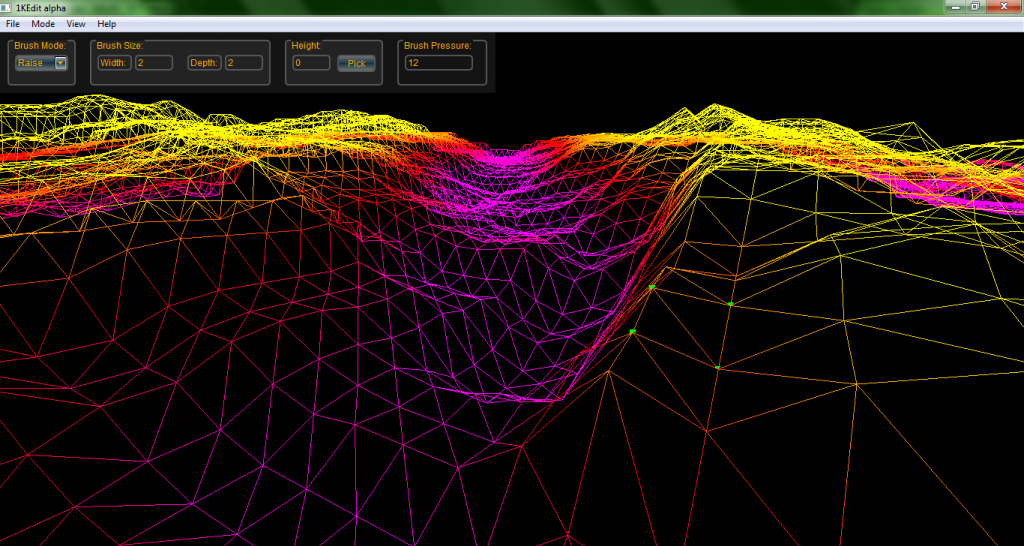
Here's something I wrote up in four seconds:
It's a bit steep - at the moment things get fully saturated yellow or purple just 15 meters above/below sea level. But that's the general gist of it.
And, got file saving to work. I don't know why I put that off so long. In the process I've uncovered another bug with the loading code. Today's the first chance I have to test it on actual stock .ter files rather than VM-generated ones, and I've found that the loading fails for some reason with .ter files that have a total grid size other than 1024. So it'll load modder-made terrains fine, but it's having a hard time loading stock ones. Not sure what the reason is yet, I wasn't expecting that. It'll be my project for tomorrow.
EDIT - Found the error, working on fixing it.
Edit 2 - Fixed.
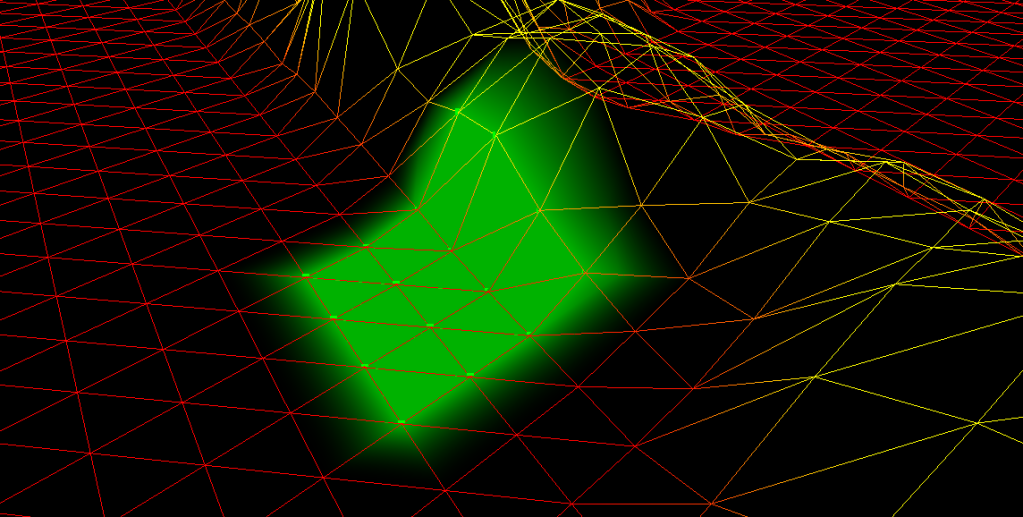
EditTrain Car #3 - Brushes now look like they do in ZE, filled in green and everything:
I might have to optimize that later, the code behind it is really inefficient, but they work just fine. Since it's no longer actually a brush drawn over the terrain, but rather the terrain itself recolored in certain parts, the brush no longer clips through it at long distances.
Re: BF2 ZE Terrain Tool
Posted: Fri Jan 04, 2013 1:08 pm
by Cerfon Rournes
Excellent work. Keep it up.

Re: BF2 ZE Terrain Tool
Posted: Fri Jan 04, 2013 1:35 pm
by ANDEWEGET
Cool. Coming along nicely!

Re: BF2 ZE Terrain Tool
Posted: Sun Jan 06, 2013 10:16 pm
by Fiodis
All of today's and yesterday's coding time was spent solving a very bothersome issue. This:
Fiodis wrote:I might have to optimize that later, the code behind it is really inefficient
was an understatement. It looked okay if I was just moving the mouse over terrain, and if I altered the terrain, but if I moved the mouse while altering the terrain, frames-per-second became seconds-per-frame. I was sending
way too much data to the GPU for a simple brush.
So today I offloaded the code that calculates the extents of the brush and determines whether a vertex is within the brush onto the GPU. Result: fps increased by a factor of three hundred.
Where am I at now? Way far behind where my naive, two-months-younger self had predicted, but meh - I'm not getting paid. The .ter file loads properly, brushes look and act like they should, and file saving works. I can check off the two first points on my list in the first post. Tomorrow I'll add a few minor things to let the user tweak settings, like whether or not the brush highlights the vertices it's acting on. Then, true to the first post, I'll upload what I have so far for people to toy around with and try to break. I'm anxious to see how it'll perform on systems other than the sole computer I've tested it on.
For those curious, I've been developing it on my laptop, a 64-bit (though I've been developing 32-bit) Win7 with an Intel i5, 2.5 GHz CPU and an Intel HD 3000 graphics card.
Re: BF2 ZE Terrain Tool
Posted: Sun Jan 06, 2013 11:50 pm
by Loopy53
digging the purple, now you just need a colour to show height, besides yellow though. Yellow good be 15m above sea level, and maybe green/blue for higher heights (ie usefull for background mountains, see my map.) Great job
Re: BF2 ZE Terrain Tool
Posted: Thu Jan 24, 2013 10:04 pm
by Fiodis
Urgh. All I've been doing for the past two and a half weeks has been trying to get a release version of the exe to work.
It seems to work fine on computers that have the Windows SDK installed (some version of Visual Studio). On computers without the SDK, the .exe doesn't seem to want to run. If I try to run it, I see it pop up in the Processes tab of Task Manager, linger for a few seconds, then vanish. Even if all the required .dlls are present. I can't understand it.
But then again, I only have one computer available to test it on that doesn't have the Windows SDK installed. So maybe it's not even that, and the issue lies elsewhere, perhaps with OpenGL support or something. Whatever the problem actually is, it's clear I need more than one test case to identify it.
So,
here is a link to version 0.15 of the program (hopefully; I've never used Dropbox before). I make no guarantees it'll run, since I haven't even been able to identify the cause of the problem. Make sure you also install the Microsoft Visual C++ 2010 redistributable.
Please, if you have time to be a test case, download the current version and try to run it. Send me a PM saying whether or not you got it to work, as well as your system specs (OS, graphics card, etc.). If you further have time to help me out, download Dependency Walker (
http://www.dependencywalker.com/) and open the .exe file with it. DW will spit out useful information about potentially missing dependencies.
Also useful to me would be data about the system's OpenGL support - if you wish, download and run the
OpenGL Extensions Viewer. glew32.dll ought to enable OpenGL 3.1 for graphics cards that support it, but there may be a problem in the version I'm distributing, which means there may only be support for OpenGL 1.1. If the OpenGL Extensions Viewer indicates your system only supports OpenGL 1.x but can handle DirectX 9.0c, there's most likely a problem with glew32.
And thanks everyone for all your helpful feedback in this thread so far!
Re: BF2 ZE Terrain Tool
Posted: Thu Jan 24, 2013 10:37 pm
by Dreadnot9
I just downloaded and it opened up nice and quick on my Window's 8 machine, loaded the shipped .ter files from the stock battlefront II maps. Should objects/path/boundaries/etc. be appearing? All I see is the terrain height itself.
I'm 99.99% sure I do NOT have SDK on my computer as well.
Hope this helps, it's a great tool
Re: BF2 ZE Terrain Tool
Posted: Thu Jan 24, 2013 11:05 pm
by THEWULFMAN
Dreadnot9 wrote:Should objects/path/boundaries/etc. be appearing?
Nope.
Downloading now, will test assuming I don't forget about it in 10 seconds. My memory has been shot lately.
Re: BF2 ZE Terrain Tool
Posted: Fri Jan 25, 2013 8:56 am
by Fiodis
I'm getting a bunch of reports saying it's working. That's making me very happy!
As I was typing up the requirements in the last post, something occurred to me. My general guideline I kept in mind was "if it can run BF2, it should be able to run this." Thinking back, I realize the non-SDK machine I was testing it on
wasn't actually able to run BF2. So perhaps I spent 18 days trying to fix programatically what was actually a hardware issue.

Or maybe not; maybe it
is a software and no testers have stumbled across it yet. Either way, a lack of bad news is good news indeed.
A note about the camera controls: right now they're set up to directly respond to KeyDown events. On Windows, though, a KeyDown event isn't sent every moment a key is down. When you're typing something and hold down a letter key, only one letter appears, followed by a brief pause, followed by more letters appearing. Similarly, if you want to move the camera a long distance, you have to hold down the key. It'll jerk forward a bit, pause, then move forward smoothly. Another unfortunate quirk is that you can only move in one direction at a time - holding down two keys simultaneously braks the flow. These are awkward settings that I'll try to fix in the next version.
I forgot to mention in the help menu - you can speed up the camera with the ] key and slow it down with [.
Re: BF2 ZE Terrain Tool
Posted: Fri Jan 25, 2013 10:29 am
by Teancum
@Fiodis -- not sure if you're interested, but if you are I can send you the terrain files from the Clone Wars game. They're not 100% the same, in fact Psych0fred said he thought they *might* have been done in Maya, but if you're looking for a fun side-project lemmie know.
Re: BF2 ZE Terrain Tool
Posted: Wed Feb 20, 2013 11:42 am
by Fiodis
Hello, thread. Long time no update. Mainly because I've been preoccupied trying to sort out academics (they're forcing me to take multivariable calculus, even though I already know it

). I've only been coding when I had a spare moment.
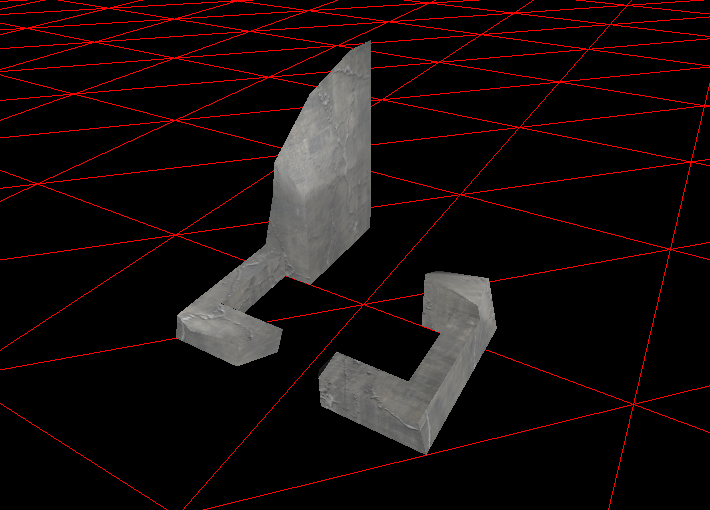
I meant to tackle terrain texture editing next, but I don't have enough sample .ter files to figure out how best to load the data, so I've been putting that off and working on MSH import. I can now load simple MSH files with only 1 texture and 1 geometry segment, but the code's modular so it shouldn't be hard to just iterate over all textures and geometry segments. Here's Rhn_bldg_bunker.msh loaded up in the editor:
At some point I'll have to change the program from loading .ter files to .wld files, so it can position all the objects correctly.
Many thanks to Ande, who's been a great help when it came to figuring out msh files.
One other thing: do you guys really use the "color" edit mode in ZE a lot? Originally I only meant to support loading terrain colors and not editing them, since I never used it much myself; I found it easier to work with lights and terrain textures. What sort of stuff do people use the color mode for?
Re: BF2 ZE Terrain Tool
Posted: Wed Feb 20, 2013 11:45 am
by Noobasaurus
Fiodis wrote:What sort of stuff do people use the color mode for?
People sometimes like to make the ground look psychedelic.
Re: BF2 ZE Terrain Tool
Posted: Wed Feb 20, 2013 12:02 pm
by kinetosimpetus
it could be used to make an area look burned or contaminated around a crashed ship or damaged storage tank.