Page 1 of 2
Changin a Unit's Animations
Posted: Sat Jul 25, 2009 12:19 am
by Fierfek
Okay, I looked through the FAQ, but couldn't find anything.
I know I'll probably get kicked for this, but how do I change a model's animation? I want to change a droid's animation to a clone one.
Re: Changin a Unit's Animations
Posted: Sat Jul 25, 2009 12:23 am
by Maveritchell
Clones use the standard human animations, droids use the droid animationbank. To switch animationbank lines is pretty self-explanatory (they have an obvious odf parameter); to use the standard human animations, just remove the line.
Re: Changin a Unit's Animations
Posted: Sat Jul 25, 2009 12:05 pm
by Fierfek
Maveritchell wrote:Clones use the standard human animations, droids use the droid animationbank. To switch animationbank lines is pretty self-explanatory (they have an obvious odf parameter); to use the standard human animations, just remove the line.
Which line is that?
Sorry, I have never ever worked with animations before, so I am a complete noob.
Re: Changin a Unit's Animations
Posted: Sat Jul 25, 2009 12:35 pm
by MetalcoreRancor
add SkeletonName = "human"
AnimationName = "human" to your droids odf coding
Re: Changin a Unit's Animations
Posted: Sat Jul 25, 2009 4:11 pm
by Fierfek
Okay, here is my droid's odf:
He isn't ingame. Here is the section of my error log:
Now what?
Re: Changin a Unit's Animations
Posted: Sat Jul 25, 2009 4:15 pm
by RogueKnight
Fierfek wrote:Okay, here is my droid's odf:
He isn't ingame. Here is the section of my error log:
Now what?
Possibly the fact that you don't have an anim bank named "human"?
Not sure if thats a stock animbank, I don't work with those often, but what I would do first is to go check the parent odf of the clone trooper to find out what animation bank that uses, copy it over to your CIS side, reference it in your engineer ODF and munge.
Re: Changin a Unit's Animations
Posted: Sat Jul 25, 2009 4:25 pm
by Fierfek
DarthRogueKnight wrote:Fierfek wrote:Okay, here is my droid's odf:
He isn't ingame. Here is the section of my error log:
Now what?
Possibly the fact that you don't have an anim bank named "human"?
Not sure if thats a stock animbank, I don't work with those often, but what I would do first is to go check the parent odf of the clone trooper to find out what animation bank that uses, copy it over to your CIS side, reference it in your engineer ODF and munge.
How do I find out which animation the rep odf uses? I looked through everything I could think of, but couldn't find anything.
Re: Changin a Unit's Animations
Posted: Sat Jul 25, 2009 4:29 pm
by Maveritchell
Maveritchell wrote:Clones use the standard human animations, droids use the droid animationbank. To switch animationbank lines is pretty self-explanatory (they have an obvious odf parameter); to use the standard human animations, just remove the line.
Re: Changin a Unit's Animations
Posted: Sat Jul 25, 2009 5:01 pm
by Fierfek
Maveritchell wrote:Maveritchell wrote:Clones use the standard human animations, droids use the droid animationbank. To switch animationbank lines is pretty self-explanatory (they have an obvious odf parameter); to use the standard human animations, just remove the line.
Okay, but where is the parameter? This is my VERY first time working with animations, so don't expect me to know everything about it.
Is this the parameter?
Do I just remove that part?
Re: Changin a Unit's Animations
Posted: Sat Jul 25, 2009 5:12 pm
by Maveritchell
Yes. "Skeleton" and "Animation" references are - essentially - the same thing. The default animationbanks aren't supposed to be specifically referenced in the odf, so all you need to do is remove any references to anything else.
Re: Changin a Unit's Animations
Posted: Sat Jul 25, 2009 5:27 pm
by Fierfek
Okay - figured it out.
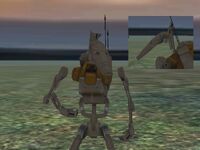
Problem though - now he looks like this:
How do I fix that?
Re: Changin a Unit's Animations
Posted: Sat Jul 25, 2009 5:29 pm
by Maveritchell
Fierfek wrote:How do I fix that?
By using the droid animationset that you just changed it from. Alternatively you could re-envelop the model to a new skeleton in XSI.
Re: Changin a Unit's Animations
Posted: Sat Jul 25, 2009 5:32 pm
by Fierfek
Maveritchell wrote:Fierfek wrote:How do I fix that?
By using the droid animationset that you just changed it from. Alternatively you could re-envelop the model to a new skeleton in XSI.
I want him to have the clone's animations for a disguise kit.
And XSI won't work for me.
Xavious did this in his new Battlefront Clone Wars mod, right? How did he get it working?
Re: Changin a Unit's Animations
Posted: Sat Jul 25, 2009 5:43 pm
by Maveritchell
Fierfek wrote:Maveritchell wrote:Fierfek wrote:How do I fix that?
By using the droid animationset that you just changed it from. Alternatively you could re-envelop the model to a new skeleton in XSI.
I want him to have the clone's animations for a disguise kit.
And XSI won't work for me.
Xavious did this in his new Battlefront Clone Wars mod, right? How did he get it working?
He either did what you did and lived with it or he did one of the things I said.
Re: Changin a Unit's Animations
Posted: Sat Jul 25, 2009 5:45 pm
by Fierfek
Maveritchell wrote:Fierfek wrote:Maveritchell wrote:Fierfek wrote:How do I fix that?
By using the droid animationset that you just changed it from. Alternatively you could re-envelop the model to a new skeleton in XSI.
I want him to have the clone's animations for a disguise kit.
And XSI won't work for me.
Xavious did this in his new Battlefront Clone Wars mod, right? How did he get it working?
He either did what you did and lived with it or he did one of the things I said.
Wait, are the skeleton and the animationset the same thing?
Re: Changin a Unit's Animations
Posted: Sat Jul 25, 2009 5:49 pm
by Maveritchell
Fierfek wrote:Wait, are the skeleton and the animationset the same thing?
Maveritchell wrote:Yes. "Skeleton" and "Animation" references are - essentially - the same thing.
Re: Changin a Unit's Animations
Posted: Sat Jul 25, 2009 6:00 pm
by AceMastermind
add SkeletonName = "human"
AnimationName = "human" to your droids odf coding
..."Skeleton" and "Animation" references are - essentially - the same thing...
excerpt from BF2 Jedi Creation.doc simplified by me wrote:the next line can be one of 3 choices:
1. Not included (blank)
if the model wants to use the basic human skeleton and animations.
2. AnimationName
if this model uses the basic human skeleton, but wants to provide its own animations as a set of files in the "munged" folder.
3. SkeletonName
if this model wants to use its own skeleton in addition to its own animations.
Re: Changin a Unit's Animations
Posted: Sat Jul 25, 2009 7:04 pm
by Fierfek
No offense or anything, but is that just telling Mav something, or can it help me?
Re: Changin a Unit's Animations
Posted: Sat Jul 25, 2009 7:08 pm
by RogueKnight
Fierfek wrote:No offense or anything, but is that just telling Mav something, or can it help me?
That can be very useful to you, if you understand it.
Re: Changin a Unit's Animations
Posted: Sat Jul 25, 2009 7:09 pm
by Fierfek
DarthRogueKnight wrote:That can be very useful to you, if you understand it.
I kind of understand it.
This is what I want:
I want a normal-looking droid who, when the disguise kit is activated, turns into a normal-looking clone.
My question is: How do I accomplish that? Without using XSI.