Page 1 of 2
.option Creator
Posted: Sun May 22, 2011 10:36 am
by ANDEWEGET
Im learning some basic programming right now and needed something which isnt too complex and only uses textfiles, so I decided to write a small program which lets you create .tga.option files for multiple .tga's. You can load them all into the program, then choose the parameters you want to use and let the program do the rest. Not really that usefull unless you create a lot of new textures or want to, for example, have only 1 Mip map level on all your map's textures.
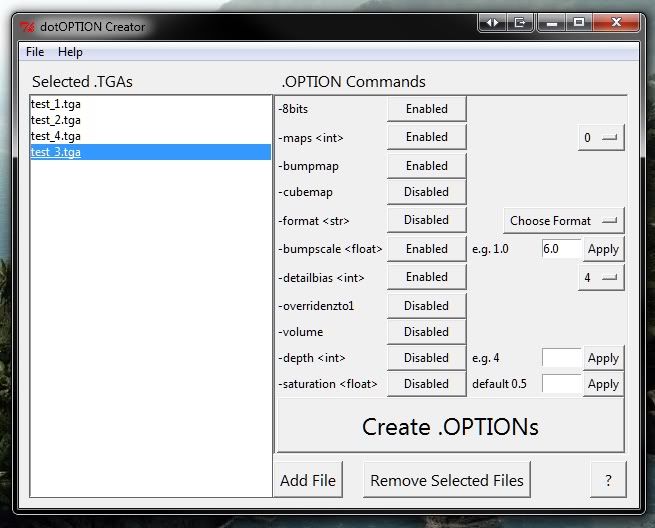
Even though it might not be of much use, I still want to make it right and for that Id need some questions answered:
The documentation says that -8bit is only for the PS2, I remember someone saying it works for PC, too. Does anybody know if it does? If -8bit works, does -32bit work, too?
Do parameters like -bordercolor or -borderalpha get used at all? Is it worth including them?
Do -format and -forceformat make any difference ingame?
Comments?
EDIT: This might fit better into SWBF2 Modding...or does it?
EDIT2:
Version 0.99 changes:
- It now does .msh.option, too(needs a bit more work though).
- Fixed bug when selecting a file which path contains spaces
Download:
http://www.gamefront.com/files/20413626 ... r_v0_99.7z
32bit:
https://sites.google.com/site/andescp/m ... ects=0&d=1
It doesnt seem to have too many bugs/errors(just 1 reported

), so Ill add this to my release thread and will update that thread with updates after 1.0 or so.
Re: .option Creator
Posted: Sun May 22, 2011 10:44 am
by DarthD.U.C.K.
that looks really cool!
as far as i know the 8bits etc. values have no effect on the pc. does the "?" button open something like a documentation?
Re: .option Creator
Posted: Sun May 22, 2011 11:15 am
by ANDEWEGET
Thanks for the info and yes the ? button opens a window with short descriptions of each command.
Re: .option Creator
Posted: Sun May 22, 2011 11:25 am
by THEWULFMAN
DarthD.U.C.K. wrote:that looks really cool!
as far as i know the 8bits etc. values have no effect on the pc. does the "?" button open something like a documentation?
I have tried out 8bit and 32bit, and the only difference I saw was the texture with a 32bit line, was more pixelly, and it looked crappy.
Anyway, this looks really helpfull, and a time saver.

Re: .option Creator
Posted: Sun May 22, 2011 11:47 am
by acryptozoo
ooooo.... pretty cool
Re: .option Creator
Posted: Sun May 22, 2011 12:08 pm
by Lephenix
You are begining, another skill to add to your others

.
Re: .option Creator
Posted: Sun May 22, 2011 12:53 pm
by [Padawan]Helkaan
I can't believe this was written by a beginner programmer

What language did you use for making it?
Re: .option Creator
Posted: Sun May 22, 2011 2:30 pm
by ANDEWEGET
Im using Python, its very easy to understand and mostly straight forward, although its not as fast as C++ or similar. Thanks for the nice comments BTW!
Re: .option Creator
Posted: Sun May 22, 2011 11:29 pm
by Cerfon Rournes
Great concept ANDE! Can't wait for the release.

Re: .option Creator
Posted: Mon May 23, 2011 3:36 am
by naru1305
Cerfon Rournes wrote:Great concept ANDE! Can't wait for the release.
i agree!
realy nice, this will be helpful for me. thx so much
 and you are a beginner? i´ve started with programming too, but imo it is quite difficult(C++), so i must say: you are a realy awesome modder.
Re: .option Creator
Posted: Tue May 24, 2011 12:10 pm
by ANDEWEGET
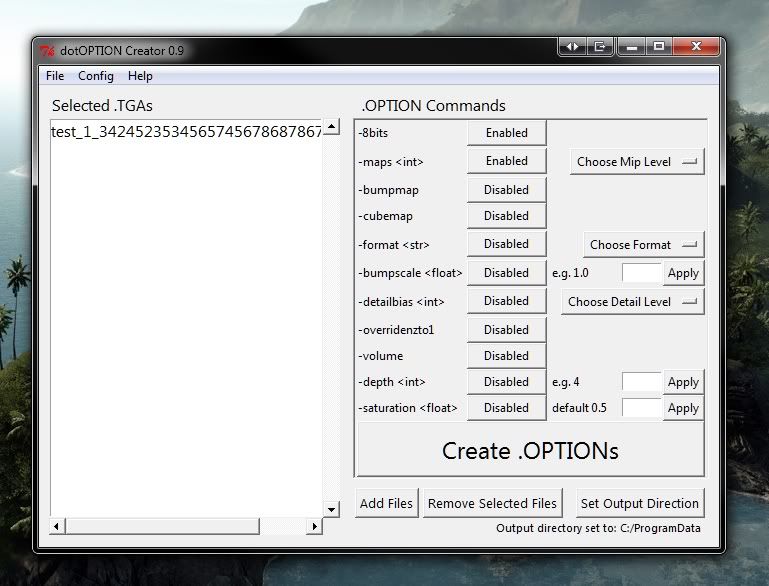
So, did some more work on this:
Changes include:
- Added scrollbars
- Added changeable output directory(stored locally, 'recovered' on every start)
- Added support for multiple file selection in the Add Files window
- Added output dir change command and output dir reset(to .exe's folder) in the Config menu
- Deleted the Help button from the main window, it still exists in the Help menu
- Added an info label at the bottom
- Did some changes to fonts/button size

Ive decided to not include these -bordercolor commands for now. -8bit will stay for now, it doesnt crash anything, that means it isnt bad, even though it might not do anything.
Anything you(yes, you) want to see in this program? Post it!
Ill maybe build an (hopefully)externally usable .exe later, anyone wants to test? Id need
XP, 32bit
XP, 64bit
Vista, 32bit
Vista, 64bit
Win7, 32bit
(Win7, 64bit; my system)
testers(multiple testers for every system is good).
Re: .option Creator
Posted: Tue May 24, 2011 12:15 pm
by skelltor
I only see .tga options does it do .msh.options?
Re: .option Creator
Posted: Tue May 24, 2011 12:32 pm
by ANDEWEGET
No, it doesnt do .msh.option right now. If this works out well I might make one for .msh, too. I have to test, if I can get it to work in only one .exe or if I have to either create two .exe's or rewrite the complete code in another sctructure.
Re: .option Creator
Posted: Tue May 24, 2011 1:15 pm
by commander501stappo
ANDEWEGET wrote:XP, 32bit
Count me in
Re: .option Creator
Posted: Tue May 24, 2011 1:32 pm
by naru1305
ANDEWEGET wrote:anyone wants to test? Id need
XP, 32bit
Vista, 32bit
can i please test it?
Re: .option Creator
Posted: Tue May 24, 2011 1:51 pm
by Lephenix
On your screen , it is written Choose Mip Level , isn't it Choose Map Level
? It looks good
.
Re: .option Creator
Posted: Tue May 24, 2011 2:53 pm
by THEWULFMAN
Lephenix wrote:On your screen , it is written Choose Mip Level , isn't it Choose Map Level
? It looks good
.
Actually no, not necessarily.
Mipmap
Re: .option Creator
Posted: Tue May 24, 2011 4:02 pm
by ANDEWEGET
For everyone who'd like to test:
RAR
ZIP
If you experience a missing .dll or any sort of .dll error, run vcredist_x86.exe which is included in the archive. If you still experience .dll errors, please post them with a screenshot of the error.
If you run into any problems which arent .dll errors, look into the .log file(it should be named something with log, cant remember if its something.log or log in the name itself) and post the error here. Please post your OS, too.
Re: .option Creator
Posted: Tue May 24, 2011 6:00 pm
by Cerfon Rournes
I'm having some Winzip extract errors, could you post this in a compressed .zip folder?
Re: .option Creator
Posted: Wed May 25, 2011 10:10 am
by ANDEWEGET
Uploaded a .zip and a .rar archive, those should work now:
RAR
ZIP