Error when munging

In this forum you will find and post information regarding the modding of Star Wars Battlefront 2. DO NOT POST MOD IDEAS/REQUESTS.

Moderator: Moderators

Post Reply
Sotsvamp
Recruit Womprat Killer
Posts: 13
Joined: Tue Oct 27, 2015 4:44 pm
Projects :: No Mod project currently.
xbox live or psn: No gamertag set

Error when munging

Post by Sotsvamp »

Hello, can someone help me with this error.

This is from my mungelog:
Hidden/Spoiler:
ERROR[levelpack YA3.req]:Could not open ..\..\common\munged\pc\core.files for input. DOS reports:
No such file or directory
ERROR[levelpack YA3.req]:Could not open ..\..\common\munged\pc\core.files for input. DOS reports:
No such file or directory
[continuing]
2 Errors 0 Warnings

ERROR[levelpack YA3_conquest.mrq]:Could not open ..\..\common\munged\pc\core.files for input. DOS reports:
No such file or directory
ERROR[levelpack YA3_conquest.mrq]:Could not open ..\..\common\munged\pc\core.files for input. DOS reports:
No such file or directory
[continuing]
2 Errors 0 Warnings

ERROR[levelpack YA3.req]:Could not open ..\..\common\munged\pc\core.files for input. DOS reports:
No such file or directory
ERROR[levelpack YA3.req]:Could not open ..\..\common\munged\pc\core.files for input. DOS reports:
No such file or directory
[continuing]
2 Errors 0 Warnings


This is from my munge output:
Hidden/Spoiler:
Worlds\munge PC
munge_world Common PC
Done
Done
Done
1 file(s) moved.
1 file(s) moved.
1 file(s) moved.
1 file(s) moved.
1 file(s) moved.
1 file(s) moved.
1 file(s) moved.
1 file(s) moved.
1 file(s) moved.
munge_world YA3 PC
Done
sky_yav2 has 169 vertices and no collision geometry - using normal geometry
Munging sky_yav2.tga
Munging sky_yav2_trees.tga
Munging YA3.tga
Munging YA3_main_1.tga
Munging yav2.tga
Munging yav2_main_1.tga
Munging yav2_main_2.tga
Munging yav2_main_3.tga
Munging yav2_main_4.tga
Munging yav2_map.tga
Munging yav_detail.tga
Munging YA3.TER
Munging YA3_conquest.lyr
Munging YA3_conquest.RGN
Munging YA3_conquest.BAR
File ..\..\..\worlds\ya3\world1\YA3_conquest.BAR not found; skipping
Munging YA3_conquest.HNT
File ..\..\..\worlds\ya3\world1\YA3_conquest.HNT not found; skipping
Finished Munging files, writing output
Done
Munging YA3.wld
Munging YA3.wld
Munging YA3.RGN
Munging YA3.BAR
Munging YA3.HNT
File ..\..\..\worlds\ya3\world1\YA3.HNT not found; skipping
Finished Munging files, writing output
Done
Munging YA3.PTH
Munging YA3_conquest.PTH
1 file(s) moved.
1 file(s) moved.
Munging YA3.sky
1 file(s) moved.
1 file(s) moved.
1 file(s) moved.
Munging YA3.BND
1 file(s) moved.
1 file(s) moved.
Munging YA3.LGT
1 file(s) moved.
1 file(s) moved.
Munging YA3.req
Munging YA3_conquest.mrq
0 file(s) moved.
The system cannot find the path specified.
Munging YA3.req
0 file(s) moved.
The system cannot find the path specified.
1 file(s) moved.
1 file(s) moved.
Munging addme.lua...done.
Copying files to Battlefront II directory:
"F:\Games\steamapps\common\Star Wars Battlefront II\GameData"
Addon dir exists, continuing...
Mod dir "YA3"exists, continuing...
Copying addme.script to mod dir...done
Copying "mission.lvl" to modDir\data\_LVL_PC\...done
Copying "core.lvl" to modDir\data\_LVL_PC\...done
Copying "YA3" to modDir\data\_LVL_PC\...done
Copying "SIDE" to modDir\data\_LVL_PC\...done
Munge process finished


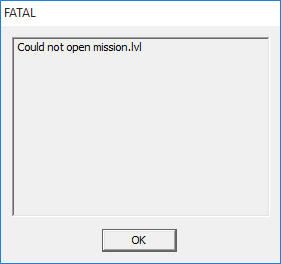
It allso says that it can't open mission.lvl when I try to run it ingame

Thanks in advance
User avatar
AceMastermind
Gametoast Staff
Gametoast Staff
Posts: 3285
Joined: Mon Aug 21, 2006 6:23 am
Contact:

Re: Error when munging

Post by AceMastermind »

Do this:
1. Make sure you have the munge fix installed correctly
2. Create a new map but don't modify anything
3. Munge the new map
4. Play the new map and see if it works

I don't have Windows 10 and know nothing about it, so I can't help you any further there.
Sotsvamp
Recruit Womprat Killer
Posts: 13
Joined: Tue Oct 27, 2015 4:44 pm
Projects :: No Mod project currently.
xbox live or psn: No gamertag set

Re: Error when munging

Post by Sotsvamp »

Ok, can you tell me what is the correct way to install the fix?
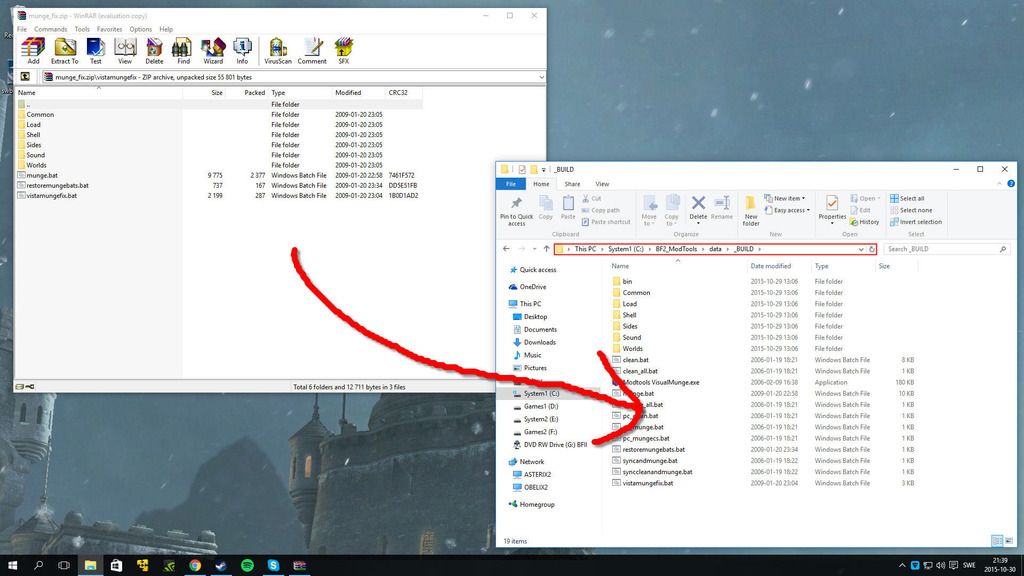
Like this?:
Image
User avatar
AceMastermind
Gametoast Staff
Gametoast Staff
Posts: 3285
Joined: Mon Aug 21, 2006 6:23 am
Contact:

Re: Error when munging

Post by AceMastermind »

That's wrong, the 3-step instructions are here:
http://www.gametoast.com/viewtopic.php? ... 73#p295373
Instructions:
  • Download munge_fix.zip from GameFront or MediaFire.
    Extract the vistamungefix folder into your C:\BF2_ModTools directory.
    Run the vistamungefix.bat located inside the vistamungefix folder.

The Fixed and improved munge files by Marvel4 add more functionality to the batch files and installation only requires you to drag n drop them into your project or the data folder. If you don't get any overwrite prompts with these then you're installing it wrong.

http://www.gametoast.com/viewtopic.php?f=64&t=30415
Sotsvamp
Recruit Womprat Killer
Posts: 13
Joined: Tue Oct 27, 2015 4:44 pm
Projects :: No Mod project currently.
xbox live or psn: No gamertag set

Re: Error when munging

Post by Sotsvamp »

Did not read the steps for some reason, thanks alot for the help. Gonna try it out now


EDIT
Still didn't work :( It gave me the same mungelog:
Hidden/Spoiler:
ERROR[levelpack AMO.req]:Could not open ..\..\common\munged\pc\core.files for input. DOS reports:
No such file or directory
ERROR[levelpack AMO.req]:Could not open ..\..\common\munged\pc\core.files for input. DOS reports:
No such file or directory
[continuing]
2 Errors 0 Warnings

ERROR[levelpack AMO_conquest.mrq]:Could not open ..\..\common\munged\pc\core.files for input. DOS reports:
No such file or directory
ERROR[levelpack AMO_conquest.mrq]:Could not open ..\..\common\munged\pc\core.files for input. DOS reports:
No such file or directory
[continuing]
2 Errors 0 Warnings

ERROR[levelpack AMO.req]:Could not open ..\..\common\munged\pc\core.files for input. DOS reports:
No such file or directory
ERROR[levelpack AMO.req]:Could not open ..\..\common\munged\pc\core.files for input. DOS reports:
No such file or directory
[continuing]
2 Errors 0 Warnings
Thanks for the help tough
User avatar
AceMastermind
Gametoast Staff
Gametoast Staff
Posts: 3285
Joined: Mon Aug 21, 2006 6:23 am
Contact:

Re: Error when munging

Post by AceMastermind »

You did run the vistamungefix.bat right? This copies the fixed bat files into the right locations.
phazon_elite was getting the exact same error before fixing the batch files.

Problem:
http://www.gametoast.com/viewtopic.php?p=313081#p293937
Solved:
http://www.gametoast.com/viewtopic.php?p=313081#p294820

Similar error with solutions:
viewtopic.php?f=27&t=29401
viewtopic.php?f=27&t=29673
viewtopic.php?f=27&t=30803
viewtopic.php?f=27&t=30943
Sotsvamp
Recruit Womprat Killer
Posts: 13
Joined: Tue Oct 27, 2015 4:44 pm
Projects :: No Mod project currently.
xbox live or psn: No gamertag set

Re: Error when munging

Post by Sotsvamp »

Yes I ran the vistamungefix.bat but the message in the mungelog came up:
Hidden/Spoiler:
ERROR[levelpack AMO.req]:Could not open ..\..\common\munged\pc\core.files for input. DOS reports:
No such file or directory
ERROR[levelpack AMO.req]:Could not open ..\..\common\munged\pc\core.files for input. DOS reports:
No such file or directory
[continuing]
2 Errors 0 Warnings

ERROR[levelpack AMO_conquest.mrq]:Could not open ..\..\common\munged\pc\core.files for input. DOS reports:
No such file or directory
ERROR[levelpack AMO_conquest.mrq]:Could not open ..\..\common\munged\pc\core.files for input. DOS reports:
No such file or directory
[continuing]
2 Errors 0 Warnings

ERROR[levelpack AMO.req]:Could not open ..\..\common\munged\pc\core.files for input. DOS reports:
No such file or directory
ERROR[levelpack AMO.req]:Could not open ..\..\common\munged\pc\core.files for input. DOS reports:
No such file or directory
[continuing]
2 Errors 0 Warnings
Does he say somewhere how he edited the .bat files?

Thank you alot for taking your time to find these topics :)
User avatar
AceMastermind
Gametoast Staff
Gametoast Staff
Posts: 3285
Joined: Mon Aug 21, 2006 6:23 am
Contact:

Re: Error when munging

Post by AceMastermind »

This is what the code block in the bat looks like straight out of the default installation:

Code: Select all

@if "%MUNGE_BIN_DIR%"=="" (
	@set MUNGE_BIN_DIR=%CD%\%MUNGE_ROOT_DIR%\..\ToolsFL\Bin
	@set PATH=%CD%\..\..\..\ToolsFL\Bin;%PATH%
	@echo MUNGE_BIN_DIR=!MUNGE_BIN_DIR!
)
This is what vistamungefix changes:

Code: Select all

REM @if "%MUNGE_BIN_DIR%"=="" (
	@set MUNGE_BIN_DIR=%CD%\%MUNGE_ROOT_DIR%\..\ToolsFL\Bin
	@set PATH=%CD%\..\..\..\ToolsFL\Bin;%PATH%
REM	@echo MUNGE_BIN_DIR=!MUNGE_BIN_DIR!
REM )
This is what the Fixed and improved munge files change:

Code: Select all

@if "%MUNGE_BIN_DIR%"=="" (
	@set MUNGE_BIN_DIR=%CD%\%MUNGE_ROOT_DIR%\..\ToolsFL\Bin
	@set "PATH=%CD%\..\..\..\ToolsFL\Bin;%PATH%"
	@echo MUNGE_BIN_DIR=!MUNGE_BIN_DIR!
)
The vistamungefix comments out the 1st, 4th and 5th line, whereas the Fixed and improved files just have the path in the 3rd line wrapped in quotation marks, either way will work.

I guess the next step for you is to confirm if the fixed bat files were actually copied into the right places after running the vistamungefix.bat, if they were then I don't know where to go from here.
User avatar
[RDH]Zerted
Gametoast Staff
Gametoast Staff
Posts: 2982
Joined: Sun Feb 26, 2006 7:36 am
Projects :: Bos Wars AI - a RTS game
Games I'm Playing :: SWBF2 and Bos Wars
xbox live or psn: No gamertag set
Location: USA
Contact:

Re: Error when munging

Post by [RDH]Zerted »

Could not open ..\..\common\munged\pc\core.files for input.
You get that if you try to munge something without munging Common first. Do a full clean then munge common.

You still may have needed the munge fix, but either way you do need to check common.
Sotsvamp
Recruit Womprat Killer
Posts: 13
Joined: Tue Oct 27, 2015 4:44 pm
Projects :: No Mod project currently.
xbox live or psn: No gamertag set

Re: Error when munging

Post by Sotsvamp »

Actually the vistamungefix changed the default:

Code: Select all

@if "%MUNGE_BIN_DIR%"=="" (
	@set MUNGE_BIN_DIR=%CD%\%MUNGE_ROOT_DIR%\..\ToolsFL\Bin
	@set PATH=%CD%\..\..\..\ToolsFL\Bin;%PATH%
	@echo MUNGE_BIN_DIR=!MUNGE_BIN_DIR!
)
to

Code: Select all

@if "%MUNGE_BIN_DIR%"=="" (
	@set MUNGE_BIN_DIR=%CD%\%MUNGE_ROOT_DIR%\..\ToolsFL\Bin
	@set "PATH=%CD%\..\..\..\ToolsFL\Bin;%PATH%"
	@echo MUNGE_BIN_DIR=!MUNGE_BIN_DIR!
)
And not the default to

Code: Select all

REM @if "%MUNGE_BIN_DIR%"=="" (
	@set MUNGE_BIN_DIR=%CD%\%MUNGE_ROOT_DIR%\..\ToolsFL\Bin
	@set PATH=%CD%\..\..\..\ToolsFL\Bin;%PATH%
REM	@echo MUNGE_BIN_DIR=!MUNGE_BIN_DIR!
REM )
I think the dude who uploaded the mungefix changed the vistamungefix to the "Fixed and improved munge files"
Instructions:
Download munge_fix.zip from GameFront or MediaFire.
Extract the vistamungefix folder into your C:\BF2_ModTools directory.
Run the vistamungefix.bat located inside the vistamungefix folder.
Maybe I should try the code from the old vistamungefix (if i'm right about that he changed it)
(To this)

Code: Select all

REM @if "%MUNGE_BIN_DIR%"=="" (
   @set MUNGE_BIN_DIR=%CD%\%MUNGE_ROOT_DIR%\..\ToolsFL\Bin
   @set PATH=%CD%\..\..\..\ToolsFL\Bin;%PATH%
REM   @echo MUNGE_BIN_DIR=!MUNGE_BIN_DIR!
REM )


[RDH]Zerted wrote:
Could not open ..\..\common\munged\pc\core.files for input.
You get that if you try to munge something without munging Common first. Do a full clean then munge common.

You still may have needed the munge fix, but either way you do need to check common.
I tried building my "data_ABC" without common checked and with common checked but it says could not load mission.lvl either way.


EDIT
There is no mission.lvl created even with the fix for some reason
I do this:

1. Extract vistamungefix folder to C:\BF2_ModTools

2. Run vistamungefix.bat from the vistamungefix folder

3. Run Modtools VisualMunge.exe from the C:\BF2_ModTools\data\_BUILD

4. Go to C:\BF2_ModTools\data_ABC\_BUILD and run the Modtools VisualMunge.exe

5. Run the game

Then this comes up:

Image

Edit: It's weird that sometimes it works and sometimes it doesn't
User avatar
AceMastermind
Gametoast Staff
Gametoast Staff
Posts: 3285
Joined: Mon Aug 21, 2006 6:23 am
Contact:

Re: Error when munging

Post by AceMastermind »

Sotsvamp wrote:I think the dude who uploaded the mungefix changed the vistamungefix to the "Fixed and improved munge files"
...
Maybe I should try the code from the old vistamungefix (if i'm right about that he changed it)
...
Nah, I think you're getting the files mixed up. I just checked every bat file in the vistamungefix and they all use commenting whereas the Fixed and improved files use quotation marks and some additional things for more functionality.

Just leave the default options ticked when you munge your new map for the first time.
Sotsvamp
Recruit Womprat Killer
Posts: 13
Joined: Tue Oct 27, 2015 4:44 pm
Projects :: No Mod project currently.
xbox live or psn: No gamertag set

Re: Error when munging

Post by Sotsvamp »

Yes, I was probalby wrong about that he changed the vistamungefix. I think that vistamungefix.bat didn't create/move the files like it should in my case. Because it seems that it didn't change the munge.bat
Post Reply