Page 1 of 1
Geo_prop_dust problem
Posted: Fri May 26, 2006 5:55 am
by Gunjak
i added the geo_prop_dust to my map but it caused a big amount of lag, when i removed it from my map, i munged but it still appeared in my map,
now my maps gonna be a lagfest.
does anyone know how to get rid of the geo_prop_dust
ps- i also deleted the odf for it and the msh in my world folder.
Posted: Fri May 26, 2006 7:31 am
by RC-1290
did you try to clean?
Posted: Fri May 26, 2006 8:51 am
by Gunjak
what does clean do?
Posted: Fri May 26, 2006 9:56 am
by RC-1290
It removes all munged files so you munge everything from the ground up(like munging the first time)
Posted: Fri May 26, 2006 11:02 am
by Gunjak
aahh
maybe ill try that thanks dreadnought
It didnt work. dang, answer from a pro plwease

Posted: Fri May 26, 2006 11:17 am
by xwingguy
Open zeroeditor and see if the dust is still there. (Sometimes deleted objects aren't quite deleted.)
Posted: Fri May 26, 2006 1:37 pm
by Gunjak
xwingguy wrote:Open zeroeditor and see if the dust is still there. (Sometimes deleted objects aren't quite deleted.)
nope there not apearing in zeroeditor , only ingame, the effects dust makes is really crappy also. Shouldve been called geo_prop_dontplacethispropitbuggersupyourmap
Posted: Fri May 26, 2006 3:16 pm
by Squirrel7Hunter
did u check all the layers? somtimes zeroedits messes up and glitches, like when I select an object to delete, it will have another object selected with the one I want to delete and it will delete both of them.
Posted: Fri May 26, 2006 3:37 pm
by -_-
using the fog/dues settings in .fx file is more reliable.
Posted: Fri May 26, 2006 5:36 pm
by PvtParts
Edit: Oh shnizzle. Make sure you dont have the 'cp' entry typed in the first box, as a matter of fact make sure the first box is empty.
Check all layers, and to be safe, in the object browser (do this in all layers as well) type in this box:
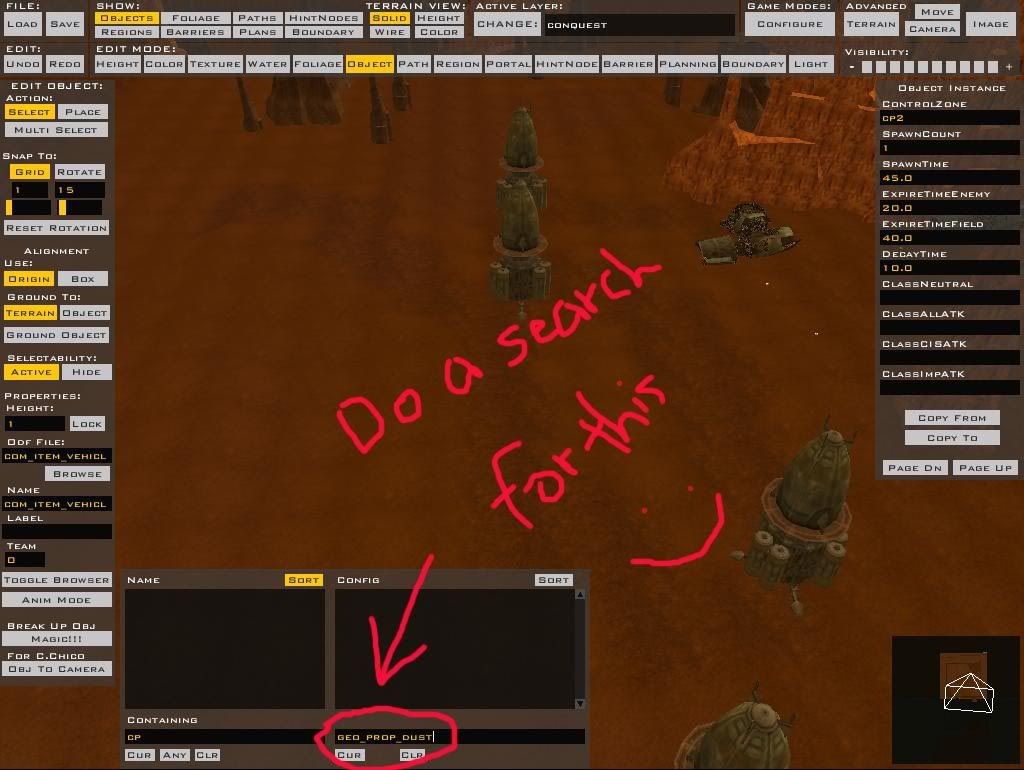
Also do searches for other things, such as geo_prop_mist. It could be something else. Have you changed the map to more units? I highly doubt one dust can cause that much lag.
Once you do this, do another clean (make sure to select all before doing it). Then munge.
Posted: Fri May 26, 2006 6:00 pm
by Gunjak
PvtParts wrote:Edit: Oh shnizzle. Make sure you dont have the 'cp' entry typed in the first box, as a matter of fact make sure the first box is empty.
Check all layers, and to be safe, in the object browser (do this in all layers as well) type in this box:
Also do searches for other things, such as geo_prop_mist. It could be something else. Have you changed the map to more units? I highly doubt one dust can cause that much lag.
Once you do this, do another clean (make sure to select all before doing it). Then munge.
er i tried it just now still no geo_prop_dust , i'll take a screenie of what my map looks like now .

EW horrible!
Posted: Fri May 26, 2006 6:29 pm
by PvtParts
can you post a full screen screen shot?
And dude thats definatly an odf, not the .fx fog.
Are you checking all layers? Are you checking for things like geo_prop_mist? look through the geonosis assets and do a search for all the ones that are similar such as _cloud, _mist_vent, _dust, _mist
Posted: Fri May 26, 2006 6:42 pm
by Gunjak
Yeah ive checked em all, i have used a geo_prop_mist to make the effect of fumes coming off a run down LAAT, ill delete it and see if that is the problem.
ps how can i post a full screen piccy, photo bucket doesnt support that i dont think?
ZOMG it worked, after all that it was soo easy , all i had to do was delete the geo_prop_mist, ahh crap, i feel like a nub again
One more thing where do i find the .fx? nva mind i found it
Posted: Fri May 26, 2006 8:26 pm
by PvtParts
yes it does. Just use the bottom code labeled "Img". It should start like this:
Its 2 below Url, 1 below Tag