Page 84 of 96
Re: SWBF Series Model Showcase Thread 5th Edition
Posted: Sun Aug 18, 2013 2:13 pm
by Loopy53
In ZE, your objects are set to snap to the grid by default. To fix this, go into ZE and object edit mode, then find where it says "snap to" and then select rotate. Here is a screenshot of it.
also, if you press the "<" and ">" keys on your keyboard, it will slow the camera down or speed it up, respectively.
An alternate solution is to export many variations of your models. One with this type of front, another with that shape, etc. To keep it clean and organized, your naming convention could be as follows.
Suppose you have 3 different shaped buildings, each that can have 3 different fronts. The shapes would be called "L", "T", "U", etc. The fronts would be called "chimney", "door", "bare" etc. Your final model name when you export it would be called ABC_bldg_T_door, as an example. Where ABC is your world name and bldg stands for building. It also keeps in tune with pandemics work. I hope this helps!
Re: SWBF Series Model Showcase Thread 5th Edition
Posted: Sun Aug 18, 2013 6:43 pm
by lucasfart
Heh, thanks for the tips! I kinda do know about that stuff already.

I'm talking about making the models in such a way that they just nicely fit together when you have snap to grid enabled. To avoid the annoyance of finely manipulating every single little piece of a building and all that.

Didn't know about the camera speed thingy though! Should come in handy. Thanks for that.
Re: SWBF Series Model Showcase Thread 5th Edition
Posted: Sun Aug 18, 2013 6:53 pm
by Loopy53
Why would you want snap to grid enabled? Also, what I mentioned is a way of having the models fit together nicely. By exporting multiple variations of a model, you eliminate the need to work with each piece individually. As for ZE tricks, there are docs on it. If you read the docs that came with the mod tools I believe there is a ZE one. And, if you search in google "swbf2 docs" a google doc's form will come up which has a lot of useful info. If you read through it, im sure you will find a lot of helpful information!

Re: SWBF Series Model Showcase Thread 5th Edition
Posted: Mon Aug 19, 2013 10:58 am
by lucasfart
Old Post wrote:Because if I can model them right so that they fit to the grid it'd save a lot of time fiddling with the precise position of every model on the map.
I can just leave snap to grid enabled and know that they'll fit perfectly instead of trying to stick every piece together.
I would prefer to stick clear of making lots of complete models in variation. It'd add a huge amount of textures and models to the project which would just make the filesize and performance impact a lot worse (I think? Correct me if I'm wrong.
). Not to mention a lot of extra work making textures and UV's for EVERY model variation.
So I felt like making a crossbow.
I'm a big fan of the medieval stuff - I find it a lot easier to model blocky objects than smoother ones...
And the wire:
It only has 270 verts, so I figured I could afford to splurge a bit on the curves.
Re: SWBF Series Model Showcase Thread 5th Edition
Posted: Mon Aug 19, 2013 11:31 am
by Marth8880
What, no handle?

Other than that, looks swish.
Re: SWBF Series Model Showcase Thread 5th Edition
Posted: Mon Aug 19, 2013 6:52 pm
by lucasfart
Thanks.
Heh, I was actually thinking about that after. Neither of the references I had included one, but I'm not sure that BF2 has any good animations for two hands under the model, so I might have to add one. But having done a bit of research, I get the impression medieval ones didn't really have handles (although they do have some sort of loading mechanism underneath the body.
A quick google search would also suggest they didn't have triggers.
If I were to leave it without a handle, are there any animations that support the whole "two hands underneath" posture?
Re: SWBF Series Model Showcase Thread 5th Edition
Posted: Mon Aug 19, 2013 7:05 pm
by Maveritchell
lucasfart wrote:If I were to leave it without a handle, are there any animations that support the whole "two hands underneath" posture?
Does rifle not do what you need?
Re: SWBF Series Model Showcase Thread 5th Edition
Posted: Mon Aug 19, 2013 8:45 pm
by CressAlbane
Sorry for the late reply, but if you want models that fit nicely with "Snap To Grid," the dimensions of the object need to multiples of what you're snapping with (1m?). If you meant "Snap Together," then what you need to do is create models in the same scene / file with the origin at the same point, then export separately. Pretty snappy!
Re: SWBF Series Model Showcase Thread 5th Edition
Posted: Mon Sep 09, 2013 6:21 am
by lucasfart
I made these a few weeks back. I really need to start texturing some of these.
Pitchfork
Sword
Torchs
Halberd
They're all working ingame perfectly - they just need some textures to make them look awesome.

I'm pretty sure they're all well under 100 vertices in Blender. For some reason they show up with far more vertices when exported in ZE (a bit under 2000 - around 3-4 times as many). Is that normal?
For example, the crossbow has 270 verts in Blender, but MshViewer says the exported model has :
SEGM (48918)
{
MATI (4) Material No.0
POSL (17248) 1437 points
NRML (17248) 1437 normals
UV0L (11500) 1437 UV coords
STRP (2878) 1437 strip refs, 480 triangles
}
Re: SWBF Series Model Showcase Thread 5th Edition
Posted: Mon Sep 09, 2013 11:03 pm
by Noobasaurus
Those look incredible! I think that the torch and pitchfork would be awesome in game as melee weapons, or even throwing weapons. Great job!geef plz i wantz
Re: SWBF Series Model Showcase Thread 5th Edition
Posted: Tue Oct 15, 2013 5:18 pm
by noMatt
Ok Ive posted it a few days a go in my WIP but no i am almost done so I do a post here
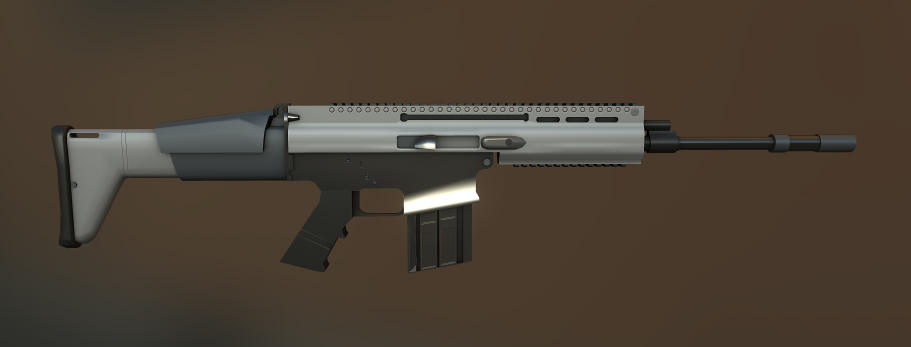
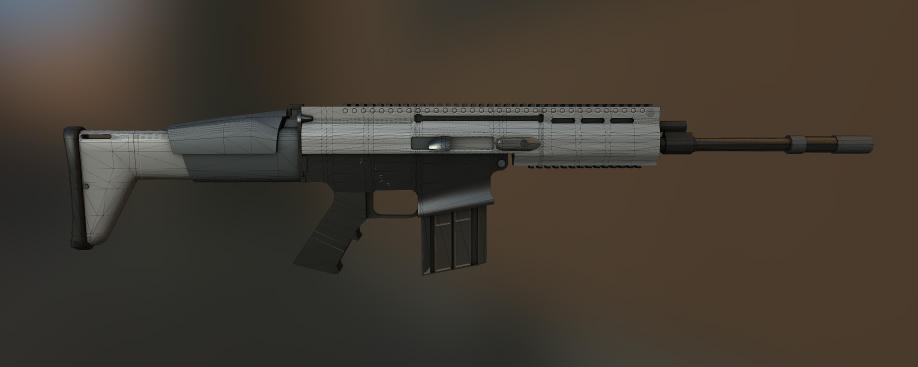
Its my Scar-H now with basic textures (i'll add detaills later
)
I hope you guys like it
Here we go:
(Big Images i am sorry guys)
images replaced with smaller ones -Staff
I hope you like it, if not please tell me why, and i am going to improve it
It uses normal mapes (I hope thats visible
) and a Diffuse specular and gloss.
Re: SWBF Series Model Showcase Thread 5th Edition
Posted: Tue Oct 15, 2013 6:05 pm
by Marth8880
Those images literally crashed Dolphin (my browser); there is no reason they should be as large as they are.
Re: SWBF Series Model Showcase Thread 5th Edition
Posted: Tue Oct 15, 2013 6:09 pm
by noMatt
i am sorry i had a problem :/
but anyway did you liked it?
Re: SWBF Series Model Showcase Thread 5th Edition
Posted: Tue Oct 15, 2013 6:14 pm
by Marth8880
No. It is impossible to view; it is too large, and the file format (bin, binary) isn't even a common or valid image format.
Re: SWBF Series Model Showcase Thread 5th Edition
Posted: Tue Oct 15, 2013 6:18 pm
by kinetosimpetus
They show up in firefox, but they are huge beyond reason, and clicking "View Image" on context menu say's it's an application or something that it wants you to find a program to open with or run or save as.
Re: SWBF Series Model Showcase Thread 5th Edition
Posted: Sat Oct 19, 2013 7:44 am
by noMatt
Gibson Les Paul E guitare (WIP)
Wireframe:
Shaded
Re: SWBF Series Model Showcase Thread 5th Edition
Posted: Sat Oct 19, 2013 1:22 pm
by Luke
I don't know what this has to do with SWBF....
BUT hey, I love Les Paul guitars. I also have one at home. (The world's best e-guitar in my mind)
So, keep it up and let it rock.
But the rounding on the bottom of the body seems to be a bit to much and the 3way switch for the humbuckers is a bit tiny (I think)
Looking forward to see it complete!
Re: SWBF Series Model Showcase Thread 5th Edition
Posted: Sat Oct 19, 2013 1:45 pm
by noMatt
Thanks man
And i am sorry, i thought its ok to post non swbf2 models here as well. If thats not the case i am sorry
Re: SWBF Series Model Showcase Thread 5th Edition
Posted: Mon Oct 28, 2013 8:47 pm
by Labj
Work in progress. Bald at the moment, but pretty easy to guess.
Re: SWBF Series Model Showcase Thread 5th Edition
Posted: Mon Oct 28, 2013 8:57 pm
by noMatt
looks awesome
whats your learning ressource?