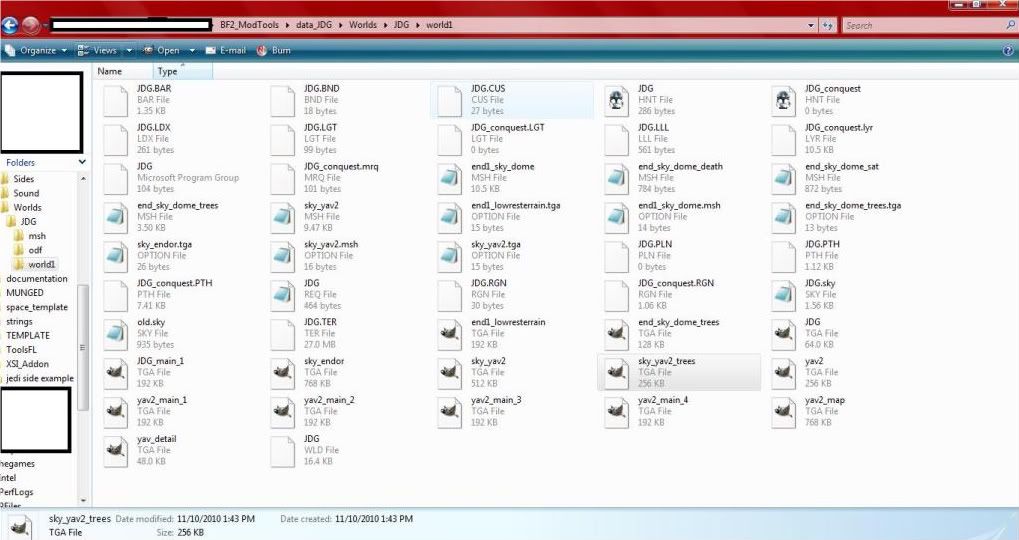
Okay, so copied over all the Files from the assets folder to my World1 folder. (I changed the sky from Yavin to endor)
I renamed the Endor.sky file to Jdg.sky and it doesn't change ingame.
(I'm using fierfek's tut)
I'm probably doing something wrong and I feel like a noob.
THe thing is, the sky changed in ZE. THe sky in ZE went from a White to black. I must be doing something wrong. I don't know, WHat will a Manual clean do?
Re: Sky not changing
Posted: Wed Jan 12, 2011 1:16 pm
by DarthD.U.C.K.
it will remove all munged files so everything is munged again.
Re: Sky not changing
Posted: Wed Jan 12, 2011 1:27 pm
by Jdg50
It worked, kinda. Now the sky is black.
Re: Sky not changing
Posted: Wed Jan 12, 2011 1:54 pm
by sampip
Then you're either missing a file (might be the texture of the sky) or the dome model you are using doesn't fit with the texture. Are you sure you copied all the files you needed?
Re: Sky not changing
Posted: Wed Jan 12, 2011 2:29 pm
by Jdg50
Checked, and I have them all. Do I have todo anything with the yavin sky files in there?
Re: Sky not changing
Posted: Wed Jan 12, 2011 5:54 pm
by asleeponduty
No, you don't.
Open up your new sky file and look at everything you need ex: textures and their .OPTION files. make sure that you have the .msh for you're dome model as well.
Then it will work, unless you have messed with you're .wld file...
Re: Sky not changing
Posted: Wed Jan 12, 2011 7:36 pm
by Jdg50
Could it be something with my computer? It still is black.......
Re: Sky not changing
Posted: Wed Jan 12, 2011 7:47 pm
by asleeponduty
maybe the sky texture you're using is black.
the sky will never* be black if somethings wrong with your computer
*unless you have an illegal version of the game and then nobody can help you
Re: Sky not changing
Posted: Wed Jan 12, 2011 8:38 pm
by Jdg50
I'll have to look...... Crud. I want to change it. Maybe I'll try out a different sky and see if the endor sky is the problem.
Re: Sky not changing
Posted: Wed Jan 12, 2011 10:26 pm
by THEWULFMAN
Actually, this may sound wierd, but, isn't BF2 case sensitive?
If so, rename Jdg.sky to JDG.sky
Or did you just not bother to captalize it in your post?
Try removing your old.sky file, and corresponding yavin sky msh's, and tga's. You could also copy over end1.fx, and end1.LGT from stock Endor renaming them JDG.LGT and JDG.fx. It might improve things. Do a manual clean in _BUILD/Worlds/JDG and then munge. Worth a try.
Re: Sky not changing
Posted: Wed Feb 09, 2011 9:30 am
by Jdg50
Interesting...... After removing the yavin Files, adding the two other files, and then munging, the sky is still black, but there seems to be a large sunlike thing in the sky, along with smoke/fog like stuff around.