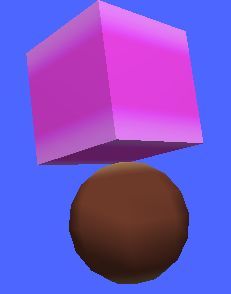
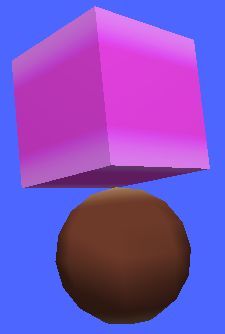
After I freeze all transforns for all primitives, and export them without merge, texture bug is gone. But I have no idea, how to create well look's complicated model, if I must never merge primitives... Usualy, when I create something, I have to merge, cut, blend, symmetrize polygons, and merge again, and on, and on... All my already created, complicated models done by this way, and look's like, I have to learn first, how to make something nice and beauty, by new way, without merge...
Re: XSI ZETools
Posted: Thu Aug 30, 2012 2:36 pm
by Maveritchell
Try making the copies of your material local (as in the instructions for MshEx, which yes, is an entirely separate program) after you merge your primitives. You may also want to try freezing your textures.
Re: XSI ZETools
Posted: Thu Aug 30, 2012 4:22 pm
by ANDEWEGET
Maybe it happens because you have too many clusters. I exported models with 2 and 3 materials(one cluster per material) and I never had that problem. The one model you sent me had 6 or more clusters.
Usually you won't need 6 materials per model. The only occasion where you might need more than one material per model is maybe character models. Even then not necessarily. You can always split your model into parts which only have one material.
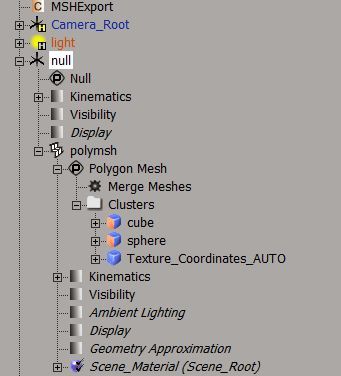
You can merge all you like, as long as the final model doesn't have too many clusters(you can find clusters here: YOUR_MODEL>PolyMsh>Clusters).
Re: XSI ZETools
Posted: Fri Aug 31, 2012 4:41 am
by sereja2
Sorry, I am not much experienced in this... So, each time, as I click on "Phong" button, to add new material, to my model parts, it creates new cluster? Well, it may explain something: most of my models usualy has 40-50 clusters. MshEx can handle with it, and I had no problem with export before. Reason, why I need so many clusters/materials is next: most of my models has shiny, transparent, scroll parts, and I need to make different materials for them, for editing them with HEX editor, after export. So, have to forget about shiny lights, in my animated door? It is realy sad...
Well, I try to do, what you say: I merge my primitives, and only after that, add single material to polymesh. Result: it has no texture bug.
Still, crash problem stay, where it was. Well, I do not know, how to correct delete all materials, from already created model, but here is my simple method: I create some small primitive, let's say a "cube", and merge it, with my model, but do not merge materials. After that, I just delete "cube" part, and as result got totaly untextured model. So, I try to do this, with my complicated models, and add single material for them. But when I try them, they crash anyway.
So, I think, the crash problem, probably isn't connected with clusters...
Re: XSI ZETools
Posted: Sat Sep 01, 2012 5:47 am
by ANDEWEGET
ANDEWEGET wrote:Yes, the crash problem must be caused by something else. But the problem why it's crashing should be easy to find out if you send me a .msh file which crashes.
You don't have to forget about having many materials, you just have to try out how many clusters per model you can have without the texture bug. If you get the texture bug just extract some of the clusters into their own models(Select the polygons and Create>Poly. Msh>Extract Polygons(delete)).
You can see all the materials in the current scene by pressing CTRL + 7 or going to View>Rendering/Texturing>Material Manager, or ZE Tools>.MSH Tools>Manage Materials...(that's my own material manager, it has fewer features but supports SWBF flags and rendertypes).
Did you make sure that you only have tris and quads? The problem is in the STRP chunk which contains polygons. If you select the bottle and press the 'Check Sel' button it will analyze your model for problems.
Warnings for texture support:
Bad model type:Texture Support(might cause problems, freeze to remove it.)
"tris and quads"? Hmm... Not sure, what you mean, but here what I do: I create primitive cylinder, deform & move & scale polygons; duplicate it; cut & create some new poligons; merge two cylinders, add material with cylindrical projection and freeze all transforms... That's it...
Re: XSI ZETools
Posted: Sat Sep 01, 2012 7:31 am
by ANDEWEGET
Well, we've found the problem...
To quickly fix this, select the model and press Modify>Poly. Msh>Triangulate(on the left panel).
My exporter only exports faces with 3 or 4 sides/vertices.
The second one isn't really a problem now. It goes away if you select your models and press the Freeze button in the bottom right corner. Don't freeze enveloped meshes though!
Quad(four-sided polygon/4 vertices/points per polygon):
O's are points, lines/dots are edges between points.
Re: XSI ZETools
Posted: Sat Sep 01, 2012 9:42 am
by sereja2
Yes! It realy work's now!
Unfortunately I didn't found Freeze button in the bottom right corner. I may click only Transform>Freeze All Transform.
Hope someday, you can "teach" your tool, recognize more then 1 cluster/material...
If I ever figure out, how to export door animations, I will continue my testings...
Re: XSI ZETools
Posted: Sat Sep 01, 2012 9:44 am
by minilogoguy18
Perhaps you can add a script or something so that it triangulates the model on export but the model in the scene stays as is. The dotXSI exporter can do this and us JA modders have to have that setting checked too since JA doesn't like anything with more than 3 sides.
You can freeze enveloped meshes, you just have to use the "Freeze M" button rather than the regular "Freeze". That way you can freeze the modeling construction history without affecting the others like animation which will hold the envelope weights operator.
sereja:
To find the buttons on the bottom right tool pane you either need to increase your screen resolution so they show or right click on one of the things like Select or Transform to collapse those menus.
Re: XSI ZETools
Posted: Sat Sep 01, 2012 1:21 pm
by sereja2
Ok, here some quick question: what exactly selected parameters, of export aplication, should I use for animated door exporting (under "Misc")? I mean, for door.msh, basepose.msh, and open.msh?
Re: XSI ZETools
Posted: Sun Sep 02, 2012 12:22 pm
by ANDEWEGET
ANDEWEGET wrote:@Sereja: I'll see if I can piece together a small tutorial on how to export animations with my exporter later or tomorrow.
Actually it recognizes more clusters/materials per model. I exported some models with 2 or 3 clusters/materials and they all worked fine.
@mini: Hmm, worth a try. Might be that this isn't possible without rewriting a lot of code. Have to try it tomorrow or so.
Added a small tutorial on how to export a door animation to the guidelines/tutorials: https://sites.google.com/site/andescp/zet_m
This does not explain how to munge it, we already have a tutorial for that.
Re: XSI ZETools
Posted: Wed Sep 05, 2012 12:33 pm
by sereja2
I just test it with SWBF2 munge folders, and the animation is realy works!
I create totaly new simple door, totaly similar, as it look's in tutorial.
Unfortunately it has no collision, and may not crash for SWBF2 only. But the same happens, when Lephenix, try to help me export my door with real XSI and Pandemic addon, so, I may say, your tool is functional, similar to Pandemic! I just can making only incorrect doors.
But about texture, I was not so lucky, and just can't add more then 1 material, and here the one of my old sample, with 2 materials:
Hidden/Spoiler:
Sorry, but I am sure, you still need to fix this bug...
Merged models.
I selected the 2 primitives, used Merge, merged materials, then dragged the polymsh under the root null I have.
Hidden/Spoiler:
And the hierarchy:
Hidden/Spoiler:
I didn't freeze anything. I seriously have no idea how you do that...
Maybe send me that scene with the 2 materials. Then I'll take another look.
So, I found the problem. Let's assume we have a model with 2 clusters. The 2 clusters make up the complete geometry. Cluster 1 has Material1, Cluster 2 has Material2. The model itself is merged from 2 others. So the model itself doesn't have a material manually applied, that means it gets the Scene_Material automatically.
Now, the problem was that sometimes one of XSI's internal functions returned 2 materials (Material1 and Material2) and sometimes returned 3 materials (Scene_Material, Material1 and Material2). This still wouldn't cause a problem if Scene_Material was returned as second or more. It only would produce a problem if it was returned as first material. Then my geometry split algorithm peppered it up and assigned some faces to the wrong material.
This should be history now though.
I'll see if I can find some more stuff to do then I'll release the revised version.
And Sereja, if you want collision primitives exported with the ZETools you should follow the Collision guidelines on this page: https://sites.google.com/site/andescp/zet_m
Otherwise the hierarchy of you door looks fine.
Added the new version to the first post.
Re: XSI ZETools
Posted: Thu Sep 06, 2012 12:26 pm
by sereja2
Yes, it's realy can export many materials now! I just export my door with 25 materials!
Unfortunately now, it can't export anims at all , and say this:
Hidden/Spoiler:
' ERROR : Traceback (most recent call last):
' File "<Script Block >", line 36, in exportbutton_OnClicked
' export.export()
' File "C:\users\Serejenka\Autodesk\Softimage_Mod_Tool_7.5\Addons\XSIZEtools\Application\Core\andezetexport.py", line 690, in export
' self.do_export()
' File "C:\users\Serejenka\Autodesk\Softimage_Mod_Tool_7.5\Addons\XSIZEtools\Application\Core\andezetexport.py", line 740, in do_export
' self.msh.animation = anim.convert()
' File "C:\users\Serejenka\Autodesk\Softimage_Mod_Tool_7.5\Addons\XSIZEtools\Application\Core\andezetexport.py", line 85, in convert
' bonecoll.add(boneconv.convert())
' File "C:\users\Serejenka\Autodesk\Softimage_Mod_Tool_7.5\Addons\XSIZEtools\Application\Core\andezetexport.py", line 35, in convert
' self.bone.recrc()
' File "C:\users\Serejenka\Autodesk\Softimage_Mod_Tool_7.5\Addons\XSIZEtools\Application\Modules\msh2.py", line 1649, in recrc
' self.CRC = msh2_crc.crc(self.name)
' File "C:\users\Serejenka\Autodesk\Softimage_Mod_Tool_7.5\Addons\XSIZEtools\Application\Modules\msh2_crc.py", line 17, in crc
' return hextranslate(val)
' File "C:\users\Serejenka\Autodesk\Softimage_Mod_Tool_7.5\Addons\XSIZEtools\Application\Modules\msh2_crc.py", line 39, in hextranslate
' res = res + chr(int(s[realIdx:realIdx + 2], 16))
' ValueError: invalid literal for int() with base 16: '"C'
' - [line 35 in C:\users\Serejenka\Autodesk\Softimage_Mod_Tool_7.5\Addons\XSIZETools\Application\Logic\exporter.py]
' ERROR : Property Page Script Logic Error (Python ActiveX Scripting Engine)
' ERROR : [33] params.preview()
' ERROR : [34] export = andezetexport.Export(xsi, params)
' ERROR : >[35] try:
' ERROR : [36] export.export()
' ERROR : [37] except SystemExit:
' ERROR : [38] return
' ERROR : Traceback (most recent call last):
' File "<Script Block >", line 36, in exportbutton_OnClicked
' export.export()
' File "C:\users\Serejenka\Autodesk\Softimage_Mod_Tool_7.5\Addons\XSIZEtools\Application\Core\andezetexport.py", line 690, in export
' self.do_export()
' File "C:\users\Serejenka\Autodesk\Softimage_Mod_Tool_7.5\Addons\XSIZEtools\Application\Core\andezetexport.py", line 740, in do_export
' self.msh.animation = anim.convert()
' File "C:\users\Serejenka\Autodesk\Softimage_Mod_Tool_7.5\Addons\XSIZEtools\Application\Core\andezetexport.py", line 85, in convert
' bonecoll.add(boneconv.convert())
' File "C:\users\Serejenka\Autodesk\Softimage_Mod_Tool_7.5\Addons\XSIZEtools\Application\Core\andezetexport.py", line 35, in convert
' self.bone.recrc()
' File "C:\users\Serejenka\Autodesk\Softimage_Mod_Tool_7.5\Addons\XSIZEtools\Application\Modules\msh2.py", line 1649, in recrc
' self.CRC = msh2_crc.crc(self.name)
' File "C:\users\Serejenka\Autodesk\Softimage_Mod_Tool_7.5\Addons\XSIZEtools\Application\Modules\msh2_crc.py", line 17, in crc
' return hextranslate(val)
' File "C:\users\Serejenka\Autodesk\Softimage_Mod_Tool_7.5\Addons\XSIZEtools\Application\Modules\msh2_crc.py", line 39, in hextranslate
' res = res + chr(int(s[realIdx:realIdx + 2], 16))
' ValueError: invalid literal for int() with base 16: '"C'
'
Re: XSI ZETools
Posted: Thu Sep 06, 2012 1:29 pm
by ANDEWEGET
Seems there was a problem with my sync tool. It messed something up so the 2 .exe files you need for animation export were somehow gone...
Added r4 to the first page. Should work now.
Re: XSI ZETools
Posted: Thu Sep 06, 2012 2:54 pm
by sereja2
Yes, it's realy work's now! Great job! This day, should be stay in htstory, of 3D modeling!
Still, I think, it's cud be nice, if you release another "template", with realy working door...
Re: XSI ZETools
Posted: Thu Sep 06, 2012 9:04 pm
by CressAlbane
Just used the ZETools to export my first working weaponmodel. Everything went flawlessly. Great work and thanks a lot, ANDE!
Re: XSI ZETools
Posted: Sat Sep 08, 2012 8:39 am
by ANDEWEGET
Good to hear that everything seems to work nicely!
Templates can only be in .xsi format and AFAIK you can't preserve primitive data with that. So in the end the template would just be 2 resized cubes and some nulls... Dunno if that's worth it.
Re: XSI ZETools
Posted: Sun Sep 09, 2012 5:21 pm
by Tears2Roses
I am getting this error as soon as I start softimage: