
AI not moving [Solved]
Moderator: Moderators
-
myers73
- Lieutenant General

- Posts: 690
- Joined: Fri Apr 03, 2009 11:04 pm
- Projects :: No Mod project currently.
- xbox live or psn: No gamertag set
- Location: Atlanta, GA xfire=myers73 IngameName=mYers
Re: AI not moving
go into ZE. Toggle on show barriers and show planning, and show regions. change to orthographic view and take a screenshot that includes all of those, you might have done some of your pathing wrong.
-
[RDH]Zerted

- Gametoast Staff

- Posts: 2982
- Joined: Sun Feb 26, 2006 7:36 am
- Projects :: Bos Wars AI - a RTS game
- xbox live or psn: No gamertag set
- Location: USA
- Contact:
Re: AI not moving
Generate a debug log and post it. If the AI have invalid goals, it will show up in the log. If not, then maybe they are just defending the CP? If an enemy approaches, will the lazy AI attack it?
Also, post that screenshot. The AI might be trying to move into an unassailable area and are thus unsure how to get there.
Also, post that screenshot. The AI might be trying to move into an unassailable area and are thus unsure how to get there.
-
ArkAngel

- Rebel Sergeant

- Posts: 215
- Joined: Fri Nov 13, 2009 10:00 am
Re: AI not moving
alright well I just got back from vacation and got my computers rid of the viruses, so instead of making a whole new topic I'll bring this one back so I can finally solve the problem
two questions: what is orthographic view and is the debug log like the normal error log?
two questions: what is orthographic view and is the debug log like the normal error log?
-
sim-al2

- 2nd Lieutenant

- Posts: 412
- Joined: Mon Jul 06, 2009 10:26 pm
- Projects :: Mapping on occasion
- Location: In the cockpit of some vehicle...
Re: AI not moving
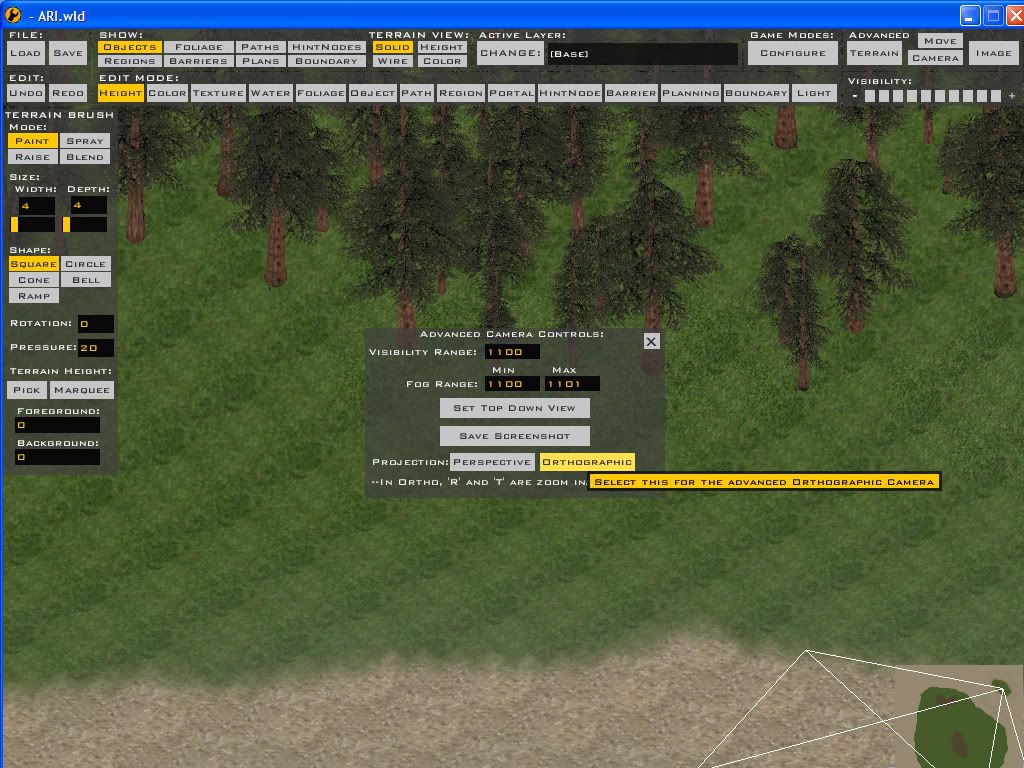
This is how to do orthographic view:
Hit camera button at the top and you will see:
Make sure you are centered over what you want to see because the controls in ortho are a tad different.
The debug log is the one you get from running the modtools.exe version (the one that runs in the window instead of fullscreen) so yes, the normal one, but NOT the munge log if that's the one you're refering to.
Hit camera button at the top and you will see:
Hidden/Spoiler:
The debug log is the one you get from running the modtools.exe version (the one that runs in the window instead of fullscreen) so yes, the normal one, but NOT the munge log if that's the one you're refering to.
-
ArkAngel
- Rebel Sergeant
- Posts: 215
- Joined: Fri Nov 13, 2009 10:00 am
Re: AI not moving
Screenie:
Error Log:
Hidden/Spoiler:

Hidden/Spoiler:
-
SAMofBIA
- Major General

- Posts: 649
- Joined: Tue Jun 15, 2010 3:38 pm
- Projects :: Nothing....nothing at all.
- xbox live or psn: No gamertag set
- Location: MIA and not stopping in often anymore.

Re: AI not moving
offtopic: umm are you the arkangel from ps2 version who recently joined SF? just a question.
-
ArkAngel
- Rebel Sergeant
- Posts: 215
- Joined: Fri Nov 13, 2009 10:00 am
Re: AI not moving
no I don't play PS2
-
SAMofBIA
- Major General
- Posts: 649
- Joined: Tue Jun 15, 2010 3:38 pm
- Projects :: Nothing....nothing at all.
- xbox live or psn: No gamertag set
- Location: MIA and not stopping in often anymore.
Re: AI not moving
k, cause there is an arkangel on ps2. just thought i'de ask.
-
sim-al2
- 2nd Lieutenant
- Posts: 412
- Joined: Mon Jul 06, 2009 10:26 pm
- Projects :: Mapping on occasion
- Location: In the cockpit of some vehicle...
Re: AI not moving
This might not be the root cause but this should be fixed:
There's also this:
Not sure what kind of effect, if any, that might have.
Code: Select all
Message Severity: 3
.\Source\CommandPost.cpp(493)
Command Post missing capture region "cp3_capture"
Code: Select all
Message Severity: 2
.\Source\ActiveRegion.cpp(186)
Region "TeleportRegion" not found-
ArkAngel
- Rebel Sergeant
- Posts: 215
- Joined: Fri Nov 13, 2009 10:00 am
Re: AI not moving
ah I fixed it. I found a lone hub that I forgot about and I guess the AI were trying to get to it but there was no connection to it so they stayed idle. prob solved 
-
SAMofBIA
- Major General
- Posts: 649
- Joined: Tue Jun 15, 2010 3:38 pm
- Projects :: Nothing....nothing at all.
- xbox live or psn: No gamertag set
- Location: MIA and not stopping in often anymore.
Re: AI not moving [Solved]
LOL...i really hate the planning phase of maps...but they're so crucial.
-
sim-al2
- 2nd Lieutenant
- Posts: 412
- Joined: Mon Jul 06, 2009 10:26 pm
- Projects :: Mapping on occasion
- Location: In the cockpit of some vehicle...
Re: AI not moving [Solved]
Yeah I was going to point out the fact that a hub was just hanging out there but I forgot... 
