Yep the problem was user error this time, forgot cloth collision had to start with c_ instead of p_ , all working well now.
I haven't tried the update yet but thanks for adding the checks and standardizing primitive naming.
Re: XSI ZETools
Posted: Thu Feb 18, 2016 6:58 am
by Anakin
It still does not work to export the unit when it's under a model, because the name c_l_thigh,... is invalid and the name Modelname.c_l_thigh does not start with c_
Maybe you can add to the ZETools the possibility to have the unit under a model.
But when i put the dummyroot under sceneroot i can export. I hope it will work ingame, too.
Thank you both
==EDIT==
The cloth is not ingame...
when exporting ZE says in the bottom line "argument 0 is invalid". I ignored it, but maybe it is something important.
Anakin wrote:The cloth is not ingame...
when exporting ZE says in the bottom line "argument 0 is invalid". I ignored it, but maybe it is something important.
I replaced your cylinder collision with spheres and it exports without the error, didn't check to see if it works in the game though.
I also want to add that in the past I never had problems with spherical cloth collision and never could get cylinders working right.
Re: XSI ZETools
Posted: Thu Feb 18, 2016 9:22 am
by Anakin
Yes you are right with sphere there is no more error. But the kama is still not ingame. Can i may ask you to try it on yourself and tell me whether it works or not? That way i can be sure that it is my fault and not an export problem.
Re: XSI ZETools
Posted: Sat Mar 19, 2016 7:20 pm
by AceMastermind
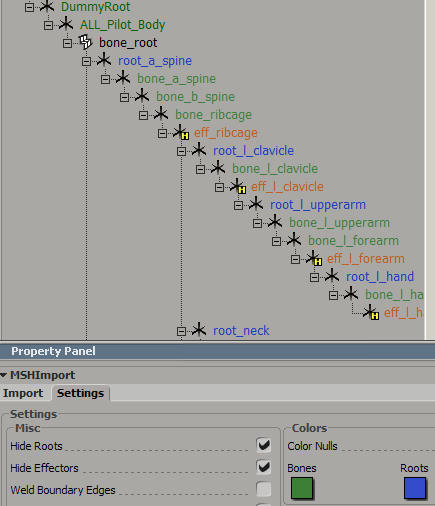
"Hide Roots" in import settings does not hide root nulls when ticked, "Hide Effectors" does work.
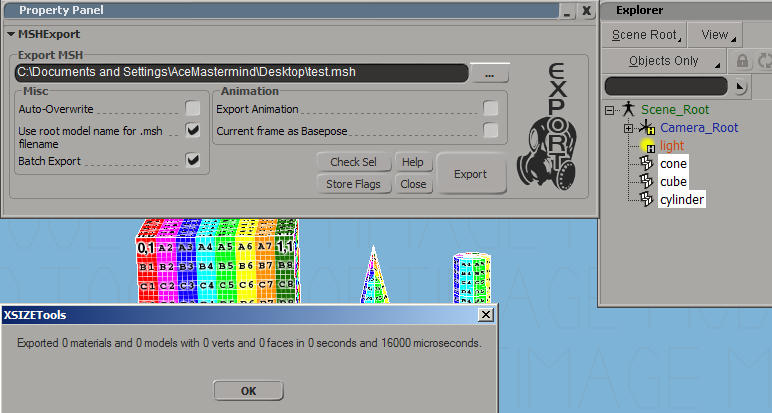
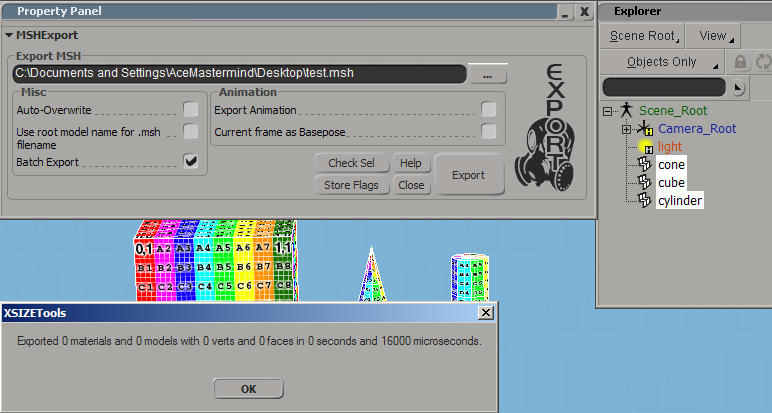
"Batch Export" doesn't work - nothing is logged
Import error when "Color Nulls" is ticked in import settings:
error when copying error to clipboard when "Yes" is pressed:
or error when copying error to clipboard when "No" is pressed:
Hidden/Spoiler:
[code]# ERROR : Traceback (most recent call last):
# File "<Script Block >", line 91, in importbutton_OnClicked
# import_.import_()
# File "C:\users\AceMastermind\Autodesk\Softimage_Mod_Tool_7.5\Addons\xsizetools-1.3.0022\Application\Core\andezetimport.py", line 852, in import_
# self.do_import()
# File "C:\users\AceMastermind\Autodesk\Softimage_Mod_Tool_7.5\Addons\xsizetools-1.3.0022\Application\Core\andezetimport.py", line 905, in do_import
# self.chain = builder.build()
# File "C:\users\AceMastermind\Autodesk\Softimage_Mod_Tool_7.5\Addons\xsizetools-1.3.0022\Application\Core\andezetimport.py", line 635, in build
# item = builder.build()
# File "C:\users\AceMastermind\Autodesk\Softimage_Mod_Tool_7.5\Addons\xsizetools-1.3.0022\Application\Core\andezetimport.py", line 180, in build
# self.build_null()
# File "C:\users\AceMastermind\Autodesk\Softimage_Mod_Tool_7.5\Addons\xsizetools-1.3.0022\Application\Core\andezetimport.py", line 542, in build_null
# r, g, b = [float(item) for item in col.split(' ')]
# AttributeError: 'NoneType' object has no attribute 'split'
# - [line 90 in C:\users\AceMastermind\Autodesk\Softimage_Mod_Tool_7.5\Addons\xsizetools-1.3.0022\\Application\Logic\importer.py]
# ERROR : Property Page Script Logic Error (Python ActiveX Scripting Engine)
# ERROR : [88] settings = andezetcore.load_settings('import', PPG.Inspected(0))
# ERROR : [89] import_ = andezetimport.Import(xsi, settings)
# ERROR : >[90] try:
# ERROR : [91] import_.import_()
# ERROR : [92] except SystemExit:
# ERROR : [93] return
# ERROR : Traceback (most recent call last):
# File "<Script Block >", line 91, in importbutton_OnClicked
# import_.import_()
# File "C:\users\AceMastermind\Autodesk\Softimage_Mod_Tool_7.5\Addons\xsizetools-1.3.0022\Application\Core\andezetimport.py", line 852, in import_
# self.do_import()
# File "C:\users\AceMastermind\Autodesk\Softimage_Mod_Tool_7.5\Addons\xsizetools-1.3.0022\Application\Core\andezetimport.py", line 905, in do_import
# self.chain = builder.build()
# File "C:\users\AceMastermind\Autodesk\Softimage_Mod_Tool_7.5\Addons\xsizetools-1.3.0022\Application\Core\andezetimport.py", line 635, in build
# item = builder.build()
# File "C:\users\AceMastermind\Autodesk\Softimage_Mod_Tool_7.5\Addons\xsizetools-1.3.0022\Application\Core\andezetimport.py", line 180, in build
# self.build_null()
# File "C:\users\AceMastermind\Autodesk\Softimage_Mod_Tool_7.5\Addons\xsizetools-1.3.0022\Application\Core\andezetimport.py", line 542, in build_null
# r, g, b = [float(item) for item in col.split(' ')]
# AttributeError: 'NoneType' object has no attribute 'split'[/code]
Re: XSI ZETools
Posted: Sun Mar 20, 2016 6:59 pm
by ANDEWEGET
Which version of python and pywin do you have installed?
Re: XSI ZETools
Posted: Sun Mar 20, 2016 8:36 pm
by AceMastermind
Python 2.6.2.2 with matching pywin32 extensions, same as always. I recall all of them working some time ago until a newer version of this plugin rolled out. Its not a big deal and I can live without them, just thought I would log it here anyway.
Re: XSI ZETools
Posted: Fri Mar 25, 2016 8:18 am
by ANDEWEGET
Hmm, I can't seem to delete my previous post like usual to not have to double-post, maybe because I recently edited it? Can a mod delete it or something?
Fixed coloring nulls on import.
Fixed hidden nulls not being hidden on import.
I also added an alternate call for the error-to-clipboard functionality, not sure if that fixes it for you though.
Batch export worked for me, did you maybe have "Use root model name for .msh filename" unchecked?
Re: XSI ZETools
Posted: Fri Mar 25, 2016 2:05 pm
by AceMastermind
Hidden/Spoiler:
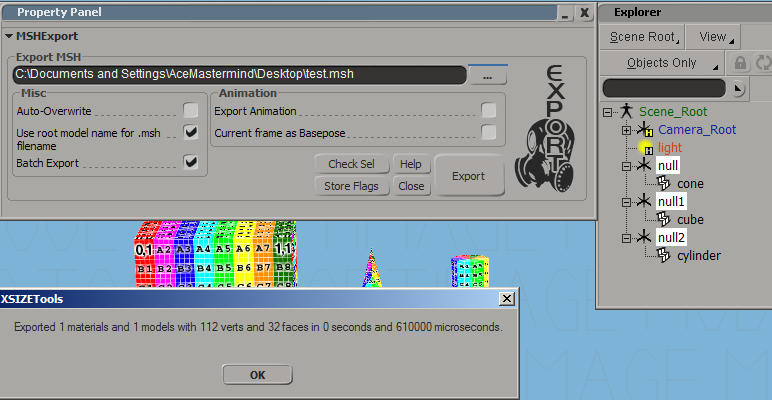
In the last image only the cone was exported.
Hide Roots still isn't working.
Also i'd like to request an option to suppress the OK dialogs after a successful import/export, if not too much trouble.
Re: XSI ZETools
Posted: Fri Mar 25, 2016 2:53 pm
by ANDEWEGET
That's because batch export will export all children of the currently selected object as a .msh file.
So
Added toggle to show/hide dialog on completion.
Fixed names used to index cloth collisions.
Fixed calculation of CMSH size for the third time.
Fixed export not aborting if a cloth collision primitive has no primitive data.
Roots get hidden fine for me. They just have to contain "root" in their name.
Re: XSI ZETools
Posted: Fri Mar 25, 2016 5:11 pm
by AceMastermind
ANDEWEGET wrote:Roots get hidden fine for me. They just have to contain "root" in their name.
Hide Roots is a no-go for me:
Hidden/Spoiler:
I don't know why but its not important. I can use a script button to hide roots after import.
Re: XSI ZETools
Posted: Fri Mar 25, 2016 5:42 pm
by ANDEWEGET
Found the problem, fix is in the last commit. I must have written that piece of code late at night or something.
Re: XSI ZETools
Posted: Fri Mar 25, 2016 6:04 pm
by Anakin
Do i understand your 1.3.10 changelog right, the collision does no longer need to be a primitive?? Or does this just mean it does not need the information, but still need to be a primitive??
Re: XSI ZETools
Posted: Fri Mar 25, 2016 6:31 pm
by ANDEWEGET
It means if previously no primitive data (either for cube, sphere or cylinder) was found the export just continued and the object just had no primitive data which means the export would fail later on. Now it just aborts the export with a message.
Collision for cloth needs the primitive data (size, radius and radius/height) so it must be a primitive.
Re: XSI ZETools
Posted: Fri Mar 25, 2016 6:49 pm
by AceMastermind
ANDEWEGET wrote:Found the problem, fix is in the last commit.
Yep that got it, thanks!
EDIT
Your success with this ZETools project has motivated me to try and learn Python.
The timing was perfect because Jeremie Passerin of cmiVFX has recently released some tutorial videos on Vimeo that includes Python in Softimage!
INFO (848, do_export): Processing material "Material91".
INFO (854, do_export): Finished processing.
INFO (848, do_export): Processing material "Material82".
INFO (854, do_export): Finished processing.
INFO (848, do_export): Processing material "Material81".
INFO (854, do_export): Finished processing.
INFO (848, do_export): Processing material "Material87".
INFO (854, do_export): Finished processing.
INFO (848, do_export): Processing material "Material88".
INFO (854, do_export): Finished processing.
INFO (848, do_export): Processing material "Material14".
INFO (854, do_export): Finished processing.
INFO (848, do_export): Processing material "Material72".
INFO (854, do_export): Finished processing.
INFO (867, do_export): Processing model "Scene_Root".
Traceback:
Traceback (most recent call last):
File "<Script Block >", line 28, in exportbutton_OnClicked
File "C:\users\Administrador\Autodesk\Softimage_Mod_Tool_7.5\Addons\xsizetools-1.3.0024\Application\Core\andezetexport.py", line 829, in export
self.do_export()
File "C:\users\Administrador\Autodesk\Softimage_Mod_Tool_7.5\Addons\xsizetools-1.3.0024\Application\Core\andezetexport.py", line 868, in do_export
conv = ModelConverter(model, self)
File "C:\users\Administrador\Autodesk\Softimage_Mod_Tool_7.5\Addons\xsizetools-1.3.0024\Application\Core\andezetexport.py", line 168, in __init__
self.geo = si_mdl.ActivePrimitive.GetGeometry2(0)
AttributeError: 'NoneType' object has no attribute 'GetGeometry2'
[/code]
Re: XSI ZETools
Posted: Wed Mar 30, 2016 6:57 am
by ANDEWEGET
Programming is amazing fun (especially with Python (and Softimage has some really good scripting documentation, too)). So I guess I hope you can get the same value out of it as I do.
@Deviss: XSI 6.0+ is supported, looks to me like you're using an older XSI version.
Re: XSI ZETools
Posted: Wed Mar 30, 2016 8:02 pm
by Deviss
ANDEWEGET wrote:Programming is amazing fun (especially with Python (and Softimage has some really good scripting documentation, too)). So I guess I hope you can get the same value out of it as I do.
@Deviss: XSI 6.0+ is supported, looks to me like you're using an older XSI version.