
Trouble with skins [Solved]

In this forum you will find and post information regarding the modding of Star Wars Battlefront 2. DO NOT POST MOD IDEAS/REQUESTS.

Moderator: Moderators

Post Reply
Labj
Sith
Sith
Posts: 1400
Joined: Tue Jun 16, 2009 3:20 pm
Games I'm Playing :: Halo 4
xbox live or psn: SiulS2409
Location: Costa Rica
Contact:

Trouble with skins [Solved]

Post by Labj »

I reskined objects but when it loads in ZE everything its green and the floor grey.
Hidden/Spoiler:
Image
vegati
Chief Warrant Officer
Posts: 352
Joined: Fri Dec 26, 2008 1:21 pm
Projects :: No Mod project currently.
Games I'm Playing :: I have not listed any games yet
xbox live or psn: No gamertag set
Location: At Gametoast.com enjoyin some fresh salmon jerky. Mmmmmm.
Contact:

Re: Trouble with skins

Post by vegati »

Munge and see what it looks like.
Labj
Sith
Sith
Posts: 1400
Joined: Tue Jun 16, 2009 3:20 pm
Games I'm Playing :: Halo 4
xbox live or psn: SiulS2409
Location: Costa Rica
Contact:

Re: Trouble with skins

Post by Labj »

Everything is grey.
Here is the munge log:
Hidden/Spoiler:
WARNING[PC_modelmunge msh\tat3_bldg_jabba.msh]:SplitSkinnedSegments: WARNING: out of space in splitting catalog!
WARNING[PC_modelmunge msh\tat3_bldg_jabba.msh]:SplitSkinnedSegments: WARNING: resorting to brute force, this may take a while...
WARNING[PC_modelmunge msh\tat3_bldg_jabba.msh]:SplitSkinnedSegments: WARNING: out of space in splitting catalog!
WARNING[PC_modelmunge msh\tat3_bldg_rancor.msh]:SplitSkinnedSegments: WARNING: out of space in splitting catalog!
WARNING[PC_modelmunge msh\tat3_prop_CZ1droid_parts.msh]:tat3_prop_CZ1droid_parts has 1588 vertices and NO COLLISION GEOMETRY (WILL BE SLOW)!
0 Errors 7 Warnings

ERROR[PC_texturemunge msh\tat2_bldg_dockingbay_01.tga]:Targa type 10 not currently supported.
[continuing]
ERROR[PC_texturemunge msh\tat2_bldg_dockingbay_01_lowrez.tga]:Targa type 10 not currently supported.
[continuing]
ERROR[PC_texturemunge msh\tat2_bldg_set01_lowrez.tga]:Targa type 10 not currently supported.
[continuing]
ERROR[PC_texturemunge msh\tat2_bldg_set02.tga]:Targa type 10 not currently supported.
[continuing]
ERROR[PC_texturemunge msh\tat2_bldg_set02_lowrez.tga]:Targa type 10 not currently supported.
[continuing]
ERROR[PC_texturemunge msh\tat2_bldg_set03.tga]:Targa type 10 not currently supported.
[continuing]
ERROR[PC_texturemunge msh\tat2_bldg_set03_lowrez.tga]:Targa type 10 not currently supported.
[continuing]
ERROR[PC_texturemunge msh\tat2_bldg_set04.tga]:Targa type 10 not currently supported.
[continuing]
ERROR[PC_texturemunge msh\tat2_bldg_set04_lowrez.tga]:Targa type 10 not currently supported.
[continuing]
ERROR[PC_texturemunge msh\tat2_bldg_set05.tga]:Targa type 10 not currently supported.
[continuing]
ERROR[PC_texturemunge msh\tat2_bldg_set05_lowrez.tga]:Targa type 10 not currently supported.
[continuing]
ERROR[PC_texturemunge msh\tat2_bldg_set06.tga]:Targa type 10 not currently supported.
[continuing]
ERROR[PC_texturemunge msh\tat2_bldg_set07.tga]:Targa type 10 not currently supported.
[continuing]
ERROR[PC_texturemunge world2\tat2_main_1.tga]:Targa type 10 not currently supported.
[continuing]
ERROR[PC_texturemunge world2\tat2_main_2.tga]:Targa type 10 not currently supported.
[continuing]
ERROR[PC_texturemunge world2\tat2_main_3.tga]:Targa type 10 not currently supported.
[continuing]
ERROR[PC_texturemunge world2\tat2_main_4.tga]:Targa type 10 not currently supported.
[continuing]
ERROR[PC_texturemunge world2\tat2_main_5.tga]:Targa type 10 not currently supported.
[continuing]
36 Errors 0 Warnings
User avatar
Fluffy_the_ic
Hoth Battle Chief
Hoth Battle Chief
Posts: 3223
Joined: Thu Jan 24, 2008 7:03 pm
xbox live or psn: fluffytherc
Location: she/her
Contact:

Re: Trouble with skins

Post by Fluffy_the_ic »

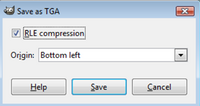
You're saving your skins with RLE compression. When you save skins, always go to "Save As" and then uncheck "RLE Compression" if you're using GIMP. Although, you only need to do it once every time you start up GIMP, after that it stays unchecked until you close GIMP.
Labj
Sith
Sith
Posts: 1400
Joined: Tue Jun 16, 2009 3:20 pm
Games I'm Playing :: Halo 4
xbox live or psn: SiulS2409
Location: Costa Rica
Contact:

Re: Trouble with skins

Post by Labj »

Where exactly do i find that RLE ?
AQT
Gametoast Staff
Gametoast Staff
Posts: 4910
Joined: Sat Nov 03, 2007 4:55 pm
Location: SoCal, USA

Re: Trouble with skins

Post by AQT »

Do you use GIMP? Fluffy's post was pretty clear.
User avatar
Fierfek
High General
High General
Posts: 805
Joined: Wed Jul 01, 2009 4:38 pm
Projects :: No Mod project currently.
Games I'm Playing :: I have not listed any games yet
xbox live or psn: No gamertag set
Location: Somewhere in the Galaxy (Most Likely Scrapping Tinnies)

Re: Trouble with skins

Post by Fierfek »

AQT wrote:Do you use GIMP? Fluffy's post was pretty clear.
It might be difficult for him to find it (he has the spanish version of gimp).
Labj
Sith
Sith
Posts: 1400
Joined: Tue Jun 16, 2009 3:20 pm
Games I'm Playing :: Halo 4
xbox live or psn: SiulS2409
Location: Costa Rica
Contact:

Re: Trouble with skins

Post by Labj »

Yeah, i do, i have Gimp in spanish, but i talk in spanish and english, so where exactly it is ?
User avatar
Fierfek
High General
High General
Posts: 805
Joined: Wed Jul 01, 2009 4:38 pm
Projects :: No Mod project currently.
Games I'm Playing :: I have not listed any games yet
xbox live or psn: No gamertag set
Location: Somewhere in the Galaxy (Most Likely Scrapping Tinnies)

Re: Trouble with skins

Post by Fierfek »

Labj wrote:Yeah, i do, i have Gimp in spanish, but i talk in spanish and english, so where exactly it is ?
When you save it, from the file menu, click "Save As".
When you save it as a TGA, this screen comes up:
Hidden/Spoiler:
Image
Uncheck RLE Compression.
Labj
Sith
Sith
Posts: 1400
Joined: Tue Jun 16, 2009 3:20 pm
Games I'm Playing :: Halo 4
xbox live or psn: SiulS2409
Location: Costa Rica
Contact:

Re: Trouble with skins

Post by Labj »

It works, in ZE, i will munge.
Yes, it works perfect.
Thaks everyone.
Post Reply