Hey, I'm Acklay of Chaos and a recently started messing around with the mod tools. I'm working on my first map currently entitled "Vendaxa: Failed Settlement" and I think it's looking pretty good at the moment. The only problem is when I munge and the only errors appear to be about sound, my game crashes in attempt to play on the map.
I've tried lower the visibility level to the lowest notch in ZE but it still crashes. My map is 72x64 and has a lot of water and some trees so far, there are of course buildings and the like but the ones I mentioned are what tend to cause me lag. Unfortunently, I read somewhere that the map has to be a perfect multiple of 2, so might that be what's screwing me over? If so, how could I keep all my objects AND make the terrain a correct size?
I have 4 layers, [Base], conquest, eli and hunt. Each layer only has 4 cps at the moment. I believe I correctly added my own side into hero assault because no errors mentioned it. Anyways, here's my log, if sound errors do cause crashes I'll feel n00b-ish, but I am a newbie anyways XD
Error Log
Hidden/Spoiler:
ERROR[levelpack shell.req]:Input file shell.req does not exist. [continuing]
1 Errors 0 Warnings
soundflmunge.exe : Error : Unable to open file ..\gcw\streams\PlayerCommands_vo\AI1COM474.wav - while munging C:\BF2_ModTools\data_VFS\Sound\global\all_unit_vo_quick.stm
soundflmunge.exe : Error : Unable to open file ..\gcw\streams\PlayerCommands_vo\AI1COM474.wav, format may be invalid - while munging C:\BF2_ModTools\data_VFS\Sound\global\all_unit_vo_quick.stm
soundflmunge.exe : Error : Unable to read file list C:\BF2_ModTools\data_VFS\Sound\global\all_unit_vo_quick.stm - while munging C:\BF2_ModTools\data_VFS\Sound\global\all_unit_vo_quick.stm
soundflmunge.exe : Error : Unable to open file ..\worlds\GAL\streams\metagame_vo\AOCOM0069.wav - while munging C:\BF2_ModTools\data_VFS\Sound\global\all_unit_vo_slow.stm
soundflmunge.exe : Error : Unable to open file ..\worlds\GAL\streams\metagame_vo\AOCOM0069.wav, format may be invalid - while munging C:\BF2_ModTools\data_VFS\Sound\global\all_unit_vo_slow.stm
soundflmunge.exe : Error : Unable to read file list C:\BF2_ModTools\data_VFS\Sound\global\all_unit_vo_slow.stm - while munging C:\BF2_ModTools\data_VFS\Sound\global\all_unit_vo_slow.stm
soundflmunge.exe : Error : Unable to open file ..\cw\streams\PlayerCommands_vo\CI1COM527.wav - while munging C:\BF2_ModTools\data_VFS\Sound\global\cis_unit_vo_quick.stm
soundflmunge.exe : Error : Unable to open file ..\cw\streams\PlayerCommands_vo\CI1COM527.wav, format may be invalid - while munging C:\BF2_ModTools\data_VFS\Sound\global\cis_unit_vo_quick.stm
soundflmunge.exe : Error : Unable to read file list C:\BF2_ModTools\data_VFS\Sound\global\cis_unit_vo_quick.stm - while munging C:\BF2_ModTools\data_VFS\Sound\global\cis_unit_vo_quick.stm
soundflmunge.exe : Error : Unable to open file ..\worlds\GAL\streams\metagame_vo\COCOM0076.wav - while munging C:\BF2_ModTools\data_VFS\Sound\global\cis_unit_vo_slow.stm
soundflmunge.exe : Error : Unable to open file ..\worlds\GAL\streams\metagame_vo\COCOM0076.wav, format may be invalid - while munging C:\BF2_ModTools\data_VFS\Sound\global\cis_unit_vo_slow.stm
soundflmunge.exe : Error : Unable to read file list C:\BF2_ModTools\data_VFS\Sound\global\cis_unit_vo_slow.stm - while munging C:\BF2_ModTools\data_VFS\Sound\global\cis_unit_vo_slow.stm
soundflmunge.exe : Error : Unable to open file ..\worlds\cor\streams\Objective_VO\ROCOR0006.wav - while munging C:\BF2_ModTools\data_VFS\Sound\global\cor_objective_vo_slow.stm
soundflmunge.exe : Error : Unable to open file ..\worlds\cor\streams\Objective_VO\ROCOR0006.wav, format may be invalid - while munging C:\BF2_ModTools\data_VFS\Sound\global\cor_objective_vo_slow.stm
soundflmunge.exe : Error : Unable to read file list C:\BF2_ModTools\data_VFS\Sound\global\cor_objective_vo_slow.stm - while munging C:\BF2_ModTools\data_VFS\Sound\global\cor_objective_vo_slow.stm
soundflmunge.exe : Error : Unable to open file ..\cw\streams\mxCISCor01_Act01_lp.wav - while munging C:\BF2_ModTools\data_VFS\Sound\global\cw_music.stm
soundflmunge.exe : Error : Unable to open file ..\cw\streams\mxCISCor01_Act01_lp.wav, format may be invalid - while munging C:\BF2_ModTools\data_VFS\Sound\global\cw_music.stm
soundflmunge.exe : Error : Unable to read file list C:\BF2_ModTools\data_VFS\Sound\global\cw_music.stm - while munging C:\BF2_ModTools\data_VFS\Sound\global\cw_music.stm
soundflmunge.exe : Error : Unable to open file ..\worlds\dea\streams\Objective_VO\IODEA0010.wav - while munging C:\BF2_ModTools\data_VFS\Sound\global\dea_objective_vo_slow.stm
soundflmunge.exe : Error : Unable to open file ..\worlds\dea\streams\Objective_VO\IODEA0010.wav, format may be invalid - while munging C:\BF2_ModTools\data_VFS\Sound\global\dea_objective_vo_slow.stm
soundflmunge.exe : Error : Unable to read file list C:\BF2_ModTools\data_VFS\Sound\global\dea_objective_vo_slow.stm - while munging C:\BF2_ModTools\data_VFS\Sound\global\dea_objective_vo_slow.stm
soundflmunge.exe : Error : Unable to open file streams\desert_battlechatter_vo\jawa_01.wav - while munging C:\BF2_ModTools\data_VFS\Sound\global\des_unit_vo_slow.stm
soundflmunge.exe : Error : Unable to open file streams\desert_battlechatter_vo\jawa_01.wav, format may be invalid - while munging C:\BF2_ModTools\data_VFS\Sound\global\des_unit_vo_slow.stm
soundflmunge.exe : Error : Unable to read file list C:\BF2_ModTools\data_VFS\Sound\global\des_unit_vo_slow.stm - while munging C:\BF2_ModTools\data_VFS\Sound\global\des_unit_vo_slow.stm
soundflmunge.exe : Error : Unable to open file ..\worlds\fel\streams\Objective_VO\ROFEL0005.wav - while munging C:\BF2_ModTools\data_VFS\Sound\global\fel_objective_vo_slow.stm
soundflmunge.exe : Error : Unable to open file ..\worlds\fel\streams\Objective_VO\ROFEL0005.wav, format may be invalid - while munging C:\BF2_ModTools\data_VFS\Sound\global\fel_objective_vo_slow.stm
soundflmunge.exe : Error : Unable to read file list C:\BF2_ModTools\data_VFS\Sound\global\fel_objective_vo_slow.stm - while munging C:\BF2_ModTools\data_VFS\Sound\global\fel_objective_vo_slow.stm
soundflmunge.exe : Error : Unable to open file streams\gamorian_guard_battlechatter_vo\gamoreanGuard_01.wav - while munging C:\BF2_ModTools\data_VFS\Sound\global\gam_unit_vo_slow.stm
soundflmunge.exe : Error : Unable to open file streams\gamorian_guard_battlechatter_vo\gamoreanGuard_01.wav, format may be invalid - while munging C:\BF2_ModTools\data_VFS\Sound\global\gam_unit_vo_slow.stm
soundflmunge.exe : Error : Unable to read file list C:\BF2_ModTools\data_VFS\Sound\global\gam_unit_vo_slow.stm - while munging C:\BF2_ModTools\data_VFS\Sound\global\gam_unit_vo_slow.stm
soundflmunge.exe : Error : Unable to open file ..\gcw\streams\mxAllDag01_Amb01_lp.wav - while munging C:\BF2_ModTools\data_VFS\Sound\global\gcw_music.stm
soundflmunge.exe : Error : Unable to open file ..\gcw\streams\mxAllDag01_Amb01_lp.wav, format may be invalid - while munging C:\BF2_ModTools\data_VFS\Sound\global\gcw_music.stm
soundflmunge.exe : Error : Unable to read file list C:\BF2_ModTools\data_VFS\Sound\global\gcw_music.stm - while munging C:\BF2_ModTools\data_VFS\Sound\global\gcw_music.stm
soundflmunge.exe : Error : Unable to open file ..\worlds\geo\streams\Objective_VO\ROGEO0011.wav - while munging C:\BF2_ModTools\data_VFS\Sound\global\geo_objective_vo_slow.stm
I never did anything regarding shell besides checking it on the munge menu, should I have done something? It might also be worth noting that in my msh and odf folders I have several world's worth of thing I'm using in my map, do I need to delete all unused items when I'm done/now to run the map?
I'd really like to be able to beta test my own map... My test maps also crash or nothing shows up(objects), even after munging. Most succesful was a first test in which all textures remained and the few objects I placed stayed in play on the terrain, but that's it. If more info is required to diagnose my problem, please tell me.
Anyways onto my questions.
1. Is it possible to give the acklay unit a new weapon? Say Jango's flame thrower(sans an actual object) to look like fire breath? I want to create an entire Acklay faction(go figure) If it's not possible, I'll just stick to multiple colors of acklay, I saw a simple hex edit thread in the list of important threads...
2. Has anyone been able to make a decent Acklay running pose? The normal one is very demented... It wants to be a jedi running, correct?
3. Is it possible to give acklay the ability to jump? Sure they're huge, but that doesn't mean they don't have a predator pounce XD
TY in advance troops.
Re: A problem and a few questions from a new guy
Posted: Tue Apr 28, 2009 6:17 am
by YaNkFaN
Hi welcome to GT
so to address your issue it definitely looks like you know a little bit about what you are doing which is a plus.
I read somewhere that the map has to be a perfect multiple of 2, so might that be what's screwing me over? If so, how could I keep all my objects AND make the terrain a correct size?
you are correct in saying that a map's dimensions must be 2^x X 2^x so the ie 2x2 4x4 8x8 16x16 32x32 etc you get the point the closest thing right now to your size is 64x64 so resizing it may help with your problems it won't fix the crashing but it will allow you to place objects accurately. Also I'm not sure how to fix the ZE lag all I can suggest is save frequently and turn off any background programs also if you are using a lot of leaf objects or endor trees with lots of leaves that can cause lag since ZE renders all the leaves.
Sound errors most usually do not cause crashes however I believe if you post your BF2 error log (you can get one by Putting the BF2_modtools.exe in the same directory as your battlefront2.exe, usually \LucasArts\Star Wars Battlefront II\GameData, then you can launch BF2_modtools.exe to get a BFront2.log located in that same directory.)
if you have the DVD version of the map check the everything you need to know thread and it will tell you how to fix that. Then post the BF2 error log just as you posted your munge log. This will tell most times what's wrong with your map.
Re: A problem and a few questions from a new guy
Posted: Tue Apr 28, 2009 8:10 am
by FragMe!
Also for the sound munge errors, and for other things munge, unless you are changing or creating new sounds or sides or localization the only box you really need to have check during a munge is the common box, and even then after the first really munge with it on you don't need it checked unless you have changed any of the scripts.
If it is world changes you are checking out pressing munge without any of the other boxes checked is a lot faster munge.
Oh and when you change your world size to be a power of two dimension it will take away your terrain texture and any terrain height changes you have done and your placed objects will shift slightly from where you put them.
Re: A problem and a few questions from a new guy
Posted: Tue Apr 28, 2009 3:26 pm
by Acklay of Chaos
Ah, thanks for the replies guys. It sucks I didn't know about the need of the power of 2s, but atleast it will run once I redo everything. I had a river heading to the sea with a lake on the side with some mountains... Dang, oh well. Anyways, I'm glad that the terrain dimension is what's most likely causing the crashes, I want to see my world first hand.
I think I have a fairly decent grasp on all of this, there's just stuff I don't know yet.
Thanks.
*goes to fix map*
Please do not use any type of personalized text/signature as per the rules. This includes making your posts all in one color. -Staff
Re: A problem and a few questions from a new guy
Posted: Tue Apr 28, 2009 4:40 pm
by Fiodis
Acklay of Chaos wrote:Anyways onto my questions.
1. Is it possible to give the acklay unit a new weapon? Say Jango's flame thrower(sans an actual object) to look like fire breath? I want to create an entire Acklay faction(go figure) If it's not possible, I'll just stick to multiple colors of acklay, I saw a simple hex edit thread in the list of important threads...
2. Has anyone been able to make a decent Acklay running pose? The normal one is very demented... It wants to be a jedi running, correct?
3. Is it possible to give acklay the ability to jump? Sure they're huge, but that doesn't mean they don't have a predator pounce XD
TY in advance troops.
The Acklay Firebreath.... Let's see. It is possible to set up a flamethrower weapon, but I'm not sure if you can set the hp_fire as the Acklay's mouth. I'd reccommend looking at the Wampa's lightsaber ODF; it seems to reference hp's on the Wampa's hands as fire points. Then there's the matter of animations; not sure if those will get in the way or not.
For the second question, not that I know of, though if you wish I suppose you could remove the run (and roll, you ever see that one?) completely.
For the third question, you'd have to make a new anim for it.
Re: A problem and a few questions from a new guy
Posted: Tue Apr 28, 2009 4:52 pm
by Frisbeetarian
YaNkFaN wrote:...so resizing it may help with your problems it won't fix the crashing but it will allow you to place objects accurately.
Like has been said, we really need that BFront2.log. If you remunge with only common checked, like has been said, all those errors in your munge log will go away. The errors in this other log we're talking about are what will truly tell use what's wrong in your case.
Re: A problem and a few questions from a new guy
Posted: Tue Apr 28, 2009 5:28 pm
by Acklay of Chaos
Ah *facepalm* Skimmed over it, heh. Well I'm not entirely sure how one puts the BF2_Modtools.exe into said battlefront2.exe directory. I don't want to screw anything up by doing it incorrectly, could you give me a walthrough, even it literally is as simple as "Paste the Modtool file into the game data file".
Oh, and sorry about the text color, I'm on like 4 other servers and I tend to mix 'em up, especially because all of the others allow personalization.
By the way, I have the CD-rom version.
Re: A problem and a few questions from a new guy
Posted: Tue Apr 28, 2009 5:31 pm
by Maveritchell
Acklay of Chaos wrote:could you give me a walthrough, even
Why, certainly.
Acklay of Chaos wrote:it literally is as simple as "Paste the Modtool file into the game data file".
Re: A problem and a few questions from a new guy
Posted: Tue Apr 28, 2009 6:20 pm
by Fiodis
Maveritchell wrote:
Acklay of Chaos wrote:could you give me a walthrough, even
Why, certainly.
Acklay of Chaos wrote:it literally is as simple as "Paste the Modtool file into the game data file".
Right.
In your BF2_Modtools folder, there should be a file called "BF2_modtools.exe". It may have a little icon next to it in the shape of a clone's helmet; it may not.
Right-click on that and select, "copy" (or "cut", whichever you prefer - both ought to work).
Alright, got it so far?
Then go to your GameData folder. This is not within the BF2_Modtools folder. This is within the actual game's folder. By default it is
Like that. Right-click in an empty spot in there, and select "paste".
There! The .exe file should appear there. This method is called "Cutting and Pasting", and as it is used in 90% of Modding (to say nothing of millions of other uses), it's worth getting used to.
Once the .exe is in there, run it from there by double-clicking it. You'll get a mini-version of SWBFII, with green across the top. Play your map in this, whether it crashes or not.
Once you've played your map, tested things out, go back into that GameData folder (remeber, C:\Program Files\LucasArts\Star Wars Battlefront II\GameData) and look for a file called BFront2.txt. This is your debug log or error log, and it tells you everything you need to fix. Severity 3's and up usually cause CTD's (Crash To Desktop's). This is what you should post whenever someone asks you to post your error log or debug log.
Re: A problem and a few questions from a new guy
Posted: Tue Apr 28, 2009 6:33 pm
by Acklay of Chaos
Thanjks Mav and Fiodis, I've got my log.
I beleive there's a level 3 "No odf found" error for everyone of my objects. I've alredy copied all odfs into each odf file in my VFS data, so I don't know why no .odfs can be found...
Example:
Message Severity: 3
.\Source\LoadUtil.cpp(1172)
Could not find odf "yav_prop_bush2"!
Message Severity: 3
.\Source\LoadUtil.cpp(1222)
Attempting to build an object, yav_prop_bush37, that does not have an .odf file associated with it
Also:
Message Severity: 3
.\Source\LuaHelper.cpp(312)
CallProc failed: (none):0: attempt to perform arithmetic on a nil value
stack traceback:
(none): in function `AddCommandPost'
(none): in function `ScriptPostLoad'
You have to edit new CPs in to the lua, don't you? I forgot to do that, but I don't think that explains the odf errors.
There is also a ton of level 2s like this:
Message Severity: 2
.\Memory\RedMemoryPool.cpp(170)
Memory pool "SoldierAnimation" is full; raise count to at least 4
That number at the end goes all the way up to 380 by fours...
Usually I rock with computers, but this is more indepth. I didn't post the whole log because I would need to double post, would that be alright in this case? It's a 113kb file...
Re: A problem and a few questions from a new guy
Posted: Tue Apr 28, 2009 7:45 pm
by trainmaster611
The only things you need to post are the ones with a Message Severity: 3 label. Just do Crtl + F and type in 'message severity: 3' and copy and paste the respective errors here.
As for the ones you've already found, the first two should be painfully obvious. You don't have the ODF for those objects. They're probably in the yavin world assets somewhere so find those ODFs and copy them into your world.
The last error, that means you've added a command post in ZE but you did not add it to the LUA. I'm not totally sure what could have gone wrong with ScriptPostLoad other than obviously you have some mission-script problems there.
Re: A problem and a few questions from a new guy
Posted: Tue Apr 28, 2009 8:02 pm
by Fiodis
trainmaster611 wrote:As for the ones you've already found, the first two should be painfully obvious. You don't have the ODF for those objects. They're probably in the yavin world assets somewhere so find those ODFs and copy them into your world.
Acklay of Chaos wrote:I've alredy copied all odfs into each odf file in my VFS data, so I don't know why no .odfs can be found...
Yep.
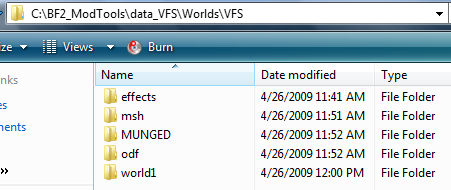
My guess is that you set up the folders wrong. Double-check, the odf files should be in a dataVFS/Worlds/VFS/odf folder. The msh and tga (and option files, if any) should be in the msh folder in the same directory, dataVFS/Worlds/VFS. Any effects would go in an effects folder, and animations in MUNGED (you don't need to worry about that unless you ahve things that move, like spaceship doors or Rancors or Jabbas).
Re: A problem and a few questions from a new guy
Posted: Tue Apr 28, 2009 8:13 pm
by Acklay of Chaos
As I said, it's saying no odf for EVERY object, that means I beleive 5 worlds worth(DAG,FEL,KAM,TAT2 & TAT3 and YAV) and I have an odf file filled in my VFS_data. I have the same data in the Common folder in VFS_data. That data is also in the _BUILD file's odf folder. And now, after refreshing and seeing Fiodis' post, I have them in C:\BF2_ModTools\data_VFS\Worlds\VFS Where else am I supposed to put them? Copy into the world1 folder? Still getting the same errors...
As I also stated in my last post, I did forget to put the CPs for Hunt in the lua.
Re: A problem and a few questions from a new guy
Posted: Tue Apr 28, 2009 8:15 pm
by YaNkFaN
you do not have the .odfs set up right or you placed the .mshs in ZE not the .odfs try placing .odfs as objects not .mshs
this error
Message Severity: 3
.\Source\LuaHelper.cpp(312)
CallProc failed: (none):0: attempt to perform arithmetic on a nil value
stack traceback:
(none): in function `AddCommandPost'
is a .lua error did you try to add an extra cp or edit cps at all this may not cause the crash but when you fix the crash it may not cause units to spawn
Re: A problem and a few questions from a new guy
Posted: Tue Apr 28, 2009 8:19 pm
by Fiodis
Acklay of Chaos wrote:As I said, it's saying no odf for EVERY object, that means I beleive 5 worlds worth(DAG,FEL,KAM,TAT2 & TAT3 and YAV) and I have an odf file filled in my VFS_data. I have the same data in the Common folder in VFS_data. That data is also in the _BUILD file's odf folder. And now, after refreshing and seeing Fiodis' post, I have them in C:\BF2_ModTools\data_VFS\Worlds\VFS Where else am I supposed to put them? Copy into the world1 folder? Still getting the smae errors...
As I also stated in my last post, I did forget to put the CPs for Hunt in the lua.
Look, this:
Hidden/Spoiler:
is the only place where you should have prop files. Don't keep 'em in the _BUILD, dataVFS, etc.
Re: A problem and a few questions from a new guy
Posted: Tue Apr 28, 2009 8:35 pm
by Acklay of Chaos
Ah, thank you my good man... Much better error log now XD Don't know how I ever got that mixed up...
Hidden/Spoiler:
Opened logfile BFront2.log 2009-04-28 1739
shell_interface: Entered
shell_interface: gPlatformStr, gOnlineServiceStr, gLangStr, gLangEnum: PC GameSpy english 0
ifs_era_handler - Entered
ifs_era_handler - Exited
shell_interface: No custom_gc_0.lvl
shell_interface: No custom_gc_1.lvl
shell_interface: No custom_gc_2.lvl
shell_interface: No custom_gc_3.lvl
shell_interface: No custom_gc_4.lvl
shell_interface: No custom_gc_5.lvl
shell_interface: No custom_gc_6.lvl
shell_interface: No custom_gc_7.lvl
shell_interface: No custom_gc_8.lvl
shell_interface: No custom_gc_9.lvl
shell_interface: No custom_gc_10.lvl
custom_EraButtonList(): Finished building era button table Known eras buttons: 28
custom_GetGMapEras(): Finished building era table Known eras: 28
custom_GetGMapModes(): Finished building game mode table Known Modes: 39
custom_GetMPGameModeList(): Finished building game mode list table List Length: 40
custom_SetMovieLocation()
custom_GetGCButtonList()
custom_SetMovieLocation()
custom_GetFreeformBattleModeList(): Finished building freeform battle mode list Known Modes: 39
ingame stream movies\crawl.mvs
shell_interface: Opening movie: movies\shell.mvs
shell_interface: Leaving
Mission Checker: Entered addme
Mission Checker: addme: Now listening in on AddDownloadableContent() calls
Mission Checker: Exited addme
prev = none iLastPage = nil
prev = texture iLastPage = 1
prev = texture iLastPage = 2
prev = texture iLastPage = 3
ifs_legal.Exit
Message Severity: 2
.\Source\GameMovie.cpp(399)
Unable to find open movie segment shell_main
ifs_saveop_DoOps LoadFileList
ifs_saveop_DoOps LoadFileList
ifs_saveop_DoOps LoadProfile
ifs_saveop_DoOps LoadProfile
ifs_sp_campaign: Input_Accept(): Entered: _tab_instant
missionlist_ExpandMapList()
ifs_missionselect_pcMulti_fnSetMapPreview(): Defaulting index to 1
Checkbox for check_era7 clicked
this.CurButton = check_era7
cur_button = nil
this.CurButton = nil
cur_button = nil
Checkbox for check_era3 clicked
this.CurButton = check_era3
cur_button = nil
this.CurButton = check_mode1
cur_button = nil
this.CurButton = check_mode5
cur_button = nil
this.CurButton = check_mode5
cur_button = nil
this.CurButton = nil
cur_button = nil
this.CurButton = check_mode6
cur_button = nil
this.CurButton = nil
cur_button = nil
DoubleClicked
custom_AddMapNew()
custom_printTable(): table: 03EAE8A8
The key, value is: mode_hunt_c 1
The key, value is: era_g 1
The key, value is: mode_con_c 1
The key, value is: isModLevel 1
The key, value is: bSelected 1
The key, value is: era_c 1
The key, value is: mode_con_g 1
The key, value is: mode_eli_g 1
The key is mapluafile, the formated value is: VFS<A>_<B>
custom_printTable(): Returning
custom_printTable(): table: 03CA672C
The key, value is: key mode_con
The key, value is: subst con
The key, value is: showstr modename.name.con
The key, value is: descstr modename.description.con
The key, value is: icon mode_icon_con
custom_printTable(): Returning
gMapEras.key = era_c Era = era_c subst = c
Adding map: VFSc_con idx: 1
gMapEras.key = era_g Era = era_g subst = g
Adding map: VFSg_con idx: 2
Adding map: VFSg_eli idx: 3
this.CurButton = nil
cur_button = nil
this.CurButton = check_mode6
cur_button = nil
this.CurButton = check_mode1
cur_button = nil
this.CurButton = check_mode5
cur_button = nil
this.CurButton = nil
cur_button = nil
DoubleClicked
custom_AddMapNew()
custom_printTable(): table: 03EAE8A8
The key, value is: mode_hunt_c 1
The key, value is: era_g 1
The key, value is: mode_con_c 1
The key, value is: isModLevel 1
The key, value is: bSelected 1
The key, value is: era_c 1
The key, value is: mode_con_g 1
The key, value is: mode_eli_g 1
The key is mapluafile, the formated value is: VFS<A>_<B>
custom_printTable(): Returning
custom_printTable(): table: 03CA672C
The key, value is: key mode_con
The key, value is: subst con
The key, value is: showstr modename.name.con
The key, value is: descstr modename.description.con
The key, value is: icon mode_icon_con
custom_printTable(): Returning
gMapEras.key = era_c Era = era_c subst = c
Adding map: VFSc_hunt idx: 4
gMapEras.key = era_g Era = era_g subst = g
this.CurButton = Launch
cur_button = nil
Message Severity: 2
.\Source\HUDElementBitmap.cpp(380)
HUD BitmapElement unable to find texture btn_directional_pad_LR
game_interface: Entered
utility_functions2: Listening on AddUnitClass() calls
utility_functions2: Listening on SetHeroClass() calls
utility_functions2: Listening on ReadDataFile() calls
game_interface: Reading in custom strings
game_interface: No user_script_0.lvl
game_interface: No user_script_1.lvl
game_interface: No user_script_2.lvl
game_interface: No user_script_3.lvl
game_interface: No user_script_4.lvl
game_interface: No user_script_5.lvl
game_interface: No user_script_6.lvl
game_interface: No user_script_7.lvl
game_interface: No user_script_8.lvl
game_interface: No user_script_9.lvl
game_interface: No user_script_10.lvl
ifs_sideselect_fnBuildScreen()
game_interface: Exited
Message Severity: 2
.\Memory\RedMemoryPool.cpp(317)
Memory pool "ClothData" set item count after being allocated
Message Severity: 2
.\Source\SkyManager.cpp(122)
Skyfile FarSceneRange is in old format
Message Severity: 2
.\Source\GameModel.cpp(221)
Model "yav_bldg_watchtower" already loaded in ather level file
Message Severity: 2
.\Source\CollisionMesh.cpp(550)
Duplicate collision mesh name exists in another level file: 9f2ea800
Message Severity: 2
.\Source\CollisionBody.cpp(250)
Duplicate collisionbodyprimitive exists in another level file: c672c390
Message Severity: 3
.\Source\MountedTurret.cpp(1555)
Mounted turret "tat_hover_skiff TURRET1" weapon 1 "com_weap_bldg_gunturret" not found
Message Severity: 3
.\Source\MountedTurret.cpp(1555)
Mounted turret "tat_hover_skiff TURRET2" weapon 1 "com_weap_bldg_gunturret" not found
Message Severity: 3
.\Source\MountedTurret.cpp(1555)
Mounted turret "tat_hover_skiff TURRET3" weapon 1 "com_weap_bldg_gunturret" not found
Message Severity: 2
.\Source\GameObject.cpp(978)
Too many damage effects specified for gameobject [tan4_prop_Console]
Message Severity: 2
.\Source\GameObject.cpp(978)
Too many damage effects specified for gameobject [tan4_prop_Console]
Message Severity: 2
.\Source\GameObject.cpp(978)
Too many damage effects specified for gameobject [kas2_bldg_oilrefinery]
Message Severity: 2
.\Source\GameObject.cpp(978)
Too many damage effects specified for gameobject [kas2_bldg_oilrefinery]
Message Severity: 3
.\Source\EntityHover.cpp(3446)
Hover "cis_hover_stap" weapon 1 "cis_weap_hover_stap_cannon" not found
Message Severity: 2
.\Source\StringDB.cpp(48)
ID=b40c484b: trying to replace "fel1_bldg_segmented" with "fel1_bldg_segmented1"
Message Severity: 2
.\Source\Godray.cpp(298)
GodrayManager: Exceeded maximum number of godrays (0)
Message Severity: 2
.\Source\StringDB.cpp(48)
ID=930eda4e: trying to replace "fel1_bldg_bladder" with "fel1_bldg_bladder4"
Message Severity: 2
.\Source\FLEffect.cpp(427)
Attach: model '' [b92433ae] has no hardpoint '' [f1bb7ab7]
Message Severity: 2
.\Source\FLEffect.cpp(427)
Attach: model '' [b92433ae] has no hardpoint '' [f83941d9]
Message Severity: 2
.\Source\StringDB.cpp(48)
ID=b50c49de: trying to replace "fel1_bldg_segmented" with "fel1_bldg_segmented2"
Message Severity: 2
.\Source\Godray.cpp(298)
GodrayManager: Exceeded maximum number of godrays (0)
Message Severity: 2
.\Source\StringDB.cpp(48)
ID=b90c502a: trying to replace "fel1_bldg_segmented" with "fel1_bldg_segmented6"
Message Severity: 2
.\Source\Godray.cpp(298)
GodrayManager: Exceeded maximum number of godrays (0)
Message Severity: 2
.\Source\StringDB.cpp(48)
ID=64a97ec8: trying to replace "fel1_bld_post" with "fel1_bld_post1"
Message Severity: 3
.\Source\LoadUtil.cpp(1172)
Could not find odf "tur_bldg_geoturret"!
Message Severity: 3
.\Source\LoadUtil.cpp(1222)
Attempting to build an object, tur_bldg_geoturret, that does not have an .odf file associated with it
Message Severity: 2
.\Source\StringDB.cpp(48)
ID=7ceac77e: trying to replace "fel1_prop_supply_box" with "fel1_prop_supply_box1"
Message Severity: 3
.\Source\LoadUtil.cpp(1172)
Could not find odf "tur_bldg_chaingun_tripod"!
Message Severity: 3
.\Source\LoadUtil.cpp(1222)
Attempting to build an object, tur_bldg_chaingun_tripod1, that does not have an .odf file associated with it
Message Severity: 2
.\Source\StringDB.cpp(48)
ID=25ec5def: trying to replace "dag1_prop_rockgroup_2" with "dag1_prop_rockgroup_21"
Message Severity: 2
.\Source\StringDB.cpp(48)
ID=980ee22d: trying to replace "fel1_bldg_bladder" with "fel1_bldg_bladder1"
Message Severity: 3
.\Source\LoadUtil.cpp(1172)
Could not find odf "tur_bldg_chaingun_tripod"!
Message Severity: 3
.\Source\LoadUtil.cpp(1222)
Attempting to build an object, tur_bldg_chaingun_tripod2, that does not have an .odf file associated with it
Message Severity: 2
.\Source\StringDB.cpp(48)
ID=adcd229e: trying to replace "fel1_bldg_pitcher_c" with "fel1_bldg_pitcher_c1"
Message Severity: 2
.\Source\StringDB.cpp(48)
ID=b60c4b71: trying to replace "fel1_bldg_segmented" with "fel1_bldg_segmented3"
Message Severity: 2
.\Source\Godray.cpp(298)
GodrayManager: Exceeded maximum number of godrays (0)
So, from what I can tell, I need to put my turret odfs from the tur side folder into the same area. Same goes for the stap and skiff I believe. The only one I have no clue about is the one in red.
Re: A problem and a few questions from a new guy
Posted: Tue Apr 28, 2009 8:38 pm
by YaNkFaN
Message Severity: 3
.\Source\MountedTurret.cpp(1555)
Mounted turret "tat_hover_skiff TURRET2" weapon 1 "com_weap_bldg_gunturret" not found
that's what is causing your crash add those files to your tur side odf folder and you're good to go i think
Re: A problem and a few questions from a new guy
Posted: Tue Apr 28, 2009 9:49 pm
by Acklay of Chaos
After running a search, I found that the gunnturrets you mentioned, YankFan, are some of the missing assets. Anyone know how to get them? I know ]v[ had the right files for the +123 mod, the turrets are usable in one of the Tatooine modes.
L8 format? Elaborate infernal machine! XD Anyways, so close to getting the map playable I can taste it, so more help is appreciated.
Re: A problem and a few questions from a new guy
Posted: Wed Apr 29, 2009 4:14 am
by MercuryNoodles
That last is an error that pops up if you don't turn off RLE compression when you save a tga. Resave it, and make sure you have RLE compression unchecked/off.
Re: A problem and a few questions from a new guy
Posted: Wed Apr 29, 2009 4:12 pm
by Fiodis
MercuryNoodles wrote:That last is an error that pops up if you don't turn off RLE compression when you save a tga. Resave it, and make sure you have RLE compression unchecked/off.
That sounds like it; but if that were the case he would get a Munge log error, no? @OP, do you have any Mungelog error about this texture? (The Mungelog is the other log, the one that pops up after munging something).