Page 1 of 2
Exporting help (MshEx) [Solved]
Posted: Fri Jan 30, 2009 11:40 am
by Fiodis
Well, I decided today to try and learn how to model. So I followed a tutorial (written in XSI Foundation, I have the free Modtool). I got the thing together, and I tried exporting it with the MshEx, but I couldn't seem to get it right.
RepSharpshooter wrote:Instructions:
1. Put everything you're going to export under a null (not the scene root).
2. In the scene explorer, middle-mouse click the name of the null.
3. Go to file, crosswalk, export (it should be on 6.0 text when it pops up).
4. Click settings tab.
5. Select a filename/filepath.
6. CHECK "EXPORT SELECTION ONLY"
7. CHECK "CONVERT GEOMETRY TO TRIRANGLES"
8. CHECK "EXPORT XSI NORMALS"
9. UNCHECK "Keep referenced paths relative"
10. Press export.
11. Run mshex in same directory and convert file to a msh. (and if you're really stupid to put it bluntly, this means put the .xsi file in the same folder as mshex.exe and hedr.msh, then double click on mshex. Then type in the .xsi name such as box.xsi)
All well and good, but I'm a newbie. I have no idea what Rep means by putting everything under a null. I know how to make a null (that was in the tutorial) but I don't know what to put under it. Everything I am going to export, yes, but what am I going to export? The MS3DSceneRoot only? So would I middle-click on MS3DSceneRoot and export that?
Then, middle-clicking didn't do anything.
The rest of the instructions I followed well until number 9, UNCHECK "Keep referenced paths relative". I couldn't find any check box like that. So I skipped that step after looking and not finding it.
The rest went well, and I got door_wall.XSIFTK. However, on step 11, the MshEx utility froze up after a bit. Trying to put the resulting MSH in ZE resulted in ZE crashing.
I'm sure I did quite a few things wrong. What were they?
Re: Exporting help
Posted: Fri Jan 30, 2009 11:49 am
by DarthD.U.C.K.
1. select all objects and dragg them on the rootnul (called ms3dsceneroot or dummyroot)
when you no middlemouseclick on it it will select the nulla dn all childs of it, the object you dragged on the null are now childs of the null
2. maybe you dont have the needed version of crosswalk
Re: Exporting help
Posted: Fri Jan 30, 2009 6:52 pm
by elfie
Fiodis wrote:
The rest of the instructions I followed well until number 9, UNCHECK "Keep referenced paths relative". I couldn't find any check box like that. So I skipped that step after looking and not finding it.
I'm sure I did quite a few things wrong. What were they?
Like duck said, make sure you have Crosswalk 2.6. Also, the UNCHECK "Keep referenced paths relative" thing, I couldn't find it either, but my models still export fine.
Re: Exporting help
Posted: Fri Jan 30, 2009 6:54 pm
by obiboba3po
its a good idea to merge objects and freeze all tramsforms and of course make sure this is under the null. are you using XSI modtool 6? also, you should have no problem with the checks if you have crosswalk 2.6 (like duck said)
Re: Exporting help
Posted: Fri Jan 30, 2009 8:43 pm
by Fiodis
Ohh....the link on his page goes to Crosswalk 3.11. Where can I find 2.6? There doesn't seem to be a link on the Softimage site.
Re: Exporting help
Posted: Fri Jan 30, 2009 9:00 pm
by FragMe!
Version 3.11 should work fine it would be versions eralier than 2.6 that wouldn't
Re: Exporting help (MshEx)
Posted: Sat Jan 31, 2009 2:18 pm
by Fiodis
Oh. Well then that's strange, because I have version 3.11 and I still can't fidn that uncheck box.
EDIT - Reinstalled Crosswalk 3.11, now I see it. But it still refuses to work.
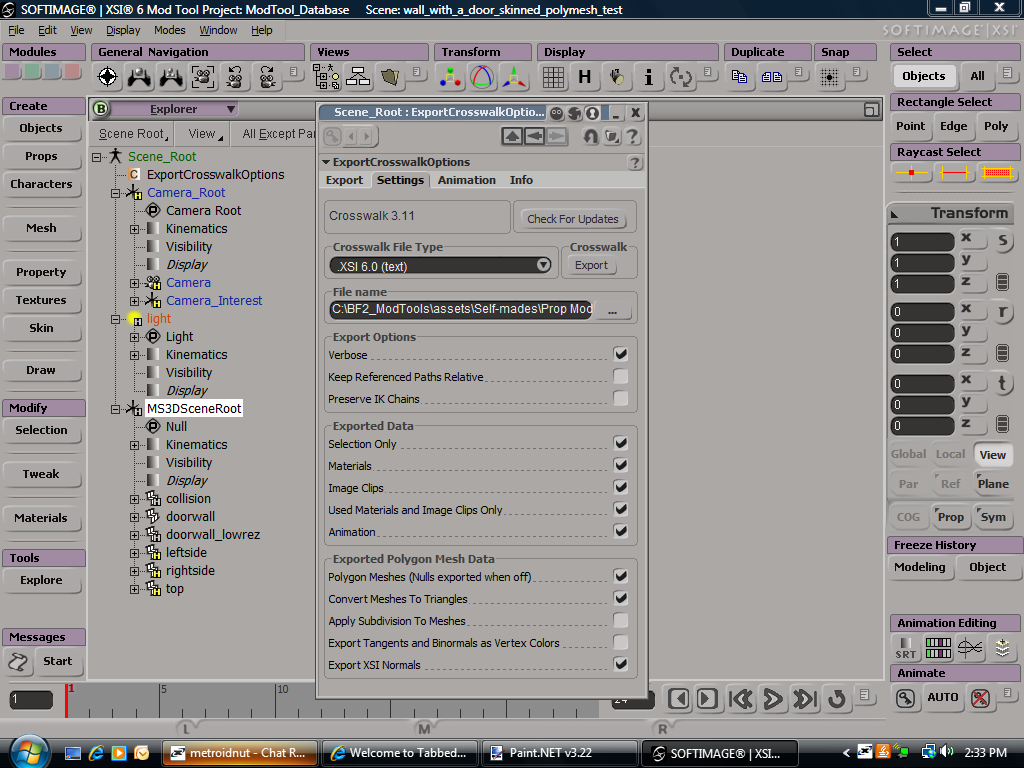
Here's a pic of my setup, maybe I'm doing something wrong:
I also tried it with "Selection Only" being the only thing checked in the "Exported Data" box. That didn't work, either.
Re: Exporting help (MshEx)
Posted: Sat Jan 31, 2009 3:39 pm
by FragMe!
Okay this is version 2.6 but this is where it should show up

Re: Exporting help (MshEx)
Posted: Sat Jan 31, 2009 3:56 pm
by Fiodis
What about the setup I have there?
Re: Exporting help (MshEx)
Posted: Sat Jan 31, 2009 4:13 pm
by FragMe!
by the looks of it you haven't properly branch selected everything.
Put your mouse on MS3DSceneRoot in the explorer and press the middle mouse button, everything should then show it is selected. Picture of branch selection results, also the all objects should change color to show they are selected.
Re: Exporting help (MshEx)
Posted: Sat Jan 31, 2009 4:20 pm
by Fiodis
Ah, therein lies my problem. Pressing the middle mouse button does nothing for me. I have one, yes; but nothing visible happens.
Is there any alternative? I mean, surely, the designers of XSI must have realized that not every mouse has a middle mouse button? They must have put some other way in, right?
Re: Exporting help (MshEx)
Posted: Sat Jan 31, 2009 4:22 pm
by FragMe!
Try CTL-T select tree, with the MS3DScene selected
Re: Exporting help (MshEx)
Posted: Sat Jan 31, 2009 5:05 pm
by Fiodis
I've ran it over several times that way now, and it still doesn't function.
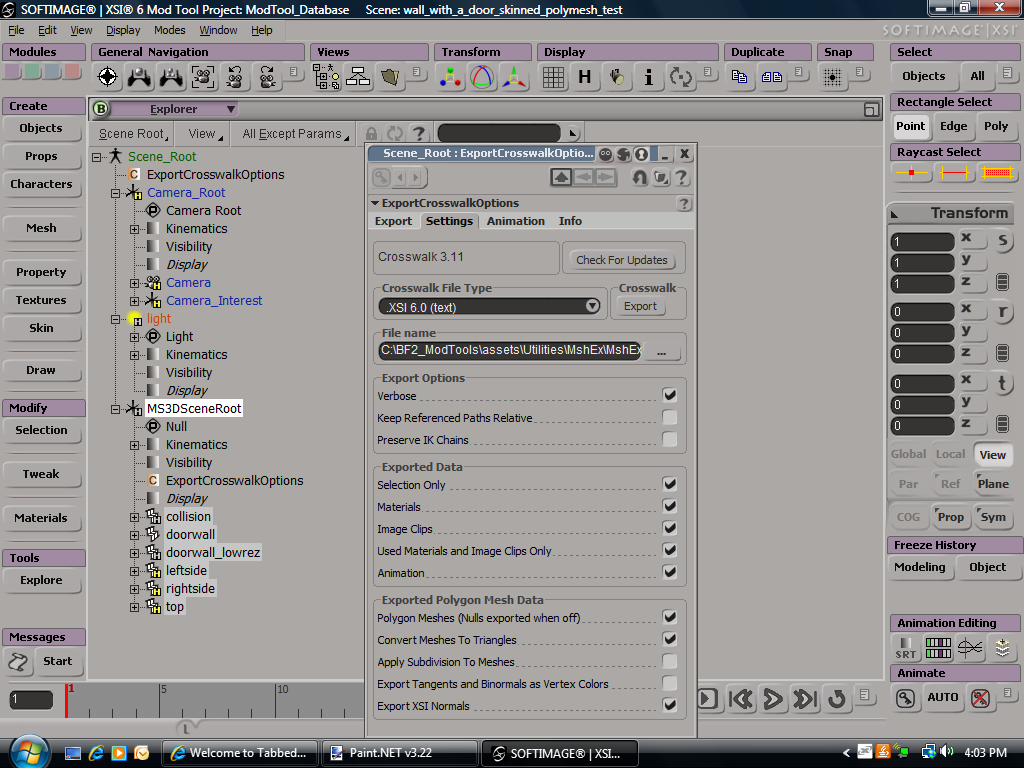
My current setup:
Is there anything I have checked that I shouldn't? Should I have verbose unchecked, for instance?
And are there any other free programs besides MshEx that can export files?
Re: Exporting help (MshEx)
Posted: Sat Jan 31, 2009 5:22 pm
by FragMe!
Try unhiding all objects, lowres is automatically hidden by VM as well mshex doesn't handle collisions so well, just slide it to the SceneRoot for now if you don't want to delete it. VM will create a collision for you.
If the leftside, rightside and top are the individual pieces of the doorwall, freeze doorwall and delete the other bits (or once again slide them up to sceneroot if you don't want to delete them.)
Re: Exporting help (MshEx)
Posted: Sat Jan 31, 2009 6:38 pm
by Fiodis
I deleted lowrez and collision, then I right-clicked on doorwall and selected "Freeze generator and delete inputs" or something along those lines. Tried to export and it still crashed. What is VM? And how do I unhide all objects?
Re: Exporting help (MshEx)
Posted: Sat Jan 31, 2009 8:57 pm
by FragMe!
By unhide all objects I meant make sure none of the things you are trying to export are hidden.
H toggles hide unhide when an object is selected. VM = Visual Munge
Re: Exporting help (MshEx)
Posted: Sun Feb 01, 2009 1:53 pm
by Fiodis
Thanks for all the help. 15 pages on how to export, lol. It still doesn't work, though. Maybe....do I have to move the Camera and Light bits under MS3DSceneRoot as well?
Re: Exporting help (MshEx)
Posted: Sun Feb 01, 2009 2:26 pm
by FragMe!
No those can stay where they are.
Why not try and experiment, make a simple box, give it a cubic projection and a simple texture and try to export that, just to make sure you are doing things correctly, if that works then we know nothing else is wrong and then can figure out why your other model is not working.
Re: Exporting help (MshEx)
Posted: Sun Feb 01, 2009 2:45 pm
by Fiodis
Ok, I made a cube and didn't texture it. Then I tried to export it and ran into the same problem. MshEx runs for a while then crashes.
Re: Exporting help (MshEx)
Posted: Sun Feb 01, 2009 3:04 pm
by FragMe!
Needs to have a texture