
Hidden/Spoiler:
Hud error...seriously?
Moderator: Moderators
-
Havoc 526
- Rebel Warrant Officer

- Posts: 317
- Joined: Sat Apr 04, 2009 6:24 pm
- Projects :: Something
- Location: Howling at the Moon
Hud error...seriously?
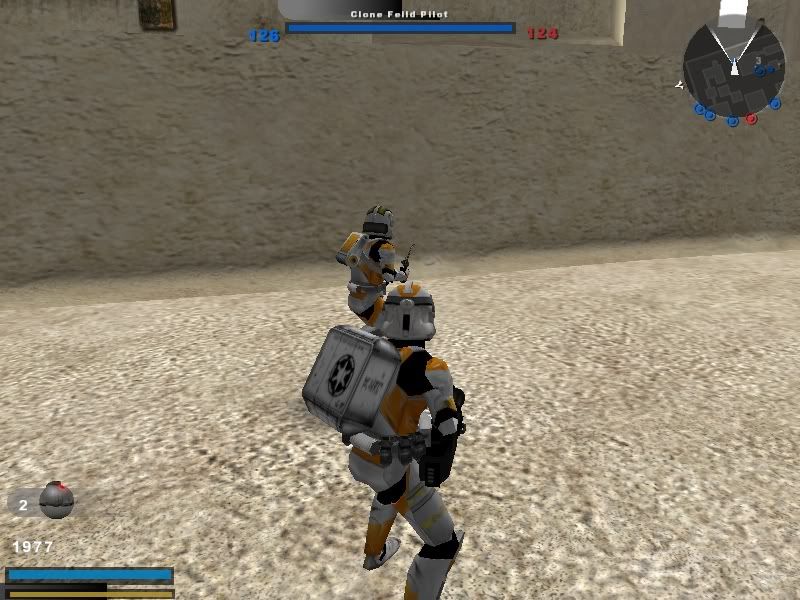
Okay, I just really don't know how to explain this. The Hud...just...look!
That's not even blurry! That is high quality! Why is the hud doing that? I'm using a custom hud and the unofficial patch hud is also being read...but...I don't understand this at all! Is this a conflict of the two huds? Whatever could this be?
-
DarthD.U.C.K.

- Master of the Force

- Posts: 6027
- Joined: Wed Sep 27, 2006 11:05 am
- Location: Duckburg, Germany
Re: Hud error...seriously?
to be honest, i dont really understand the problem, is it the black rectangle in the lower left corner?
if it is, which map/mod is that and which custom hud do you use? i know only the one from the 1.2/1.3 patch.
if it is, which map/mod is that and which custom hud do you use? i know only the one from the 1.2/1.3 patch.
-
Havoc 526
- Rebel Warrant Officer
- Posts: 317
- Joined: Sat Apr 04, 2009 6:24 pm
- Projects :: Something
- Location: Howling at the Moon
Re: Hud error...seriously?
Okay. It is the black bar at the top of the screen and the lower left corner.
This screenshot is from a mod that I'm working on right now.
I am using two different ingames here, the one from the unofficial patch 1.2/3 and the ingame from Deviss' side mod (Credits to Deviss for that). It's just supposed to remove the visual effects for the awards that we all know and love. But it doesn't even do that. All it does is glitch out the hud.
This screenshot is from a mod that I'm working on right now.
I am using two different ingames here, the one from the unofficial patch 1.2/3 and the ingame from Deviss' side mod (Credits to Deviss for that). It's just supposed to remove the visual effects for the awards that we all know and love. But it doesn't even do that. All it does is glitch out the hud.
-
DarthD.U.C.K.
- Master of the Force
- Posts: 6027
- Joined: Wed Sep 27, 2006 11:05 am
- Location: Duckburg, Germany
Re: Hud error...seriously?
hmwell,if the ingame from devisses sidemod doesnt work right and causes the glitch, i would just use the 1.3 one.
-
Havoc 526
- Rebel Warrant Officer
- Posts: 317
- Joined: Sat Apr 04, 2009 6:24 pm
- Projects :: Something
- Location: Howling at the Moon
Re: Hud error...seriously?
Well, the thing is, the same happens when I use my own custom ingame....It just...does not work! And the map itself doesn't even work if I read JUST the ingame.lvl I have inside the map's folder.
...Maybe I should have included that.
...Maybe I should have included that.
-
AQT
- Gametoast Staff

- Posts: 4910
- Joined: Sat Nov 03, 2007 4:55 pm
- Location: SoCal, USA
Re: Hud error...seriously?
You don't need to use/make a custom ingame.lvl that utilizes a new HUD in order to remove the visual award effects. Just make a custom ingame.lvl that only loads the dummy visual award effects. That is if that is the only thing you want to be done.
-
DarthD.U.C.K.
- Master of the Force
- Posts: 6027
- Joined: Wed Sep 27, 2006 11:05 am
- Location: Duckburg, Germany
Re: Hud error...seriously?
with the 1.3 patch installed you can also disable the awardeffects in its menu.
-
Havoc 526
- Rebel Warrant Officer
- Posts: 317
- Joined: Sat Apr 04, 2009 6:24 pm
- Projects :: Something
- Location: Howling at the Moon
Re: Hud error...seriously?
....I knew that. 
Well, I guess the only fix for this is to get rid of the custom ingame and set the award effects for OFF. Thanks guys.
Well, I guess the only fix for this is to get rid of the custom ingame and set the award effects for OFF. Thanks guys.