Glamour Skins parte 6

In this forum you will find and post information regarding the modding of Star Wars Battlefront 2. DO NOT POST MOD IDEAS/REQUESTS.

Moderator: Moderators

Locked
User avatar
vampire_lord
Rebel Sergeant
Rebel Sergeant
Posts: 216
Joined: Thu Mar 20, 2008 7:02 pm
Projects :: No Mod project currently.
Games I'm Playing :: I have not listed any games yet
xbox live or psn: No gamertag set
Location: Mexico City
Contact:

Re: Glamour Skins parte 6

Post by vampire_lord »

I am sharing these, simple works (just a few layers and overlays), if you want to use them just credit me, although you still need to "reverse engineer" them to get the proper skins for 1st person modes.
Hidden/Spoiler:
Image
Forest
Hidden/Spoiler:
Image
Sand
Hidden/Spoiler:
Image
Snow
Hidden/Spoiler:
Image
Urban
Too bad I couldn't put in-game screenies because I need to hex-edit them on the model (you know, just renaming each one to default so I can use SWBFViewer is not a pleasant experience), so, if you take some in-game screenies and post them it would be great.
Link to TGAs Here!
RogueKnight
Space Ranger
Posts: 2512
Joined: Sat Nov 22, 2008 1:50 pm
Projects :: Life. Work.
Games I'm Playing :: League of Legends
xbox live or psn: No gamertag set
Location: Washington, US

Re: Glamour Skins parte 6

Post by RogueKnight »

Image
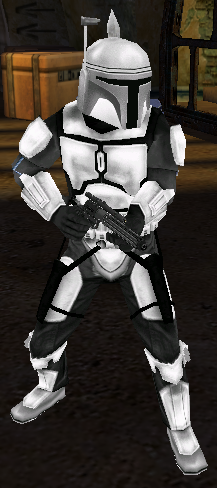
White Mandalorian, useful for skinning.

EDIT: Thanks again to DEV for the screen.
User avatar
Fiodis
Master of the Force
Master of the Force
Posts: 4145
Joined: Wed Nov 12, 2008 9:27 pm
Projects :: Rannoch + Tientia + Tools Programming

Re: Glamour Skins parte 6

Post by Fiodis »

Vampire, how'd you make the camo on the urban one?
theultimat
Lieutenant General
Lieutenant General
Posts: 679
Joined: Sun Apr 13, 2008 1:39 pm
Location: UK

Re: Glamour Skins parte 6

Post by theultimat »

Fiodis wrote:Vampire, how'd you make the camo on the urban one?
Aye, I was wondering too. It does look very good.
kinetosimpetus
Imperial Systems Expert
Posts: 2381
Joined: Wed Mar 25, 2009 4:15 pm
Projects :: A secret project
Games I'm Playing :: Warframe STO

Re: Glamour Skins parte 6

Post by kinetosimpetus »

DarthRogueKnight wrote:
Hidden/Spoiler:
Image
White Mandalorian, useful for skinning.

EDIT: Thanks again to DEV for the screen.
Looks like an Imperial Mando to me.
User avatar
Super_Clone
High General
High General
Posts: 803
Joined: Sat Jul 12, 2008 7:58 am
Projects :: No Mod project currently.
Games I'm Playing :: I have not listed any games yet
xbox live or psn: No gamertag set
Location: Florida

Re: Glamour Skins parte 6

Post by Super_Clone »

DarthRogueKnight wrote:
Hidden/Spoiler:
Image
White Mandalorian, useful for skinning.

EDIT: Thanks again to DEV for the screen.
Will you please release it? It looks freakin' awesome :eek:
RogueKnight
Space Ranger
Posts: 2512
Joined: Sat Nov 22, 2008 1:50 pm
Projects :: Life. Work.
Games I'm Playing :: League of Legends
xbox live or psn: No gamertag set
Location: Washington, US

Re: Glamour Skins parte 6

Post by RogueKnight »

It'll be released with my latest skinpack, whenever I decide that theres enough skins to constitute one.

EDIT:
Image

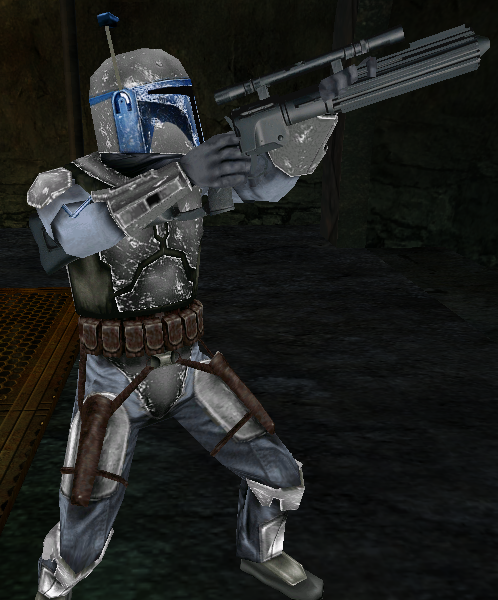
New Jango Fett, Lightened the Armor, desat'd the blue mask a bit, added battle damage to the thigh plates, and added battle damage to the blue helm.

Thanks again to DEV for the screen.
User avatar
vampire_lord
Rebel Sergeant
Rebel Sergeant
Posts: 216
Joined: Thu Mar 20, 2008 7:02 pm
Projects :: No Mod project currently.
Games I'm Playing :: I have not listed any games yet
xbox live or psn: No gamertag set
Location: Mexico City
Contact:

Re: Glamour Skins parte 6

Post by vampire_lord »

Fiodis wrote:Vampire, how'd you make the camo on the urban one?
theultimat wrote:Aye, I was wondering too. It does look very good.
I use Photoshop, but if GIMP can handle the same variety of layer modes is quite simple.

1.- Open the base skin.
2.- Make a duplicate of the base layer and put it on top (if you can, photoshop locks the original by default).
3.- Change the duplicate colors to grayscale (in Photoshop is Layer>New Adjustment Layer>Channel Mixer>Monochrome).
3a.- If you used the photoshop method, merge the new channel mixer and your duplicate.
4.- Now make a new layer on top with "overlay" mode.
5.- Use the brush and other tools to apply the base color.
6.- Make another "overlay" or "multiply" layer (other modes work as well, you need to experiment a little).
7.- Paint over the new layer using the brush, smudge and blur to add some touches.
8.- If you think you need extra layers to paint on, repeat from step 6.
9.- Once done merge all layers except the Base Skin and the Duplicate Skin.
10.- Use the Eraser to delete all undesired strokes on the merged layers (so there won't be strokes over the mask and so).
11.- If you want to preserve some of the original skin color parts like the masks on the marines, just erase those parts from your duplicate layer.
12.- Once done you can merge all layers.

Writting down the colors mixes you used is better if you plan to add the same combination over a different skin or the 1st person mode skins.
obiboba3po
2008 Most Technically Challenging Avatar
Posts: 2376
Joined: Tue Feb 12, 2008 7:46 pm
Projects :: No Mod project currently.
Games I'm Playing :: League of Legends
xbox live or psn: No gamertag set
Location: NJ, USA

Re: Glamour Skins parte 6

Post by obiboba3po »

Hidden/Spoiler:
[quote="vampire_lord"][quote="Fiodis"]Vampire, how'd you make the camo on the urban one?[/quote]
[quote="theultimat"]Aye, I was wondering too. It does look very good.[/quote]
I use Photoshop, but if GIMP can handle the same variety of layer modes is quite simple.

1.- Open the base skin.
2.- Make a duplicate of the base layer and put it on top (if you can, photoshop locks the original by default).
3.- Change the duplicate colors to grayscale (in Photoshop is Layer>New Adjustment Layer>Channel Mixer>Monochrome).
3a.- If you used the photoshop method, merge the new channel mixer and your duplicate.
4.- Now make a new layer on top with "overlay" mode.
5.- Use the brush and other tools to apply the base color.
6.- Make another "overlay" or "multiply" layer (other modes work as well, you need to experiment a little).
7.- Paint over the new layer using the brush, smudge and blur to add some touches.
8.- If you think you need extra layers to paint on, repeat from step 6.
9.- Once done merge all layers except the Base Skin and the Duplicate Skin.
10.- Use the Eraser to delete all undesired strokes on the merged layers (so there won't be strokes over the mask and so).
11.- If you want to preserve some of the original skin color parts like the masks on the marines, just erase those parts from your duplicate layer.
12.- Once done you can merge all layers.

Writting down the colors mixes you used is better if you plan to add the same combination over a different skin or the 1st person mode skins.[/quote]
sounds like it can be done with some good brushes and fancy brushwork in gimp too.
RevanSithLord
Sith Master
Sith Master
Posts: 2636
Joined: Mon Nov 07, 2005 12:40 am
Projects :: Designated Days + LFC + GT vs SWBFC
Games I'm Playing :: FO3 + FO New Vegas
xbox live or psn: Master Revan
Location: GDSS Philadelphia

Re: Glamour Skins parte 6

Post by RevanSithLord »

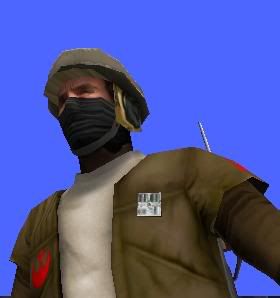
A Rebel Terrorist I made for AQT. Not saying anymore.

Sorry if the quality of the pic is bad. Photobucket did something weird when I uploaded it!
Hidden/Spoiler:
Image
Even if Photobucket blurred it, the textures themselves aren't actually blurred. I did not do any blurring of any kind on the skin except for the mask parts to try and conceal the entire bottom of the face. I slightly used pieces of a Reborn New's mask to achieve the effect. I edited it for my purposes. Hope that's alright with people here. Made this about a week ago or so.

More Rebel skins to come soon.
User avatar
CodaRez
Field Commander
Field Commander
Posts: 940
Joined: Mon May 25, 2009 6:49 am
Projects :: I would like one.....
Location: Ride around the world! And I won't give you anything :P

Re: Glamour Skins parte 6

Post by CodaRez »

RevanSithLord wrote:A Rebel Terrorist I made for AQT. Not saying anymore.
I bet I may very well know what you "aren't saying anymore" :P
icemember
Rebel Warrant Officer
Posts: 318
Joined: Thu Jun 11, 2009 3:02 am
Projects :: Designated Days Chapter 1
Games I'm Playing :: SWBF2 Mortal Komabt
xbox live or psn: icemember x
Location: 6 planet of the Hoth system

Re: Glamour Skins parte 6

Post by icemember »

WOW! Incredible!!! Work Rev. I released a white skin pack to Filefront. They should release it soon. Can't wait to see the other rebels.
AQT
Gametoast Staff
Gametoast Staff
Posts: 4910
Joined: Sat Nov 03, 2007 4:55 pm
Location: SoCal, USA

Re: Glamour Skins parte 6

Post by AQT »

Incredible work indeed, RSL. :)

Here is a Stormtrooper with a similar scheme as the AT-RT driver
Hidden/Spoiler:
Image
Image
icemember
Rebel Warrant Officer
Posts: 318
Joined: Thu Jun 11, 2009 3:02 am
Projects :: Designated Days Chapter 1
Games I'm Playing :: SWBF2 Mortal Komabt
xbox live or psn: icemember x
Location: 6 planet of the Hoth system

Re: Glamour Skins parte 6

Post by icemember »

Hey Not Bad! AQT, Not bad at all. Infact its good condering an ATRT attemp on a storm trooper.

Heres that clone commander seen in clone wars taking on the supers. I dont even know his name lol :lol:

I'll release this skin to whom ever wants it asap via PM.

Clone Commander
Hidden/Spoiler:
Image
User avatar
B.I.G_Cookie
High General
High General
Posts: 839
Joined: Sun Feb 22, 2009 4:28 pm
Games I'm Playing :: Battlefield 4
Location: Frankfurt, Germany

Re: Glamour Skins parte 6

Post by B.I.G_Cookie »

Thats an awesome skin, icemember. :o
User avatar
Ping
Sith
Sith
Posts: 1398
Joined: Thu Sep 18, 2008 4:19 pm
Location: College

Re: Glamour Skins parte 6

Post by Ping »

icemember wrote:Hey Not Bad! AQT, Not bad at all. Infact its good condering an ATRT attemp on a storm trooper.

Heres that clone commander seen in clone wars taking on the supers. I dont even know his name lol :lol:

I'll release this skin to whom ever wants it asap via PM.

Clone Commander
Hidden/Spoiler:
Image
That guy is called Fordo, and actually makes several appearences throughout the cartoon.
User avatar
B.I.G_Cookie
High General
High General
Posts: 839
Joined: Sun Feb 22, 2009 4:28 pm
Games I'm Playing :: Battlefield 4
Location: Frankfurt, Germany

Re: Glamour Skins parte 6

Post by B.I.G_Cookie »

A CIS elite droid for my Ryloth map.
Hidden/Spoiler:
Image
Hidden/Spoiler:
Image
mswf
Master Bounty Hunter
Posts: 1674
Joined: Tue Mar 31, 2009 3:40 pm
Location: Twello, The Netherlands
Contact:

Re: Glamour Skins parte 6

Post by mswf »

Wow, that droid skin looks good!
Labj
Sith
Sith
Posts: 1400
Joined: Tue Jun 16, 2009 3:20 pm
Games I'm Playing :: Halo 4
xbox live or psn: SiulS2409
Location: Costa Rica
Contact:

Re: Glamour Skins parte 6

Post by Labj »

icemember wrote:Hey Not Bad! AQT, Not bad at all. Infact its good condering an ATRT attemp on a storm trooper.

Heres that clone commander seen in clone wars taking on the supers. I dont even know his name lol :lol:

I'll release this skin to whom ever wants it asap via PM.

Clone Commander
Hidden/Spoiler:
Image
Thats not a clone commander, lol, its Fordo in phase II remember ? i sent you a skin weeks ago lol...
User avatar
Super_Clone
High General
High General
Posts: 803
Joined: Sat Jul 12, 2008 7:58 am
Projects :: No Mod project currently.
Games I'm Playing :: I have not listed any games yet
xbox live or psn: No gamertag set
Location: Florida

Re: Glamour Skins parte 6

Post by Super_Clone »

But Fordo is a commander....
Locked