Page 1 of 2
How do you add Foliage? [Solved]
Posted: Sat Nov 25, 2006 11:47 pm
by Elmo
How do you add foliage? I know it's (probably) a really simple question but still. Is it similar to putting in water?!?

And what exactly does the foliage add? Bushes? Trees? Grass?

Cause I lay it out in the ZE, but i find no "foliage" anywhere in the map... So... what do I have to do?
RE: Foliage
Posted: Sun Nov 26, 2006 2:02 am
by Penguin
Foliage adds in what ever you want, trees, bushs, grass. Theres a foliage doc. read it :p
RE: Foliage
Posted: Sun Nov 26, 2006 6:17 pm
by Dark117
Where is this foilage doc, would appreciate the telling of this.
thanks in advance.
Foliage is explained in the documentation
Posted: Sun Nov 26, 2006 6:22 pm
by AceMastermind
Open the "ZeroEditor_guide.doc" that came with the modtools and scroll down to "FOLIAGE EDIT MODE", there it will tell you exactly what has to be done.
Posted: Sun Nov 26, 2006 6:39 pm
by Dark117
So... to make my texture 0 into grass i would have too add this to some PRP file?
Layer(0)
{
SpreadFactor(0.1);
Mesh()
{
GrassPatch("nab_prop_grass.odf", 50);
File("editor_grasspatch.msh", 50);
Frequency(100);
Scale(1);
Stiffness(0.0);
}
}
Where is this file of which i need to add that into?
Thanks in advance.
Dark117
:EDIT:
Also would i have to copy the naboo folder into my world 1 folder for my map so the grass texture would work?
You need a prp file
Posted: Sun Nov 26, 2006 7:00 pm
by AceMastermind
You'll either have to create a ".prp" file from scratch or copy one from another location and delete it's contents and rename it to "ABC.prp".
The texture and the msh that you'll need should be listed in the "nab_prop_grass.odf", search for the ".tga" and ".msh" file and copy them to your "world1" folder.
*ABC = example modID
Posted: Sun Nov 26, 2006 8:33 pm
by Dark117
everything requires so much work...

i found the .odf and the .msh file for the grass and i already inserted the command line into my own .prp file, cant find .tga for grass, where would the .tga file be?
http://img179.imageshack.us/img179/5616 ... nwoor8.jpg
Dark117 :vader:
:EDIT:
Layer(0)
{
SpreadFactor(0.1);
Mesh()
{
GrassPatch("nab_prop_grass.odf", 50);
File("editor_grasspatch.msh", 50);
Frequency(100);
Scale(1);
Stiffness(0.0);
}
}
In the code it only shows the .odf and the .msh needed 1 for the file 1 for where the object is located. Are you sure i need some .tga
-I have the code in my .prp file
-i have nab_prop_grass.odf in my world 1 folder
-i have editor_grasspatch.msh in my world 1 folder
-do i need a .tga, where is it located.
missing grass assets?
Posted: Sun Nov 26, 2006 10:04 pm
by AceMastermind
That is odd indeed, "nab_grass" doesn't exist in the assets.
The closest texture that i could find was "end_grass" located in:
BF2_ModTools\assets\worlds\END\msh
You could copy this file and just rename it "nab_grass" and put it in your "world1" folder.
Posted: Sun Nov 26, 2006 10:06 pm
by Penguin
Posted: Mon Nov 27, 2006 9:27 am
by Dark117
Anyone else put grass in there map and found the naboograss.tga (texture) file? Im not sure if I need a texture file as if you look it doesent use it in the command lines... Im not sure if the endor grass texture and the other 2 msh and odf files would collide farily well...
Posted: Mon Nov 27, 2006 4:19 pm
by Penguin
[cough]
Penguin wrote: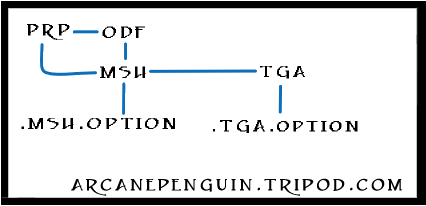
[/cough]
Its a hirarchy!
Posted: Tue Nov 28, 2006 8:06 pm
by Dark117
oo thanks that made no sence...
.:EDIT:.
Looks like it works without the .tga file anyways because white discs appear in Zeditor which the foilage apperance for grass as it says in the Zeditor doc under foilage...
EDIT2
I need to know what map has the big trees, the huuuuuuuge ones, i think its endor... but im not sure... *sigh* Well i could open the game and cheak. I guess i will... But i need to know what the tree is called so i can get the .msh and the .odf files in my world 1 folder. I also need a command code for the .prp file
either thou i thinky i can make it myself... Sorry for all the questions guys. gtpwn
EDIT3
I need to know howe to figure out which msh files go with what odf files and what tga files because some of them dont have same file names... would appreciate some help.
EDIT4
Figured out i can open the files. Cant find odf for Yav_Towerturrent.msh
Posted: Tue Nov 28, 2006 9:02 pm
by fat_walrus
I think the tall trees might be odfs you have to put in.
BTW just use the end.prp which is easier than the nab.prp cuz I forgot if there is a nab grass or not.
Thank you Penguin that is a helpful picture like the other you had a while ago

Posted: Tue Nov 28, 2006 10:07 pm
by Elmo
ya, Dark, go into the Kas odf folder and there is a tree group prop. I'm just using that lol
Posted: Wed Nov 29, 2006 11:32 pm
by Dark117
I added them to my map, i used the treegroup prop and the treegroup msh files but when i load my map it shows grey trees, then i cheaked the file and it said add (or osmething like that), kaspropleafpatch.odf . will it work now? Do i need a texture file for it seeing as its a prop, i dont know if i would. ty.
Examine the image...it's a hierarchy
Posted: Thu Nov 30, 2006 5:55 pm
by AceMastermind
Dark117 wrote:when i load my map it shows grey trees. Do i need a texture file for it seeing as its a prop, i dont know if i would. ty.
Look hard at the image and maybe after a while you will understand what it means...

Posted: Thu Nov 30, 2006 7:36 pm
by Dark117
EXPLAIN IT TO ME PLEASE *WEAPS*

Prp+Odf+Msh=.msh option
PRP+Msh+Tga=.tga option
: ?
I dont even know if thats rihgt ^^...
For things to work they have to end up as an option file?
Posted: Thu Nov 30, 2006 7:54 pm
by arty
So you guys were looking for the naboo grass. I'm thinking that would be in the BF1 modtools, sense Naboo: Plains is in swbf1.
@Dark117: That is the file list. What it says if you click on prp or odf, it would go to a msh folder, and as well as tga. Then you would click on one of them and it would go to TGA.OPTION (tga file) MSH.OPTION (msh).
Posted: Thu Nov 30, 2006 7:57 pm
by Elmo
arty wrote:So you guys were looking for the naboo grass. I'm thinking that would be in the BF1 modtools, sense Naboo: Plains is in swbf1.
@Dark117: That is the file list. What it says if you click on prp or odf, it would go to a msh folder, and as well as tga. Then you would click on one of them and it would go to TGA.OPTION (tga file) MSH.OPTION (msh).
Arty, When you say they are in the BF1 mod tools what do you mean. I mean can I just take the odfs there and place them in my odf folder? And add them like any other object?
Posted: Thu Nov 30, 2006 8:46 pm
by fat_walrus
They're in the BR1 Modtools and you can take the flies and the textures and stick those in your msh and odf folders